Role of QR codes in magazine publishing: a publisher’s guide
TL;DR:
- QR codes enable UK magazine publishers to turn printed pages into measurable digital touchpoints without reprinting. They enhance engagement, support trackable advertising, and allow post-print updates through dynamic redirects while complying with GDPR. Using platforms like Qrlytics ensures long-term code longevity, reliable scanning, and comprehensive analytics for editorial and commercial success.
QR codes turn each printed page into a measurable gateway to digital content, commerce, and audience data. For UK magazine publishers, that means richer storytelling, shorter purchase paths for advertisers, and scan analytics that inform both editorial planning and ad pricing — all without reprinting a single page.
The core gains at a glance:
- Engagement: readers scan to access video interviews, extended photo galleries, audio walkthroughs, and downloadable resources that the printed page cannot hold.
- Revenue: advertisers get trackable, shoppable placements; publishers can prove print ROI with real scan data rather than estimated circulation figures.
- Measurement: scan counts, geographic heatmaps, device type, and downstream conversions give editorial and commercial teams concrete performance data.
- Flexibility: dynamic QR codes let you update the destination URL after the issue has gone to press, so a link to a live event can redirect to a recording once the event is over.
- Compliance: UK GDPR governs how scan data is collected and stored; using a platform built around privacy-first analytics keeps you on the right side of the law.
Platforms such as Qrlytics handle generation, dynamic redirects, and GDPR-compliant analytics in one place. Print contrast and sizing follow GS1 guidance, which sets the baseline for reliable scanning across gloss and matt finishes.
Table of Contents
- What do QR codes actually do for magazine publishers?
- Editorial and advertising use cases that fit magazine workflows
- Design and print rules that make codes scan reliably
- Static vs dynamic QR codes: which should publishers use?
- What to measure and how to do it lawfully in the UK
- How to integrate QR codes into your editorial schedule
- Common QR-code mistakes publishers make and how to fix them
- What the research says about QR codes in publishing
- How to choose a QR-code management approach for your publication
- Key takeaways
- The case for treating QR codes as editorial infrastructure
- Qrlytics keeps your magazine’s QR codes live, trackable, and GDPR-ready
- Useful sources
- FAQ
What do QR codes actually do for magazine publishers?
The role of QR codes in magazine publishing goes well beyond novelty. They convert a static printed article into a two-way channel: readers get more content, and you get data about how they engage with it.

Engagement depth. A feature on a chef can link to a three-minute recipe video. A fashion shoot can open a shoppable gallery. Behind-the-scenes content, extended interviews, and interactive polls all become possible without adding a single extra page to the print run. Publishers who embed QR codes into editorial workflows can iterate content post-print and measure real engagement rather than guessing at reader interest.
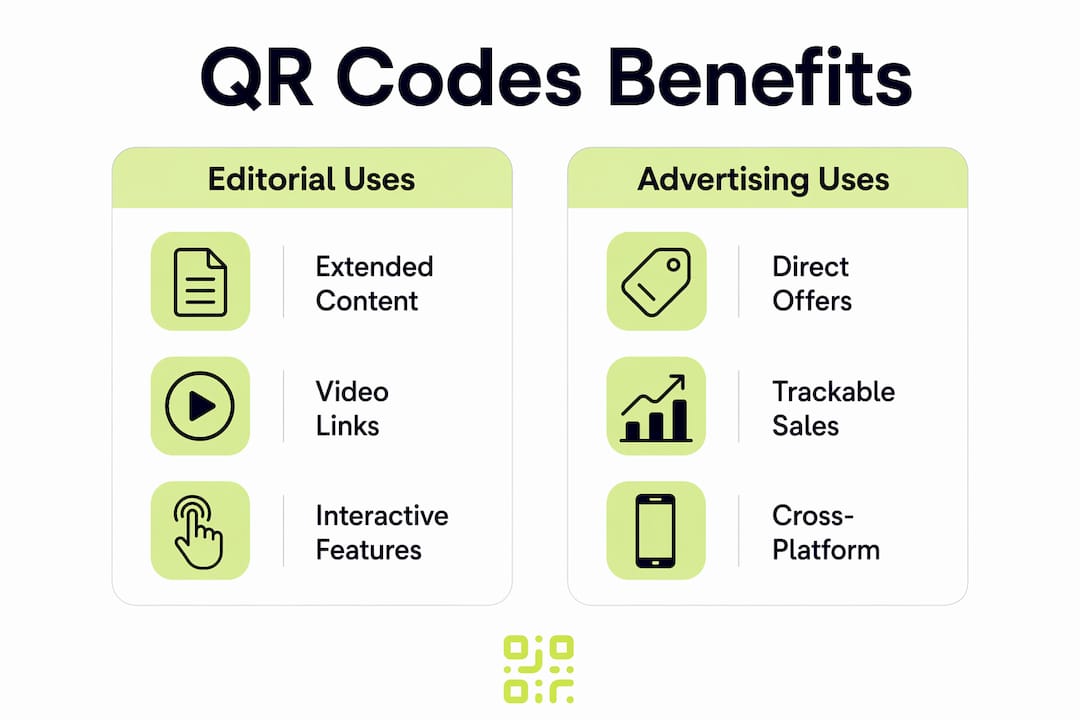
Revenue and advertiser value. Print advertising has long struggled to prove direct response. A QR code on a full-page ad creates a trackable path from page to purchase, letting your sales team quote scan rates alongside circulation figures. Magazines and newspapers that add QR codes can link readers to extended content and offers, shortening the purchase path for advertisers and supporting affiliate, subscription, and voucher models.
Future-proofing with dynamic codes. Static codes lock in a URL at print time. Dynamic codes separate the printed pattern from the destination, so you can redirect a back-issue code to updated content years later. That single capability protects your archive and reduces the risk of dead links embarrassing your brand in issues that stay on shelves or in waiting rooms for months.
Editorial and advertising use cases that fit magazine workflows
The most effective QR placements are specific, not generic. Here is how editorial and commercial teams are using them.
Editorial use cases
- Extended interviews: a pull-quote links to the full audio or video conversation, giving print readers a reason to pick up their phone mid-article.
- Recipe and how-to walkthroughs: step-by-step video or an interactive ingredient list supplements the printed version without crowding the layout.
- Immersive photo galleries: a fashion or travel spread links to a full gallery or a 360° view that print cannot replicate.
- Downloadable resources: templates, checklists, and data tables sit behind a code rather than cluttering the page.
- Reader polls and feedback forms: a code at the end of a feature collects structured reader opinion that feeds back into editorial planning.
Advertising use cases
QR codes in print ads let advertisers link readers to offers and purchase paths, turning a passive impression into a measurable action. Common formats include shoppable editorial, coupon and voucher redemption, event registration, and lead-capture landing pages. Each placement gets its own code, so scan data maps directly to a specific ad unit and issue.

Cross-platform campaigns
Print-to-AR entry points are growing in lifestyle and luxury titles: a code triggers an augmented-reality try-on or a 3D product view. Subscription acquisition funnels work well here too — a code on the contents page links to a discounted digital subscription offer, with the scan itself acting as the attribution event. HarperCollins used QR codes to link to microsites and exclusive content for book launches, a model magazine publishers can adapt for series, brand partnerships, or sponsored content hubs.
Pro Tip: Pair every QR placement with a social amplification prompt. A caption such as “Scan and share” alongside the code turns a passive scan into a shareable moment, extending your reach beyond the print run.
Design and print rules that make codes scan reliably
Poor design is the most common reason a QR campaign fails before it starts. These rules apply to UK print production across both gloss and matt finishes.
Size and quiet zone
The minimum recommended size for a QR code in a standard magazine placement is 2 cm × 2 cm at final printed scale. Larger is better: a full-column code (roughly 4 cm × 4 cm) scans faster and more reliably, especially on high-gloss stock where light reflection can reduce contrast. The quiet zone — the white border around the code — must be at least four modules wide on all sides. Cutting into it is one of the most common prepress errors.
Contrast and colour
Black on white remains the most reliable combination. GS1 guidance sets a minimum contrast ratio that most dark-on-light combinations meet, but light-on-dark (white code on a dark background) fails on many device cameras. Avoid placing codes over photographic backgrounds, textured paper, or areas with spot varnish or foil, all of which disrupt the camera’s ability to read the pattern.
Placement guidance
Contents pages and inside front covers get the highest dwell time and are ideal for subscription or campaign codes. Within articles, place codes near the relevant content — beside a pull-quote, adjacent to a product shot, or at the natural end of a feature. Avoid the spine and gutter, where page curl reduces scan reliability.
Prepress QA checklist:
- Export the code as a vector (SVG or EPS) rather than a low-resolution raster.
- Proof-scan from a printed proof, not a screen PDF, before approving the press run.
- Test on at least three different devices (iOS, Android, older handset).
- Check that varnish and foil zones do not overlap the code or its quiet zone.
- Confirm the destination URL resolves correctly from a mobile browser.
Pro Tip: Matt laminate is generally safer than gloss for QR codes. If the cover or spread uses high-gloss or UV varnish, request a spot matt window over the code area in your finishing spec.
For a full prepress checklist, the Qrlytics guide on QR code printing covers every step from file preparation to final-run verification.
Static vs dynamic QR codes: which should publishers use?
The technical choice between static and dynamic codes has significant consequences for magazine publishing, where issues stay in circulation long after the press run.
Static vs dynamic: the core difference
A static code encodes the destination URL directly into the pattern. Once printed, it cannot be changed. A dynamic code points to a redirect URL; you control where that redirect sends the scanner. Dynamic codes let publishers update destinations after printing and provide analytics such as scan counts and geographic data — capabilities that static codes simply cannot offer.
For one-off, low-stakes placements (a single event with a fixed date), static codes are fine. For any placement that will appear in a distributed print run, a dynamic code is the right choice.
URL strategy and lifecycle planning
Short, mobile-optimised landing pages load faster and reduce bounce rates. Use UTM parameters (source, medium, campaign, content) on every destination URL so scan traffic is attributed correctly in your analytics platform. Plan the lifecycle of each code at the brief stage: decide whether the destination will be updated, archived, or redirected to evergreen content once the campaign ends.
Workflow for issuing dynamic codes:
- Generate the dynamic code in your management platform (assign a campaign ID and expiry policy).
- Build and test the destination landing page on mobile before embedding the code.
- Embed the code in the layout file and proof-scan from a printed proof.
- Monitor scan data in the first week after distribution.
- Update the destination URL if the content changes or the campaign ends.
Pro Tip: Avoid redirect chains longer than one hop. A code that redirects to a short link that redirects to a campaign page adds latency and creates an extra failure point. Set the dynamic code’s destination directly to the final mobile landing page.
The Qrlytics guide on updating QR code links explains the mechanics of post-print redirects in detail.
What to measure and how to do it lawfully in the UK
Scan analytics give publishers something print has rarely offered: direct evidence of reader behaviour. Here is what to track and how to stay compliant under UK GDPR.
Core metrics
- Scan counts per code: the baseline engagement figure for each placement or ad unit.
- Unique scanners (approximate): most platforms use device fingerprinting or session hashing to deduplicate; treat this as an estimate, not a precise headcount.
- Time of scan: reveals when readers engage (immediately on receipt, or weeks later from a waiting room).
- Geographic heatmaps: show regional distribution of engagement, useful for regionally targeted ad packages.
- Device type: iOS vs Android split informs mobile landing page optimisation.
- Downstream conversions: tracked via UTM parameters and conversion events on the destination page.
Publishers can collect scan counts, geographic reach, and device types as standard analytics from QR campaigns, giving commercial teams the data to price trackable placements above standard display rates.
Attribution
Assign a unique code to each ad unit and editorial placement. Use UTM conventions consistently: utm_source=print, utm_medium=magazine, utm_campaign=[issue-date], utm_content=[placement-id]. Single-use landing pages per campaign make attribution cleaner still, especially when you need to separate editorial scans from advertiser scans. Linking print interactions to digital retargeting and CRM capture improves overall campaign performance and gives advertisers a measurable return.
UK GDPR considerations
Scan analytics that collect IP addresses or device identifiers constitute personal data processing under UK GDPR. The lawful basis most publishers rely on is legitimate interests, provided the processing is proportionate and readers are informed via a privacy notice linked from the landing page. For gated content (where a reader submits an email to access the resource), explicit consent is required and must be logged. Key practical steps:
- Use server-side aggregation where possible to avoid storing raw IP addresses.
- Apply hash-based deduplication rather than persistent cookies for unique-scanner estimates.
- Keep short-lived session cookies (under 24 hours) for conversion tracking.
- Record the processing activity in your Article 30 register, noting the code ID, data collected, retention period, and lawful basis.
- Link to your privacy notice from every QR landing page.
Legal note: this article provides general information for UK publishers and does not constitute legal advice. Confirm your specific processing activities with a qualified data protection practitioner or your organisation’s DPO.
How to integrate QR codes into your editorial schedule
Treating QR codes as an afterthought — dropped in at the layout stage — is how campaigns go wrong. The destination needs to be built and tested before the code is generated, not after.
Here is a replicable workflow for a standard monthly magazine:
- Editorial brief (six weeks before press): decide which features and ad placements will carry codes. Assign a content owner for each destination URL.
- Content build (four weeks before press): build and sign off the landing page or digital asset. Confirm the mobile experience on at least two device types.
- QR generation (three weeks before press): generate dynamic codes in your management platform. Assign campaign IDs, UTM tags, and expiry policies. Log each code in the prepress template (fields: code ID, destination URL, campaign tag, expiry policy, content owner).
- Design integration (two weeks before press): embed codes in layout files as vectors. Confirm quiet zones and contrast in the design proof.
- Proof scanning (one week before press): print a hard proof and scan every code on three devices. Confirm destination URLs resolve correctly on mobile.
- Press approval: sign off only after all codes pass the proof scan.
- Post-distribution monitoring: check scan data in the first 48 hours. Confirm no codes are returning errors.
For detailed production guidance, the Qrlytics printed media integration guide covers spec templates and QA checklists for magazine teams.
Common QR-code mistakes publishers make and how to fix them
Most QR failures are avoidable. These are the errors that cost publishers reprints, reader trust, and advertiser confidence.
- Dead or expired links: a static code pointing to a URL that has since changed or been taken down. Fix: use dynamic codes for all distributed print runs and assign a content owner responsible for keeping destinations live.
- Poor contrast or undersized codes: a code printed at 1 cm × 1 cm on a glossy background will fail on most devices. Fix: follow the 2 cm × 2 cm minimum and test on a printed proof, not a screen.
- Placement over busy images or varnish: the camera cannot distinguish the code pattern from a complex background. Fix: place codes on clean white or light areas and exclude them from varnish and foil zones.
- No context or call to action: a code with no label gets ignored. Fix: always include a short CTA (“Scan to watch the full interview”) directly beside the code. Specific CTAs increase scan rates and set reader expectations.
- Untested mobile landing pages: a page that loads slowly or renders poorly on mobile wastes every scan. Fix: test load time and layout on both iOS and Android before the press run.
- Too many codes per article: more than two codes in a single feature creates choice paralysis and dilutes engagement. Fix: one or two codes per story, each with a distinct purpose.
The Qrlytics guide on boosting QR code scans covers CTA wording and placement tactics in more detail.
What the research says about QR codes in publishing
Academic and industry evidence supports the practical recommendations above. A one-year study of QR code usage in top-selling mass-market magazines examined scan behaviour and placement effectiveness, finding that codes placed near relevant editorial content consistently outperformed codes placed in generic positions such as the back cover or masthead.
Key findings from published research and industry documentation:
- Publishers using QR codes reported measurable gains in cross-media engagement when codes linked to genuinely exclusive or extended content rather than a homepage or generic landing page.
- Geographic heatmap data from QR campaigns has been used by UK regional titles to demonstrate local audience concentration to advertisers, supporting premium regional ad rates.
- HarperCollins’ use of QR codes to link to mobile microsites and exclusive content for children’s publishing demonstrated that QR-driven engagement works across age groups when the destination is genuinely compelling.
- Industry guides consistently note that dynamic codes and analytics are the features that separate a measurable campaign from a decorative one.
The transferability to UK magazines is straightforward: the mechanics of scanning, redirect architecture, and analytics are identical regardless of market. What varies is the regulatory frame (UK GDPR rather than EU GDPR post-Brexit) and the print production standards publishers work to.
How to choose a QR-code management approach for your publication
The choice between a free static generator, a basic link shortener, and a managed platform comes down to how much you need to control after the press run.
Selection checklist:
- Permanence guarantee: will codes remain active if you change subscription tier or miss a payment? This matters enormously for back-issues.
- Dynamic update ability: can you change the destination URL without reprinting?
- Analytics depth: do you get scan counts, geographic data, device type, and time-of-scan, or just a total count?
- GDPR features: does the platform support privacy-first tracking (server-side aggregation, consent management, data residency in the UK or EEA)?
- Branding and customisation: can you add your logo or brand colours to the code pattern?
- API access: can your production team generate and manage codes programmatically, or does everything require manual steps in a web interface?
- Data export: can you export scan data as CSV for use in your own reporting or CRM?
Minimum items to confirm with any vendor:
- Uptime SLA and incident response time.
- Data retention policy and deletion process.
- Confirmation of UK/EEA data residency or adequate transfer safeguards.
- Export format and frequency for analytics data.
- Process for updating or retiring codes at end of campaign.
Qrlytics is built specifically around the permanence problem: codes created during an active subscription remain functional regardless of billing status, which protects back-issues and long-run print assets. The platform provides dynamic QR codes with real-time analytics, GDPR-compliant tracking, global scan heatmaps, CSV export, and API access. For publishers evaluating options, the Qrlytics guide on generating and managing QR codes covers onboarding steps and minimum configuration for a magazine workflow.
Key takeaways
Dynamic QR codes, placed with clear calls to action and managed through a platform that guarantees permanence, are the most reliable way for UK magazine publishers to connect print audiences to digital content and measure the results.
| Point | Details |
|---|---|
| Use dynamic codes for all print runs | Dynamic codes let you update destinations after distribution, protecting back-issues from dead links. |
| Minimum size is 2 cm × 2 cm | Codes smaller than this fail on many devices, especially on gloss stock; larger is always better. |
| One or two codes per article | Limiting codes per story and using specific CTAs (“Scan to watch”) consistently improves scan rates. |
| Measure scans, location, and device type | These three metrics give editorial and commercial teams the data to prove print ROI and refine placements. |
| Qrlytics for permanence and compliance | Qrlytics guarantees codes stay active regardless of billing status and provides GDPR-compliant analytics for UK publishers. |
The case for treating QR codes as editorial infrastructure
The conversation about QR codes in magazines tends to get stuck on whether readers will bother scanning. That is the wrong question. The right question is whether your editorial and commercial teams are building content worth scanning to.
When a code links to a homepage, a social feed, or a generic product page, low scan rates are not a technology problem. They are a content problem. The publications seeing genuine engagement from QR placements are the ones that treat the digital destination as a continuation of the story, not an afterthought. A fashion title that links to a stylist’s commentary on the shoot, a food magazine that links to a chef demonstrating a technique, a trade title that links to the full dataset behind a feature: these are destinations readers will seek out.
For ad sales, the shift is equally significant. A trackable print placement changes the conversation with advertisers from “our circulation is X” to “your ad generated Y scans, Z of which converted.” That is a fundamentally different value proposition, and it commands a different rate card. Publishers who have not yet built scan data into their ad pricing are leaving money on the table.
The editorial guardrail worth keeping is this: one code per story, one clear purpose, one honest CTA. Readers tolerate being directed to useful content. They do not tolerate being directed to a sales page dressed up as editorial. The moment that distinction blurs, scan rates drop and reader trust follows.
Qrlytics keeps your magazine’s QR codes live, trackable, and GDPR-ready
Print campaigns live long after the press run. A back-issue sitting in a waiting room six months from now still carries your QR codes, and a dead link at that moment reflects on your brand. Qrlytics solves this directly: codes created during an active subscription stay functional permanently, so your archive is protected without manual intervention.

For UK publishers, the platform combines dynamic URL updates, real-time scan analytics (including geographic heatmaps and device breakdowns), GDPR-compliant tracking, and branded code customisation in one place. You can export scan data as CSV for your own reporting, connect via API for programmatic code management, and update any destination URL without touching the printed page. No credit card is needed to start. Try the free QR code generator to test the basics, or go straight to the dynamic QR code platform to set up trackable, editable codes for your next issue.
Useful sources
- One-year study of QR code usage in top-selling mass-market magazines: peer-reviewed research on scan behaviour and placement effectiveness in print magazines; the most directly relevant academic source for UK publishers.
- Bridging print and digital: using QR codes to enhance your magazine’s reach (3D Issue): publisher-facing overview of use cases, analytics, and dynamic code benefits; good for editorial teams new to QR integration.
- QR codes in magazines and newspapers (Supercode): practical size and placement guidance for print developers and production teams.
- Using QR codes for books and publishing (Bitly): explains dynamic codes, redirect architecture, and analytics for publishing workflows.
- QR codes tie print and online marketing (Publishers Weekly): industry case study on HarperCollins’ use of QR codes for children’s publishing and cross-media promotion.
- QR codes and AR in print: a marketer’s guide (Parkcom): UK-focused guide on combining QR codes with augmented reality in print campaigns.
- QR printed media integration guide (Qrlytics): step-by-step production workflow and testing checklist for magazine and print teams.
- Printed material tracking: mastering QR code campaigns (Qrlytics): covers UTM attribution, analytics export, and CRM integration for print campaigns.
FAQ
Do magazines use QR codes?
Yes. UK and international magazines use QR codes to link readers to video content, extended articles, subscription offers, shoppable product pages, and advertiser landing pages. Usage has grown steadily as native camera scanning became standard on iOS and Android.
How big should a QR code be in a magazine?
The minimum recommended size is 2 cm × 2 cm at final printed scale. Using a larger size such as 4 cm × 4 cm further improves scan reliability, especially on high-gloss stock or where scanning conditions vary.
What is the main purpose of a QR code in a magazine?
A QR code connects a printed page to a digital destination, whether that is extended editorial content, an advertiser’s purchase page, or a subscription offer. For publishers, the secondary purpose is equally important: every scan generates data (count, location, device type) that proves print engagement to advertisers and informs editorial planning.
What are the most common QR-code mistakes in magazine publishing?
The most damaging errors are dead links (fixed by using dynamic codes), codes that are too small or placed over varnish (fixed by following the 2 cm × 2 cm minimum and prepress QA), and missing calls to action (fixed by adding a short label such as “Scan to watch” beside every code). Testing on a printed proof before the press run catches most of these before they reach readers.
How does Qrlytics help publishers manage QR codes long-term?
Qrlytics guarantees that codes remain active regardless of billing status, which protects back-issues from dead links. The platform supports dynamic URL updates, GDPR-compliant scan analytics, geographic heatmaps, and CSV data export, giving UK publishers the tools to manage codes across multiple issues and campaigns from a single dashboard.