QR codes for instruction manuals: a complete UK guide

TL;DR:
- QR codes link physical products to digital manuals, enabling instant access without app installation.
- Dynamic codes allow updates and analytics, making them superior for manuals that change or require tracking.
A QR code for instruction manuals is a scannable two-dimensional barcode that links users directly to a digital manual via their smartphone camera. No app required. Just point, scan, and the full documentation opens instantly on screen.
What is a QR code for instruction manuals?
QR codes, short for Quick Response codes, are two-dimensional barcodes that store a URL or other data readable by any modern smartphone camera. In the context of instruction manuals, they serve as a direct bridge between a physical product and its digital documentation. Scan the code on the packaging or device, and the manual opens immediately.
Their core purposes in this context are:
- Instant access to full manuals without carrying printed booklets
- Real-time content updates without reprinting a single page
- Multilingual manual delivery from one code
- Reduced paper waste and long-term printing costs
- Analytics on how and where users access documentation
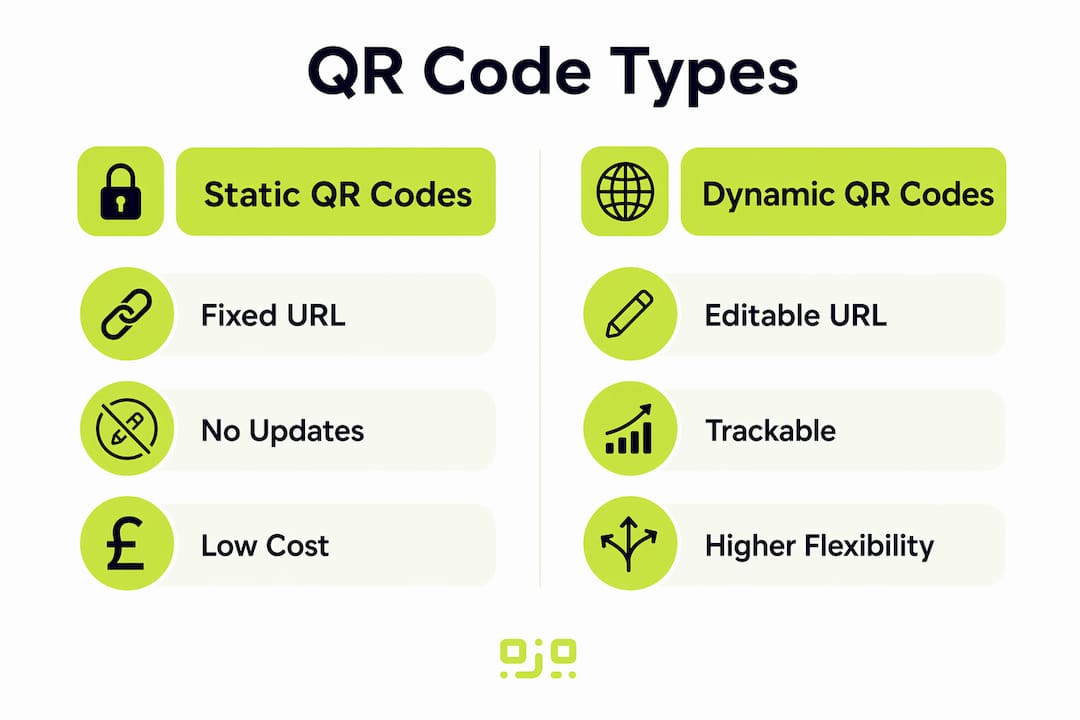
Two types matter here: static QR codes contain a fixed URL that cannot be changed after printing, while dynamic QR codes allow you to update the destination URL at any time. For instruction manuals, dynamic codes are almost always the better choice.
Why QR codes outperform traditional printed manuals

Paper manuals in industrial and medical settings are easily contaminated, lost, or damaged. A QR code printed on a waterproof label eliminates those risks entirely. The digital manual behind it stays clean, complete, and permanently accessible.
Key advantages over printed manuals:
- No reprinting needed when content changes, saving time and operational cost
- Multimedia content such as video demonstrations replaces flat text instructions, shifting training from “tell-only” to genuinely interactive
- Multilingual access from a single code, with the destination page serving the user’s preferred language
- Compliance support under EU Machinery Regulation (EU) 2023/1230, which permits digital-only manuals via QR codes from 20 January 2027, subject to Article 10(7) conditions
- Reduced clutter on factory floors, in operating theatres, and in customer packaging
How to design and place QR codes effectively
Good design and placement determine whether users actually scan your code.
- Size matters. QR codes should be at least a minimum size recommended for reliable scanning to scan reliably across all smartphone cameras, including older models. Smaller codes frequently fail.
- Use high contrast. Dark code on a light background is the standard for a reason. Avoid placing codes on patterned or coloured surfaces.
- Add a call-to-action. Text such as “Scan for full manual” placed near the code significantly improves uptake.
- Use durable labels. In industrial or medical environments, print codes on waterproof, scratch-resistant labels.
- Never rely on QR codes alone for safety warnings. Critical safety information must remain visibly printed on the product or packaging.
- Test across devices. Scan your code on both Android and iOS before printing at scale.
Pro Tip: Keep QR code branding consistent across your product range. A recognisable, on-brand code builds user trust and increases scan rates over time.
Static vs dynamic QR codes: which suits manuals?
The choice between static and dynamic codes has real consequences for manual management.
- Static codes contain a fixed URL. Once printed, the destination cannot change. If your manual moves or updates, the code becomes useless.
- Dynamic codes point to a redirect URL you control. Update the manual, change the language, or swap the destination entirely without touching the printed code.
- Dynamic codes provide scan analytics: count, location, device type, and timing, giving you genuine insight into how users engage with your documentation.
- They also support A/B testing of manual versions, letting you measure which format or language performs better.
For any manual that will be updated, reprinted, or translated, dynamic codes are the only practical option. Qrlytics provides dynamic QR code generation with permanent code functionality, meaning codes remain active regardless of billing status.
Real-world use cases in the UK
QR codes in instruction manuals are already delivering measurable results across several sectors.
- Operating theatres: Research on QR code manuals in hospital equipment management found improved utilisation rates, accuracy, and training quality compared with traditional paper card manuals.
- Industrial machinery: Manufacturers place QR codes beside equipment on factory floors, linking to safety checklists, video demonstrations, and fault-finding guides accessible on demand.
- Consumer electronics: A single QR code on packaging delivers the full manual in the user’s language, replacing bulky multilingual booklets.
- Employee training: QR codes on printed training guides link staff to video walkthroughs and updated procedures, supporting onboarding and ongoing education without reprinting materials every time a process changes.
- UK regulatory context: With EU Machinery Regulation (EU) 2023/1230 taking effect from January 2027, UK manufacturers exporting to the EU have a clear legal pathway to digital-only manuals via QR codes.
Security and privacy when using QR codes in manuals
Deploying QR codes responsibly means thinking beyond convenience.
- Link to HTTPS URLs only. Unencrypted destinations expose users to data interception.
- Use GDPR-compliant analytics. Any scan data you collect, including location or device type, must be handled in line with UK GDPR. Qrlytics provides GDPR-compliant tracking with anonymised scan data by default.
- Guard against code tampering. In public-facing environments, physically secure labels to prevent malicious replacement with codes linking to harmful content.
- Do not use QR codes as the sole route to critical safety information. Regulations require safety warnings to remain visible without a device.
- Choose a reliable platform. Codes that go offline because a provider cancels a subscription can render printed materials useless overnight. Qrlytics guarantees permanent code functionality for codes created during an active subscription.
How to use scan analytics to improve your manuals
Scan data turns a static document into a living product you can genuinely improve.
- Scan counts by section reveal which parts of a manual users return to most, pointing to areas of confusion worth clarifying.
- Geolocation data shows where in the UK (or globally) your manuals are being accessed, useful for localisation decisions.
- Device type data tells you whether users are on mobile or tablet, so you can optimise the manual’s layout accordingly.
- Timing patterns highlight when users consult manuals most, often immediately after purchase or during installation.
- A/B testing with dynamic codes lets you compare two manual versions and measure which reduces support queries.
Qrlytics provides real-time analytics and global heat maps, giving you a clear picture of engagement without needing a separate analytics platform.
Making QR codes accessible to users with disabilities
Accessibility is not optional, particularly for UK organisations subject to the Equality Act 2010.
- Size and contrast first. A minimum size recommended for reliable scanning code with strong contrast helps users with low vision scan reliably.
- Provide text alternatives. Always include a printed URL or short web address alongside the QR code for users who cannot scan.
- Link to accessible digital content. The destination manual should meet WCAG 2.1 AA standards, with readable fonts, sufficient colour contrast, and screen-reader compatibility.
- Consider audio output. The Accessible QR (AQR) format combines a standard QR code with a dot-dash pattern, activating smartphone accessibility features such as VoiceOver to announce product details aloud.
- Ensure good lighting conditions. Place codes in well-lit locations and avoid glossy surfaces that cause glare.
- Test with assistive technology. Scan your code using VoiceOver on iOS and TalkBack on Android before deployment.
Qrlytics makes QR codes for manuals reliable and measurable
The single biggest risk with QR codes in printed manuals is a code that stops working after you have already printed thousands of labels. Qrlytics solves that directly: codes created during an active subscription remain functional permanently, regardless of what happens to your billing status later.

Beyond permanence, Qrlytics gives you dynamic URL updates, real-time scan analytics, GDPR-compliant tracking, and branded code design, all without requiring a credit card to get started. For UK manufacturers, training teams, and product managers who need reliable, trackable documentation, it is a practical starting point. Create your first dynamic QR code free and see how straightforward it is to attach living documentation to any printed product.
Key takeaways
Dynamic QR codes are the only practical choice for instruction manuals because they allow content updates, deliver scan analytics, and remain functional across a product’s full lifecycle.
| Point | Details |
|---|---|
| Use dynamic codes | Dynamic QR codes let you update manual content without reprinting any physical materials. |
| Minimum size is 3cm square | Codes smaller than 3cm square scan unreliably, especially on older smartphone cameras. |
| EU regulation supports digital manuals | EU Machinery Regulation (EU) 2023/1230 permits digital-only manuals via QR codes from 20 January 2027. |
| Accessibility requires alternatives | Always include a printed URL alongside the QR code for users who cannot scan. |
| Qrlytics for permanent functionality | Qrlytics guarantees codes remain active after creation, preventing broken links on printed materials. |
FAQ
What is a QR code for instruction manuals?
A QR code for instruction manuals is a scannable two-dimensional barcode printed on a product or its packaging that links users directly to a digital manual via their smartphone camera.
Are digital manuals via QR codes legally accepted in the UK?
Under EU Machinery Regulation (EU) 2023/1230, digital manuals delivered via QR codes are legally permitted from 20 January 2027, provided Article 10(7) conditions are met. UK manufacturers exporting to the EU can use this route.
What is the difference between static and dynamic QR codes for manuals?
A static code contains a fixed URL that cannot be changed after printing. A dynamic code lets you update the destination at any time, making it far more practical for manuals that are revised or translated.
How do I make a QR code accessible for users with disabilities?
Use a QR code of at least 3cm square with high contrast, include a printed URL alternative, and ensure the linked digital manual meets WCAG 2.1 AA accessibility standards.
How can I track how users engage with my manual via QR code?
Dynamic QR codes provide scan analytics including count, location, device type, and timing. Qrlytics offers real-time analytics and global heat maps to help you identify which parts of your manual need improvement.