How to update QR code links without reprinting
TL;DR:
- Dynamic QR codes enable destination updates without reprinting, making campaigns more flexible and cost-effective.
- Before updating, verify the code’s dynamic status, test new URLs, and use temporary redirects to prevent caching issues.
You have 5,000 flyers in distribution and the URL they point to is wrong. Or the campaign has changed, the product page has moved, and every scan is now a dead end. Knowing how to update QR code links without touching a single printed sheet is one of the most practically valuable skills a marketer can have. The solution exists, it is not complicated, and this guide walks you through every step, from understanding the underlying redirect mechanics to verifying that your update actually worked.
Key takeaways
| Point | Details |
|---|---|
| Dynamic codes are essential | Only dynamic QR codes support destination updates after printing, unlike static codes which are fixed permanently. |
| Use 302 redirects, not 301 | Temporary redirects prevent browsers from caching old destinations, keeping every scan current and accurate. |
| Security must be verified | Each URL update should be treated as a security operation to prevent QR phishing attacks on your audience. |
| Test across multiple devices | Confirming the updated link works on iOS, Android, and different browsers catches errors before your audience does. |
| Track scans post-update | Monitoring scan analytics after an update confirms the new destination is receiving traffic as expected. |
Understanding QR code types and updating links
Before you can change anything, you need to understand why some QR codes allow updates and others do not. The distinction matters enormously for anyone managing printed campaigns.

A static QR code encodes the destination URL directly into its pattern. The black and white squares are the URL. Once printed, the code cannot be changed. If the destination moves, the code is permanently broken. Your only option is to reprint.
A dynamic QR code works differently. It encodes a short, fixed slug pointing to a redirect server. That server then routes the scan to whichever destination URL you have configured. A dynamic QR code encodes a short URL pointing to a redirect server where the destination can be updated at any time, leaving the printed code completely unchanged. This is what QR code redirection means in practice: the code itself never changes, but the destination it points to can.
The industry term for this underlying mechanism is URL redirection or a redirect URL. When marketers refer to a “QR code URL update,” they are almost always describing a change to the redirect target on the server, not a physical change to the printed code.
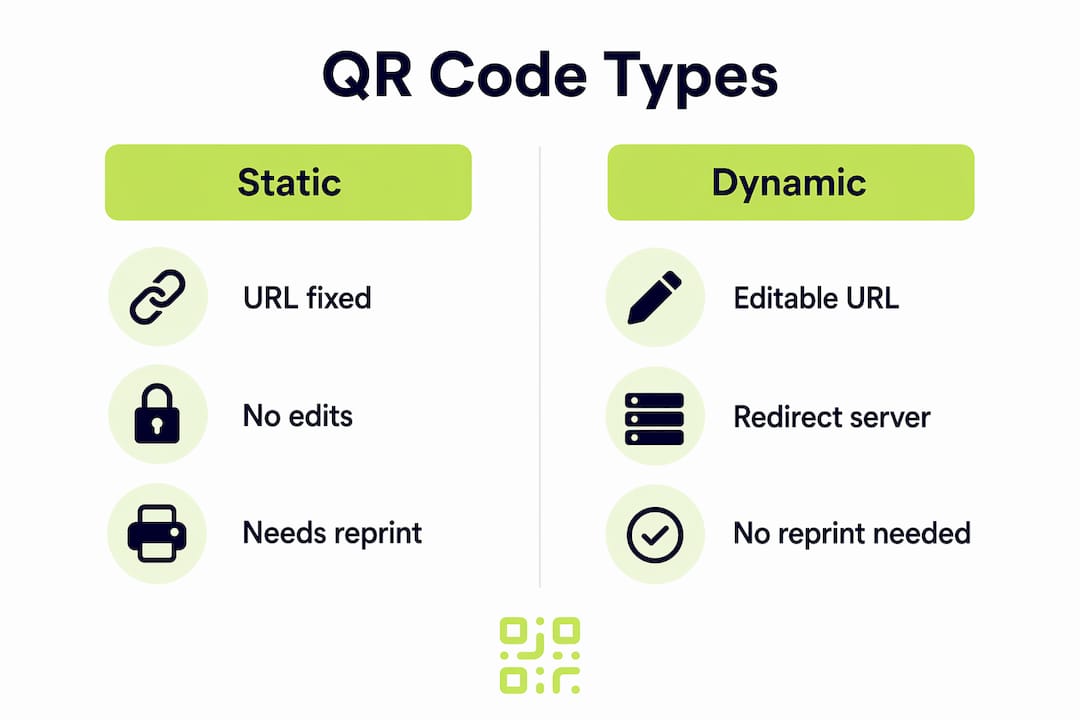
Here is a quick comparison to make the choice clear:
| Feature | Static QR code | Dynamic QR code |
|---|---|---|
| Destination URL editable | No | Yes |
| Requires reprinting to update | Yes | No |
| Scan analytics available | No | Yes |
| Suitable for printed campaigns | Limited | Recommended |
| Short redirect URL encoded | No | Yes |
The advantages of QR code redirecting extend well beyond simple convenience. Reusable short redirect links allow marketers to update QR code URLs without reprinting or reprogramming QR codes and NFC tags, which directly reduces print waste and campaign cost. For any marketer running seasonal promotions, product launches, or events on printed collateral, dynamic codes are the only sensible choice.
What you need before updating a QR code link
Jumping straight into an update without preparation is where most errors occur. A few checks before you start will save you time and protect your audience.
- Confirm your code is dynamic. Log into the platform where the code was created. If you cannot find an editable redirect URL attached to the code, it is likely static and cannot be updated remotely. You will need to reduce print waste by planning dynamic codes from the outset for future campaigns.
- Identify all materials using this code. Before changing a destination, map every place the code appears. Brochures, posters, packaging, event stands, and digital PDFs may all carry the same code. Knowing the full scope prevents surprises.
- Verify the new destination URL. Check that the target page is live, loads correctly on mobile, and does not require the user to log in before seeing the relevant content. A broken or restricted destination defeats the purpose.
- Check security. QR code phishing surged 146% in 2026, making it absolutely necessary to only update destinations to vetted, secure URLs. Never point a QR code to a page that captures sensitive data unless you own and fully control that page.
- Ensure you have admin access. Confirm your login credentials and permissions on the QR code management platform before you begin. Mid-update access issues create unnecessary risk.
Pro Tip: Create a simple spreadsheet listing every active QR code, the platform it is managed on, its current destination, and all printed materials where it appears. Updating this register each time you change a destination takes two minutes and prevents the chaos of not knowing what points where.
Controlling all redirect URLs and monitoring destination link health is foundational to campaign longevity. Treat this register as a live document, not a one-time exercise.
Step-by-step: how to update QR code URLs
With preparation complete, the update itself is straightforward. Follow these steps carefully to change the destination without disrupting active scans.
-
Log into your QR code management platform. Navigate to the dashboard where your codes are listed. Most platforms organise codes by campaign name, creation date, or ID. Locate the specific code you want to update.
-
Select the code and open its settings. Click into the code’s detail view. You should see the current redirect URL displayed clearly. This is the destination all scans are currently resolving to.
-
Edit the redirect URL. Replace the existing destination with your new URL. Paste the full address including the https:// prefix. Double-check for typos, particularly at the end of long URLs where parameters can be easily truncated.
-
Confirm the redirect type is set to HTTP 302. This is a critical technical point. Using HTTP 302 temporary redirects instead of permanent 301 redirects prevents browsers from caching the old destination aggressively. A 301 redirect tells browsers to store the destination locally. Subsequent scans may resolve to the old URL from cache rather than checking the server. A 302 keeps every scan fresh. If your platform exposes redirect type settings, set it to 302.
-
Save the update. Most platforms apply changes immediately. Some may show a short propagation delay of a few seconds to a minute.
-
Test on at least two devices. Scan the printed code or a digital copy using an iOS device and an Android device. Testing across different devices and browsers confirms the updated destination loads correctly and catches any platform-specific issues before your audience encounters them.
-
Communicate the update internally. If other team members, partners, or agencies reference this code in their own tracking or reporting, notify them of the destination change. This keeps campaign data aligned across stakeholders.
Pro Tip: If you manage multiple codes for a single campaign, update and test them one at a time rather than all at once. This makes it far easier to isolate a problem if one update behaves unexpectedly.
Troubleshooting common update problems
Even when you follow the correct process, a few issues can surface. Knowing what to look for saves significant time.
-
Scans still resolving to the old URL. The most common cause is redirect caching. If the code was previously configured with a 301 permanent redirect, some devices may have saved the old destination locally. The fix is to switch to 302 temporary redirects going forward and wait for cached entries to expire, typically between 24 and 72 hours depending on the browser.
-
The code no longer works at all. This can happen when a QR code platform deactivates codes following account suspension or billing issues. Some free services tie code functionality to an active paid subscription. If the platform has deactivated your code, you may have no option but to reprint with a new provider. This is precisely the scenario Qrlytics was built to address: codes created during an active subscription remain functional permanently.
-
Security concerns after updating. Treat each destination change as a security-sensitive operation. QR phishing attacks increasingly target brands by manipulating redirect URLs, particularly in environments where multiple team members have platform access. Restrict edit permissions to trusted users only and audit destination changes regularly.
-
Redirect server performance issues. Errors in redirect server performance and caching setup can cause inconsistent scans, where some users land on the new destination and others do not. If this happens, contact your platform’s support team and check their status page.
If your static QR codes cannot be updated remotely, accept that reprinting is the only viable path. The operational cost is real, but continuing to point audiences to broken destinations is far more damaging to your brand than a reprint run.
Verifying the update worked
Completing the update is not the end of the process. Verification protects your campaign and confirms the change is live everywhere it needs to be.
| Verification method | What it confirms | When to use it |
|---|---|---|
| Physical QR scan test | New destination loads on real devices | Immediately after saving |
| Browser-based URL test | Redirect resolves correctly on desktop | After device testing |
| Scan analytics check | Traffic is flowing to the updated URL | 24 to 48 hours post-update |
| Link health monitoring | Destination URL remains live and accessible | Weekly for active campaigns |
Checking scan analytics after the update is one step many marketers skip, and it is one of the most telling. If analytics show scans occurring but no corresponding traffic on the new destination, something in the redirect chain is not resolving correctly. Equally, a spike in scan volume after an update confirms that distribution is working and the new destination is being reached.
Periodic review of all active QR code destinations should be part of your standard campaign maintenance. URLs expire, pages get redirected by web teams, and hosting lapses happen. A monthly check across your QR code register takes under an hour and prevents silent failures.
My perspective on updating QR codes effectively
I have watched marketers treat QR code updates as a five-second task and then spend days untangling the consequences. The technical side is genuinely simple. What catches people out is the preparation they skip.
The biggest mistake I see is organisations running dynamic QR codes on platforms they do not truly control. A free tool with a convenient interface feels fine until the provider changes its pricing model, the account lapses, and every printed code suddenly resolves to an error page. The redirect infrastructure your codes depend on should be treated like any other critical piece of campaign infrastructure.
Security is the other area that gets almost no attention until something goes wrong. Updating a QR code destination is, technically, redirecting thousands of people to a new URL. If that update process is not protected by proper access controls and destination validation, it is a meaningful attack vector. The rise of QR phishing should have raised the profile of this risk far more than it has among marketing teams.
My honest recommendation: before your next print run, audit every QR code in your active inventory. Confirm which platform manages the redirect, confirm your access is current, and confirm the destination is still valid. It takes less time than you expect and eliminates the most common causes of QR code failure before they reach your audience.
— The
How Qrlytics makes link updates straightforward
Managing QR code destinations across printed campaigns should not require a technical background or a separate developer. Qrlytics is built precisely for business professionals and marketers who need reliable, editable QR codes with the analytics to back them up.

With Qrlytics, every code you create is a dynamic QR code with a fully editable redirect URL. You can update the destination at any time from the dashboard, with changes taking effect immediately. Codes created during an active subscription remain functional permanently, regardless of billing status. That means no silent failures and no reprints caused by platform issues.
The platform also provides real-time scan analytics and tracking, so you can confirm that every updated destination is receiving traffic and performing as expected. GDPR-compliant tracking and global heat maps give your campaigns the measurement they deserve.
Start with the free QR code generator to create your first dynamic code. No credit card required.
FAQ
Can I update a static QR code without reprinting?
No. A static QR code encodes the destination URL directly into its pattern and cannot be changed after printing. Only dynamic QR codes, which use a redirect URL, support destination updates without reprinting.
What is a QR code redirect and why does it matter?
A QR code redirect is a server-side mechanism where a short, fixed URL in the code resolves to a configurable destination. It matters because it allows the destination to be updated at any time while the printed code remains unchanged.
Why are my scans still going to the old URL after updating?
The most likely cause is redirect caching. If the code used a 301 permanent redirect, browsers may have stored the old destination locally. Switching to a 302 temporary redirect and waiting 24 to 72 hours typically resolves this.
How do I confirm the update was successful?
Scan the code on at least one iOS and one Android device immediately after saving, then check your scan analytics 24 to 48 hours later to confirm traffic is flowing to the new destination.
Is it safe to update QR code destinations on shared platforms?
Only if access is restricted to trusted users. QR code phishing attacks have grown significantly, and an unprotected platform with multiple editors creates real security risk. Audit permissions regularly and only point codes to URLs you fully control.