Real-time campaign adjustment: a practical guide for marketers
Real-time campaign adjustment means changing an active campaign’s bids, budget, creative, or audience targeting while it is still running, based on live performance signals rather than waiting for a post-campaign report. The industry term you will see in platform documentation is in-flight optimisation. For campaign managers, the immediate value is straightforward: you catch a failing ad before it drains budget, shift spend to what is working, and shorten the feedback loop from weeks to hours.
Three quick examples of what this looks like in practice:
- Pause a failing ad set in Meta Ads Manager when cost per acquisition climbs 30% above target within the first six hours of a launch.
- Shift daily budget from a low-CTR Google Ads campaign to a higher-performing one before the afternoon peak.
- Swap a landing page URL in a QR-driven print campaign via Qrlytics’s dynamic redirect, routing traffic to a better-converting page without reprinting a single poster.
The honest verdict: real-time adjustment is worth practising when you have enough data volume to distinguish signal from noise. Avoid it when a campaign is still in its learning phase or when your conversion window is longer than 24 hours, because the numbers you are reacting to are provisional.
Key takeaways
Real-time campaign adjustment works best as a governed operating rhythm with pre-set thresholds, clear roles, and protected learning phases — not as continuous manual intervention.
| Point | Details |
|---|---|
| Define thresholds before launch | Write trigger rules (e.g. CPA up 30% over six hours) before the campaign goes live, not during it. |
| Use fast metrics for fast decisions | Act on CTR, spend pacing, and hook rate in real time; wait for conversion data to stabilise before drawing conclusions. |
| Protect algorithmic learning | Mark campaigns live for fewer than seven days as “observe only” and review paid search every 7–14 days. |
| Build a kill-switch first | Set an automatic revert rule — for example, pause all automated changes if ROAS drops more than 20% in 24 hours. |
| Qrlytics for offline signals | Use Qrlytics’s permanent dynamic QR codes and near-real-time scan analytics to bring offline campaign data into your live decision loop. |
Table of Contents
- What is real-time campaign adjustment, and what makes it possible?
- Practical tactics you can apply channel by channel
- How to set up governed real-time adjustment: a step-by-step checklist
- Which tools does your tech stack need?
- What should you monitor, and how often?
- Common pitfalls and how to avoid them
- How QR scan data feeds real-time campaign decisions
- Handling data latency and keeping your streams fresh
- An honest perspective on real-time optimisation in practice
- Qrlytics brings offline scan signals into your live campaign loop
- Sources
- FAQ
What is real-time campaign adjustment, and what makes it possible?
The technical foundation is a chain of four layers. Real-time decision-making gives businesses an operational advantage by collapsing the gap between an event and the action that follows it. For marketing teams, that chain looks like this:
Source → Processing → Decision → Execution
- Source layer: ad platform metrics (impressions, clicks, spend), site events (page views, add-to-cart, purchases), CRM activity, and offline signals such as QR scan events. Each source has a different freshness profile.
- Processing layer: APIs pull data into a warehouse or streaming pipeline. Attribution models and event deduplication happen here. This is also where latency is introduced.
- Decision layer: dashboards surface anomalies; alerting rules fire when a threshold is crossed; rules engines or AI agents evaluate whether to act automatically or flag a human.
- Execution layer: the approved action is pushed back to the ad platform, the customer data platform (CDP), or an automation workflow such as HubSpot Marketing Hub.
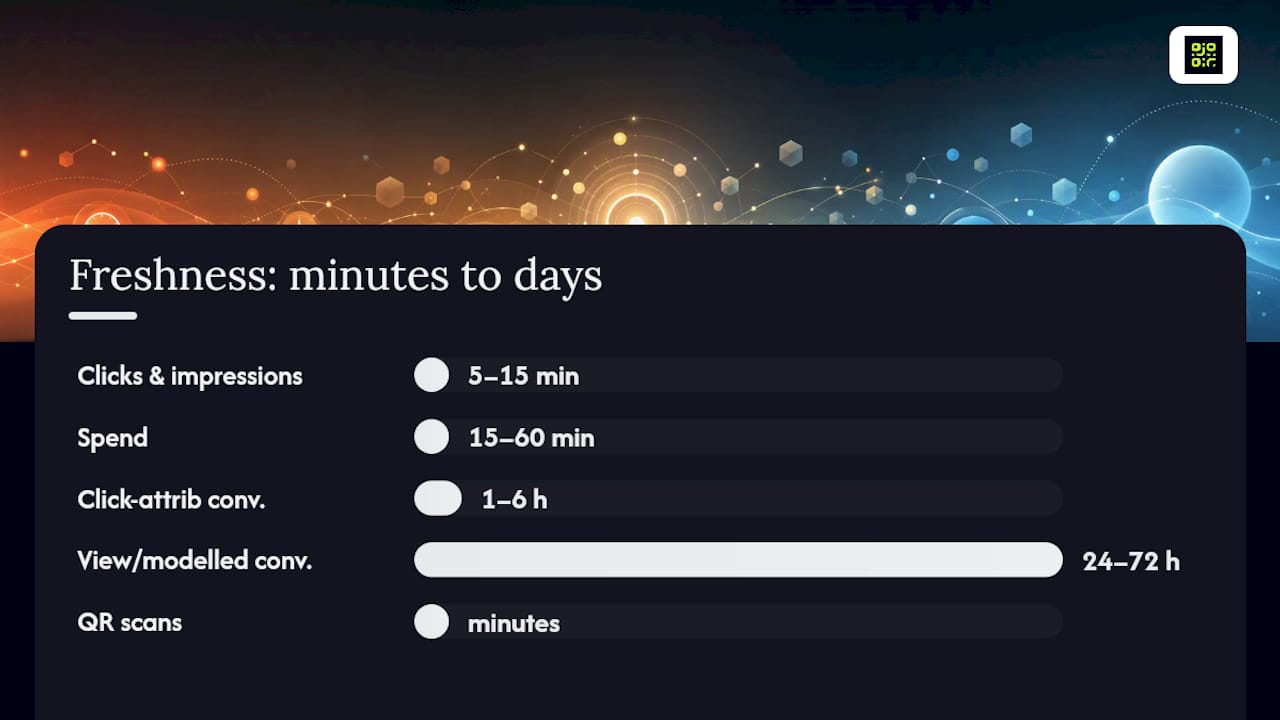
One important calibration: for marketing, “real time” usually means on-demand current data refreshed in minutes to a couple of hours, not millisecond streaming. Click and spend data in Google Ads and Meta Ads Manager typically refresh within minutes; conversion events can lag by hours due to attribution modelling. Plan your thresholds around this reality, not around the assumption that every metric is live to the second.
| Data type | Typical freshness | Treat as provisional for |
|---|---|---|
| Clicks and impressions | 5–15 minutes | Nothing — reliable quickly |
| Spend | 15–60 minutes | First 30 minutes of a new day |
| Conversions (click-attributed) | 1–6 hours | First 3 hours post-event |
| View-through / modelled conversions | 24–72 hours | Always — never act on these in real time |
| QR scan events | Near-real-time (minutes) | Nothing — event fires on scan |
Pro Tip: Set your alerting thresholds on click and spend data, not on conversion counts. Conversion numbers are the last to stabilise and the first to mislead you into a premature change.
Practical tactics you can apply channel by channel
Real-time analytics turns campaigns from static launches into steerable systems, enabling immediate interventions the moment performance deviates. Here is how that plays out per channel.
Paid social (Meta Ads Manager)
- Pause ad sets when frequency rises rapidly within a short timeframe, as creative fatigue can be detected before cost per acquisition increases.
- Rotate in a fresh creative variant when click-through rate drops significantly from the campaign baseline.
- Narrow the audience temporarily if spend is accelerating but conversion rate is falling.
Search (Google Ads)
- Adjust bid modifiers by device or location when one segment is spending disproportionately with lower conversion rates.
- Pause exact-match keywords that show high spend with no resulting conversions, indicating inefficiency.
- Use ad scheduling to reduce bids during hours that consistently underperform, rather than pausing the whole campaign.
- Shift send time for the remaining unsent segment if early opens show a lower rate than expected.
- Suppress contacts who opened but did not click from a follow-up sequence, and route them to a re-engagement path instead.
Programmatic (The Trade Desk and similar DSPs)
- Reallocate impression share away from placements with high viewability but low post-click engagement.
- Apply frequency caps mid-flight when reach is saturating faster than planned.
Onsite personalisation (Optimizely and similar)
- Trigger a different hero banner for visitors arriving from a specific UTM source.
- Swap a CTA copy variant automatically when an A/B test reaches statistical significance.
The team swaps in a pre-approved static image variant. The metric to watch immediately after the swap is CTR, not CPA, as conversion data will not be meaningful for another two to three hours.
They delay the remaining send by three hours. The signal was clear because the sample was large enough: over 2,000 recipients in the first batch.
When to act vs when to wait:
- Wait until spend has reached at least 50% of the daily budget before drawing conclusions about CPA.
- Never adjust a campaign that has been live for fewer than 72 hours if it is still in an algorithmic learning phase.
- Act immediately if spend is pacing to exhaust the daily budget before midday with no conversions.
- Wait for statistical significance (minimum 95% confidence) before declaring an A/B test winner in Optimizely or any testing tool.
- Act on frequency and reach anomalies quickly — these do not require conversion data to be actionable.
Budget reallocation based on same-day signals consistently outperforms allocations locked into weekly or quarterly cycles. A practical starting allocation is 70% to proven channels, 20% to scaling what is working, and 10% to tests — adjusted in real time as signals emerge.
How to set up governed real-time adjustment: a step-by-step checklist
Real-time marketing requires three operational layers: monitoring, decision, and execution, plus pre-approved creative and rapid approval workflows. Here is how to build that structure before your next campaign launches.
-
Define your KPIs and thresholds first. Before launch, agree on the two or three metrics that will trigger an action. Write them down as rules: “If CPA exceeds £X for more than Y hours, reduce bid by Z%.” Example: if CPA increases by 30% over a six-hour window, reduce max CPC bid by 15%.
-
Instrument every touchpoint. Tag all landing pages with your analytics platform. Set up server-side event tracking where possible to reduce browser-based data loss. Connect your ad platforms to a central dashboard — Google Looker Studio, Supermetrics, or a similar aggregation layer.
-
Build your dashboard before the campaign goes live. A dashboard you build during a crisis is a dashboard you cannot trust. Include spend pacing, CPA, CTR, and conversion rate as the four primary panels.
-
Set automated alerts. Use your ad platform’s built-in alerting (Google Ads automated rules, Meta Ads Manager automated rules) for the fastest response. Layer a secondary alert in your analytics platform for cross-channel anomalies.
-
Create a pre-approved creative library. Every swap you might need should be ready before launch: alternative headlines, backup images, a secondary landing page URL. Waiting for creative approval during a live incident is the most common cause of delayed response.
-
Run a pilot on a small budget first. Test your threshold rules on a campaign spending no more than 10–15% of your normal budget. Validate that your alerts fire correctly and that your execution path works end to end.
-
Assign clear roles. Use this micro-template:
- Monitor: junior analyst or automated alert system checks dashboards every two hours during business hours.
- Approve pauses: campaign manager approves any pause or budget shift above 20% of daily spend.
- Deploy creative: creative lead or pre-authorised team member swaps assets; no approval needed if the asset is in the pre-approved library.
- Escalate: anything affecting total campaign budget by more than 30% goes to the marketing director.
-
Document every change with a timestamp and rationale. A shared log (even a Google Sheet) lets you correlate changes with performance shifts and roll back if needed.
-
Protect learning phases. Review paid ad performance every 7–14 days to avoid disrupting algorithmic learning. Mark campaigns in learning phase as “observe only” in your dashboard so the team does not act on provisional signals.
-
Schedule a weekly review. Tactical adjustments happen in real time; strategic decisions happen weekly. Keep them separate so real-time actions do not drift into strategy changes without proper review.
Which tools does your tech stack need?
AI-driven automation and marketing tools are increasingly central to real-time campaign operations. The categories below cover what you need and what to look for in each.
Ad platforms (Google Ads, Meta Ads Manager, The Trade Desk)
- Look for: automated rules, bid strategy APIs, creative rotation settings, and real-time spend reporting.
- Key capability: the ability to push bid or budget changes via API without manual platform login.
Analytics and visualisation
- Look for: sub-hourly data refresh, custom alerting, and the ability to blend data from multiple ad platforms.
- Key capability: webhook or email alerts when a metric crosses a defined threshold.
Customer data platforms (Segment / Twilio Segment, Lotame)
- Look for: real-time audience segment updates, event streaming, and identity resolution across devices.
- Key capability: the ability to push an updated segment to an ad platform within minutes of a qualifying event.
Marketing automation and workflow (HubSpot Marketing Hub)
- Look for: trigger-based workflows, A/B testing with automated winner selection, and CRM integration.
- Key capability: automated A/B testing and dynamic creative optimisation so winning variants are promoted without manual intervention.
Experimentation platforms (Optimizely)
- Look for: server-side testing, statistical significance monitoring, and automated traffic reallocation.
- Key capability: the ability to stop a losing variant automatically when significance is reached.
Attribution and server-side event piping (Braze and similar)
- Look for: server-side event forwarding to reduce browser-based signal loss, multi-touch attribution models, and data residency options.
- Key capability: consent-aware event piping that respects GDPR and CCPA requirements.
Procurement tips:
- Confirm the SLA for data freshness in writing — “near real time” means different things to different vendors.
- Check API rate limits: a platform that throttles your calls at 100 per hour will bottleneck automated rules.
- Ask about maintenance windows — a platform that goes down for two hours every Sunday night is a problem if you run weekend campaigns.
- Verify data residency: for EU audiences, confirm data does not transit through non-adequate countries without appropriate safeguards.
What should you monitor, and how often?
| Metric | Why it matters | Action trigger |
|---|---|---|
| Spend pacing | Overspend or underspend signals delivery problems | Act if pacing is >15% off target by midday |
| CPA / CAC | Core efficiency metric | Act if CPA exceeds threshold for 6+ hours |
| CTR / hook rate | Creative health indicator | Investigate if CTR drops significantly from baseline |
| On-site engagement (scroll depth, time on page) | Landing page relevance signal | Swap page if bounce rate spikes >20 percentage points |
| Conversion rate | End-to-end funnel health | Act if CR drops >15% with stable traffic |
| Cart-add rate (e-commerce) | Mid-funnel signal, faster than purchase | Investigate if cart-add drops >20% |
| Scan-to-action rate (QR campaigns) | Offline→online conversion signal | Act if scan rate drops vs. prior period at same location |
Cadence by channel:
- Launch day (any channel): check every 30–60 minutes for the first four hours, then hourly.
- Live events or time-sensitive promotions: 15-minute monitoring windows with a dedicated analyst on call.
- Paid social: daily delivery and spend checks; creative health review twice weekly; weekly scaling decisions.
- Paid search (Google Ads): daily anomaly checks; full performance review every 7–14 days to protect Smart Bidding learning.
- Email: monitor open and click rates for the first two hours post-send; act on send-time or subject line within that window.
- Programmatic (The Trade Desk): daily pacing and frequency checks; placement-level review twice weekly.
Pro Tip: Protect algorithmic learning phases as a hard rule. Mark any campaign that has been live for fewer than seven days as “observe only” in your shared dashboard. Early signals in a learning phase are noisy by design — acting on them resets the algorithm and costs you more in the long run.
Common pitfalls and how to avoid them
Failure modes to watch for:
- Reacting to noise. A single hour of poor performance is rarely statistically meaningful. Set minimum data thresholds before any action is permitted.
- Misreading lagging conversions. View-through and modelled conversions can take 24–72 hours to appear. Acting on an incomplete conversion count leads to over-pausing campaigns that are actually working.
- Breaking learning phases. Changing bids, budgets, or targeting on a campaign that is still learning resets the algorithm. The cost is days of wasted spend while the model relearns.
- Privacy and data-protection errors. Passing PII through ad platform pixels without proper consent is a compliance risk. Server-side tagging and consent management platforms are not optional.
- Automation runaway. An automated rule that fires repeatedly without a human check can drain a budget or pause every ad in an account. Always set a maximum action frequency and a human review gate.
Mitigation checklist:
- Define minimum data thresholds before any rule can fire (e.g. minimum 500 impressions and 50 clicks).
- Require human approval for any action that affects more than 20% of total campaign budget.
- Build an automated kill-switch: if ROAS drops by more than 20% within a 24-hour window, all automated rules pause and a human review is triggered before any further changes.
- Log every automated action with a timestamp, the metric that triggered it, and the change made.
- Test rollback procedures before launch — know exactly how to revert a bid change or creative swap within five minutes.
Pro Tip: *Write your kill-switch rule before you write your optimisation rules.
How QR scan data feeds real-time campaign decisions
Offline signals are the most underused input in real-time optimisation. A QR code scan is a timestamped, geolocated event that fires the moment a physical audience engages with your material, making it one of the fastest offline-to-online signals available.
Here is a practical flow:
- Scan event fires when a user scans a QR code on a poster, product, or printed insert.
- Enrichment: the platform captures device type, time of scan, and geographic location, building a signal profile without collecting PII.
- Segment assignment: the scan event is matched to a campaign segment (e.g. “in-store visitor, afternoon, London postcode”) and passed to your CDP or analytics layer.
- Automated action: the dynamic URL redirects the user to a personalised landing page based on their segment; simultaneously, a remarketing tag fires so the user enters a follow-up ad sequence.
For this flow to work reliably, the QR code’s destination URL must be editable without reprinting. Permanent dynamic QR codes let you swap the destination in real time, so a campaign running across thousands of printed materials can be redirected to a new landing page within minutes. Location heatmaps built from scan data show which physical placements are generating engagement, informing decisions about where to concentrate OOH spend.
Privacy and compliance note:
- Collect only the data your consent framework covers. Scan events that capture device type and location must be disclosed in your privacy notice.
- Do not pass scan-derived PII (email, name) into ad platforms without explicit consent and a lawful basis.
- Log consent status alongside each scan event so you can demonstrate compliance if audited.
- Use server-side event forwarding to keep PII off client-side pixels.
Handling data latency and keeping your streams fresh
Data latency is the gap between when an event happens and when it appears in your reporting. For most marketing teams, the practical problem is not that data is slow — it is that different data types arrive at different speeds, and mixing them creates false readings.
Clicks and spend from Google Ads and Meta Ads Manager are typically available within 5–15 minutes. Conversion events, particularly those that rely on modelled or view-through attribution, can take 24–72 hours to finalise. If your dashboard blends these two data types without labelling their freshness, a campaign that looks like it is failing may simply be waiting for its conversions to appear.
Three practical steps to manage this:
-
Label every metric with its freshness SLA. In your dashboard, show the last-updated timestamp next to each panel. A conversion count that was last updated six hours ago should be visually distinct from a spend figure updated 10 minutes ago.
-
Use leading indicators for real-time decisions. CTR, hook rate, and spend pacing are fast-moving and reliable. Use them for in-flight decisions. Reserve conversion-based decisions for your daily or weekly review cadence, when the numbers have had time to stabilise.
-
Build a data-freshness alert. If your pipeline stops updating, you need to know before you act on stale data. A simple alert that fires when a data source has not refreshed within its expected window prevents decisions based on yesterday’s numbers presented as today’s.
Near-real-time reporting usually suffices for marketing decisions; the goal is not millisecond precision but reliable, labelled data that arrives fast enough to act on within a sensible window. Investing in streaming infrastructure beyond what your decision cadence actually requires adds cost and complexity without improving outcomes.
An honest perspective on real-time optimisation in practice
The most common mistake campaign managers make is treating real-time adjustment as a sign of attentiveness rather than a disciplined practice. Checking dashboards every 30 minutes and making small changes throughout the day feels productive. Often, it is the opposite.
The campaigns that perform best over a full flight tend to be the ones where the team made fewer, better-considered changes. The real-time capability is most valuable as a safety net — catching genuine anomalies like a broken tracking pixel, a budget that is pacing to exhaust by noon, or a creative that is generating complaints — not as a tool for continuous micro-management.
Three dos and don’ts that senior practitioners tend to agree on:
- Do codify your thresholds before launch. A rule written in advance is a decision made calmly; a rule made during a live campaign is a decision made under pressure.
- Do protect learning phases as a non-negotiable. The short-term discomfort of watching a campaign underperform for seven days is almost always cheaper than resetting the algorithm.
- Don’t let real-time data access become a substitute for a proper weekly review. The two operate at different time horizons and answer different questions.
Qrlytics brings offline scan signals into your live campaign loop
Most real-time optimisation stacks handle digital signals well. The gap is offline. When your campaign runs across print, OOH, or physical retail, you lose visibility the moment a customer walks past a poster — unless that poster carries a trackable QR code.
Qrlytics closes that gap. Every QR code you create stays permanently active, so a code printed on 50,000 leaflets will still redirect correctly in two years, regardless of your billing status. You can update the destination URL at any time, meaning a live campaign can be redirected to a new landing page in under a minute without touching the printed material.

For real-time decisions, Qrlytics surfaces scan analytics in near-real-time: scan volume, device type, time of day, and geographic location, visualised as a heatmap so you can see which physical placements are driving engagement. That data feeds directly into your campaign adjustment loop, the same way a click event feeds your paid social dashboard.
Start with a free QR code and connect your first offline signal to your campaign analytics today, no credit card required.
Sources
- Build business advantage with real-time decision-making | MIT Sloan Management Review
- Real-Time Analytics: How Instant Insights Help Teams Optimize Campaigns Faster — Adspirer Blog
- Campaign optimization — HubSpot Blog
- Real-Time Marketing in 2026: Strategy, Tools, and Implementation Guide | Performoo Blog
FAQ
What does real-time campaign adjustment mean?
Real-time campaign adjustment, also called in-flight optimisation, means changing a campaign’s bids, budget, creative, or audience while it is still running, based on live performance data rather than a post-campaign report.
What are some examples of real-time marketing actions?
Common examples include pausing an underperforming ad set in Meta Ads Manager when CPA spikes, shifting budget to a higher-converting Google Ads campaign mid-day, swapping a landing page URL via a dynamic QR code, and updating email send times based on early open-rate signals.
How often should you adjust a live campaign?
For paid search, review performance every 7–14 days to protect algorithmic learning phases. For paid social, check delivery and spend daily and creative health twice weekly. On launch days or during live events, monitor every 15–30 minutes.
What is real-time data in a marketing context?
For most marketing platforms, real-time data means on-demand current data refreshed within minutes to a couple of hours. Click and spend data typically updates within 5–15 minutes; conversion events can lag by 24–72 hours due to attribution modelling, and should be treated as provisional until they stabilise.
How do QR codes contribute to real-time campaign decisions?
A QR scan fires a timestamped, geolocated event the moment a user engages with physical material, giving campaign managers an offline signal that feeds into the same decision loop as digital clicks. Platforms like Qrlytics surface these scan-to-action events in near-real-time, with dynamic URL control so the destination can be updated without reprinting.