QR codes in table ordering: a practical guide for restaurants
TL;DR:
- QR code table ordering enables contactless, self-directed ordering that reduces wait times and errors in restaurants. Fully integrated systems boost efficiency, increase table turnover, and provide valuable analytics, but require proper setup and staff training for optimal results. Maintaining fallback options and following best practices in presentation and implementation maximize guest adoption and operational success.
QR code table ordering is defined as a contactless ordering method where diners scan a code at their table, browse a digital menu on their smartphone, and submit their order without waiting for a server. The role of QR codes in table ordering has moved well beyond novelty. Platforms such as GoTab, BillFeeds, and Square now offer fully integrated systems that connect the customer’s phone directly to your point-of-sale (POS) system, cutting wait times and reducing errors in one step. For restaurant owners weighing the investment, the operational case is strong and the technology is mature enough to deploy with confidence.
How do QR codes transform the customer ordering experience?
QR code ordering replaces the traditional server-led workflow with a self-directed one. A guest sits down, scans the code on the table, and a mobile-optimised menu loads instantly on their phone. They browse, customise their order with modifiers, and pay, all without flagging down a member of staff.

The contrast with traditional ordering is significant. Under a conventional model, a table waits an average of 8–12 minutes before placing an order. QR ordering cuts that to 2–3 minutes per table. That reduction compounds across a full service, saving 5–8 hours of labour daily in a 30-table restaurant.
Key improvements guests notice immediately include:
- No waiting for a server to take the order or bring the bill
- Fewer errors because guests select their own modifiers and dietary preferences directly
- Contactless payment built into the same flow, reducing friction at the end of the meal
- Menu accuracy because digital menus update in real time, so out-of-stock items disappear automatically
Digital modifiers and instant payment options through QR ordering improve accuracy and hygiene, contributing to measurably better guest satisfaction. Guests who control their own ordering pace tend to spend more time exploring the menu, which directly supports higher average order values.
What are the operational benefits of QR ordering systems for restaurant owners?
The measurable gains from QR code ordering systems are well documented. Restaurants using QR ordering see a 15–25% increase in table turnover and a 10–18% rise in average order value. Faster ordering means tables clear sooner, and upselling prompts built into digital menus encourage guests to add sides, drinks, and desserts they might otherwise skip.
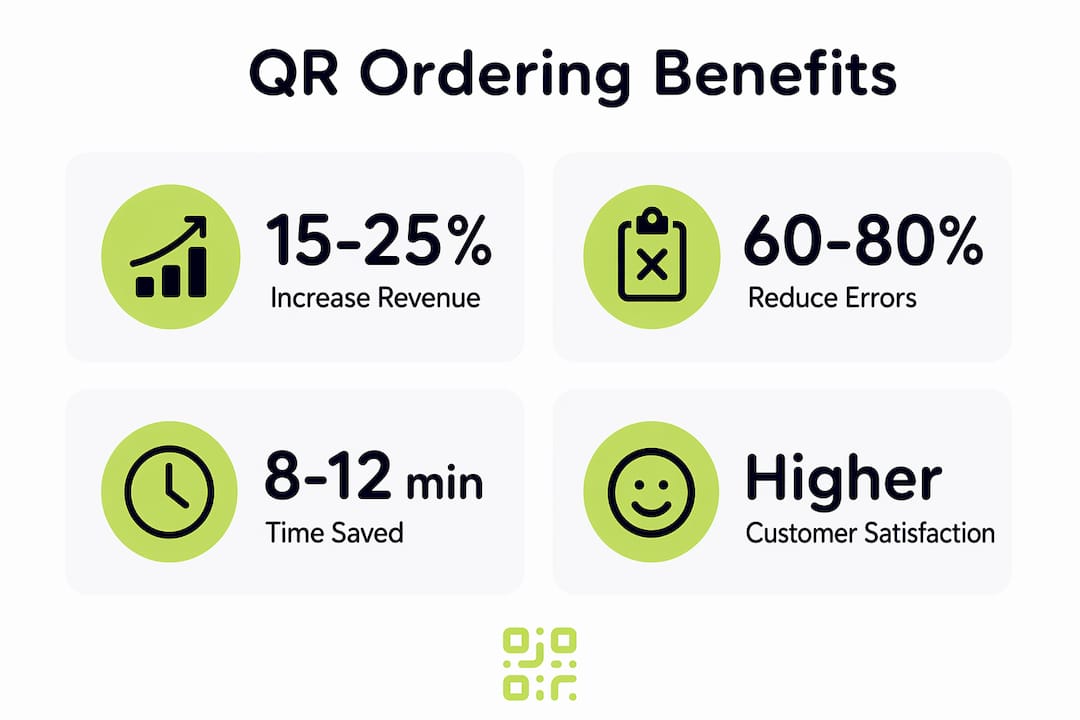
Order accuracy improves sharply too. Fully integrated QR systems reduce manual order errors by 60–80% and decrease wait staff reliance by 30–40%. Fewer errors mean fewer remakes, less food waste, and fewer unhappy guests.
| Metric | Traditional ordering | QR code ordering |
|---|---|---|
| Order-taking time per table | 8–12 minutes | 2–3 minutes |
| Order error rate | Baseline | 60–80% lower |
| Table turnover improvement | Baseline | 15–25% higher |
| Average order value change | Baseline | 10–18% higher |
| Staff dependency | High | 30–40% lower |
The staff benefit deserves particular attention. QR ordering transforms staff roles from transactional to hospitality-focused, freeing your team to check in on guests, handle special requests, and build rapport rather than shuttling orders back and forth. That shift often improves tipping rates and staff satisfaction simultaneously.
Pro Tip: Use the labour hours saved by QR ordering to redeploy one member of staff as a dedicated floor host. Their sole job is guest experience: refilling water, answering questions, and resolving issues before they become complaints.
What challenges and technical considerations affect QR code table ordering?
Implementing QR ordering well requires more than printing a code and sticking it on the table. Several technical and operational factors determine whether your system runs smoothly or creates new problems.
-
Table assignment accuracy. Static QR codes with fixed table IDs cause order misassignments when tables are rearranged. Dynamic session IDs per seating solve this by generating a unique identifier for each party, preventing orders from merging or routing to the wrong table.
-
Wi-Fi reliability. A guest who cannot load the menu will not order via QR. Your in-venue Wi-Fi must be fast, stable, and cover every corner of the dining room. A dedicated guest network separate from your operational systems is best practice.
-
Mobile optimisation. The menu must load quickly and display correctly on every screen size. A menu that requires pinching and zooming on a small phone will frustrate guests and reduce adoption.
-
Physical QR code presentation. Durable table tents or embedded signs vastly outperform damaged or poorly placed codes. A scratched, faded, or awkwardly angled code simply will not scan. Invest in quality materials and replace worn codes promptly.
-
Fallback ordering options. Not every guest is comfortable ordering via phone. Offering a traditional ordering channel alongside your QR system is not a concession to failure. High adoption rates of 60–80% depend on clear signage, staff support, and maintaining a non-digital option for guests who prefer it.
Pro Tip: Brief your front-of-house team to proactively introduce the QR ordering process to every table. A 15-second explanation from a friendly staff member increases first-time adoption far more than signage alone.
Static QR menus vs fully integrated QR ordering systems
Not all QR codes in restaurants do the same job. The distinction between a static QR menu and a fully integrated ordering system is the most important decision you will make when choosing your technology.
A static QR menu links to a PDF or a basic webpage showing your menu. Guests view it on their phones but still place orders verbally with a server. The benefit is simple: you eliminate printing costs and can update the menu without reprinting. The limitation is equally simple: nothing else changes operationally.
A fully integrated QR ordering system connects the guest’s phone directly to your POS. Orders flow automatically to the kitchen, payments process at the table, and every transaction generates data you can analyse. A basic static QR menu saves printing costs only; a fully integrated system provides real-time order processing, operational insights, and demand forecasting data.
| Feature | Static QR menu | Integrated QR ordering system |
|---|---|---|
| Menu viewing | Yes | Yes |
| Order submission | No | Yes |
| POS integration | No | Yes |
| Real-time stock updates | Limited | Yes |
| Payment processing | No | Yes |
| Analytics and reporting | No | Yes |
| Upselling prompts | No | Yes |
Distinguishing between static QR menus and fully integrated ordering systems is key for operational success. If your goal is efficiency, revenue growth, and data-driven decisions, the integrated route is the correct one. If you simply want to reduce printing costs, a static menu will suffice, but you will leave most of the value on the table.
For restaurants exploring QR code menus for hospitality, understanding this distinction before committing to a platform saves significant time and money.
What best practices maximise the effectiveness of QR code table ordering?
Getting QR ordering right from the start prevents the most common failure modes: low adoption, guest frustration, and operational confusion. These practices apply whether you are running a 10-table café or a 200-cover restaurant.
- Invest in physical presentation. Use laminated table tents, acrylic stands, or engraved inserts. The code must be clean, scannable, and at eye level when a guest is seated.
- Keep your digital menu current. Remove sold-out items the moment they run out. A guest who orders something unavailable loses trust in the system immediately.
- Train every staff member. Your team should be able to explain the ordering process in under 20 seconds and assist guests who struggle with it. Staff resistance is the single biggest barrier to adoption.
- Monitor your data weekly. Integrated systems generate order timing, popular item, and abandonment data. Review it regularly and adjust your menu layout and staffing accordingly.
- Maintain a fallback channel. Keep printed menus available and ensure servers can take verbal orders. This protects the experience for guests who are less comfortable with mobile technology.
- Encourage guest feedback. A short prompt at the end of the digital ordering flow asking for a rating takes seconds and gives you a continuous read on satisfaction.
Understanding how QR codes function across industries can also help you spot cross-sector ideas worth adapting for your own restaurant context.
Pro Tip: Place a second QR code on the receipt or at the exit linking to your Google Business Profile or TripAdvisor page. Guests who had a smooth ordering experience are far more likely to leave a review in the moment than hours later.
Key takeaways
QR code table ordering delivers its greatest value when restaurants deploy fully integrated systems rather than static menus, combining faster service with real-time data and measurable revenue gains.
| Point | Details |
|---|---|
| Integrated systems outperform static menus | Full POS integration unlocks order processing, analytics, and upselling that static menus cannot provide. |
| Labour savings are substantial | QR ordering saves 5–8 hours of labour daily in a 30-table restaurant by cutting order-taking time per table. |
| Table turnover and revenue both rise | Restaurants see a 15–25% increase in table turnover and a 10–18% rise in average order value. |
| Technical setup determines success | Dynamic session IDs, fast Wi-Fi, and quality physical codes prevent the most common operational failures. |
| Fallback options protect adoption rates | Maintaining a non-digital ordering channel keeps adoption high and protects the experience for all guests. |
The honest truth about QR ordering that most guides skip
Most articles about QR code ordering treat it as a straightforward efficiency upgrade. The reality is more nuanced, and I think it is worth being direct about that.
The technology works. The numbers on table turnover and order accuracy are real, and I have seen them play out in practice. What the statistics do not capture is how much implementation quality varies. A restaurant that prints a QR code on a paper slip and calls it done will see poor adoption and frustrated guests. A restaurant that invests in proper physical presentation, trains its team thoroughly, and monitors the data weekly will see genuine operational improvement within weeks.
The other thing worth saying plainly: QR ordering does not replace hospitality. It replaces the transactional parts of a server’s job. The best restaurants using this technology have redirected their staff energy toward the things technology cannot do, genuine human connection, reading a table’s mood, recommending a wine, handling a complaint with grace. That is where the real guest satisfaction gains come from.
If you are considering QR ordering, start with a pilot on a section of your floor rather than a full rollout. Measure adoption, gather staff feedback, and fix the friction points before scaling. The restaurants that get the most from this technology are the ones that treat it as an ongoing operational practice, not a one-time installation.
— The
Start building your restaurant’s QR ordering system with Qrlytics
If you are ready to put QR code ordering to work in your restaurant, Qrlytics gives you the tools to do it properly. You can create your first code in minutes using the free QR code generator, with no credit card required. For restaurants that need dynamic updates and full scan analytics, the dynamic QR code generator lets you update your menu URL at any time without reprinting a single table tent.

Qrlytics codes remain active permanently once created during an active subscription, so your printed materials never become dead links. Real-time scan tracking, GDPR-compliant analytics, and global heat maps give you the operational data to keep improving your guest experience long after launch.
FAQ
What is QR code table ordering?
QR code table ordering is a contactless ordering method where guests scan a code at their table, view a digital menu on their smartphone, and submit their order and payment without server involvement. Platforms such as GoTab and BillFeeds offer fully integrated versions that connect directly to a restaurant’s POS system.
How much can QR ordering reduce order errors?
Fully integrated QR ordering systems reduce manual order errors by 60–80% compared to traditional verbal ordering, because guests enter their own selections and modifiers directly.
Do all guests need to use QR ordering?
No. Maintaining a non-digital ordering option alongside QR systems is recommended practice. High adoption rates of 60–80% depend on offering a fallback channel for guests who prefer traditional ordering.
What is the difference between a static QR menu and an integrated ordering system?
A static QR menu displays your menu on a guest’s phone but requires a server to take the order. An integrated QR ordering system processes the order and payment directly, connects to your POS, and generates operational data for analysis.
How do I prevent orders going to the wrong table?
Use a system that generates dynamic session IDs per seating rather than static table codes. Dynamic session IDs prevent order misassignments when tables are rearranged or reused in quick succession.