QR generador: the marketer’s guide for 2026
TL;DR:
- A QR generator creates static or dynamic codes for marketing and sharing information. Proper selection of code type, format, and design ensures reliability and security in campaigns. Batch tools and privacy-focused options support large-scale, sensitive, or personalized code production.
A QR generador is an online or client-side tool that creates static or dynamic QR codes for marketing campaigns, customer engagement, and information sharing. The term “QR generador” is the Spanish-language label for what the industry calls a QR code generator or QR code maker. Both terms describe the same category of software, and understanding the distinction between static and dynamic codes is the single most important decision you will make before generating your first code. Modern tools in 2026 support over 130 QR and barcode formats, from standard URLs to payment codes and vCards, giving marketers far more flexibility than most realise. Privacy, code longevity, and print quality are the three pillars that separate professional-grade generators from basic free tools.

What types of QR codes can a QR generador produce?
Static QR codes encode data directly into pixels and function indefinitely without any online service. That permanence makes them the right choice for product labels, business cards, and any printed material you cannot easily reprint. Dynamic codes, by contrast, rely on server redirects and active subscriptions. If a subscription lapses, the redirect fails and your printed codes become useless.
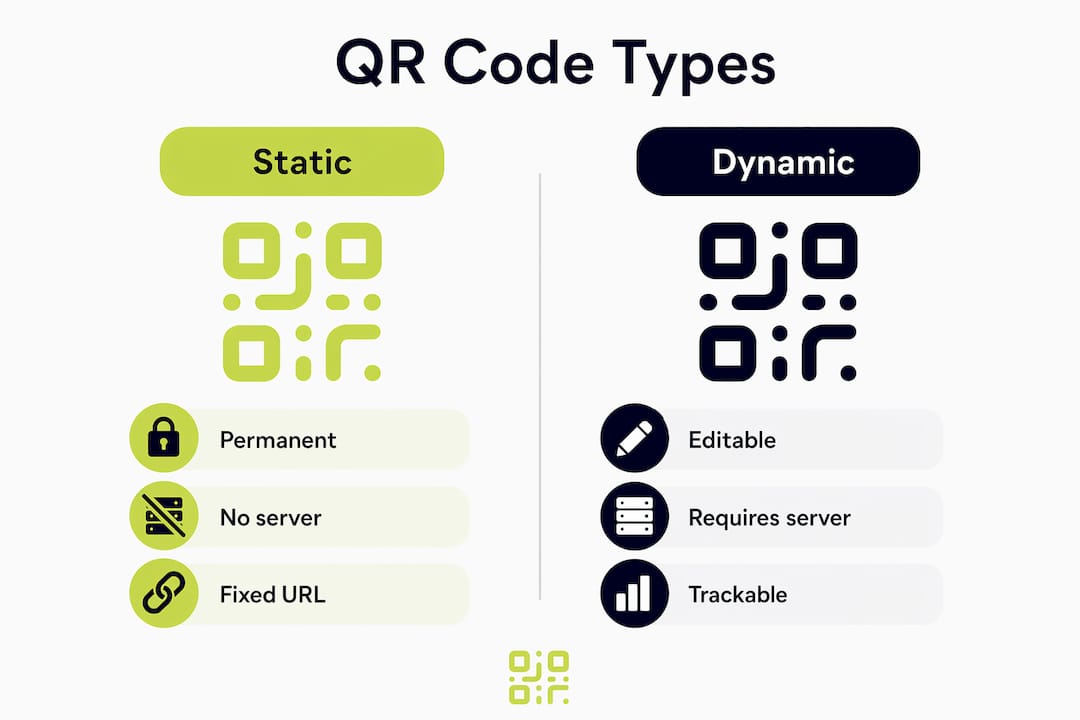
The practical implication is significant. A static code pointing to a fixed URL will scan correctly in five years without any maintenance. A dynamic code gives you the ability to change the destination URL after printing, which is valuable for campaigns where the landing page evolves, but it introduces a dependency on the platform staying active.
Beyond URL codes, modern QR code generators support specialised formats that many marketers overlook:
| Code type | Best use case | Key consideration |
|---|---|---|
| URL / landing page | Digital campaigns, print ads | Choose dynamic if the destination may change |
| vCard / contact | Business cards, networking events | Static is sufficient; no server needed |
| WiFi access | Hospitality, offices, events | Always generate client-side to protect credentials |
| Payment (PIX, Swiss QR-bill, UPI) | Retail, invoicing | Verify format compliance with your payment provider |
| Plain text / SMS | Simple instructions, alerts | Static; no redirect required |
Pro Tip: When embedding a logo inside a QR code, raise error correction to level H. This allows the logo to cover up to 30% of the code area without breaking scannability. Always test with a physical device before sending anything to print.
What do you need before generating your QR codes?
Preparation determines whether your codes perform well in the real world. The content you embed, the file format you download, and the design choices you make all affect scan reliability and print quality.
Start by gathering the content you want to encode:
- URLs: confirm the destination page is live and mobile-friendly before encoding it
- Contact details: prepare a complete vCard with name, phone, email, and organisation
- WiFi credentials: have the network name (SSID), password, and security type ready
- Plain text or SMS: draft and proofread the message before generation
- Payment data: confirm the correct format (PIX, UPI, or Swiss QR-bill) with your finance team
File format is a decision most marketers get wrong. SVG files scale infinitely without quality loss, making them the correct choice for banners, signage, and any large-format print. PNG files are fine for web pages, email headers, and social media where the display size is small and controlled.
Design considerations matter just as much as format. High contrast between the foreground dots and the background is the primary factor for scan success under variable lighting. Avoid placing dark dots on a dark background or using pastel combinations that look attractive on screen but fail under fluorescent lighting in a shop.
Pro Tip: Download both SVG and PNG versions of every code you generate. Use SVG for your print supplier and PNG for your digital assets. Keeping both on file saves time when a campaign scales unexpectedly.
How to generate QR codes step by step
Generating a single QR code takes under two minutes when you have your content ready. The process for batch campaigns is equally straightforward once you understand the CSV upload workflow.
Generating a single code
- Choose your code type. Select URL, vCard, WiFi, payment, or text depending on your campaign objective.
- Enter your content. Paste the URL or fill in the relevant fields. Double-check spelling, especially for contact details.
- Set the error correction level. Use level M for standard codes. Raise to level H if you plan to embed a logo.
- Customise the design. Adjust foreground colour, background colour, dot shape, and add a logo if required. Keep contrast high.
- Preview and test. Use your smartphone camera to scan the preview before downloading. Confirm the destination loads correctly.
- Download in the right format. Choose SVG for print and PNG for digital use.
Batch generation for campaigns
Batch creation supports up to 500 QR codes generated simultaneously from a single CSV file upload. Each row in the CSV becomes one code, and you can apply per-row style customisation to maintain branding consistency across a personalised campaign. This capability is particularly valuable for event management, where each attendee receives a unique code, and for retail, where each product SKU needs its own scannable label.
| Feature | Single code | Batch (CSV upload) |
|---|---|---|
| Volume | 1 per session | Up to 500 per upload |
| Personalisation | Manual entry | Per-row data from CSV |
| Time required | Under 2 minutes | Under 10 minutes for 500 codes |
| Best for | One-off campaigns | Events, retail, direct mail |
After generating batch codes, test a representative sample across multiple devices and operating systems. Android and iOS cameras handle QR scanning slightly differently, and catching a rendering issue before distribution saves considerable cost.
Why does privacy matter when using a QR code generator?
Most mainstream QR code generators process user data on their servers, often with tracking pixels and telemetry embedded in the service. For marketers handling proprietary campaign URLs, client contact data, or WiFi credentials, that data transmission is a genuine risk.
Client-side generators run entirely within the browser. No data leaves your device during the generation process. This is the correct approach for any code containing sensitive information, including WiFi passwords, internal URLs, and personal contact details.
Developers of privacy-focused QR tools note that most online generators include hidden tracking pixels and telemetry. Professionals who handle sensitive marketing data should use client-side generators to keep that data secure and ensure zero transmission to third-party servers.
The freemium model used by many platforms introduces a separate concern. Some platforms cap free accounts at three dynamic codes and add watermarks to PNG exports. Watermarked codes look unprofessional on printed materials and undermine brand credibility. Client-side tools typically offer unlimited static codes without watermarks or registration requirements, which is the better starting point for most campaigns.
Pro Tip: Before committing to any QR code platform, check its privacy and data security policy for explicit statements about server-side processing. If the policy is vague or absent, treat the tool as server-side and act accordingly.
How do you optimise QR code design for better scan rates?
Design choices directly affect how often your codes get scanned and whether they scan successfully. The following principles apply to both print and digital placements:
- Prioritise contrast. High contrast between foreground and background is the single most important factor for scan reliability. Dark dots on a white or light background perform best in variable lighting.
- Keep dot shapes simple. Rounded or square dots both work well. Highly decorative dot patterns reduce scan reliability, especially at small sizes.
- Size codes correctly. A minimum of 2.5 cm × 2.5 cm for print ensures most smartphone cameras can read the code from a comfortable distance.
- Add a clear call to action. A short label such as “Scan to book” or “Scan for the menu” increases scan rates by telling people what to expect.
- Use frames sparingly. A simple frame with a short instruction improves engagement. Overly decorative frames can confuse scanners.
- Test in context. Scan your code under the actual lighting conditions where it will appear, whether that is a dimly lit restaurant, a bright exhibition hall, or a glossy magazine page.
For dynamic codes, the ability to update the redirect URL without reprinting is one of the most practical advantages in campaign management. You can point a single printed code at a product launch page, then redirect it to a review page once the launch period ends, all without touching the physical material. Tracking scan volume, location, and device type through a platform like Qrlytics gives you the data to judge whether a placement is working and where to invest print budget next.
Key takeaways
A QR code generator produces reliable, scannable codes only when you match the code type, file format, and design settings to your specific campaign requirements.
| Point | Details |
|---|---|
| Static vs dynamic | Static codes last indefinitely; dynamic codes require active subscriptions and introduce failure risk. |
| File format | Download SVG for print and PNG for digital to preserve quality at every size. |
| Error correction | Set error correction to level H when embedding a logo to keep up to 30% of the code covered safely. |
| Privacy first | Use client-side generators for sensitive data; server-side tools often transmit and track your content. |
| Batch generation | CSV uploads let you produce up to 500 personalised codes in a single session for large campaigns. |
What I have learned from years of working with QR code tools
The most common mistake I see marketers make is treating QR code generation as an afterthought. They design a beautiful campaign, print 10,000 flyers, and only then scan the code to discover it points to a page that does not load on mobile. Testing before printing is not optional. It is the step that separates a professional campaign from an expensive mistake.
The privacy question is one that the industry has been slow to address honestly. Most free tools are not free in any meaningful sense. They collect your data, your campaign URLs, and your users’ scan behaviour. For a small business running a local promotion, that trade-off may be acceptable. For an agency managing a client’s proprietary product launch, it is not.
I have also found that the obsession with decorative QR codes often works against the people creating them. A code with a gradient background, custom dot shapes, and a large logo looks impressive in a design presentation. In a poorly lit venue or on a glossy surface, it simply does not scan. The marketing pro’s guide to QR codes puts it plainly: contrast and simplicity outperform aesthetics every time.
The trend I am watching closely is the growth of payment QR codes in European markets, particularly Swiss QR-bill and PIX adoption in cross-border retail. Marketers who understand these formats now will have a genuine advantage as contactless payment behaviour continues to expand.
— The
Qrlytics: professional QR code generation without the compromises
Qrlytics offers a free QR code generator that produces unlimited static codes with no watermarks and no registration required. For campaigns that need more, the platform’s dynamic QR code tools let you edit destination URLs, track scan analytics in real time, and monitor performance by location and device type.

Codes created during an active Qrlytics subscription remain functional permanently, regardless of billing status. That guarantee matters when your codes appear on printed materials with a long shelf life. GDPR-compliant tracking, batch generation support, and watermark-free SVG exports make Qrlytics a practical choice for marketers who need reliability alongside performance data. Start with the free generator and scale to dynamic tracking when your campaigns require it.
FAQ
What is the difference between a static and dynamic QR code?
Static QR codes encode data permanently into the code itself and work without any server. Dynamic codes use a redirect URL hosted on a platform, which means they can be edited after printing but will stop working if the hosting service lapses.
What file format should I download for printed QR codes?
Download SVG for any print application. SVG files scale to any size without losing quality, making them the correct format for banners, signage, and large-format materials. Use PNG for web and social media.
How do I embed a logo in a QR code without breaking it?
Set the error correction level to H before adding your logo. This setting allows the logo to cover up to 30% of the code area while preserving scannability. Always test with a physical device before printing.
Are free QR code generators safe to use for business campaigns?
Client-side free generators that run entirely in the browser are safe, as no data leaves your device. Server-side free tools often transmit your content to third-party servers and may include tracking. Check the platform’s privacy policy before use.
Can I generate multiple QR codes at once for a campaign?
Batch generation via CSV upload lets you produce up to 500 personalised QR codes in a single session. Each row in the CSV file becomes one unique code, with per-row customisation available for branding consistency.