Rules-based QR routing: how to send one code to many places
Use it whenever you need a printed code to behave differently for different people: regional campaigns, device-specific app-store links, or content that changes after launch day. QRlytics builds this logic into every dynamic code, with GDPR-compliant tracking baked in, and partner research shows campaigns using analytics properly see a 57% improvement in ROI.
Key Takeaways
Rules-based QR routing works because it separates the printed code from the destination, letting one code serve different content based on time, location, device, language, source, or scan count.
| Point | Details |
|---|---|
| Definition | A dynamic QR code resolves through a redirect engine that evaluates rules before sending the scan onward. |
| Rule types | Time, geo, device, language, campaign source, and scan count cover most real-world routing needs. |
| Attribution matters | Preserve UTM parameters through every redirect hop or campaign data becomes unreliable. |
| Compliance and reliability | Minimise IP retention, use HTTPS, and choose a provider with an SLA-backed redirect service. |
| Recommended platform | QRlytics offers rule-based routing, permanent code functionality, and GDPR-compliant analytics with no credit card required to start. |
Table of Contents
- What is rules based QR routing and how does it work?
- Which campaigns actually need dynamic QR routing?
- How do you set up QR code rules step by step?
- What are the most common QR routing rules?
- How do you measure routing rules and preserve attribution?
- Is geo-targeted QR routing GDPR compliant?
- What are the best practices for designing routing rules?
- How does QRlytics handle rules-based QR routing?
- A practitioner’s take on rolling out routing rules
- Get started with a rules-capable QR platform
- Useful sources and further reading
- FAQ
What is rules based QR routing and how does it work?
The mechanism is simpler than it sounds. A dynamic QR code doesn’t point directly at your landing page. It points at a short redirect URL, and when someone scans it, the provider’s engine checks a set of configured rules before deciding where to send them. This is what makes the same QR code redirect behave differently in Berlin than it does in Boston.
The request path follows a predictable sequence:
- The scan resolves the short URL hosted by your QR provider.
- The redirect engine evaluates rules in order: geography, device type, time window, campaign source, scan count.
- The first matching rule (or highest-priority match) determines the destination.
- The server issues a redirect response, either a 301 or a 302.
- Analytics logging captures the scan event before or alongside the redirect.
Rule evaluation typically happens at the provider’s edge server or reverse proxy, not on your own infrastructure, which keeps latency low. Analytics get captured server-side through logs or an API, and developers usually plug into this system through a dashboard, a webhook, or a REST API for programmatic rule updates. Picture it as five connected pieces: the printed code, the redirect engine that reads it, a rules store the engine consults, an analytics sink that records what happened, and the final destination page.
Pro Tip: Order your simplest, most frequently matched rules first. Keeping evaluation close to O(1) complexity avoids the small but real latency spikes that come from checking dozens of conditions on every single scan.
Which campaigns actually need dynamic QR routing?
Not every code needs this. But these are the campaigns that gain the most from routing logic instead of a single fixed link:
- Global packaging — a country-specific landing rule sends UK buyers to one page and US buyers to another, cutting print runs from a dozen regional codes down to one.
- Event badges — role-based rules route speakers to a session dashboard and attendees to the general schedule.
- Restaurant menus — language and device rules serve a mobile-optimised French menu to one guest and an English tablet view to another.
- App downloads — device rules send iPhone users to the App Store and Android users to Google Play automatically.
- Time-limited offers — a time/date rule swaps a daytime promotion for a different one after 6pm.
- A/B testing — split rules divide traffic between two landing page variants without printing two codes.
- Scan-count gating — first-time scanners see an introductory offer; repeat scanners land on an account or loyalty page.
Each use case trades one variable (print complexity, staff time, missed conversions) for a single rule that handles it automatically.
How do you set up QR code rules step by step?
Follow this checklist in order to avoid the failures that catch most teams out on launch day.
- Define objectives and KPIs. Decide what “success” looks like: conversion rate by region, app installs by platform, or repeat-scan engagement.
- List required metadata. Know which conditions you’ll route on (geo, device, time, source) before you touch the rule builder.
- Design rule priority. Write rules so they don’t overlap. If two rules could both match the same scan, decide which one wins.
- Create the dynamic short link. Generate it over HTTPS; a code pointing at an unsecured link will trigger browser warnings on many devices.
- Test across a device matrix. Check iOS, Android, and desktop behaviour separately, since browser handling of redirects varies.
- Simulate geography. Use a VPN to confirm country-based rules fire correctly before you print anything.
- Roll out in stages. Launch to one region or one print batch first, watch the logs, then expand.
- Set up monitoring and alerts. Know within minutes if a rule stops matching or a destination goes down.
- Prepare a rollback plan. Keep a fallback URL ready and know how to disable a misbehaving rule without pulling the whole code offline.
Before publishing, confirm UTM parameters survive the redirect, check whether you need a 301 or 302 status code (301 for permanent destinations, 302 for temporary campaigns you want re-indexed later), and test under slow network conditions to catch timeout issues.
Pro Tip: Build an automated smoke test that fires a simulated scan against every rule immediately after deployment. It catches priority conflicts before a real customer does.
What are the most common QR routing rules?
A handful of rule types cover the vast majority of real-world routing needs, and most platforms support the same core set:
- Time/date rules — route to a “we’re open” page during business hours and an after-hours contact form outside them.
- Geo rules — match country or city to send a UK scan to a pricing page in pounds and a US scan to one in dollars.
- Device rules — send iOS to the App Store, Android to Google Play, desktop scanners to a full website.
- Language/browser-locale rules — match the Accept-Language header to serve a translated page automatically.
- Campaign/source rules — route based on which printed material or UTM source triggered the scan, useful when the same code appears on a poster and a flyer.
- Scan-count rules — show an introductory offer on scan one, an account page from scan two onward.
- Fallback rules — a default destination for any scan that matches nothing else, which every rule set needs.
Common routing axes like these cover most practical marketing scenarios, but ordering matters enormously.
Rule ordering determines outcomes as much as the rules themselves. A first-match system will always fire the top rule even if a lower one is more specific, so audit your priority list every time you add a new condition. IP-based geo detection also has real limits: VPNs and corporate proxies can put a scan in the wrong country entirely.
How do you measure routing rules and preserve attribution?
Routing rules must preserve attribution, or your campaign data becomes unreliable the moment a redirect strips it out. Every scan should log: timestamp, geo location, device type, referring source or UTM parameters, which rule matched, the final destination, and any downstream conversion event.
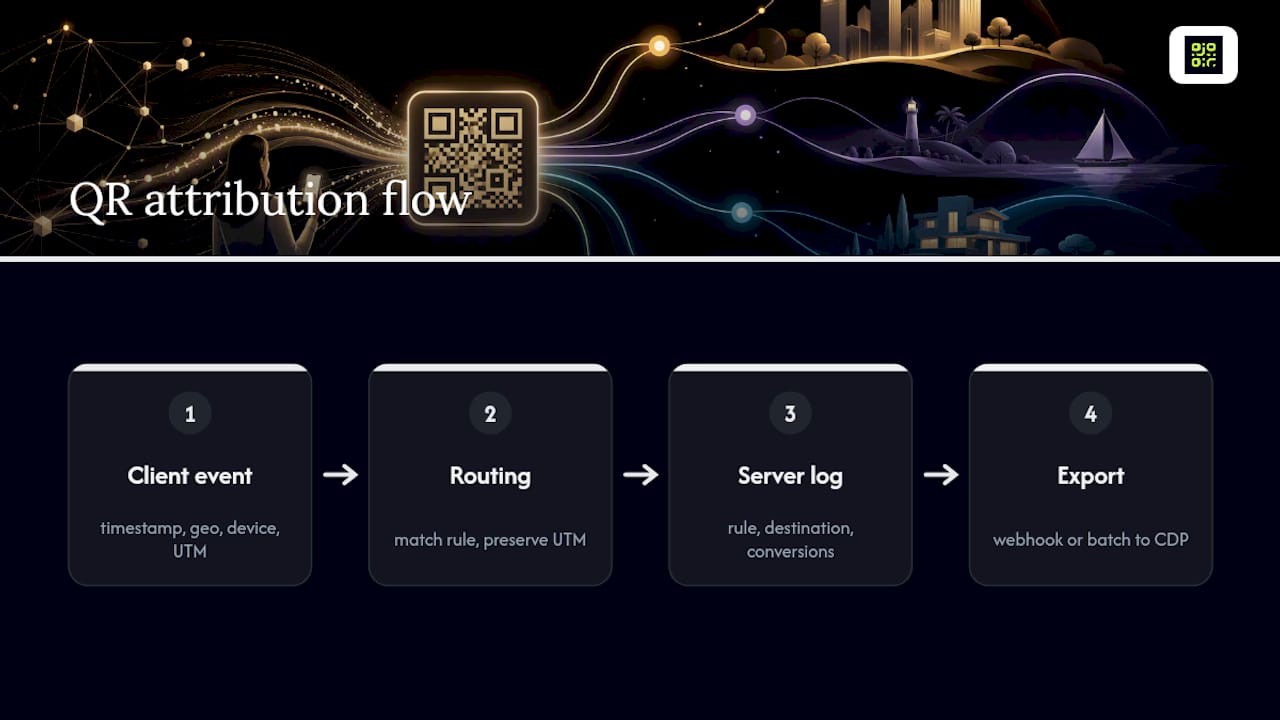
Technically, that means carrying UTM parameters through every redirect hop rather than dropping them at the first jump, favouring server-side logging alongside client-side events for accuracy, and exporting data into your analytics platform or CDP through a webhook or batch export rather than checking a dashboard manually.
This effort pays off. Partner research on marketing performance found analytics-informed campaigns see a 57% improvement in ROI compared with campaigns that skip structured measurement, a gap large enough to justify the extra setup time on its own. Tools built for QR code tracking make this integration straightforward rather than a custom engineering project.
Is geo-targeted QR routing GDPR compliant?
Treat geo and device-based routing as a personal data activity wherever local law requires a lawful basis for processing, GDPR being the clearest example for European visitors. That doesn’t mean routing is off the table. It means you need to handle the data responsibly.
- Minimise IP retention; you rarely need to store a full IP address once a country has been resolved.
- Offer an opt-out or transparent notice where local law requires it.
- Use GDPR-compliant analytics processing rather than a generic logging tool with no privacy controls.
- Document your data retention policy in plain terms.
- Serve every short link over HTTPS to avoid browser security warnings that kill scan-through rates.
On reliability, guard against link expiry, keep redirect chains to a single jump wherever possible, and use a provider with health checks and an SLA-backed redirection service. Caching and CDN layers can also mask a rule change for minutes at a time, so build that lag into your testing expectations.
A permanence guarantee, a documented privacy policy, and an API for audit logs turn a QR campaign from a one-off print job into infrastructure you can actually trust for the long haul.
QRlytics’ guidance on redirection stability covers testing patterns and SLA expectations in more depth if you’re planning a multi-region rollout.
What are the best practices for designing routing rules?
Apply these principles from day one and you’ll avoid most of the problems teams run into once a rule set grows past a handful of conditions.
Do:
- Keep rules simple and deterministic rather than deeply nested.
- Test rule precedence explicitly before every launch.
- Preserve UTM parameters through every hop.
- Serve everything over HTTPS.
- Set sensible cache headers so rule changes propagate quickly.
- Monitor redirect latency, not just uptime.
Don’t:
- Build overly complex nested logic that’s hard to audit.
- Rely solely on IP address for city-level precision; it’s often wrong.
- Let a short link expire without warning.
- Chain multiple redirects together when one will do.
Pro Tip: Centralise every rule definition in one dashboard with version history. Configuration drift, where two team members each tweak a rule without telling the other, is the single most common cause of routing bugs.
How does QRlytics handle rules-based QR routing?
QRlytics builds dynamic QR codes with rule-based redirect logic, real-time analytics, and a permanence guarantee that removes the operational risk most routing setups carry. Codes created during an active subscription remain functional indefinitely, which solves the industry-wide problem of links quietly dying after a billing lapse.
- Permanent code functionality for the life of your subscription, not just while you’re actively paying attention to it.
- Dynamic URL updates through both dashboard and API, so developers can automate rule changes.
- Global scan heat maps for visualising where and how a campaign performs.
- GDPR-compliant tracking built into the analytics layer.
- Lifecycle scheduling for time-based rule changes without manual intervention.
- CSV and API export for feeding scan data into your own reporting stack.
No credit card is required to start, and full developer documentation is available for teams that want to build routing logic directly into their own systems.
If you’re evaluating whether a managed platform fits your rollout, the dynamic QR code generator page is the fastest way to see the rule types in action.
A practitioner’s take on rolling out routing rules
Start with two or three core KPIs and one controlled experiment before you roll rules out across an entire campaign. Trying to route on five conditions at once, on launch day, is how teams end up debugging a printed poster in the field.
Two things consistently save time: staged rollouts with automated rule smoke tests catch conflicts before customers do, and prioritising UTM preservation and a solid fallback route protects your data even when a rule misfires. Split ownership clearly, too. Marketing should own the rule logic and business intent; developers should own the integration, monitoring, and rollback mechanics. Blurring that line is where most confusion starts.
Get started with a rules-capable QR platform
If you’d rather not build and maintain your own redirect engine, choosing a managed platform that guarantees permanence, offers API access, and already supports the rule types covered above gets you live far faster than a custom build. This fits small teams and agencies who need a fast rollout without engineering overhead, developers who want API-level control over rule logic, and enterprises who need SLA-backed reliability and audit logs for compliance.

It’s the fastest route for scenarios like global packaging with country-specific landing pages, live events where badges need role-based routing overnight, or multi-language sites that can’t afford to print a different code for every locale. QRlytics offers exactly this: dynamic codes with rules baked in, no credit card required to start. Head to the QRlytics QR code generator to see the permanence guarantee and analytics dashboard for yourself, or go straight to the dynamic QR code generator to build your first rule-based code today.
Useful sources and further reading
- Explaining QR redirected links for marketers — how redirected links behave post-launch.
- Geo-targeted QR marketing — geo-routing techniques explained.
- QR redirection stability guide — testing and SLA expectations.
- Branded landing page examples — design inspiration for routed destinations.
FAQ
What is rules-based QR routing?
It’s a dynamic QR code feature that redirects a scan to different destinations based on conditions such as time, location, device, language, campaign source, or scan count.
Should I use a 301 or 302 redirect for QR routing?
Use a 301 for permanent destinations that should pass SEO value, and a 302 for temporary campaigns or A/B tests you want re-indexed later.
Does rules-based routing affect campaign attribution?
Yes, unless UTM parameters are preserved through every redirect hop, in which case attribution stays accurate across all matched rules.
Is geo-based QR routing GDPR compliant?
It can be, provided you minimise IP retention, offer opt-outs where required, and use GDPR-compliant analytics processing rather than an unregulated logging tool.
Which platform supports rules-based QR routing with permanence guarantees?
QRlytics offers dynamic QR codes with rule-based redirects, real-time analytics, and a guarantee that codes stay functional indefinitely during an active subscription.