Stop Reprints: QR lifecycle management for marketers and operations
QR lifecycle management is the discipline of treating every printed QR code as a managed digital asset, from planning through retirement, rather than a one-off image you generate and forget. The single most important control is destination governance: use updateable links you control, on a domain you own, so a code printed today still works in three years. Get that right and you avoid the fate the FBI warns about, dead or hijacked codes, and the reprint costs that come with them. Certain QR code platforms build this control into the product itself.
TL;DR:
- Using updateable links on a domain you own is crucial to prevent dead or hijacked codes and avoid costly reprints over time.
- Deployments should include physical tamper resistance measures and visible fallback URLs to maintain security and user accessibility.
- Monitoring must track not only scan volume but also link resolution, domain expiry, and provider status to detect silent failures early.
- Maintaining a central registry with proper access controls and audit trails enables safe updates and prevents orphaned or outdated codes.
- Guaranteeing that codes remain functional after provider shutdowns or subscription expirations requires using platforms that support permanent destination updates and data exportability.
Table of Contents
- What are the stages of the QR code lifecycle?
- Planning and destination design: domains, time horizons and fallbacks
- Static or dynamic QR codes: what generation-time checks matter?
- Physical deployment: placement, tamper resistance and fallback text
- Monitoring and analytics: which metrics and health checks actually matter?
- How do you govern updates to QR destinations without breaking codes?
- Security and fraud controls: what do FBI and FTC guidance mean for QR governance?
- Retirement and graceful decommissioning of QR codes
- Publisher proof points: how a lifecycle platform reduces operational risk
- Three priorities if you’re starting from scratch
- How Qrlytics puts lifecycle governance into practice
- Sources
- FAQ
What are the stages of the QR code lifecycle?
Every QR deployment moves through six stages: planning, generation, deployment, monitoring, updating, and retirement. Treat them as a single continuous process rather than isolated tasks, because failures rarely happen inside a stage. They happen in the gaps between them.
- Planning: decide what the code is for, how long it needs to live, and who owns it
- Generation: choose static or dynamic, set up the redirect infrastructure
- Deployment: place the physical code and protect it from tampering
- Monitoring: track scans, catch broken links and expiring domains early
- Updating: change the destination without touching the printed asset
- Retirement: decommission the code gracefully instead of letting it die
The most common failure modes cut across all six: a lapsed domain, a QR provider that shuts down or changes pricing, or someone physically tampering with the code in the field. Good QR asset management means planning for all three before you print anything.
Planning and destination design: domains, time horizons and fallbacks
The first decision shapes everything else: is this code a short campaign asset or a long-term fixture, like a menu, product label, or piece of signage? A conference flyer with a four-week shelf life can tolerate a static code. A packaging label meant to last five years cannot.
- Classify the asset by expected lifespan and decide static versus dynamic accordingly
- Choose a domain you own or a reputable branded short domain, so the code stays portable if you ever switch providers
- Set naming conventions and metadata (campaign, owner, print date, expected retirement date) before generation, not after
- Define an expiry or review policy for every code, even ones intended to run indefinitely
- Print a typable fallback URL beneath every public-facing code, so a scan failure never strands the reader
Custom domains matter more than most teams assume. Industry analysis on QR code expiry and lifecycle management makes the point plainly: the QR pattern itself never expires, but the destination or resolver behind it can, and a domain you control is what lets you migrate providers without reprinting a single sticker.
Pro Tip: Write the expiry policy into your campaign brief at the same time as the creative brief. Teams that treat destination governance as a launch task, not an afterthought, retire codes cleanly instead of discovering three years later that nobody remembers what a code was for.
Static or dynamic QR codes: what generation-time checks matter?
A static code encodes the final destination URL directly into the pattern. Change the destination, and the code stops working, because the address is baked in. A dynamic code encodes a resolver link instead, a short URL that redirects to whatever destination you set, so you can update it any time without touching the printed image.
Dynamic codes cost you a dependency: your link now relies on a provider staying online and your subscription staying active. In exchange, you get editability and analytics you simply cannot get from a static code. Before you generate anything for production, run through a short technical checklist:
- Confirm the redirect sits on a custom domain, not a generic shared shortlink
- Decide whether the redirect is a 301 (permanent) or 302 (temporary), since this affects how browsers and crawlers cache it
- Check slug behaviour: is the short code memorable, or randomly generated and hard to audit?
- Set an error correction level high enough to survive smudges, creases, or partial damage
- Print a test batch and scan it under real lighting conditions before mass production
A dynamic QR code generator that handles the redirect logic for you removes most of this risk at the source.
Physical deployment: placement, tamper resistance and fallback text
Where you place a code, and what it’s printed on, determines how often it gets scanned and how easily it can be tampered with. A code at eye level in good lighting, with a clear line of sight and no glare, will always outperform one crammed into a corner of a poster.
- Use matte laminates or anti-tamper seals on codes placed in unsupervised public locations
- Avoid adhesive stickers that peel cleanly, since they’re trivially easy to swap for a malicious overlay
- Position codes where staff or cameras can notice if something looks wrong
- Print a visible fallback URL and a short “report a problem” line beneath any public-facing code
That last point matters more than it looks. The FTC has documented scammers physically covering legitimate codes with malicious stickers in parking meters and public signage, and a visible fallback gives a suspicious user a safe way to reach the same destination without scanning at all.
Monitoring and analytics: which metrics and health checks actually matter?
Scan volume alone tells you almost nothing. What matters is scan volume against location, device type, and time, cross-referenced with whether the redirect actually resolved. A code that gets scanned but fails to load is a silent failure, and most teams only find out from a customer complaint.
- Track scans, timestamps, geo approximations, device type, and any downstream conversion event
- Run automated link-resolution audits on a schedule, not just when something breaks
- Monitor TLS certificate and domain expiry dates alongside billing status and scan-limit thresholds
- Export scan data and archive it before any provider change, plan downgrade, or account cancellation
Billing lapses and provider shutdowns are among the most common causes of dynamic link failure, which is why scan-to-conversion tracking needs to sit alongside infrastructure monitoring, not separate from it. Real-time scan analytics and heatmaps only earn their keep if someone is actually watching for the gaps.
How do you govern updates to QR destinations without breaking codes?
Every organisation running more than a handful of codes needs a central registry: one place that maps each code to its physical asset, its owner, its campaign, and its expected lifespan. Without this, updates happen ad hoc, and nobody can say with confidence which codes are still live or who is allowed to touch them.
- Build a registry listing code, destination, owner, campaign, print date, and planned retirement date
- Define edit roles, so destination changes require a named approver, not just anyone with dashboard access
- Keep an audit trail of every destination change, including who made it and when
- Export scan history and archive it before any account migration, provider switch, or subscription change
This is where updating links without reprinting becomes a genuine operational advantage rather than a nice feature. A retail chain that printed 40,000 shelf-edge labels doesn’t need to reprint a single one when the promotion changes, provided the destination sits behind a registry with proper approval gates.
Pro Tip: Assign one named owner per code batch, not per campaign. Campaigns end; codes printed on physical assets often outlive them by years, and an orphaned code with no owner is the single most common cause of a stale destination nobody notices.
Security and fraud controls: what do FBI and FTC guidance mean for QR governance?
QR governance is a security function, not just a marketing task. The FBI points out that the risk sits in the destination a code launches, not the black-and-white pattern itself, which is exactly why destination review belongs in your change-approval workflow. Nation-state actors have used the same technique in spearphishing campaigns, underscoring why provenance checks matter even for internal codes.
- Verify provenance before publishing: who generated this code, and does the destination match the approved registry entry?
- Review destinations periodically, not just at launch, since a resolver link can be redirected after the fact
- Keep tamper-proof placement and visible fallback URLs on every public code
- Train staff and customers to inspect a code before scanning, and to report anything that looks stuck on or altered
If a scan leads somewhere unexpected, stop interacting immediately, change any passwords entered, and report the incident.
Retirement and graceful decommissioning of QR codes
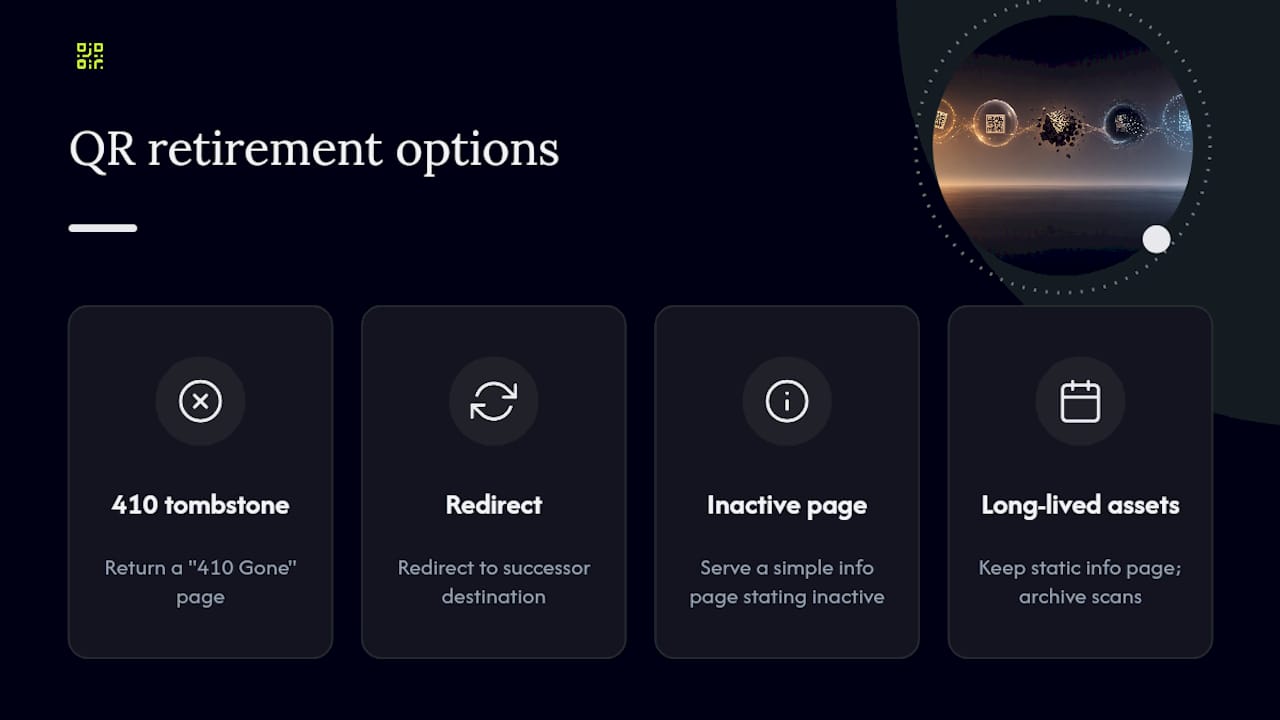
Retire a code the moment its campaign or asset reaches end of life, rather than letting the destination quietly go stale. Three approaches work well: return a clean “410 Gone” tombstone page, redirect to a successor destination (a new product page, a renewed offer), or serve a simple information page explaining the code is no longer active. For long-lived printed assets you cannot physically remove, keep the destination alive indefinitely with a static information page, and archive the scan history before closing the account.
Publisher proof points: how a lifecycle platform reduces operational risk
A platform built around lifecycle governance turns the checklist above into infrastructure rather than manual effort. Some QR code platforms offer real-time scan analytics, GDPR-compliant tracking, governance and inventory tracking across code batches, and lifecycle scheduling for updates and reviews. Its core guarantee, that codes generated during an active subscription keep working permanently, regardless of later billing status, directly addresses the provider-dependency risk this article has covered throughout.
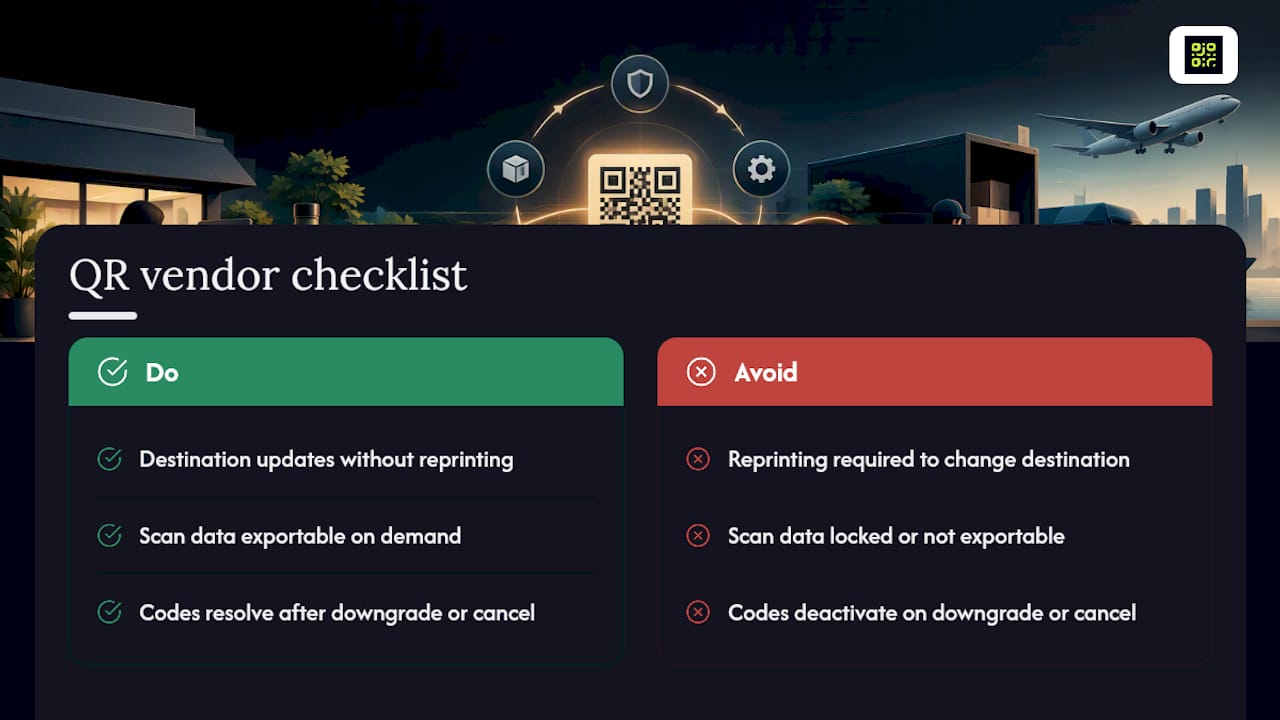
Whichever vendor you evaluate, check the same three things: does destination updating work without reprinting, is scan data exportable on demand, and does the code still resolve if you downgrade or cancel.
Three priorities if you’re starting from scratch
If your QR estate has grown without a plan, start with three things: lock down destination domains and ownership first, instrument monitoring before you scale volume, and schedule physical inspections for tamper resistance. Do audit your registry quarterly. Don’t let a single unowned code sit unreviewed for a year.
— The Read our guide on how to plan digital campaigns that drive organic growth to align your QR code lifecycle management with effective marketing strategies.
How Qrlytics puts lifecycle governance into practice
Qrlytics exists because too many businesses have watched a printed QR campaign die the moment a subscription lapsed or a provider quietly shut down. Some QR code platforms guarantee that codes generated during an active subscription keep working permanently, even after cancellation, which removes the risk of reprinting thousands of units because a destination link went dark.

Such platforms typically provide dynamic destination updates, real-time scan analytics with location heatmaps, GDPR-compliant tracking, and governance tools for managing large batches of codes across teams and campaigns. Onboarding needs no credit card, so you can test the dynamic QR code generator against your own use case before committing to anything. Compare the Free and Pro plans to see which fits your current volume, and start building your registry with a code you actually control.
Sources
- Unsolicited packages containing QR codes used to initiate fraud schemes · FBI
- See a QR code parked somewhere? Don’t scan it yet | FTC
FAQ
Is there free software for QR code inventory management?
Several platforms, including Qrlytics’s free tier, let you generate and track a limited number of codes at no cost, which works for small inventories or initial testing. For registries covering hundreds of codes across multiple owners and campaigns, a paid plan with governance features and unlimited codes becomes necessary; current Qrlytics pricing is listed on its pricing page.
What is the FBI warning about QR codes?
The FBI has warned that criminals use QR codes to direct victims to fraudulent websites, since the danger lies in the destination a code launches rather than the pattern itself. The agency has also documented nation-state actors using malicious QR codes in spearphishing campaigns targeting US organisations.
How long does a QR code generator last?
The QR pattern itself never expires; what fails is the destination or the resolver service behind a dynamic code. A static code lasts as long as its printed material survives, while a dynamic code depends entirely on the provider staying operational and the subscription remaining active, which is why permanence guarantees matter when choosing a platform.
What does QR stand for in cybersecurity?
QR stands for “Quick Response,” and in a security context the term describes the same technology used in retail and marketing, not a separate protocol. The FBI’s guidance treats QR codes as an attack vector for phishing, sometimes called “quishing,” because the code can point anywhere its creator chooses.
Should I use a custom domain for my QR codes?
Yes. A custom domain keeps your redirect infrastructure portable, so you can switch QR providers or renegotiate a contract without reprinting anything already in the field. Industry guidance on QR lifecycle best practices consistently identifies domain ownership as the strongest single lever for long-term reliability.