Marketers: Avoid Reprints, 5 Steps to Lasting Multi URL QR Codes
A multi-URL QR code sends every scanner to one landing page that lists several links, or redirects them automatically based on rules you set. The main benefit is consolidation: one printed code covers your website, socials, and booking page instead of five separate codes competing for space. The feature that actually matters is whether those links can be edited after printing and whether scans are tracked, because that is what separates a permanent marketing asset from a one-off gimmick.
TL;DR:
- Dynamic QR codes allow you to update links and track scan data, making them essential for volume print campaigns and long-term use.
- To maximize effectiveness, place codes at at least 2cm by 2cm for business cards and 4cm by 4cm for posters, with high contrast and error correction.
- Tracking should focus on button-level clicks and geographic heat maps rather than raw scan counts, to understand actual user engagement.
- Always verify destination URLs use HTTPS and clear branding to maintain user trust and reduce phishing risks.
- Use a dynamic service if campaign links change frequently or if you need proof of performance; free static tools are only suitable for one-off testing.
Table of Contents
- What is a multi-URL QR code and how does it work?
- How do you create a multi-URL QR code?
- Which features actually matter for a multi-URL QR code?
- What are the best practices for designing and printing a multi-URL QR code?
- What should you track with a multi-URL QR code?
- Are multi-URL QR codes safe and private to use?
- What does a multi-URL QR code cost, and when should you upgrade?
- Where do multi-URL QR codes actually get used?
- When I’d actually choose a multi-URL QR code
- How QRlytics keeps your multi-URL codes working
- Useful sources and further reading
- FAQ
What is a multi-URL QR code and how does it work?
A multi-URL QR code, sometimes called a multi-link or multi-destination QR code, points to one hub rather than a single web address. Scan it and you land on a short page listing your options, or you get redirected automatically to one URL chosen by rules like time of day or scan location.
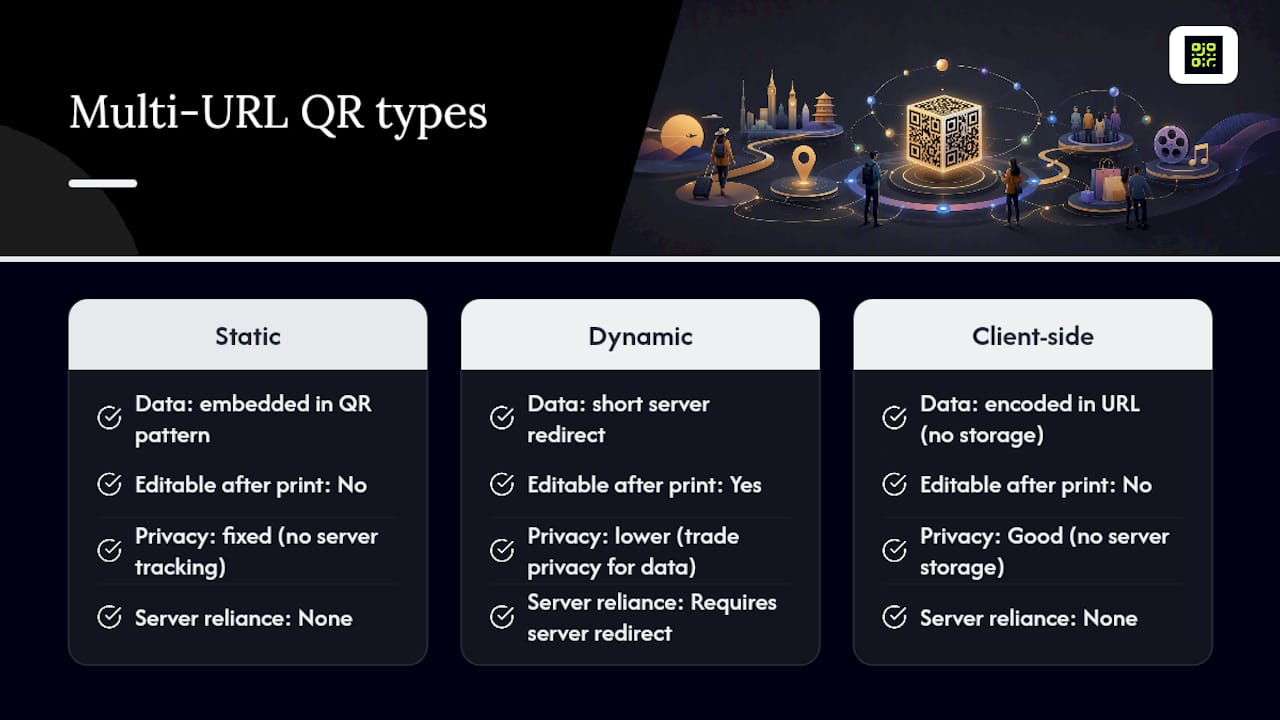
There are two ways this gets built. A static code embeds the landing page data directly in the QR pattern itself, which is why it never breaks, but also why nothing about it can ever change. A dynamic code instead points to a short server-side redirect, and the destination behind that redirect can be updated at any time. Some free browser-based tools encode link lists straight into the URL with no server storage at all, which is good for privacy but means the code is fixed the moment you print it, according to MultiLinkQR’s approach to client-side generation. Dynamic codes trade that fixed privacy surface for editability and scan data, which is the trade-off most businesses eventually need.
How do you create a multi-URL QR code?
Building one properly takes a bit more thought than typing a URL into a generator, but the workflow is straightforward once you know the decision points.
- Choose your platform and decide static or dynamic first. If you might ever need to swap a link, use a dynamic QR code generator rather than a free static tool, since static codes cannot be corrected once printed.
- Prepare your links before you build anything. Every URL should use HTTPS, each needs a short, clear label (“Book a table”, “Menu”, “Reviews”), and you should decide the order they appear in, because position affects which link gets clicked.
- Pick the landing behaviour. Decide whether scanners see a list of buttons or get auto-redirected to one destination, then apply your branding and set a higher error-correction level if the code will carry a logo.
- Test before you publish. Scan the code on at least one iPhone and one Android device in normal lighting, and check every link actually opens.
- Export and deploy. Download a print-resolution file, and if the campaign is time-limited, set an expiry or a scheduled link swap rather than leaving stale content live.
Free generators are fine for a one-off card at an event. Anything printed at volume, or intended to outlive a single campaign, needs the editability that only a dynamic system provides.
Which features actually matter for a multi-URL QR code?
Not every setting affects the outcome equally. A few choices genuinely change how the code performs in the field.
- Dynamic editing matters whenever the underlying links might change: a menu update, a new booking system, a seasonal offer. Without it, a wrong link means reprinting everything.
- Auto-open versus explicit buttons is a real trade-off. Auto-redirecting to one URL is faster for the scanner but hides your other options; a button list gives choice but adds a tap.
- Labels and link order shape conversion more than people expect. The top two links on a landing page get seen first, so lead with whatever action matters most to you.
- Branding and accessibility should never fight each other. A logo or colour scheme is fine as long as contrast stays high enough to scan reliably.
Pro Tip: If you’re unsure whether to auto-redirect or show a button list, start with buttons. You can always simplify to auto-open later once analytics tell you which link gets used most.
What are the best practices for designing and printing a multi-URL QR code?
Design mistakes are the most common reason a perfectly good QR code fails in the wild, usually because nobody tested it at the size it was actually printed.
- Keep the code at least 2cm by 2cm on business cards and roughly 4cm by 4cm on flyers or posters; small codes lose scannability fast under poor lighting.
- Use dark modules on a light background. Low contrast is the single biggest cause of failed scans, more so than the design itself.
- Raise the error-correction level when adding a logo, since a denser code with a logo overlay needs more built-in redundancy to stay readable.
- Test the final file on both iOS and Android cameras, in dim and bright light, before sending anything to print.
- Place the code somewhere with a clear line of sight and enough space around it, not tucked into a corner or behind glass.
Long-running campaigns benefit from a dynamic code specifically because you can fix a typo or update a stale offer without touching the printed materials again.
What should you track with a multi-URL QR code?
Raw scan counts tell you almost nothing on their own. What matters is which destination people actually chose once they landed.
- Total scans and unique devices, to separate repeat scanning from genuine reach.
- Time and date patterns, useful for spotting when a campaign actually gets used.
- Button-level clicks on the landing page itself, which show which destination drove the result rather than just that someone scanned.
- Geographic heat maps, which reveal whether a poster in one location is outperforming another.
Button-level click data is often more useful than the scan count alone, because it shows which destination actually moved someone through your funnel, not just that they arrived, according to QRlytics’s analytics documentation. Dynamic links also let you run time-based routing, sending morning scanners to a breakfast menu and evening scanners to dinner, or A/B testing two landing layouts against the same printed code. None of this works if the code itself might stop functioning halfway through the campaign, which is why a documented permanence guarantee matters more than it sounds for anyone measuring results over months rather than days. For deeper metric breakdowns, QRlytics’s guide to QR tracking covers how to read scan data against campaign goals.
Are multi-URL QR codes safe and private to use?
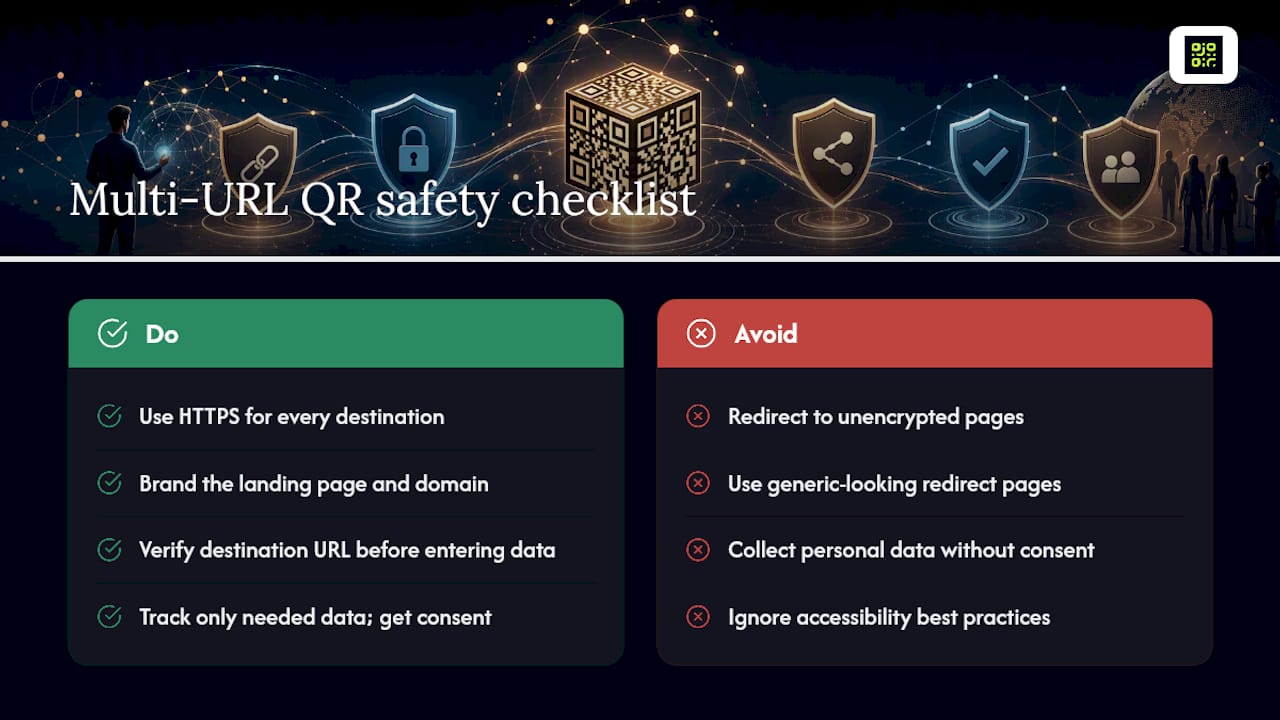
Every destination link should run on HTTPS; a code that redirects to an unencrypted page will trigger browser warnings and can look untrustworthy to scanners. Design the landing page itself with clear branding and a recognisable domain, since a generic-looking redirect page is exactly what phishing attempts imitate. The FBI has warned that criminals sometimes place fraudulent QR codes over legitimate ones or embed malicious links in codes to steal personal information, so scanners should always check the destination URL before entering any data. On the collection side, track only what you need for the campaign, be transparent about it, and if you operate in markets covered by GDPR, make sure consent basics are handled before any personal data touches your analytics. Accessibility matters too: keep landing-page text readable, links large enough to tap, and contrast high enough for low-vision users.
What does a multi-URL QR code cost, and when should you upgrade?
Free browser-based generators work for a single test code, but almost all of them share the same limits: no editing after creation, and no analytics beyond, at best, a raw scan count. Paid dynamic services add editable redirects, real click and scan analytics, permanence that survives billing changes, and often API access for teams generating codes at scale. The decision rule is simple: if the code goes on anything printed in volume, or you need to prove a campaign worked, upgrade before you print, not after.
Where do multi-URL QR codes actually get used?
Real campaigns tend to fall into a handful of patterns.
- A freelancer’s business card carries one code linking to a portfolio, LinkedIn, and email, replacing five separate icons with one scan.
- A restaurant bundles its menu, table booking page, and review links behind a single table-top code.
- An event organiser groups the schedule, slide deck, and feedback form into one code handed out at check-in.
- A creator combines their online store, social profiles, and mailing list signup into one code used across merchandise and print.
When I’d actually choose a multi-URL QR code
A multi-URL code earns its place the moment you have more than two destinations worth sharing and no natural single URL to send people to. The trade-off worth testing first isn’t design, it’s behaviour: auto-redirect feels slicker, but a button list gives you the click data that tells you what people actually wanted. Start with one test code, watch which link wins for a week, then decide whether to simplify.
— The
How QRlytics keeps your multi-URL codes working
Qrlytics is the practical fix for the biggest risk in this whole workflow: a printed QR code that quietly stops working because a subscription lapsed or a link went stale. Codes created on an active plan stay functional permanently, so a poster, menu, or business card never becomes obsolete overnight.

The platform gives you dynamic QR code generation with editable destinations, real-time scan and click analytics, geographic heat maps, and GDPR-compliant tracking, all without needing a credit card to start. That covers the two things this guide keeps circling back to: editability after printing, and measurement that actually tells you which link performed. If you want to see how it handles a live multi-link setup before committing to anything paid, try the free QR code generator first, then move to a dynamic plan once you know which features your campaign actually needs.
Useful sources and further reading
For hands-on detail beyond this guide, see QRlytics’s practical tracking guide, the advanced analytics overview, and how to update a QR code without reprinting.
FAQ
Can I make a QR code for multiple links?
Yes. A multi-URL QR code either shows a landing page listing several links or redirects automatically based on rules like time or location, and free and dynamic generators both support this.
What is the FBI warning about QR codes?
The FBI has warned that criminals sometimes cover legitimate QR codes with fraudulent ones or embed malicious links designed to steal personal or financial information, so scanners should verify the destination before entering data.
Is there a free tool that can create multi-link QR codes?
Yes, several free tools exist, including QRlytics’s free generator, though most free static codes cannot be edited once printed and offer little to no analytics.
How do I make one link work for multiple destinations?
Use a dynamic QR code service that redirects through a server-side link, which lets you point one code to a landing page of choices or swap the destination later without changing the printed code.
Do multi-URL QR codes support tracking and analytics?
Dynamic multi-URL codes typically track total scans, unique devices, button-level clicks, and geographic heat maps, giving far more insight than a static code’s fixed, untracked link.