Lead generation with QR codes: 2026 guide
TL;DR:
- Using dynamic QR codes enhances lead tracking, allowing real-time updates and analytics integration. Effective placement and clear value exchange are critical for maximizing scan rates and conversions. Reliable infrastructure and focused landing pages are essential to turn scans into measurable, quality leads.
Capturing quality leads without creating friction is one of the harder problems in modern marketing. You need people to act immediately, share their details willingly, and do it all from a channel you can actually measure. Lead generation with QR codes addresses all three requirements at once, turning a simple camera scan into a tracked, data-rich interaction that feeds directly into your sales pipeline. This guide walks you through everything from choosing the right code type and building your campaign workflow to integrating analytics and fixing the things that quietly kill conversions.
Table of Contents
- Key takeaways
- Understanding QR code types for lead generation
- How to create and deploy QR codes step by step
- Integrating QR codes with CRM and analytics
- Troubleshooting and optimising your campaigns
- QR code lead generation strategies by industry
- My perspective on what actually works
- How Qrlytics supports your lead generation campaigns
- FAQ
Key takeaways
| Point | Details |
|---|---|
| Dynamic codes are non-negotiable | Choose dynamic QR codes so you can update URLs, run A/B tests, and track scans after printing. |
| Value exchange drives scans | Users scan when the benefit is clear and immediate; vague CTAs produce low engagement. |
| Analytics must connect to conversions | Scan counts alone are misleading. Link scan data to landing page behaviour and CRM records. |
| Pilot before you scale | Test your full scan-to-CRM workflow on a small audience before committing to a large print run. |
| Placement determines performance | A well-designed QR code placed in the wrong location will consistently underperform a simpler code in a high-attention spot. |
Understanding QR code types for lead generation
Before you create a single code, you need to understand what kind of code you are actually building. The distinction between static and dynamic QR codes is not a minor technical detail. It shapes everything from how you measure performance to whether your printed materials retain any value six months after launch.
Static vs dynamic: what actually matters
A static QR code encodes the destination URL directly into the pattern. Once printed, it cannot be changed. If the landing page moves, the link breaks and every physical material carrying that code becomes useless. A dynamic QR code, by contrast, points to a redirect URL managed on a server. You control the destination at any time, update it without reprinting, and collect scan data in the process. Dynamic codes accounted for roughly 65% of the market in 2025 precisely because they give marketers flexibility that static codes simply cannot match.
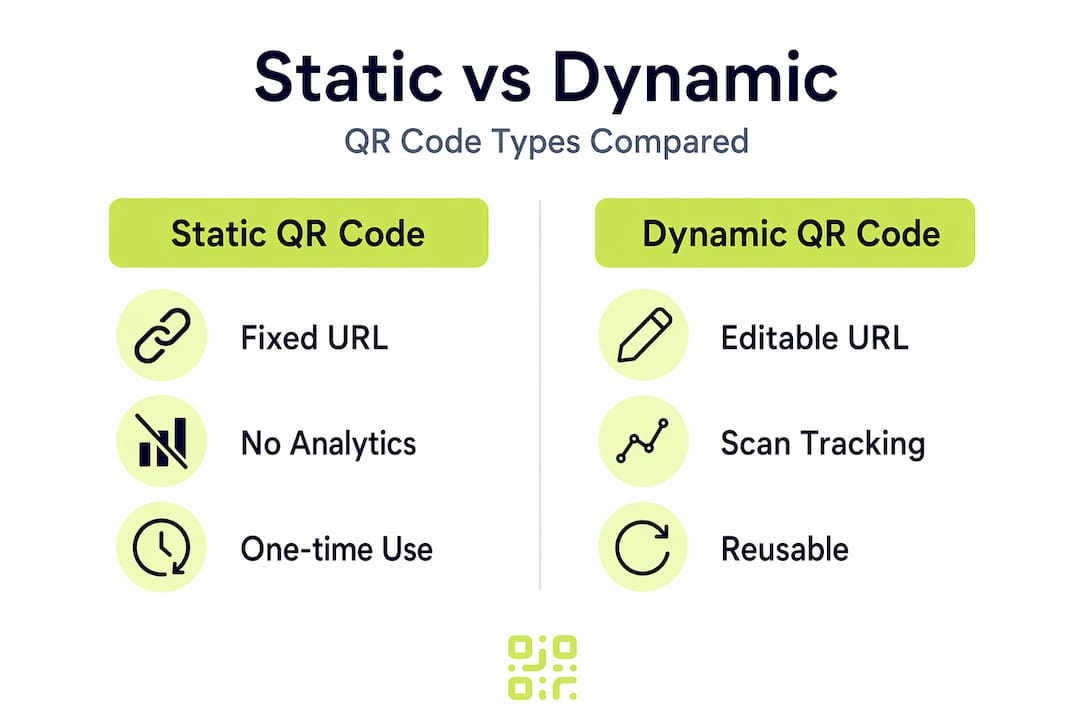
| Feature | Static QR code | Dynamic QR code |
|---|---|---|
| URL editable after print | No | Yes |
| Scan tracking | No | Yes |
| A/B testing capable | No | Yes |
| Best for | Permanent, fixed links | Marketing campaigns |
Technical prerequisites before you launch
Three things need to be in place before your first code goes live:
- Mobile-optimised landing page. Most scans happen on a smartphone. A landing page that loads slowly or breaks on mobile will lose leads before they see your form.
- CRM integration. Your form submission should write directly to your CRM, not to a spreadsheet someone checks fortnightly.
- UTM parameters. Append source, medium, and campaign tags to your redirect URL so that scan traffic appears correctly segmented in your analytics platform.
Pro Tip: Set up a dedicated landing page for each QR campaign rather than sending traffic to your homepage. A focused page with a single CTA converts significantly better and gives you cleaner attribution data.
How to create and deploy QR codes step by step
With the foundations in place, the actual build process is straightforward. The steps below cover the full workflow from concept to live deployment.
-
Define the value proposition. Decide what you are offering in exchange for a scan and a contact detail. A discount code, a gated guide, a free consultation, or access to exclusive content all work well. Campaigns using promo codes and exclusive offers consistently achieve higher interaction rates than generic “learn more” prompts.
-
Build the landing page first. Create and test the destination before you generate the code. Include a short form collecting only the fields your CRM actually needs, usually name, email, and one qualifying question.
-
Generate the QR code with tracking enabled. Use a platform that supports dynamic codes and scan analytics. Add your brand colours and logo to increase scan rates. A branded code signals legitimacy and outperforms a generic black-and-white square in most contexts.
-
Add UTM parameters to the redirect URL. Tag the destination link with campaign-specific parameters so you can separate QR traffic from other sources in Google Analytics or your chosen platform.
-
Choose your placement channels. Consider every surface where your audience has a natural moment of attention. Common high-performing placements include:
- Trade show banners and booth displays
- Product packaging and inserts
- Direct mail and printed brochures
- Event name badges and conference materials
- Digital touchpoints such as email signatures and slide decks
-
Test before printing. Scan the code on multiple devices and in varying lighting conditions. Confirm the redirect fires correctly, the landing page loads under three seconds, and the form submission routes to the right CRM pipeline.
Pro Tip: Print a small test batch of any physical material before committing to a full print run. Checking colour contrast, code size, and scan reliability on the actual substrate saves significant cost and avoids the pain of reprinting at scale.
Integrating QR codes with CRM and analytics
Generating scans is only half the job. The other half is making sure that data flows cleanly into the systems where your team actually works and that you can measure what is happening accurately.

Lead capture with QR codes at trade shows works best when attendees fill in a form on their own device, feeding data directly into the CRM without manual entry. The same principle applies across every channel. Manual data transfer is slow, error-prone, and introduces gaps that distort your pipeline reporting.
Here is how to set up a clean integration:
- Keep forms minimal. Every additional field reduces completion rates. Collect what you need to qualify and nurture, nothing more.
- Use webhook or native integrations. Most form tools connect directly to popular CRMs via webhooks or built-in integrations. Avoid CSV exports as an intermediary step.
- Segment by campaign source. Use the UTM parameters from step four to tag incoming leads by code, location, and campaign. This tells you which placements are actually converting rather than just generating scans.
- Connect scan analytics to on-site behaviour. Link your QR platform’s scan data to your web analytics so you can see the full journey from scan to form submission to conversion.
93% of marketers report that QR codes remove friction from lead capture, particularly when digital business cards sync contact data directly to the CRM without any manual input. The speed advantage is real and measurable.
Pro Tip: Use scan analytics tracking to review time-of-day and geographic scan data. Peaks in scan activity often reveal audience behaviours you would not otherwise notice, and that intelligence shapes both copy and placement decisions.
Troubleshooting and optimising your campaigns
Most QR lead generation campaigns underperform for predictable, fixable reasons. Understanding these issues before launch saves you from discovering them after a costly print run.
Poor QR code analytics often mislead marketers by counting camera reads rather than meaningful engagement. Valid analytics should connect scans to actual conversions or landing page behaviour, not just raw scan volume.
The most common issues and their fixes:
- Low scan rates in physical placements. Check whether the code is placed at eye level, in a well-lit area, and printed at a minimum size of 2.5 cm square. Codes on floor stickers or in dark corners rarely perform.
- High scan rates but low form completions. The landing page is the problem. Audit load speed, form length, and the clarity of your value proposition. Reducing a five-field form to three fields routinely increases completions by 20 to 30 percent.
- Scans not appearing in CRM. Trace the full integration chain. Test a form submission manually and confirm the webhook fires. Check whether UTM parameters are being stripped at any redirect step.
- Inflated scan counts with no matching web sessions. This is the misleading metrics problem. Some tools count every camera activation, including accidental frames. Structured pilots with well-defined CRM integration points help you identify these data gaps before they distort campaign decisions at scale.
Running a pilot with a small, well-instrumented audience before a full rollout is the single most effective way to catch integration failures and landing page issues. A pilot of 50 to 100 scans tells you almost everything you need to know about whether the full campaign will perform.
QR code lead generation strategies by industry
The mechanics are consistent across sectors, but the most effective applications vary significantly depending on the context. The table below shows how different industries are using QR codes to capture leads right now.
| Industry | Use case | Lead capture mechanism |
|---|---|---|
| Events and trade shows | Booth displays and name badges | On-device form fed to CRM, reducing reliance on staff availability |
| Consumer packaged goods | Product packaging | Gated content on packaging converts anonymous buyers into registered leads |
| Professional services | Digital business cards | Contact syncs directly to CRM via QR scan |
| Retail | In-store point of sale | Instant coupon unlock in exchange for email capture |
| B2B networking | Conference and event networking | QR-based contact exchange replaces manual card swapping |
The trade show application deserves particular attention. On-device forms that do not redirect to heavy websites increase completion rates considerably during live events because attendees are moving quickly and will abandon a slow-loading page without hesitation. Lightweight, mobile-first forms are not optional in that environment.
For retail and packaging, 92% of CPG brands used QR codes on packaging by 2025, with the leading brands using them not just for product information but as a structured lead capture mechanism. A code that unlocks a warranty registration, a tutorial series, or a loyalty programme converts a completed purchase into the start of an ongoing customer relationship.
Pro Tip: For trade show and exhibition environments, place your QR code in at least two locations on your stand. A code at eye level on the main display and a second on the handout or name badge gives attendees multiple natural moments to scan without feeling pressured.
My perspective on what actually works
I have seen plenty of QR code campaigns built around genuinely clever ideas that fell apart because the underlying infrastructure was unreliable. The code redirected to a broken page. The analytics counted scans but had no connection to actual conversions. The CRM fields never matched the form fields. In every case, the technology was not the problem. The planning was.
What I have learnt is that the technical elegance of a QR code matters far less than the reliability and completeness of what sits behind it. A plain, well-tested code pointing to a fast landing page with a working CRM integration will outperform a beautifully branded code attached to a fragile system every single time.
The misleading metrics issue is the one I find most damaging. Marketers see scan numbers and assume the campaign is working. The honest metric is form completions attributed to a specific code, in a specific location, tied to a specific campaign. Everything else is noise until you validate it against real conversions.
My practical advice: treat QR codes as a channel that connects your offline presence to your digital pipeline, not as a standalone tactic. The scan is just the opening moment. What happens in the next thirty seconds on that landing page determines whether you get a lead or lose someone who was genuinely interested.
— The
How Qrlytics supports your lead generation campaigns
If you are ready to move beyond basic code generators and build QR campaigns that genuinely produce measurable leads, Qrlytics is built for exactly that purpose.

Qrlytics provides dynamic, editable QR codes with real-time scan analytics, GDPR-compliant tracking, and global heat maps that show you where your scans are coming from geographically. You can update redirect URLs at any time without reprinting, run A/B tests across different placements, and connect scan data to your broader campaign ROI tracking. Codes created during an active subscription remain functional permanently, removing the risk of printed materials becoming obsolete when a billing cycle lapses. You can create your first QR code instantly with no credit card required, or explore the full dynamic capabilities with the editable QR code generator to see what a properly instrumented campaign looks like from the start.
FAQ
What is the difference between static and dynamic QR codes for leads?
Static codes encode a fixed URL that cannot be changed after printing, while dynamic codes point to a server-managed redirect that you can update at any time and track with scan analytics. Dynamic codes are the right choice for any lead generation campaign.
How many form fields should a QR code landing page have?
Keep it to three fields or fewer. Name and email are standard; one qualifying question is acceptable. Every additional field reduces completion rates and increases drop-off on mobile devices.
Why do my QR scan numbers not match my website sessions?
Some QR platforms count every camera activation as a scan, including accidental frames, which inflates raw scan counts. Valid analytics connect scans to actual landing page visits and form submissions. Use a platform that ties scan events to on-site behaviour rather than relying on camera reads alone.
Can QR codes integrate directly with CRM systems?
Yes. When your QR code points to a form with a webhook or native CRM integration, each submission routes automatically to the correct pipeline. This removes manual entry and captures leads accurately regardless of how busy your team is during an event or campaign.
How do I know which QR code placement is generating the most leads?
Use a separate dynamic QR code for each placement, each with its own UTM parameters. This lets you compare performance by location, material type, and campaign directly in your analytics platform without any guesswork.