Text code generator: a practical guide for developers and marketers

TL;DR:
- Text code generators turn plain English prompts into usable code snippets, aiding both developers and marketers. They support over 20 programming languages and help reduce production time and errors. Proper planning and testing enhance output quality, especially when using secure, client-side tools.
A text code generator is a tool that automatically converts plain text instructions into usable code snippets for digital engagement, promotional campaigns, and developer workflows. The industry term for this category is “AI code generation” or “automated code creation,” and the two phrases are used interchangeably throughout this guide. Both developers and marketers benefit from these tools because they remove the need to write repetitive code from scratch. AI code generators support 20–30+ programming languages, including Python, JavaScript, HTML/CSS, and SQL, which means one tool can serve an entire cross-functional team. Used well, a text to code converter cuts production time, reduces syntax errors, and keeps campaigns moving at the pace modern marketing demands.
What is a text code generator and how does it work?
A text code generator takes a plain English prompt and returns functional code in your chosen language or framework. You type an instruction such as “create a JavaScript function that validates an email address” and the tool produces ready-to-use syntax within seconds. That speed matters because AI code generators reduce manual typing by automating boilerplate and repetitive components, freeing developers to focus on business logic rather than syntax.

The underlying mechanism relies on large language models trained on vast repositories of public code. The model maps your natural language description to patterns it has seen before and returns the closest syntactic match. This is why prompt quality directly determines output quality. A vague instruction produces vague code; a specific, well-structured prompt produces production-ready output.
For marketers, the practical value is different but equally real. You do not need to understand how the model works. You need to know that a well-written prompt can generate QR code payloads, HTML email snippets, or tracking parameters without involving a developer at every step.
Essential tools and environments for code generation
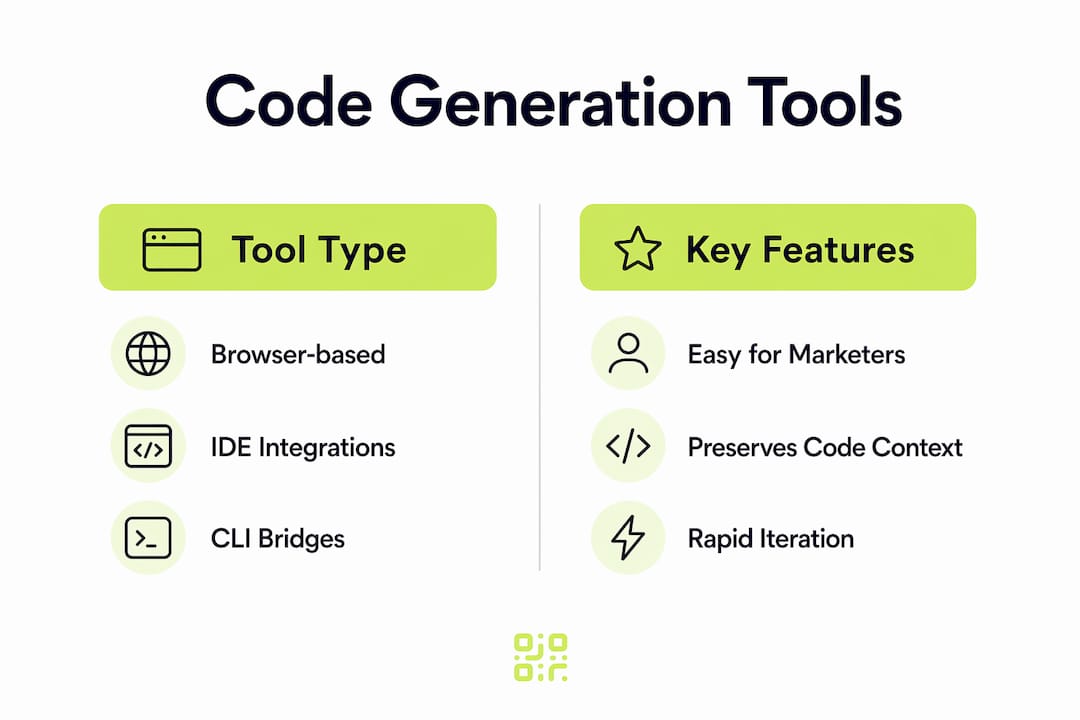
Choosing the right environment shapes how useful a code generation tool actually becomes. The three main categories are browser-based tools, IDE extensions, and command-line interfaces (CLIs). Each suits a different working style.
| Tool type | Best for | Key feature | Privacy model |
|---|---|---|---|
| Browser-based generator | Marketers and quick prototyping | No installation required | Varies; check data policy |
| IDE extension (e.g. VS Code) | Developers in active projects | Inline suggestions, context-aware | Server-side or local |
| CLI bridge | DevOps and automation pipelines | Scriptable, batch processing | Configurable |
| Client-side offline tool | Privacy-sensitive environments | No external data transmission | Fully local |
Developers favour IDE integrations and CLI bridges because they preserve code context and allow rapid iteration without switching windows. That continuity reduces the cognitive overhead of context-switching, which is where productivity actually gets lost.
Security is a genuine concern when you paste proprietary code into a cloud-based tool. Client-side, browser-based generators process all data locally using JavaScript and HTML5 Canvas, meaning your code never leaves your machine. This is the correct choice for any team working with sensitive business logic or client data.
Free usage tiers typically offer 2,500–5,000 tokens per day, with paid upgrades starting at around $1. That daily allowance is sufficient for most marketing snippet tasks but may fall short for large developer projects requiring sustained generation. Paid plans remove those limits and often add priority processing.
Pro Tip: Before selecting a browser-based tool, check whether it processes data client-side or server-side. If the privacy policy is unclear, treat the tool as server-side and avoid pasting proprietary code into it.
How to generate and manage text codes step by step
A clear process produces better results than ad hoc prompting. The steps below apply whether you are generating a JavaScript function, an HTML email block, or a QR code payload for a promotional campaign.
- Define your goal in plain language. Write one sentence describing exactly what the code must do. Avoid vague verbs like “handle” or “manage.” Use specific verbs: “validate,” “return,” “redirect,” “display.”
- Choose your language and framework. Select the programming language and any relevant framework before you open the tool. Changing these mid-session forces the model to reinterpret your earlier context.
- Plan the logic before generating. Planning architecture before AI generates code prevents poor formatting and reduces iteration cycles. Write out the expected inputs, outputs, and any edge cases in plain text first.
- Enter your prompt and generate. Paste your structured prompt into the tool. Review the output immediately. Do not accept the first result without reading it.
- Copy, download, or share the snippet. Most tools offer one-click copying. For team use, paste the snippet into a shared repository or documentation system straight away.
- Test the output in a safe environment. Run the generated code in a staging environment or sandbox before deploying it. Automated code creators produce functional code most of the time, but edge cases require human verification.
- Document and version the snippet. Save the prompt alongside the output in your documentation. This lets you regenerate or modify the code later without starting from scratch.
AI-powered tools can also convert UI screenshots into frontend code, which accelerates prototyping significantly. A marketer can photograph a wireframe and receive working HTML/CSS within minutes, without writing a single line manually.
Pro Tip: Store your best-performing prompts in a shared team document. A prompt library reduces onboarding time for new team members and keeps output consistent across campaigns.
Common mistakes when using a text code generator
Most problems with generated code trace back to the prompt, not the tool. Understanding where things go wrong saves you significant debugging time.
- Vague prompts produce incomplete code. If your instruction lacks specifics, the model fills gaps with assumptions. Those assumptions are often wrong for your use case.
- Skipping the planning step causes format drift. Generating complex logic in one pass without pre-defining the structure leads to inconsistent variable names, missing error handling, and code that works in isolation but breaks in context.
- Accepting output without testing. Generated code is a starting point, not a finished product. Syntax may be correct while logic is flawed. Always run the code before deploying it.
- Pasting sensitive data into cloud tools. Many users incorrectly assume code generation requires server-side processing. Client-side options exist and are the correct choice when your code contains proprietary logic or personal data.
- Ignoring language version mismatches. A generator may produce Python 3.9 syntax when your environment runs Python 3.7. Always specify the version in your prompt.
When output is wrong, the fastest fix is to refine the prompt rather than manually edit the generated code. Add one specific constraint at a time and regenerate. This iterative approach produces cleaner results than patching flawed output line by line.
Manual editing is sometimes necessary, particularly for business logic that requires domain knowledge the model does not have. Treat generated code as a scaffold. You build the structure with the tool, then add the specific details yourself.
How developers and marketers use code generators in campaigns
Text code generators have practical applications across the full campaign lifecycle, from asset creation to performance tracking. The overlap between developer and marketer use cases is where the real efficiency gains appear.
- QR code payload generation. Marketers can automate QR code payload creation and customised text sequences for promotional use without deep coding skills. A code snippet generator produces the correctly formatted URL string or vCard payload in seconds.
- HTML email components. Developers generate reusable button, banner, and layout snippets that marketers drop directly into email builders. This removes the back-and-forth between teams on every campaign.
- Tracking parameter automation. UTM parameters follow a consistent pattern. A programming text generator can produce a full set of tagged URLs for every channel in a campaign from a single prompt.
- Landing page prototyping. Marketers use image-to-code tools to convert design mockups into working HTML, then pass them to developers for final integration. This compresses the design-to-development handoff from days to hours.
- Analytics integration snippets. Developers generate event-tracking code for platforms like Google Analytics 4 or Meta Pixel from plain English descriptions of the events they want to capture.
For campaigns that rely on QR codes, the connection between a code snippet generator and a QR code tracking platform is direct. The generated payload feeds into the QR code, and the tracking platform captures every scan. That combination turns a printed asset into a measurable marketing channel. You can read more about practical QR code campaign applications to see how this works end to end.
Key takeaways
A text code generator produces the best results when you combine a specific prompt, a planned logic structure, and a testing step before deployment.
| Point | Details |
|---|---|
| Plan before you prompt | Define inputs, outputs, and edge cases in plain text before generating any code. |
| Match the tool to your privacy needs | Use client-side tools for proprietary code; server-side tools are acceptable for public-facing snippets. |
| Test every output | Run generated code in a staging environment before deploying it to production or a live campaign. |
| Build a prompt library | Store successful prompts alongside their outputs to speed up future campaigns and onboarding. |
| Connect generation to tracking | Pair your code snippet generator with an analytics platform to measure the impact of every asset you create. |
Why I think most teams use these tools wrong
The most common mistake I see is treating a code generator as a replacement for thinking. Teams paste a vague requirement, accept the first output, and then spend twice as long debugging as they would have spent writing the code manually. The tool is not the problem. The workflow is.
Planning logic separately before generating code reduces iteration cycles and aligns output with production standards. This is the single change that separates teams who get consistent value from these tools and teams who give up on them after a week. Spend five minutes writing out what you want the code to do before you open the generator. That five minutes saves thirty.
Security is the second area where I see teams cut corners. The assumption that all browser-based tools are safe is wrong. Enterprise-grade client-side tools process code offline, which is the correct default for any code that touches customer data or proprietary business logic. If you cannot confirm a tool is client-side, do not paste sensitive code into it.
The emerging trend worth watching is image-to-code generation. The ability to photograph a design and receive working frontend code changes the relationship between marketers and developers. Marketers gain independence for early-stage prototyping; developers gain cleaner briefs. That shift is already happening, and teams that build it into their workflow now will have a structural advantage within the next twelve months.
— The
Qrlytics: dynamic QR codes with built-in tracking
If your campaigns rely on QR codes, the quality of your code generation tool matters as much as the quality of the QR code itself. Qrlytics connects both.

Qrlytics offers a free QR code generator that produces high-quality, customisable codes instantly, with no credit card required. For campaigns that need to evolve after print, the dynamic QR code generator lets you update the destination URL at any time without reprinting. Every scan is tracked in real time, with GDPR-compliant analytics and global heat maps built in. Codes created during an active subscription remain functional permanently, regardless of billing status. That permanence removes the risk of printed materials becoming useless overnight.
FAQ
What is a text code generator?
A text code generator is a tool that converts plain English instructions into functional code snippets. It uses AI language models to match your description to the correct syntax in your chosen programming language.
How do I choose between a browser-based and an offline code generator?
Use a client-side or offline tool whenever your code contains proprietary logic or personal data, since these tools process everything locally without transmitting data externally. Browser-based server-side tools are acceptable for public-facing or non-sensitive snippets.
Can marketers use a text code generator without coding skills?
Yes. Modern automated code creators accept plain English prompts and return ready-to-use snippets, meaning marketers can generate QR code payloads, UTM parameter strings, and HTML components without writing code manually.
How many programming languages do AI code generators support?
Most modern AI code generators support 20–30+ languages, including Python, JavaScript, HTML/CSS, and SQL, making them suitable for both developer and marketing use cases within a single tool.
What is the best way to improve the quality of generated code?
Plan the logic before you prompt. Define the expected inputs, outputs, and edge cases in plain text first, then generate. This approach reduces iteration cycles and produces output that aligns with production standards.