Keep Printed QR Codes Live: UTM Safe Deep Linking for Marketers
Encode a deeplink, not a raw URL. Dynamic QR codes backed by a branded short link give you editable destinations, deferred app routing, and scan-level measurement that a static, printed URL never can. The first action to take is straightforward: build a dynamic short link on your own domain, attach UTM parameters for the placement, then export the code as an SVG for print. Do that once, correctly, and the code keeps working for the life of the campaign.
TL;DR:
- Using branded short domains for QR codes ensures campaign links remain active and manageable, even if you switch providers later.
- Deferred deep linking maintains user intent for approximately 30 days, guiding users to specific in-app screens after installation from any source.
- Testing QR codes on target devices, with final print sizes and under real lighting conditions, prevents technical failures in large-scale campaigns.
- Tracking UTM parameters across full redirect chains is essential to accurately attribute scan performance and online conversions.
- Campaign placements with clear incentive prompts, like discounts or exclusive content, significantly boost scan rates and user engagement.
Table of Contents
- What is deep linking with QR, and how does deferred deep linking work?
- How do you build a deep-link QR code step by step?
- How do you preserve UTMs and measure scan performance?
- What should you test before sending QR codes to print?
- Where does deep-link QR actually move campaign results?
- Why permanence and editability matter more than most marketers assume
- Ready to build your first deep-link QR campaign?
- Sources
- FAQ
What is deep linking with QR, and how does deferred deep linking work?
A QR deep link is not just an image that opens a website. It’s a code that encodes a deeplink, a URL structure that points to a specific in-app screen or piece of content rather than just a homepage, with a fallback web address for anyone without the app installed.
Static QR codes bake the destination directly into the code’s pixel pattern. Once printed, that destination is permanent. Change your campaign URL, and every static code becomes dead weight, along with whatever packaging or signage it’s printed on. Dynamic QR codes work differently: the code points to a short, redirect-based link, and you control where that link sends people from a dashboard, at any time, without touching the printed artwork.
- Static QR: fixed destination, no analytics, cheap for one-off internal use, risky for anything printed at scale.
- Dynamic QR: editable destination, scan-level analytics, supports UTM tracking and deferred routing.
Deferred deep linking solves a specific problem: what happens when someone scans a code but doesn’t have your app installed? Instead of dumping them on a generic app store page and losing context, deferred deep linking remembers their intended destination through the install process and routes them to that exact in-app screen once they open the app for the first time. That intent typically holds for a limited window, commonly around 30 days, which matters when someone scans a code, gets distracted, and installs the app three days later.
How do you build a deep-link QR code step by step?
Building a working deep-link QR code is less about the code itself and more about the infrastructure behind it. Follow this order and you’ll avoid the two mistakes that ruin most printed QR campaigns: hardcoded vendor domains and lost tracking parameters.
- Choose a branded short domain. Avoid generic vendor subdomains in anything you print. A branded short link protects you from vendor lock-in: if you ever switch providers, your domain keeps resolving and printed codes never break.
- Construct the deeplink payload. Define the in-app path (the specific screen or product page), a fallback
destination_urlfor web visitors, and any social preview fields (Open Graph title, image) so the link looks right when shared. - Set platform routing for iOS and Android. Each platform handles universal links and app links slightly differently, so configure both and set your deferred deep-link window so install intent survives the App Store or Google Play detour.
- Create the short link and tag it. Add UTM parameters at the placement level, not the campaign level, so you can distinguish a shelf display from a direct-mail insert even when both promote the same offer.
- Generate the QR code. Export as SVG for anything printed; PNG is acceptable for screens and digital ads.
- Run the developer checklist. For API-driven generation, confirm the endpoint accepts custom short paths, returns the QR asset in your required format, and logs the destination URL alongside the UTM string for auditing.
Pro Tip: Test your full redirect chain in an incognito browser before sending anything to print. If the UTM parameters disappear between the short link and the landing page, they’ll disappear in production too.
How do you preserve UTMs and measure scan performance?
UTM parameters are what turn an anonymous scan into an attributable marketing touchpoint. Without them, a QR code on a bus shelter and one in a direct-mail flyer look identical in your analytics, and you lose the ability to compare placements.
A consistent naming convention avoids ambiguity later:
utm_source: the specific vendor or channel (e.g.busshelter,directmail)utm_medium: the format (ooh,print,packaging)utm_campaign: the promotion nameutm_content: the exact placement or creative variant, useful when A/B testing two designs
The riskiest point in this chain is the redirect itself. If your link-management layer doesn’t pass query strings through cleanly, UTM parameters can vanish somewhere between the QR scan and the landing page, and you’ll never know a campaign underperformed for a technical reason rather than a creative one. Test the entire path end to end, not just the first hop.
Track four things at minimum: scan rate against total codes distributed, landing-page conversion after the scan, post-install conversion for any deferred flows, and lifetime value where your data allows it. Structured UTM tagging paired with dynamic QR workflows is what lets these show up cleanly in GA4 or your in-app analytics, rather than as an unexplained spike in direct traffic. Marketers increasingly rely on this because QR scans capture first-party, high-intent signals that print advertising otherwise can’t attribute at all. A practical attribution framework helps you connect that scan data back to real business outcomes rather than treating it as a vanity metric.
What should you test before sending QR codes to print?
Print runs are unforgiving. A code that fails on one phone model or under warehouse lighting can quietly kill a campaign’s numbers for weeks before anyone notices.
- Scan with the target app already installed, then again after uninstalling it, to confirm the deferred flow lands on the correct in-app screen.
- Test on at least one iOS and one Android device, since routing behaviour genuinely differs between the two.
- Print a proof at final size and check contrast, quiet zone (the blank border around the code), and scan distance under realistic lighting.
- Keep SVG files for large-format or packaging print; vector export holds scan quality at any size, where a low-resolution PNG will not.
Pro Tip: Test the smallest version of your code you plan to print, not just the hero size on a poster. If a 2cm code on a product label still scans reliably, everything larger will too.
Where does deep-link QR actually move campaign results?
Deep-link QR codes earn their keep in a handful of specific placements, more than as a blanket tactic across every touchpoint.
- Packaging: a code on the box routes new customers straight into an onboarding flow or tutorial, and doubles as a low-friction warranty registration point using deferred routing.
- Events and out-of-home: a unique short link per physical placement (each banner, each booth) lets you compare which location actually drove scans, not just guess.
- Retail and point of sale: codes at the shelf edge support quick inventory checks, instant coupons, or loyalty enrolment without a staff member involved.
- Cross-channel activation: a printed code paired with a matching social CTA and a follow-up email creates three touchpoints funnelling into one tracked destination.
The common thread across all four: every placement needs an explicit reason to scan, whether that’s a discount, faster access, or exclusive content. Codes with no clear value exchange see scan rates drop sharply, according to Adobe’s QR marketing research.
Why permanence and editability matter more than most marketers assume
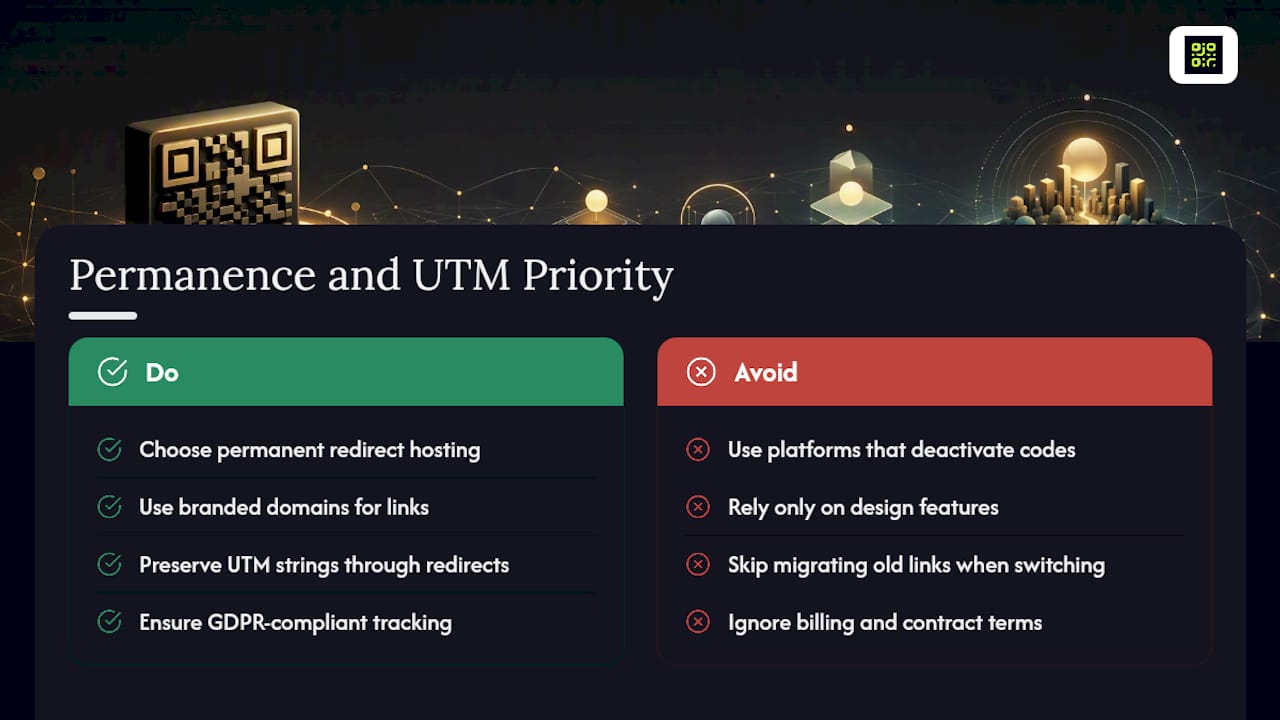
Most QR failures aren’t technical. They’re contractual. A code goes on 50,000 units of packaging, the marketing team switches tools eighteen months later, forgets to migrate the old link, and every one of those printed codes now points at nothing. Some QR code platforms deactivate codes when billing lapses, which can cause problems for print runs with a shelf life longer than a quarter.
Beyond permanence, the same infrastructure decisions determine whether your analytics survive contact with reality. Branded domains, redirect layers that preserve UTM strings, and GDPR-compliant tracking all reduce operational risk on campaigns you can’t quickly reprint. When you’re evaluating any platform for this, weigh permanence and UTM handling as heavily as design features.
— The
Ready to build your first deep-link QR campaign?
If you’ve followed the steps above, you already know what to look for in a platform: dynamic URL updates so you’re never locked into a destination, real-time analytics that show scans by placement, branded export options that keep codes on-domain, and a guarantee that codes don’t quietly die when a plan changes. That last point is the one most QR tools skip entirely, and it’s the one that matters most for anything printed at volume.

A sensible pilot costs you almost nothing to try: create one dynamic short link with placement-level UTMs, generate an SVG QR code, run it on a single placement for two weeks, and compare landing conversion against your baseline. Qrlytics’s free QR code generator lets you build that test link and code without a credit card, and the dynamic QR code generator handles the destination updates and analytics once the pilot moves to a full campaign. Start with one placement, measure it properly, then scale what works.
Sources
For deeper implementation detail, see practical branded landing page examples, a scan-to-conversion metrics sheet, and independent research on analytics-driven marketing ROI.
- QR codes, customer engagement and sales
- QR code marketing guide
- Deferred deep linking (Adjust glossary)
FAQ
What Is the Difference Between a QR Code and a Deep Link?
A QR code is just the scannable image; a deep link is the destination it encodes, pointing to a specific in-app screen or web page rather than a generic homepage.
How Long Does Deferred Deep Linking Retain Intent?
Deferred deep linking commonly holds a scanner’s intended destination for around 30 days, so a delayed app install still lands the user on the right in-app content.
Should I Use SVG or PNG for Printed QR Codes?
Use SVG for anything printed, especially packaging or large-format signage, since vector files hold scan quality at any size, while PNG works fine for screens and digital ads.
Why Did My QR Code Stop Working After a Subscription Change?
Many QR platforms deactivate codes when billing lapses or a plan is downgraded; Qrlytics guarantees that codes created during an active subscription keep functioning regardless of later billing status.
What’s the Most Common Reason UTM Tracking Breaks on QR Campaigns?
Redirect chains that don’t pass query strings through correctly are the usual culprit, so always test the full scan-to-landing-page path before a print run, not just the short link itself.