Cookieless QR Analytics for Marketers With GDPR Safe Redirects
The most reliable baseline for cookieless QR analytics is a first-party redirect paired with minimal aggregated server-side logging. It captures scan volume, placement performance, and destination conversions without setting cookies or building visitor profiles, which keeps you clear of most consent obligations under CCPA/CPRA and GDPR. Some QR analytics platforms build their tracking around this exact model.
TL;DR:
- Server-side redirect logging with minimal aggregated data respects user privacy and aligns with CCPA and GDPR by avoiding personal identifiers.
- Using short, controlled URLs and short retention periods minimizes privacy risks and simplifies legal compliance while maintaining campaign flexibility.
- Cookieless tracking primarily provides aggregate scan and placement metrics, but cannot link multiple scans to individual users or behaviors over time.
- Securing data through hashing and short retention, and avoiding embedding sensitive info in URLs, is crucial to prevent breaches and unintended identification.
- Choosing between self-hosted, managed, or specialized analytics platforms depends on your infrastructure capacity, control needs, and scale of campaign deployment.
Table of Contents
- What is cookieless QR analytics and how does it differ from cookie tracking?
- How does a privacy-first cookieless QR tracking implementation work?
- Does cookieless QR tracking meet CCPA and GDPR requirements?
- What best practices should marketers follow for QR URL design?
- Which metrics actually matter for cookieless QR campaigns?
- Which QR analytics architecture fits your team?
- How QRlytics applies this privacy-first model in practice
- When should you go cookieless by default, and when does it fall short?
- A ready-made privacy-first option, if you’d rather not build it
- Sources
- FAQ
What is cookieless QR analytics and how does it differ from cookie tracking?
Cookieless QR analytics measures how a printed or digital QR code performs without placing a tracking cookie on the visitor’s device or stitching together a personal profile across sessions. Cookie-based tracking works by dropping an identifier in the browser, then matching that identifier against future visits to build a picture of one person’s behaviour over time. Cookieless methods skip that step entirely. They log the scan event itself, on the server, and report on aggregates instead of individuals.
The practical difference shows up in what you can and cannot answer. Cookie-based tracking tells you that the same device scanned three different posters over two weeks. A cookieless setup tells you that Poster A generated 340 scans in that window and 61% landed on a mobile browser, but it will not link any of those scans to a single returning person. For most QR campaign reporting, that trade-off costs you almost nothing, because marketers rarely need individual-level detail. They need to know which placement worked.
Several technical approaches sit under the cookieless umbrella, each with different privacy and accuracy profiles:
- Server-side redirect logging: the QR code points to a short link you control; your server logs the scan event and forwards the visitor to the destination. No client-side script, no cookie.
- IP hashing and aggregation: raw IP addresses are hashed or truncated immediately and never stored in full, giving you rough geography without a persistent identifier.
- Browser fingerprinting: combines device signals (screen size, fonts, timezone) to re-identify a visitor without a cookie. This one deserves caution. The Electronic Frontier Foundation notes that fingerprinting can still re-identify individuals even without cookies, which means it carries similar privacy risk to cookies while looking cookieless on paper.
For most marketing teams, server-side redirect logging with hashed or aggregated fields is the safe default. Fingerprinting is best avoided unless a specific, disclosed use case genuinely requires it.
How does a privacy-first cookieless QR tracking implementation work?
The mechanics are simpler than most marketers expect, and the whole thing can be described to an engineering team in five steps.
- The QR code encodes a short, first-party URL you control, rather than pointing straight at the destination page.
- A scan hits your server, which logs a single event record before doing anything else.
- The server writes minimal fields to that event: when it happened, which campaign and placement it belongs to, which destination it was headed for, and whether the redirect succeeded.
- The server issues the redirect, sending the visitor on to the destination URL almost instantly.
- Raw event logs get aggregated on a short cycle (daily or weekly), after which the raw rows are purged and only summary counts remain.
The recommended minimal event schema covers occurred_at, campaign_id, placement_id, destination_id, redirect_status, and, where genuinely useful, a coarse region or device-type bucket. Nothing here identifies a person. A first-party redirect architecture gives marketers control over exactly what gets logged, which is the core advantage over letting a third-party script decide what to capture on your behalf.
Hashing matters where any field could theoretically re-identify someone, IP addresses in particular. Truncate or hash them at the point of capture rather than storing them raw and hashing later, because “raw first, hash later” defeats the purpose if a breach happens in between. Retention should be short for raw logs, typically a matter of days, before aggregation replaces individual event rows with summary totals.
Keep scan counting and destination conversion measurement as two separate concerns. Your redirect layer tells you a scan happened and succeeded. Your destination page, run through its own analytics, tells you what happened after that: a purchase, a signup, a download. Trying to force one system to do both jobs usually produces messier data than running them side by side and joining them later on campaign and placement IDs.
Pro Tip: *Ask your engineering team to log redirect_status even when everything works.
Does cookieless QR tracking meet CCPA and GDPR requirements?
Cookieless QR analytics generally sits in a far more comfortable compliance position than cookie-based tracking, but “cookieless” is not automatically synonymous with “no obligations at all.”
Under CCPA and its CPRA amendments, businesses must let consumers know when personal information is sold or shared, and consumers get a right to opt out. The California Attorney General’s CCPA overview confirms that CPRA extended these rights further, adding correction rights and limits on sensitive personal information. If your QR analytics never sends scan data to an ad network and never builds an individual profile, tools that don’t forward data to ad networks typically sit outside the CCPA/CPRA “sharing” obligations, which simplifies compliance considerably for most US-based marketing teams.
GDPR draws a similar line, though the mechanics differ. Aggregated, non-identifying server logs generally don’t require the same consent as a tracking cookie would. Cookieless analytics platforms can often avoid triggering a consent banner when they don’t collect personal data or share it with ad networks. The nuance worth remembering: the QR redirect layer being cookieless doesn’t automatically make your destination page cookieless too. Consent obligations can still apply to whatever analytics or marketing pixels run on the page the visitor lands on, even when the scan itself was tracked cleanly.
Three mistakes come up repeatedly:
- Embedding customer names, order numbers, or loyalty IDs directly in the QR destination URL, where they sit exposed in server logs and browser history.
- Letting the destination page set its own advertising cookies, undoing the privacy work done at the redirect layer.
- Forwarding raw scan data to a third-party ad platform “just in case,” which can pull the whole setup back into sharing obligations.
Before activating any QR campaign, ask your legal or data protection contact four questions: what fields does the provider log, how long is raw data retained, does any data leave the platform to a third party, and can a consumer’s opt-out request actually be honoured against this dataset.
What best practices should marketers follow for QR URL design?
Good QR analytics starts before the first scan happens, with how the URL itself gets built.
Use a first-party short link that you or your provider control, rather than embedding the final destination directly in the code. This gives you a redirect layer to log events through and lets you update the destination later without reprinting a single flyer. Avoiding sensitive data in query parameters matters because URLs routinely leak through browser history, server logs, and monitoring tools that were never designed to treat a URL as confidential.
Campaign and placement identifiers should be short, non-identifying codes, not descriptive strings that accidentally reveal something sensitive. camp_2024_spring is fine. A code that encodes a customer’s account number is not. Map those short codes to full campaign names in your own system, on the server side, rather than in the URL itself.
Retention policy needs a clear default: keep raw, event-level logs for a short window, typically no more than a few weeks, then aggregate into daily or weekly summaries and purge the underlying rows. This limits your exposure if anything goes wrong and keeps the dataset genuinely anonymous rather than merely de-identified.
Before any print run goes live, run through a short testing checklist:
- Confirm the redirect resolves correctly on at least three mobile browsers and both major operating systems.
- Sample a batch of codes physically, scanning them the way a customer would, not just testing the underlying URL in a browser tab.
- Check what happens if the destination page is ever taken down. A broken redirect on a printed flyer can’t be fixed by anyone but you.
- Confirm the redirect responds fast. Anything over two or three seconds and a meaningful share of scanners simply give up.
Pro Tip: Print a handful of test codes and physically scan them from a locked-screen phone the way a real customer would, in a lift or a stairwell with patchy signal. Desk-testing a QR code on WiFi hides most of the failures that show up in the field.
Which metrics actually matter for cookieless QR campaigns?
A compact set of metrics covers almost everything a marketing team needs, and none of them require an individual identifier.
- Total scans: the raw count of successful redirects per placement over a given window.
- Unique scan-days: how many distinct days a placement generated at least one scan, a useful proxy for sustained interest versus a single burst.
- Placement conversion rate: the share of scans at a given placement that led to a tracked outcome at the destination, joined back on
placement_id. - Redirect success rate: the percentage of scans that resolved correctly, which flags broken links or server issues fast.
- Campaign ROI proxy: cost per placement divided by tracked conversions, giving a rough efficiency comparison across print runs without needing a full attribution model.
Attribution without cookies leans on time-window matching rather than persistent identifiers: if a scan happens and a destination-side conversion follows within a defined window, say 30 minutes, you count it as attributable. UTM parameters still work here and stay useful, provided they carry only campaign and placement information, never anything that could identify a person.
Watch for attribution drift when comparing periods. Removing cookies from a measurement stack tends to shift what “traffic source” data looks like, and a sudden change in conversion numbers after switching tracking methods is usually a measurement artefact, not a real change in campaign performance. One engineering team that removed advertising cookies found their conversion metrics shifted and required real operational adjustment to interpret correctly, which is a useful reminder to expect a short recalibration period rather than panic at the first week of new numbers. A detailed breakdown of scan-to-conversion metrics is worth bookmarking if you’re building this dashboard from scratch.
Which QR analytics architecture fits your team?
Three broad approaches cover almost every marketing team’s situation, and the right one depends less on budget and more on how much infrastructure you want to own.
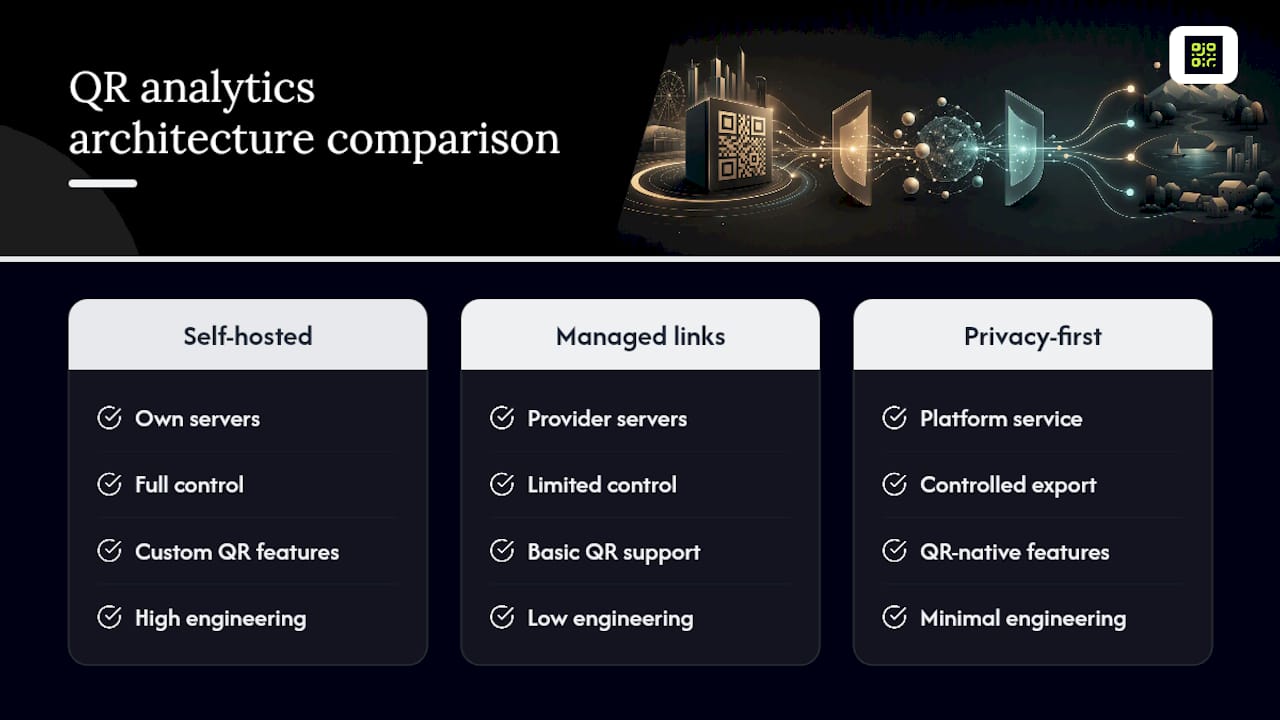
Self-hosted redirect layers give you full control over data, retention, and schema, at the cost of building and maintaining server infrastructure yourself. This suits teams with existing engineering capacity and a genuine need for data sovereignty, such as handling health or financial campaign data in-house.
Managed short-link services handle the redirect and basic logging for you but often lack QR-specific features like dynamic destination updates or campaign-level heatmaps. They’re a reasonable middle ground for teams that need reliability without deep analytics.
Privacy-first QR analytics platforms bundle code generation, redirect logging, aggregation, and reporting into one system built specifically around cookieless measurement. This is usually the fastest path for marketing teams without dedicated engineering support, and analytics-driven measurement is increasingly tied to stronger campaign ROI precisely because teams can see what’s working without waiting on a data pipeline.
Weigh four criteria when choosing: whether codes stay functional permanently or expire under certain conditions, how well the platform scales across hundreds or thousands of placements, how easily it integrates with your existing reporting stack, and how much control you get over retention and export. A managed platform earns its keep the moment your print volume or placement count outgrows what a spreadsheet can track responsibly. Build in-house only when data sovereignty or a highly custom event model justifies the ongoing engineering cost.
How QRlytics applies this privacy-first model in practice
Qrlytics builds its QR analytics around the same principles this article recommends: first-party redirects, aggregated reporting, and no dependency on cookies to make the numbers useful. Some services offer codes that keep working permanently, even after cancellation, which matters for anyone who has printed thousands of flyers around a QR code that later got deactivated by a provider’s billing dispute. Dynamic URL updates can let the destination behind a code change without reprinting, and scan data reporting may include global heatmaps and CSV export to help teams use their preferred reporting tools.
If you’re evaluating any cookieless QR analytics option, a short checklist keeps the conversation grounded:
- How long is raw scan data retained before aggregation?
- Do codes stay functional permanently, or can they be deactivated by a billing issue?
- What does the redirect performance SLA actually promise?
- Can you export raw and aggregated data on demand?
- Is the tracking GDPR-compliant by design, not bolted on afterwards?
When should you go cookieless by default, and when does it fall short?
Privacy-first, cookieless measurement should be the default for the overwhelming majority of QR campaigns. It answers the questions marketers actually ask, which scan counts, which placements, which redirect rates, without the legal overhead of consent management.
The case for adding an opt-in enhanced layer is narrow but real: loyalty programmes, personalised follow-up, or any scenario where you genuinely need to recognise a returning individual. Build that as an explicit, consented add-on layered on top of the cookieless baseline, never as a replacement for it. A hybrid architecture, aggregated capture by default with an opt-in identity layer only where the business case demands it, gives you the best of both without dragging every campaign into consent complexity it doesn’t need.
— The
A ready-made privacy-first option, if you’d rather not build it
Building a compliant redirect layer from scratch means engineering time, ongoing maintenance, and someone accountable for retention policy. Some platforms provide a first-party, cookieless architecture out of the box, typically with GDPR-compliant tracking, real-time scan analytics, and dynamic URLs that let you change a destination without touching the printed code.

The Free plan costs $0 per year and requires no credit card, so you can test the redirect logging and heatmap reporting on a real campaign before committing to anything. When you’re ready for unlimited codes and deeper analytics, the Pro plan picks up where Free leaves off. If you’re setting up your first campaign, the dynamic QR code generator is the fastest way to get a first-party redirect live today.
Sources
- California Consumer Privacy Act (CCPA) overview — Office of the Attorney General
- GDPR and browser fingerprinting: how it changes the game for sneakiest web trackers — EFF
- Cookieless web analytics: accurate data without the consent banner — Plausible
FAQ
What Is Cookieless QR Analytics?
Cookieless QR analytics measures scan volume, placement performance, and conversions without setting a tracking cookie or building an individual profile. It relies on server-side redirect logging and aggregated reporting instead, which is the approach Qrlytics uses across its analytics.
Do I Need Consent for Cookieless QR Tracking?
Generally not for the QR-level scan event itself, provided no cookies are set and no personal data is shared with third parties. Consent requirements can still apply to whatever runs on the destination page, so check that separately.
How Is Cookieless Tracking CCPA Compliant?
Tools that don’t sell or share personal information with ad networks typically sit outside CCPA/CPRA’s core obligations. The California Attorney General’s CCPA guidance confirms the right to opt out applies specifically to selling or sharing personal information, which aggregated scan logs generally don’t involve.
What Data Should a QR Scan Event Log?
A minimal, safe schema covers occurred_at, campaign_id, placement_id, destination_id, and redirect_status, with an optional coarse region or device bucket. Precise IP addresses and any personal identifiers should be excluded entirely.
Does Qrlytics Cost Anything to Start?
The Free plan is $0 per year and needs no credit card to sign up. The Pro plan’s pricing is available directly on the pricing page once you’re ready for unlimited codes and advanced analytics.