QR codes for staff directories: your 2026 guide
A QR code for a staff directory is a machine-readable code that links directly to an employee’s contact details, profile, or attendance check-in page. Scan it with any smartphone camera and you reach the right person’s information instantly, with no manual searching, no outdated spreadsheets, and no reception desk bottleneck.
These codes work differently from generic QR codes because they connect to live employee profiles rather than static web pages. The distinction matters: a static code becomes wrong the moment someone changes their role or phone number, while a staff directory code stays accurate because the underlying profile updates automatically.
Key uses in UK organisations right now include:
- Contact sharing: colleagues scan a code to save a vCard directly to their phone contacts
- Attendance logging: staff scan in at the start of a shift, triggering a timestamped record
- Visitor management: reception desks display codes linking to the correct host’s profile
- Printed directories: office maps, newsletters, and noticeboards carry codes that open live profiles
How do staff QR codes actually work for attendance and contact sharing?
Every staff QR code functions as a redirect. Scanning it sends the device to a secure landing page, an intranet profile, or a check-in form, depending on how it is configured. The code itself never changes; only the destination does.

For attendance, the redirect leads to a secured check-in page. When paired with individual credentials, such as a PIN or a login, the system captures who checked in, when, and where. QR codes used this way can also trigger additional workflow steps, such as a safety question or a photo confirmation, before logging the record.
Contact sharing works through vCard links. Scanning opens a file that the phone imports directly into its contacts app, complete with name, job title, department, email, and phone number.
The critical advantage over static printed directories is the dynamic code. Dynamic QR codes let you update the linked profile without reprinting the physical code. Change a phone number in the system and every printed badge, poster, or lanyard reflects the new detail immediately.
A few important distinctions:
- Staff directory codes link to full profiles with contact details, org chart position, and availability status
- Contactless check-in codes are attendance-only and do not expose profile data
- Training access codes link to learning materials or onboarding resources rather than personal profiles
Privacy sits at the centre of any deployment. Staff should know what data their code exposes, and GDPR-compliant systems must include an opt-out option so employees can control what colleagues see when they scan.
How to build a QR code staff directory from scratch
Getting the structure right before generating a single code saves considerable rework later. Start with the data, then build the codes around it.
Step 1: Define your data fields. Agree on what each profile will contain. Standard fields include full name, job title, department, office location, direct phone number, email address, and line manager. Optional fields might cover availability status or a profile photo.
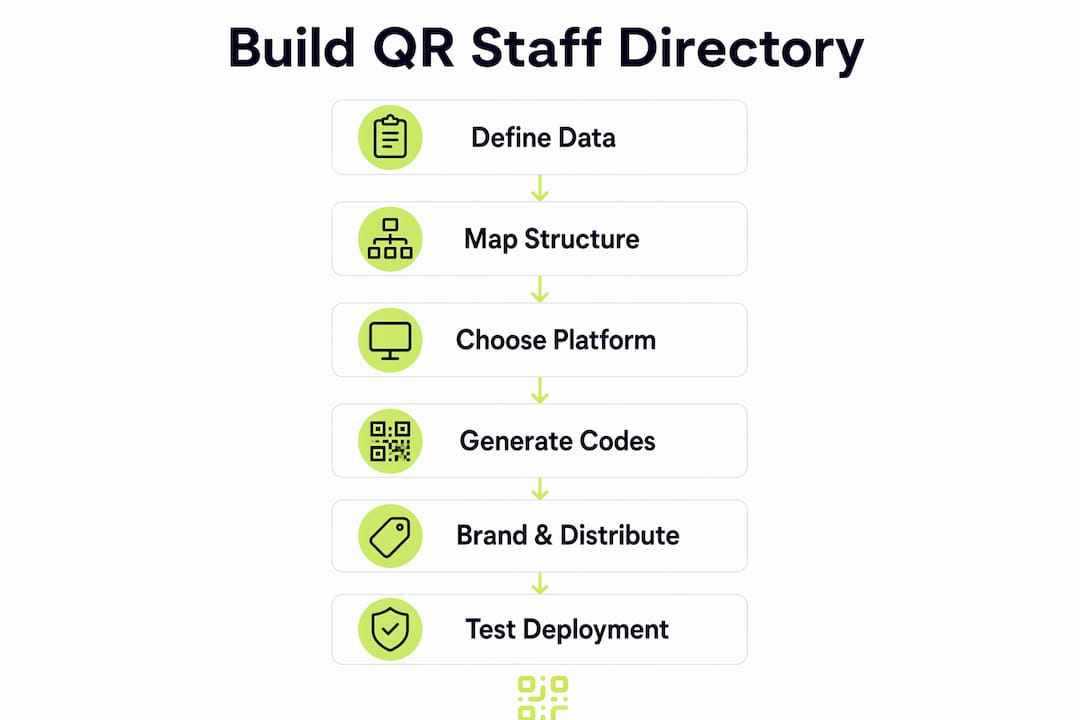
Step 2: Map your organisational structure. Group staff by team, department, and site. A well-mapped hierarchy makes the directory navigable and helps with bulk generation later.
Step 3: Choose a platform that supports dynamic codes. Static code generators are unsuitable for staff directories because any profile change requires a new code and a reprint. Platforms that generate dynamic QR codes let you update profiles centrally without touching the physical code.
Step 4: Generate codes in bulk. Bulk generation tools let you upload a staff list, map columns to vCard fields, apply your organisation’s branding, and export all codes in one batch. This is far more practical than creating codes one by one for a team of fifty or more.
Step 5: Brand and distribute. Add your logo and brand colours to the codes before printing. Place them on ID badges, desk nameplates, printed team directories, and intranet profile pages.
Step 6: Test before you deploy. Scan every code on both iOS and Android devices. Confirm the redirect reaches the correct profile and that the vCard imports cleanly.
Best practices for deploying and maintaining QR-coded directories
Deployment is where most directory projects either succeed or stall. A few practical rules make the difference.
Host profiles on your intranet, not public platforms. Corporate firewalls routinely block consumer file-sharing services. Hosting staff profiles on enterprise intranet portals keeps codes accessible on-site and compliant with your IT security policy. Codes that redirect to blocked URLs are useless the moment someone tries to scan them in the office.
Schedule regular profile audits. Assign a named owner in HR or IT to review profiles quarterly. Leavers should be removed promptly; role changes should be reflected within a working day. Dynamic codes make this straightforward because the physical code never needs replacing.
Communicate the change to staff. A directory only works if people use it. Send a short briefing explaining what the codes do, how to scan them, and what data is visible. Include an opt-out process for anyone uncomfortable with their profile being scannable.
Monitor usage with scan analytics. QR code analytics show you which codes are being scanned, how often, and from which locations. Low scan rates on certain profiles may indicate a placement problem; high rates on a single code might suggest a bottleneck worth addressing.
Pro Tip: Place codes at eye level on ID badge holders and at desk level on nameplates. Codes positioned above head height or at floor level are rarely scanned in practice.
How UK organisations are using staff directory QR codes
UK public sector and NHS trust environments have been among the earliest adopters, largely because their staff work across multiple sites and cannot rely on a single physical noticeboard. A ward team spread across three floors benefits from a printed rota that carries QR codes linking to each nurse’s contact profile, so a colleague on a different floor can reach the right person without calling the main desk.
Universities across the UK have applied the same logic to faculty directories. Printed departmental guides carry codes linking to lecturer profiles, office hours, and booking links, replacing laminated sheets that went out of date within weeks of printing.
Facilities management teams in large office estates use QR codes on printed maps and directories to link floor plans to the current occupant of each desk or meeting room. When a team moves floor, the map code is redirected to the new location without reprinting the entire building directory.
Connecting staff directory QR codes to your existing HR systems
A staff directory QR code is only as useful as the data feeding it. Connecting codes to your existing HR platform removes the need for manual profile updates and keeps information accurate without extra admin effort.
Most HR platforms, including those used widely across UK organisations, expose employee data via an API or a directory sync. Your QR code platform reads from that source, so a change made in the HR system propagates to every linked code automatically. This is the same principle behind CRM integration strategies used in contact management: one authoritative data source, many connected outputs.
For attendance, the integration runs in the opposite direction. A scan event writes a timestamped record back to your HR or workforce management system, giving payroll and compliance teams a clean audit trail without manual timesheets. Connecting QR-based attendance to your existing system takes most of the administrative burden off line managers entirely.
Ready to build your staff directory? Qrlytics lets you generate branded, dynamic QR codes with full scan analytics and GDPR-compliant tracking, no credit card required to start.

Create your first QR code free and have your directory codes ready to deploy today.
Key takeaways
Dynamic QR codes are the only practical choice for staff directories because they update linked profiles without requiring a reprint of any physical material.
| Point | Details |
|---|---|
| Use dynamic codes | Static codes become inaccurate the moment a profile changes; dynamic codes update instantly. |
| Host on your intranet | Public platform links are often blocked by corporate firewalls; intranet hosting keeps codes accessible. |
| Integrate with HR systems | Connecting codes to your HR platform removes manual updates and keeps profiles accurate. |
| Monitor with analytics | Scan data reveals which codes are used and where, helping you improve directory placement. |
| Maintain GDPR compliance | Staff must be able to opt out and control what data their code exposes to colleagues. |
FAQ
What does a staff directory QR code actually do?
It links directly to an employee’s contact profile or vCard, letting colleagues scan and save contact details instantly without typing or searching a database.
How do I create a QR code for my organisation’s staff directory?
Upload your staff list to a dynamic QR code platform, map the data fields to vCard properties, apply your branding, and generate codes in bulk. Qrlytics supports this process with no credit card required to start.
Do staff QR codes track individuals without their knowledge?
QR codes do not track individuals unless paired with login credentials or a check-in system. Transparent deployment with a clear opt-out option keeps your directory GDPR-compliant.
How do I create a QR code survey for staff feedback?
Generate a QR code that redirects to a Google Forms or Microsoft Forms survey link. Use a dynamic code so you can update the survey URL without reprinting the code.
Can staff use QR codes to access training materials as well as directory profiles?
Yes. The same dynamic code infrastructure that powers a staff directory also works for training material access, linking printed resources to up-to-date documents, videos, or onboarding portals.