What is QR code fallback? a 2026 guide

TL;DR:
- QR code fallback provides a user-friendly alternative when scanning fails, ensuring continuous access.
- Designing for both UI fallback and infrastructure failover is essential for reliable QR code campaigns.
QR code fallback is defined as an alternative method that completes the intended action when the primary QR scanning process fails. Whether a camera is broken, lighting is poor, or a redirect server goes down, fallback mechanisms keep users on track. Platforms like HYPR and WWPass have built fallback directly into their authentication flows, proving that reliable QR access is no longer optional. For marketers and businesses using printed materials, understanding what is QR code fallback means understanding how to protect every scan, every campaign, and every customer interaction.
What is QR code fallback and why does it matter?
QR code fallback is the backup process triggered when a user cannot complete a QR scan successfully. The industry also refers to this concept as QR code failover, though the two terms describe slightly different problems. Fallback covers the user-facing alternative path. Failover describes the backend infrastructure switching to a secondary system when the primary one fails.

Fallback provides an alternate method to complete the intended action when the primary QR flow breaks down. This matters because QR codes appear on packaging, posters, business cards, and menus. Once printed, they cannot be changed. If the process behind them fails and no fallback exists, the user hits a dead end.
Common scenarios that trigger fallback include:
- A broken or low-resolution device camera that cannot read the code
- Poor lighting conditions in retail or outdoor environments
- A redirect server that is slow, overloaded, or temporarily offline
- Expired or misconfigured dynamic QR destinations
- Users with accessibility needs who cannot physically point a camera
Each scenario requires a different type of response. That is why understanding the categories of fallback is the first step to designing a reliable QR experience.
What types of QR code fallback mechanisms exist?
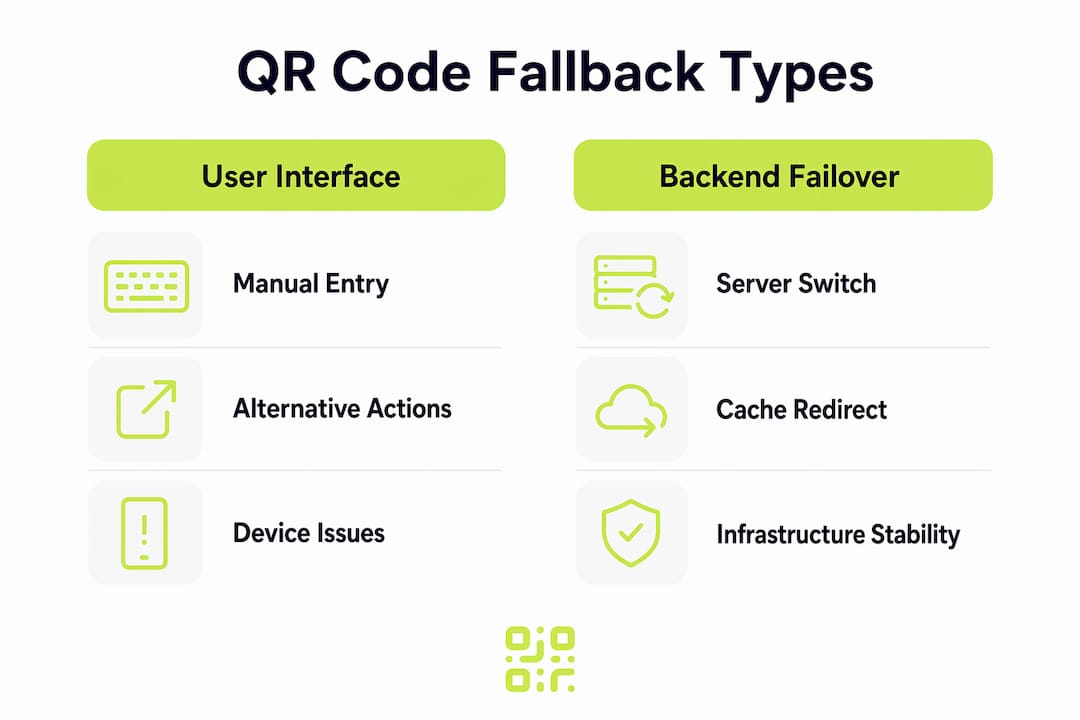
Two distinct categories of fallback exist, and confusing them leads to ineffective solutions. The first is a user-interface fallback. The second is a backend infrastructure failover.
User-interface fallbacks
A user-interface fallback gives the person scanning an alternative way to complete the action manually. The most common example is manual code entry. HYPR implements this directly: when a device camera is broken, the platform generates a six-character alphanumeric code using OWASP-recommended methods, allowing the user to type it in instead of scanning. WWPass takes a similar approach in authentication, offering a prompt such as “Can’t scan? Sign in with security key” as an alternative path.
These fallbacks solve device and environment problems. They do not solve server problems.
Backend infrastructure failover
A backend failover switches the redirect to a secondary server or cached destination when the primary infrastructure fails. This is invisible to the user if done correctly. The redirect simply resolves via a different route. Applying the wrong fallback type leads to ineffective user experiences. A manual entry option will not help if the redirect server is down. Infrastructure failover will not help if the user simply cannot scan.
The table below summarises the key differences:
| Fallback Type | Problem It Solves | Example |
|---|---|---|
| Manual code entry | Broken camera, poor lighting | HYPR six-character activation code |
| Alternative auth method | User cannot or will not scan | WWPass security key sign-in |
| Redirect failover | Server downtime or slow response | Secondary edge node takes over |
| Cached destination | Temporary network disruption | Stale-while-revalidate serving last known URL |
Pro Tip: Always design for both fallback types independently. A UI fallback and a backend failover solve different problems and must be planned separately.
How does fallback work in dynamic QR code systems?
Dynamic QR codes encode a short URL that points to a backend database entry. That entry maps to the real destination. The redirect server is the critical component. If the redirect server is slow or down, QR scans fail or return errors regardless of how well the code itself was printed.
This architecture creates a specific vulnerability. The QR code on a printed poster is permanent. The infrastructure behind it is not. Businesses that rely on a single redirect server with no failover are one outage away from dead codes across every printed asset they own.
The role of redirect type
The choice of HTTP redirect type directly affects fallback behaviour. HTTP 302 redirects ensure the latest destination is fetched on every scan. HTTP 301 redirects cause browsers to cache the destination aggressively, meaning a user’s device may continue resolving to an old or broken URL long after you have updated it. For dynamic QR codes, 302 is the correct choice.
Browser caching creates a secondary problem. Stale cached destinations can cause dynamic QR codes to resolve to outdated URLs unless proper redirect headers and time-to-live values are configured. The stale-while-revalidate caching strategy addresses this by serving the last known good destination while fetching the updated one in the background.
Edge infrastructure and global reliability
Globally distributed edge nodes improve response times and reduce the risk of a single point of failure. Services like Cloudflare Workers replicate redirect data globally, achieving read latency in milliseconds. This architecture means that even if one data centre experiences issues, nearby nodes continue serving redirects without interruption.
Pro Tip: Check whether your QR code platform uses edge infrastructure. A provider relying on a single-region server introduces unnecessary risk for printed campaigns that cannot be recalled.
How does fallback work in QR code authentication?
QR code authentication is a process where a user scans a code displayed on a login screen. The code contains a cryptographic challenge. The user’s device responds, and the session is authenticated. Dynamic authentication codes refresh every 60–180 seconds and expire after a single use, which strengthens security but also increases the chance of a failed scan due to timing.
Fallback in this context is not just a convenience feature. It is a security design requirement. Without it, a user with a broken camera or a slow network is permanently locked out.
How major platforms implement authentication fallback
HYPR and WWPass both treat fallback as a first-class feature of their authentication flows. Here is how a typical fallback-enabled authentication journey works:
- The login screen displays a QR code with a time-limited session identifier.
- The user attempts to scan with their device camera.
- If scanning fails, a fallback prompt appears automatically.
- The user selects an alternative: manual code entry, a security key, or a passkey.
- The alternative method completes the same cryptographic handshake as the QR scan.
- The session is authenticated without any reduction in security.
Fallback options including security keys and passkeys enhance accessibility and reduce failed login attempts. This matters for businesses with diverse user bases, including employees using older devices or users with physical limitations.
The security implications of fallback design deserve attention. A poorly designed fallback that bypasses cryptographic verification creates a vulnerability. The correct approach maintains the same security standard across all paths. HYPR’s manual entry code, for example, is generated using OWASP-recommended methods, not a simple static password.
What steps should you take to implement QR code fallback?
Effective fallback design starts with understanding where your QR codes are most likely to fail. Work through the following steps to build a reliable system.
-
Audit your failure points. Identify whether your biggest risk is device-side (camera quality, lighting) or infrastructure-side (server reliability, redirect configuration). The answer determines which fallback type to prioritise.
-
Add a UI fallback for every user-facing QR code. For authentication flows, this means a manual entry option or an alternative sign-in method. For marketing codes, this means a short URL printed alongside the QR code so users can type it directly.
-
Configure your redirects correctly. Use 302 redirects for all dynamic QR codes. Set appropriate cache headers to prevent stale destinations from persisting on user devices.
-
Choose infrastructure with built-in failover. Owning the redirect domain allows you to switch platforms without reprinting codes. Platforms using edge infrastructure provide automatic geographic failover.
-
Monitor fallback usage with analytics. If a significant percentage of users are triggering fallback, something is wrong upstream. Tracking fallback impact on campaigns helps you identify and fix the root cause rather than accepting fallback as a permanent workaround.
-
Avoid common mistakes. Do not treat fallback as a substitute for good infrastructure. Fallback is a safety net, not a primary strategy. Relying on it too heavily signals an underlying reliability problem that needs addressing directly.
Pro Tip: Print a short URL beneath every QR code on physical materials. This single step costs nothing and provides an immediate UI fallback for any user who cannot scan.
Key takeaways
QR code fallback is the difference between a user completing their journey and hitting a dead end. Designing for both UI fallbacks and backend failover is the only approach that covers every failure scenario.
| Point | Details |
|---|---|
| Two fallback types exist | UI fallbacks solve device problems; backend failover solves infrastructure problems. |
| Redirect type matters | Use HTTP 302 redirects for dynamic QR codes to prevent stale cached destinations. |
| Authentication needs fallback | Platforms like HYPR and WWPass use secure manual entry to prevent user lockout. |
| Edge infrastructure reduces risk | Globally distributed nodes prevent single points of failure for redirect services. |
| Analytics reveal fallback overuse | High fallback rates signal an upstream problem that needs fixing at the source. |
Fallback is not a feature. it is a requirement.
I have reviewed a lot of QR code campaigns over the years, and the ones that fail share a common pattern. The team spent time on design and placement, then assumed the technology would handle itself. Fallback was an afterthought, if it was considered at all.
The reality is that QR code reliability is an infrastructure problem as much as a design problem. A beautifully printed code on a premium brochure is worthless if the redirect server goes down during a product launch. The businesses that understand this treat fallback planning the same way they treat campaign planning: with the same rigour, the same testing, and the same accountability.
What I find most telling is the gap between authentication teams and marketing teams on this issue. Authentication engineers at companies like HYPR have been designing fallback into their systems for years because a failed login is an immediate, visible problem. Marketing teams often do not discover their fallback gap until a campaign is already live and complaints start arriving. The lesson is to borrow the discipline of authentication design and apply it to marketing QR codes before launch, not after.
The trend towards edge computing is genuinely useful here. It removes the single-region server problem that has caused so many outages. But edge infrastructure alone is not enough. You still need the right redirect configuration, the right caching strategy, and a UI fallback for the user who simply cannot scan. All three layers working together is what makes a QR code truly reliable.
— The
Build QR codes that do not break with Qrlytics
If this article has made one thing clear, it is that QR code reliability depends on the infrastructure behind the code, not just the code itself.

Qrlytics is built around this principle. Every dynamic QR code you create on the platform uses redirect architecture designed for permanence. Codes created during an active subscription remain functional regardless of billing status, which removes one of the most common causes of unexpected fallback triggers. The platform also provides real-time scan analytics, so you can monitor whether users are completing their journeys or dropping off. If you want to start without a credit card, the free QR code generator is the fastest way to see how reliable QR infrastructure works in practice.
FAQ
What is QR code fallback in simple terms?
QR code fallback is an alternative method that allows a user to complete the intended action when scanning a QR code fails. Examples include typing a short URL manually or using a security key instead of scanning a login code.
What is the difference between QR code fallback and failover?
Fallback refers to a user-facing alternative path, such as manual code entry. Failover refers to backend infrastructure automatically switching to a secondary server when the primary one fails. Both are needed for full reliability.
Why do dynamic QR codes need fallback more than static ones?
Dynamic QR codes depend on a live redirect server to function. If that server goes down, the code stops working entirely. Static codes encode the destination directly, so they do not rely on external infrastructure.
How does HYPR handle QR code fallback in authentication?
HYPR generates a six-character activation code using OWASP-recommended methods when a user cannot scan. This allows manual pairing without any reduction in security.
Should i print a URL alongside my QR code?
Yes. Printing a short URL next to a QR code provides an immediate UI fallback for users who cannot scan. It costs nothing and protects the effectiveness of printed materials if scanning fails for any reason.