Why QR codes fail: critical errors and proven fixes
TL;DR:
- Most QR codes fail due to avoidable design errors like insufficient quiet zones, poor contrast, and improper sizing, which erode customer trust. Regular testing, real-world placement, and proactive lifecycle management are crucial for ensuring ongoing functionality, especially for dynamic codes prone to platform lapses. Using reliable platforms like QRlytics helps maintain code permanence, track performance, and prevent costly failures over time.
Most QR codes printed on marketing materials never get a second chance. If a customer points their phone at your code and nothing happens, they move on, and that moment of frustration quietly erodes trust in your brand. 87% of QR codes fail due to design errors such as improper sizing, lack of quiet zone, and poor contrast. For marketing professionals and small business owners investing in print campaigns, packaging, or point-of-sale materials, understanding these failures is not optional. It is the difference between a campaign that converts and one that silently haemorrhages budget.
Table of Contents
- The most common reasons QR codes fail
- Data-driven breakdown: how design errors cause QR code failures
- Static vs dynamic QR codes: flexibility with hidden risks
- Field testing and real-world placement: the key to QR code reliability
- What most marketers miss about QR code reliability
- Create QR codes that never fail with QRlytics
- Frequently asked questions
Key Takeaways
| Point | Details |
|---|---|
| Design controls success | Proper size, contrast, and a clear quiet zone are the most critical factors for reliable scanning. |
| Dynamic codes have risks | Dynamic QR codes can break if platforms expire, so always check provider reliability for long-term use. |
| Real-world testing is essential | Always test QR codes in their actual context and with multiple devices before launch to ensure they work reliably. |
| Placement boosts engagement | Codes placed in high-visibility, post-purchase locations get better scan rates and customer interaction. |
| Continuous monitoring required | Track your QR code performance to catch issues quickly and avoid campaign downtime. |
The most common reasons QR codes fail
Now that we know the stakes, let’s break down what specifically goes wrong with QR codes in actual campaigns. The causes tend to fall into a handful of categories, each entirely avoidable with the right knowledge.
Design errors are the primary cause of scan failure across published benchmarks, which means most QR code problems are self-inflicted. That is actually good news, because it means you have full control over fixing them. Here are the most common culprits:
- Missing or inadequate quiet zone. The quiet zone is the blank white border surrounding the QR code. Without it, a smartphone camera cannot reliably detect where the code begins and ends. Many designers crop or ignore it entirely, especially when fitting a code into a tight layout.
- Poor contrast between the code and its background. Dark modules on a dark background, or light codes on pale surfaces, make it nearly impossible for a scanner to distinguish the pattern. This is a particularly common QR code marketing failure when brand colours dominate a design.
- Improper size relative to scanning distance. A code that looks fine on screen may be far too small in print, especially on materials viewed from more than an arm’s length away. The smaller the code, the more precise the scan needs to be.
- Dynamic codes breaking when platforms expire. If you use a third-party platform to generate dynamic codes and the service lapses, every printed code pointing to that platform instantly becomes useless.
- Design embellishments that corrupt the code structure. Logos placed over the centre of a QR code, custom colours applied without proper contrast testing, or decorative patterns overlaid on the data modules can all cause irreversible read failures. Good design strategies for scan success always prioritise function before aesthetics.
Each of these failures is predictable. None of them require a technical background to prevent. You simply need to know what to look for before sending anything to print.
Data-driven breakdown: how design errors cause QR code failures

Let’s dig into the numbers behind these common errors, so you know what actually causes QR code failures and which details carry the most weight.
The data is striking when you look at specific measurements. A 31% failure rate occurs with a 2mm quiet zone, compared to just 3% with an 8mm quiet zone. Codes smaller than 2x2cm produce a 34% failure rate, while properly sized codes drop that figure to around 3%. These are not marginal differences. They represent a tenfold improvement simply by respecting a few basic rules.
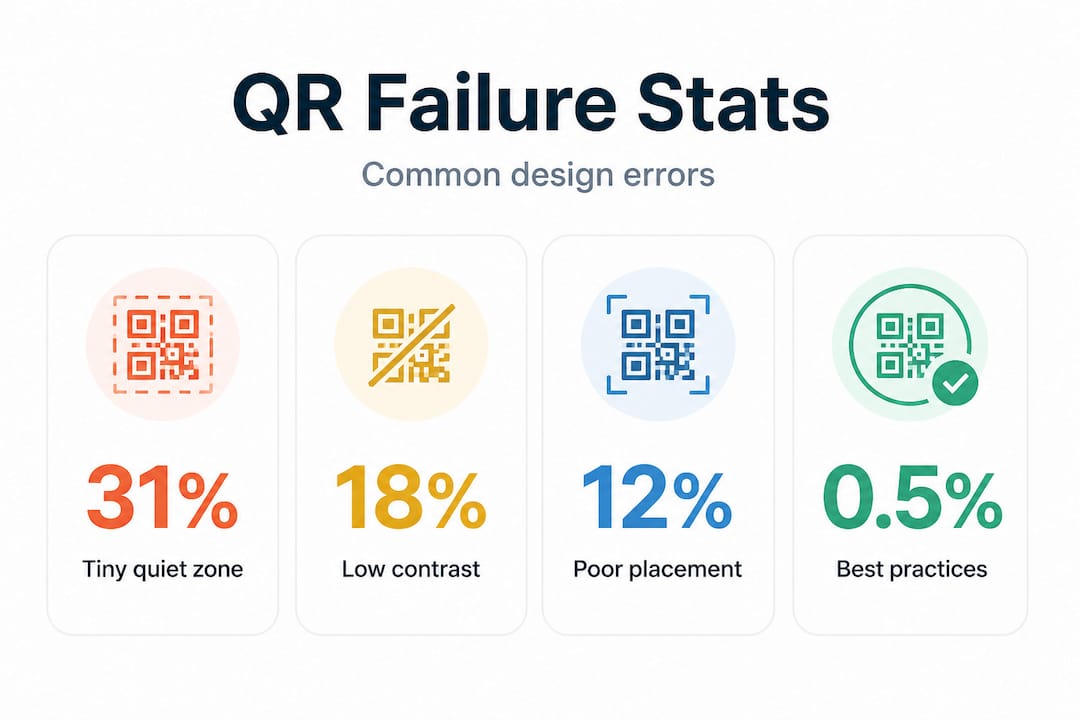
Here is a summary of how each design factor affects scan reliability:
| Design factor | Poor practice | Failure rate | Best practice | Failure rate |
|---|---|---|---|---|
| Quiet zone | 2mm border | 31% | 8mm border | 3% |
| Code size | Under 2x2cm | 34% | 2x2cm minimum | 3% |
| Contrast | Low contrast colours | High failure | Black on white | Near zero |
| Embellishments | Logo over data zone | Variable/high | Logo in centre only | Low |
Missing or inadequate quiet zone causes scanners to fail at boundary detection entirely, meaning the phone cannot even begin to read the code. It is not a partial failure. The scanner simply does not recognise a QR code is present. This is why a tight crop in a layout is so dangerous.
Improper sizing relative to scanning distance produces a different kind of failure: the scanner detects the code but cannot resolve enough detail to decode it. On a poster or banner, this becomes a significant issue because viewers stand much further away than they would with a business card.
“A QR code that fails in the field costs more than the print run. It costs you the customer interaction you designed the campaign around.”
For designer verification tips that cover everything from export settings to colour profiles, a structured review process is invaluable. When working with tools like Adobe Express QR design, always verify the exported file at actual print dimensions before approving artwork.
Pro Tip: Always conduct real-world test scans at the intended print size, in the actual location, and under the lighting conditions the code will experience. A successful scan on your monitor means nothing if the printed version is mounted in a dimly lit corridor.
Static vs dynamic QR codes: flexibility with hidden risks
Besides design errors, code type selection, whether static or dynamic, introduces its own risks. Here’s how to choose smartly.
Understanding the difference between static and dynamic codes is essential for anyone managing long-running campaigns. A static QR code encodes a fixed URL directly into the pattern. Once printed, it cannot be changed. A dynamic QR code points to a redirect URL hosted on a third-party platform, which then forwards the user to your destination. That redirect is what makes dynamic codes flexible and trackable.
| Feature | Static QR code | Dynamic QR code |
|---|---|---|
| URL editable after print | No | Yes |
| Scan analytics available | No | Yes |
| Platform dependency | None | High |
| Risk of deactivation | None | Yes, if subscription lapses |
| Ideal for | Permanent materials | Campaigns, menus, digital assets |
| File size / complexity | Larger pattern | Smaller, cleaner pattern |
The risk with dynamic codes is real and well-documented. Dynamic QR codes risk deactivation if platform trials expire or subscriptions lapse. One documented case involved a restaurant chain whose entire menu system failed after a 14-day trial period ended without renewal, with reprint costs estimated between £4,000 and £40,000. For a small business, that kind of expense is devastating.
Static codes, by contrast, are immune to remote failures because there is no platform in the middle. A static code will keep working for as long as the destination URL itself is live. The trade-off is inflexibility. You cannot correct a typo, update a landing page, or track engagement after the fact.
For most professional campaigns, dynamic QR code best practices suggest using dynamic codes for anything that appears in large print runs or high-value contexts, but only with a platform that guarantees long-term code persistence. That guarantee is not universal. Many free services offer dynamic codes on trial tiers with no commitment to keeping codes active after the trial ends.
A hybrid approach for long-term campaigns, using dynamic codes for flexibility and branding whilst maintaining static backups for disaster recovery, is the most resilient strategy available.
Pro Tip: For large-format prints or high-investment materials, always export a static backup version of your QR code before launch. If your dynamic platform ever has an outage or billing issue, you have an immediate fallback option.
Field testing and real-world placement: the key to QR code reliability
Design and code selection are just the beginning. What truly determines QR code success is how you test and deploy them in the real world.
Even a technically perfect QR code can underperform if it is placed poorly or tested inadequately. This is where many campaigns stumble at the final hurdle. The laboratory environment (your screen, your printer, your phone) rarely matches the real conditions your audience will experience.
Testing QR codes rigorously under real conditions, including variable lighting, different scanning distances, and multiple device types, is what separates campaigns achieving under 5% failure rates from those that frustrate customers. Here is a practical validation process before any campaign goes live:
- Print a full-scale proof at the exact dimensions and on the exact substrate (paper, card, vinyl, fabric) you plan to use for the campaign. Colours and contrast can shift significantly between screen and print.
- Test with at least three different smartphones including both iOS and Android devices, and use at least one older model with a less capable camera. If an older device struggles, your audience will too.
- Test at the intended scanning distance. Stand where your customer will stand. For a counter card, that might be 30cm. For a poster on a wall, it could be a metre or more. Apply the 10:1 rule: make the code at least 10cm wide for every metre of expected scanning distance.
- Test under the actual lighting conditions. A QR code on a restaurant table reads very differently under warm ambient lighting compared to the cool white light of your office. Glare on laminated surfaces is a particularly common and overlooked failure point.
- Confirm the destination URL is live and correct on both mobile and desktop. Check that the landing page loads within three seconds on a 4G connection. Slow redirects lose customers even when the scan succeeds.
Placement matters just as much as the code itself. Post-purchase placement on receipts achieves a 47% scan rate, while codes placed on walls achieve only 18%. This data tells you something important: QR codes perform best when customers have a natural reason to engage, not when they are placed where foot traffic happens to pass by.
Always pair your QR code with a clear call to action. “Scan to see today’s specials” or “Scan for your exclusive discount” gives the customer a reason to act. A bare code with no instruction is a missed opportunity, regardless of how well it scans.
Once your campaign is live, use tracking and testing tools to monitor scan rates by location, device, and time of day. Campaign analytics let you identify underperforming placements early and make adjustments before the majority of your audience has encountered the code.
“Placement and context are not afterthoughts. They are as important as the code design itself.”
What most marketers miss about QR code reliability
With best practice steps in mind, here is an insider lesson on what truly separates QR code campaign winners from preventable failures.
Most marketers treat a working QR code at launch as the finish line. It is not. It is the starting line. A code that works on day one can fail on day 90 for reasons completely unrelated to the original design. Platform changes, subscription lapses, URL redirects that were never updated, and domain expirations are all real and common post-launch failure modes.
We see this pattern consistently: a campaign is designed carefully, tested thoroughly, and launched successfully. Then a platform trial quietly ends. Or a team member cancels a subscription they thought was unused. Or a website migrates to a new domain and the old URLs stop resolving. The code on that printed poster, brochure, or packaging has not changed. But it is now broken, and no one knows until a customer tries to scan it.
The most resilient approach is to treat QR codes as you would treat any mission-critical link in your marketing infrastructure. That means monitoring them actively throughout their lifecycle, not just at launch. It means assigning ownership of each code to a specific person who is responsible for checking it periodically. It means logging the expiry dates of any platforms or subscriptions involved.
Measuring campaign ROI accurately also depends on code reliability. If codes fail silently, your analytics show declining engagement that you might incorrectly attribute to audience fatigue or poor creative, when the real cause is a broken redirect.
One of the most practical steps you can take right now is to audit every live QR code in your current campaigns. Scan each one, check the destination, confirm the platform is active, and document when each campaign material is expected to be retired. This kind of lifecycle management is not complicated. It just requires the discipline to treat QR codes as living assets rather than set-and-forget outputs.
For high-value printed materials such as product packaging, signage, or published catalogues, always maintain both a static backup and a dynamic version. If your dynamic platform ever becomes unreliable, your static fallback can be distributed quickly without a reprint.
Create QR codes that never fail with QRlytics
If you want to secure your campaigns against preventable QR code failures, here is an easy step forward.
At QRlytics, we built our platform specifically around the reliability problem that causes so much wasted budget and lost customer trust. Every code you create with an active subscription remains functional permanently, regardless of billing changes or account status. That means you never have to worry about a platform lapse breaking your printed materials mid-campaign.

You can create free QR codes immediately with no credit card required, or generate dynamic codes with tracking that let you update the destination URL at any time after printing. Every code comes with real-time scan analytics, GDPR-compliant tracking, and global heat maps so you can see exactly where and when your audience engages. If you are ready to track every scan and make genuinely informed decisions about your campaigns, QRlytics gives you the tools to do it without compromise.
Frequently asked questions
How big should a QR code be for reliable scanning?
A printed QR code should be at least 2x2cm for handheld use, and you should follow the 10:1 rule. For every metre of expected scanning distance, make the code 10cm wide to avoid misreads.
What is a quiet zone on a QR code and why does it matter?
The quiet zone is the clear border of white space surrounding the QR code. Without it, scanners fail to detect the code’s edges, causing scans to fail even when the code itself is technically correct.
Why did my dynamic QR code suddenly stop working?
Dynamic QR codes route scans through a third-party platform. If that platform’s subscription lapses, the redirect stops working entirely, even though the printed code has not changed. Always verify platform reliability before committing to a long campaign.
What scan failure rate should I aim for with my QR codes?
A well-designed and properly tested QR code should achieve under 5% failure in real-world conditions. Achieving this requires proper sizing, an adequate quiet zone, high contrast, and testing across multiple devices and environments before launch.