Cut QR Scan Drop Off: Landing Page Speed (LCP Under 2s) for Marketers
Aim for a first meaningful render on mobile of around 1.5 to 2.0 seconds, with the page fully interactive inside 3 seconds. Every additional second of delay costs you conversions, and QR scans are especially unforgiving because the reader has already committed to an action. Before you print or promote a single code, measure the destination on a real phone and strip out any redirect hops standing between the scan and the page.
TL;DR:
- Pages should load within 1.5 to 2 seconds on mobile, with full interactivity achieved in under 3 seconds to minimize abandonment.
- Minimize redirect chains, optimize server response times, and avoid unnecessary scripts to reduce latency and TTFB delays.
- Target a Largest Contentful Paint under 2 seconds on 4G networks, with thresholds over 3 seconds risking significant drops in conversions.
- Use static, pre-rendered pages or frameworks like Next.js to ensure faster load times, especially for high-traffic or repeat visitors.
- Regularly test landing pages on real devices and networks, and keep track of metrics such as LCP, INP, CLS, and TTFB for optimal performance.
Table of Contents
- How to measure QR landing page speed (metrics and tools)
- Speed targets and conversion impact for QR campaigns
- Practical technical checklist: server, hosting and front-end actions
- Mobile UX rules for QR landing pages (message match and above-the-fold)
- Pre-launch QA and testing checklist for QR campaigns
- Publisher expertise: how QRlytics helps keep QR destinations fast and permanent
- Techniques for caching and prefetching to improve repeat visit speed
- Impact of QR code scanning apps or browsers on landing page speed and compatibility
- Guidance on using AMP (Accelerated Mobile Pages) or other frameworks optimised for mobile speed
- How to optimise server response times specifically for QR landing pages
- Best practices for minimising third-party scripts and their impact on mobile speed
- Practical perspective: recurring campaign mistakes and quick wins
- Try QRlytics for a fast, permanent QR destination
- Sources
- FAQ
How to measure QR landing page speed (metrics and tools)
Four metrics matter for a scan-to-convert funnel, and each tells you something different about where you are losing people.
- Largest Contentful Paint (LCP) measures how long it takes the biggest visible element (usually your headline image or hero text) to render. This is your “did the promise show up” number.
- Interaction to Next Paint (INP), which has replaced First Input Delay in most tooling, measures how responsive the page feels once someone taps something.
- Cumulative Layout Shift (CLS) flags visual jumping, which on a small screen can make a tap miss its target entirely.
- Time to First Byte (TTFB) measures server response before any rendering starts, and on QR pages this is often inflated by unnecessary redirects.
Lab tools like Google Lighthouse give you controlled diagnostics, but they don’t reflect what a real customer experiences on patchy mobile data. Field data from the Chrome UX Report, surfaced through PageSpeed Insights, shows how the page actually performs for real visitors. A practical workflow: run PageSpeed Insights first for a quick pass/fail, then Lighthouse for the detailed breakdown, then smoke-test on an ordinary phone with the network throttled to 3G or 4G. If LCP fails, look at server response and image weight; if INP fails, look at JavaScript execution.
Speed targets and conversion impact for QR campaigns
Treat anything over 3 seconds as high abandonment risk. Below that, aim for the render targets above; above it, expect a measurable drop in scan-to-conversion rates.
The numbers behind the target: HubSpot’s testing found that a single extra second of load time can cut conversions and page views in typical experiments, and Google’s own guidance now treats speed as a landing page factor for both search and ad performance.
For QR specifically, the person scanning has already made a decision to act, so a slow load reads as a broken promise rather than a minor inconvenience. Set an internal SLA before launch:
- Target: LCP under 2 seconds on a mid-range phone over 4G.
- Warning threshold: 2 to 3 seconds triggers a review before print.
- Rollback threshold: anything consistently over 3 seconds blocks launch until fixed.
Practical technical checklist: server, hosting and front-end actions
Work through this in order. Each step removes a bottleneck the next one can’t fix around.
- Kill redirect chains. Every hop between the QR scan and the final URL adds latency and a point of failure. Use a shortlink or dynamic QR service with a single, direct redirect rather than a shortener that itself sits behind another redirect.
- Fix hosting and DNS first. Put static assets behind a CDN, confirm DNS resolution and TLS handshake are fast, and check TTFB before touching anything on the front end.
- Defer non-critical JavaScript. Remove third-party tags you don’t need for this specific campaign, and load tracking scripts asynchronously so they don’t block the render.
- Optimise every image. Convert to WebP or AVIF, compress aggressively, use responsive
srcset, and lazy-load anything below the fold. Industry testing consistently shows switching formats and lazy loading shaves multiple seconds off real load times. - Inline critical CSS and preload key resources. Load the hero image and headline font first; everything else can wait.
- Use a sane font strategy.
font-display: swapor a system font stack avoids invisible text while a custom font loads. - Consider server-side rendering or a static page. A pre-rendered campaign page does far less work on the client than a JavaScript-heavy single-page app.
Pro Tip: Before you approve any campaign page for print, load it on a phone with airplane mode toggled to 4G and a full cache clear. What you see in that thirty seconds is what your customer sees on day one.
Mobile UX rules for QR landing pages (message match and above-the-fold)
Speed and design work together here, and one without the other still loses the scan. Keep the exact thing the QR code promised, whether that’s a discount, a menu, or a form, visible above the fold with one clear call to action. Multiple competing buttons force a decision the reader didn’t come to make.
- Avoid heavy hero animations or autoplaying video on first render; they compete with your actual content for bandwidth.
- Use a simple loading skeleton rather than a spinner if any part of the page needs a moment.
- Keep tap targets large enough for a thumb, with sufficient contrast for reading in daylight or under shop lighting.
- Preserve UTM parameters through every redirect so scan data actually maps to conversions, and show a fast confirmation once a form or action completes.
Practical guides on QR-specific pages back this up directly: load times under two to three seconds paired with a single CTA consistently reduce post-scan abandonment. Our own landing page examples that convert show this pattern repeated across retail, hospitality and events.
Pro Tip: If your QR code sits on a poster promising “20% off today,” that offer needs to be the first thing visible, not buried under a hero carousel.
Pre-launch QA and testing checklist for QR campaigns
- Test on real devices and real networks, not just desktop Chrome with throttling simulated. A mid-range Android on patchy 4G tells you more than a flagship iPhone on office Wi-Fi.
- Record the full timeline, from scan to first render to interactive, and note where the delay actually sits.
- Verify redirects, UTM parameters, tracking pixels and form submissions all survive the journey intact. Attribution guidance on measuring QR performance recommends a distinct code per placement precisely so this is traceable.
- Run an A/B test on your highest-friction element, whether that’s the hero image weight or the CTA copy, with a defined success threshold before you commit budget.
- Set up post-launch monitoring with alerts for degraded LCP or a bounce-rate spike, and audit live QR destinations periodically so a broken link doesn’t sit on printed material for weeks.
Publisher expertise: how QRlytics helps keep QR destinations fast and permanent
A slow landing page is fixable. A dead QR code on ten thousand printed flyers is not, and that distinction shapes how QRlytics approaches redirect infrastructure. Codes created on an active plan keep working regardless of billing status, which matters because a broken destination after a subscription lapse is a far worse outcome than a slow one.
- Dynamic URL updates let you swap the destination without reprinting anything, so a slow page can be fixed in minutes rather than a new print run.
- Fast, low-latency shortlink redirection minimises the extra hop time that often hides inside a QR journey.
- Real-time scan analytics and heatmaps show you where and when people scan, which helps you correlate slow load complaints with actual traffic patterns.
Our QR code best practices guide and branded landing page examples walk through templates built with these constraints in mind. Testing a free or dynamic code yourself is the fastest way to see actual redirect latency on your own network.
Techniques for caching and prefetching to improve repeat visit speed
First-time load speed gets most of the attention, but plenty of QR campaigns (loyalty programmes, repeat event check-ins, packaging scanned more than once) depend on a fast second visit too. Browser caching headers on static assets, images, CSS and fonts mean a returning visitor’s phone doesn’t re-download everything it already has.
Set long cache lifetimes on anything that rarely changes, and use versioned filenames so updates still propagate correctly when you do change an asset. A service worker can go further, caching the shell of the page so it renders near-instantly on a second scan even with a poor connection, though this adds engineering overhead that’s only worth it for campaigns expecting genuine repeat traffic.
Prefetching works in the other direction: if your landing page links to a second step (a form, a menu category, a checkout), you can hint the browser to fetch that resource in the background while the user is still reading the first screen. Used sparingly, this makes multi-step QR journeys feel instant between steps. Used carelessly, on a page with limited mobile data, it can waste bandwidth on pages the visitor never reaches, so prefetch only the highest-probability next step, not everything linked from the page.
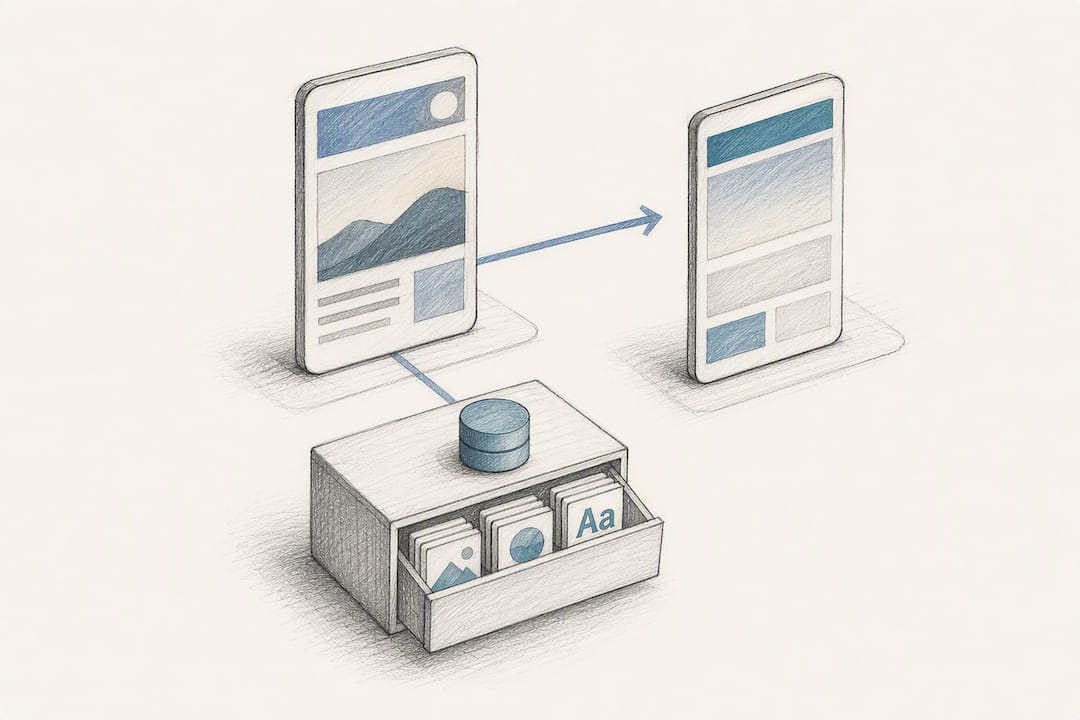
For campaigns with predictable repeat scanning (a table QR code scanned by the same diner across a meal, for instance), combining a short cache lifetime with a lightweight service worker is usually the highest-value investment for the least engineering time.
Impact of QR code scanning apps or browsers on landing page speed and compatibility
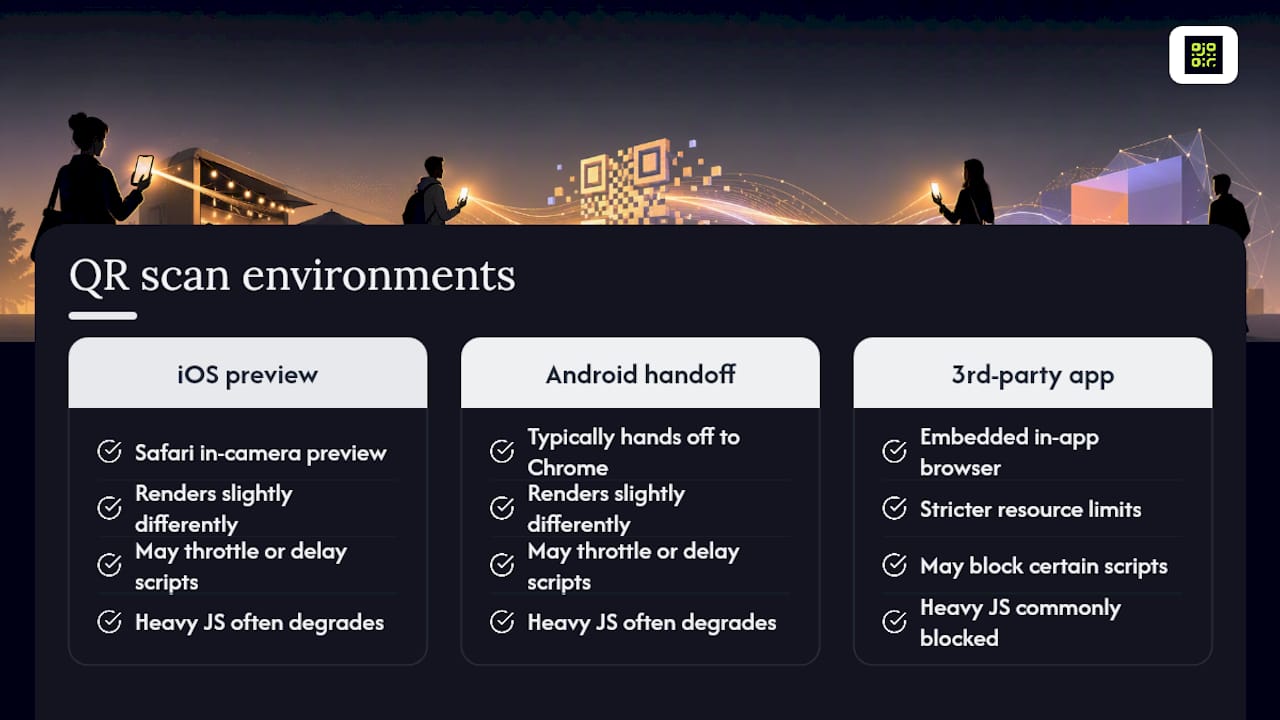
Not every scan opens the same browser. Modern iPhones open QR links in Safari’s in-camera preview, Android phones typically hand off to Chrome, and a meaningful slice of scans still happen through a third-party scanning app with its own embedded browser. Each of these renders slightly differently, and some in-app browsers apply stricter resource limits or block certain scripts outright.
The practical consequence is that a page tested only in full desktop Chrome can behave differently, and sometimes worse, inside a lightweight in-app viewer. Heavy JavaScript frameworks are the most common casualty here, since some embedded browsers throttle or delay script execution more aggressively than a standard mobile browser would.
Test your landing page inside at least one native camera scan flow (iOS and Android) and, where possible, a generic third-party scanner app, rather than assuming a desktop browser test covers it. Keep the page’s core content and CTA working even if JavaScript fails to execute at all. A page that degrades gracefully to plain HTML and CSS when scripts are blocked is far more resilient across the fragmented landscape of scanning tools than one that depends entirely on client-side rendering to show anything at all.
Guidance on using AMP (Accelerated Mobile Pages) or other frameworks optimised for mobile speed
AMP was built specifically to force fast mobile rendering by restricting what a page is allowed to load. That restriction is also its main drawback for campaign landing pages: AMP limits custom JavaScript and third-party scripts quite aggressively, which can conflict with the tracking and personalisation many QR campaigns rely on. Google’s own ecosystem has also shifted away from treating AMP as a ranking or speed prerequisite in recent years, so it’s no longer the default recommendation it once was.
A better path for most QR campaigns is a lightweight, purpose-built static page rather than a full AMP implementation or a heavy JavaScript framework. Modern static site generators and simple server-rendered templates achieve most of AMP’s speed benefit without its scripting restrictions, and they’re easier for a marketing team to update without a developer on standby.
If your organisation already runs on a framework like Next.js or Astro, use their static generation or server-side rendering modes for campaign pages specifically, rather than the client-heavy rendering mode you might use for a full web application. The goal is the same one AMP chased: minimal client-side work before the first meaningful paint, achieved through simpler markup and fewer dependencies rather than through a rigid, restrictive framework.
How to optimise server response times specifically for QR landing pages
Time to First Byte is where QR pages quietly lose seconds that never show up in a design review. Because a QR scan often triggers at least one redirect (from the shortlink to the real destination), server response time compounds across every hop rather than happening just once.
Start by measuring TTFB in isolation, separate from full page load, using the network panel in Chrome DevTools or the field data in PageSpeed Insights. If TTFB is high, the fix usually sits in one of three places: a slow database query generating the page dynamically, a hosting region too far from your audience, or a redirect service adding its own processing delay before forwarding the request.
Hosting the landing page on infrastructure geographically close to your primary audience, or behind a CDN with edge caching, cuts the physical distance data has to travel. For the redirect step itself, the architecture behind your dynamic QR codes matters more than most marketers realise. As one practical guide on QR page optimisation puts it, redirect latency is often the invisible bottleneck in an otherwise fast campaign, because the destination page can be perfectly optimised while the hop getting there adds a full second or more.
Cache dynamic content where you can, avoid database lookups on every single request when a cached response would do, and choose a redirect provider that publishes or can demonstrate low, consistent latency across regions rather than just in its home market.
Best practices for minimising third-party scripts and their impact on mobile speed
Every third-party script on a landing page is a request to someone else’s server, and you have no control over how fast that server responds. A single analytics tag might add negligible weight; stack five tracking pixels, a chat widget, a heatmap tool and an A/B testing script together, and you’ve often doubled your page’s total load work before your own content even starts rendering.
Audit what’s actually running on the page and ask whether each script is essential for this specific campaign. A general-purpose marketing tag manager loaded with a year’s worth of accumulated tags is one of the most common causes of a slow QR landing page, and it’s rarely the design or the images that are the actual problem, as outlined in our conversion rate optimisation tips.
Where you do need third-party tags, load them asynchronously or defer them so they don’t block the main content from rendering first. Tag managers like Google Tag Manager support this natively, but it still requires someone to configure triggers deliberately rather than firing everything on page load. Set a hard budget, for instance no more than two or three third-party scripts per campaign page, and review that list before every launch rather than letting it grow silently over successive campaigns.
If a script exists purely for attribution, check whether your QR platform’s own analytics can cover that need natively, removing the extra request entirely rather than layering another tracker on top of redirect data you already have.
Practical perspective: recurring campaign mistakes and quick wins
Most slow QR pages aren’t slow because of the design. They’re slow because of an accumulated tag manager, an unoptimised hero image, and a redirect chain nobody audited since launch. Fix those three first: they typically recover more milliseconds than any visual polish. When timelines are tight, choose a plainer page that loads fast over a beautiful one that doesn’t.
— The
Try QRlytics for a fast, permanent QR destination
A reliable QR code service provides a redirect layer you can control. Codes created on an active subscription remain functional, dynamic URLs let you update destinations without reprinting, and scan analytics can help identify latency or drop-off patterns.

If you’re planning a campaign and want to see actual redirect latency before you commit to print, create a code with the free QR code generator and test it on your own phone over mobile data today. For campaigns that need editable destinations and ongoing tracking, the dynamic QR code generator gives you that control from the first scan onward.
Sources
- Landing page optimization: The basics explained (with 101 tips)
- How to create a landing page with high ROI + expert and data-backed tips
- Speed is now a landing page factor for Google Search and Ads
FAQ
What is a good load time for a QR landing page?
Aim for first meaningful render around 1.5 to 2.0 seconds on mobile, with full interactivity under 3 seconds. Beyond 3 seconds, abandonment risk rises sharply.
Which metrics matter most for QR landing page speed?
Largest Contentful Paint, Interaction to Next Paint, Cumulative Layout Shift and Time to First Byte cover rendering, responsiveness, visual stability and server speed respectively.
Does redirect latency really affect QR landing page speed?
Yes. Every redirect hop between the scan and the final page adds delay, and it’s often the biggest hidden bottleneck in an otherwise well-optimised page.
Can QRlytics help improve landing page speed for QR campaigns?
Qrlytics offers fast, low-latency redirect infrastructure and dynamic URL updates, letting you swap a slow destination for a faster one without reprinting any codes.
Should I use AMP for QR campaign landing pages?
AMP forces fast rendering but restricts scripting and tracking flexibility. A lightweight static or server-rendered page usually serves campaign needs better today.