QR label guide for businesses: 2026 edition
TL;DR:
- A QR label is a vital connection between physical products and digital experiences, requiring deliberate design, material selection, and management. Using durable materials, appropriate printing technologies, and dynamic codes enhances scan reliability and prolongs usability across environments. Businesses that treat QR labels as strategic assets can leverage data analytics and standards like GS1 for maximum impact and compliance.
A QR label is not just a printed square you stick on a box. It is a direct connection between your physical product and everything your brand can offer digitally. Yet many businesses treat every QR label as interchangeable, printing them on cheap paper, slapping them on packaging, and hoping for the best. That approach costs real money when labels fade, codes break, or the wrong material causes scan failures at the worst possible moment. The smart labels market is projected to reach USD 23.32 billion by 2032, and the businesses winning that opportunity are the ones making deliberate choices about design, materials, and management from the start.
Table of Contents
- Key takeaways
- QR label types, materials, and printing methods
- QR label design best practices
- Emerging standards and smart label technologies
- How to implement and manage QR labels
- My perspective on QR labels as a strategic asset
- How Qrlytics helps you get QR labels right
- FAQ
Key takeaways
| Point | Details |
|---|---|
| Material choice matters | Label substrate and finish directly affect scan reliability, particularly in outdoor or high-traffic environments. |
| Design affects scan rates | Code size, contrast, and quiet zone must be prioritised before adding brand elements to a QR label. |
| Dynamic codes give you control | Dynamic QR codes allow destination URL updates after printing, protecting your investment in printed materials. |
| GS1 compliance future-proofs labels | Standardised QR codes improve interoperability across retail systems and meet emerging regulatory requirements. |
| Analytics turn labels into data | Tracking scan performance by location, device, and time makes QR labels a measurable part of your campaign. |
QR label types, materials, and printing methods
Not all QR labels are built the same, and the gap in performance between a well-chosen label and a poorly chosen one is significant. The substrate you print on, the finish you select, and the printing technology you use all determine whether your code scans on the first attempt or frustrates customers until they give up.
Choosing the right label material
Label materials fall into a few broad categories, each suited to specific environments.
- Paper labels are cost-effective for short-term indoor use such as event badges or shelf tags. They degrade quickly under moisture or direct sunlight.
- Polypropylene (PP) film labels resist water, tearing, and mild chemicals, making them suitable for food packaging and retail products.
- Polyester (PET) labels offer the highest durability and are ideal for outdoor use, industrial equipment, and long-term asset tracking.
- UV-coated and laminated labels add a protective layer that improves longevity but require careful attention to finish. High-gloss labels cause glare and reduce scan rates, particularly under fluorescent lighting or in direct sunlight. Matte or satin finishes are generally more reliable for QR code scanning in high-traffic areas.
Investment in durable, moisture-resistant labels pays for itself quickly when you consider the cost of reprinting materials or the damage to customer trust when a label cannot be scanned.
Comparing printing technologies

| Printing method | Best for | Durability | Volume suitability |
|---|---|---|---|
| Inkjet | Low-volume, colour-rich custom labels | Low to medium | Small batches |
| Laser | Moderate volumes, office environments | Medium | Low to medium |
| Direct thermal | Short-term logistics, receipts | Low (fades with heat) | Medium to high |
| Thermal transfer | Warehouses, outdoor assets, supply chains | High | High |
| Mobile thermal | Field use, on-demand printing | Medium | Low to medium |
Thermal transfer printers outperform direct thermal for long-lasting, fade-resistant labels. Direct thermal prints fade when exposed to heat or sunlight, which means QR codes on warehouse shelving or outdoor packaging become unreadable over time. For high-volume industrial needs, thermal transfer is the professional standard. On the lower end, laser and inkjet printers suit low-volume label production well, with specialist mobile thermal units bridging the gap for field teams.
Pro Tip: If you are producing labels for outdoor use or a supply chain environment, specify thermal transfer printing with a polyester substrate. It costs slightly more per label but eliminates the reprinting cycles that come from faded codes.
QR label design best practices
Good design is not just about how a QR label looks. It is about whether it actually works in the conditions your customers encounter it. A beautifully branded label that fails to scan is worse than a plain one that succeeds every time.
Getting the technical fundamentals right
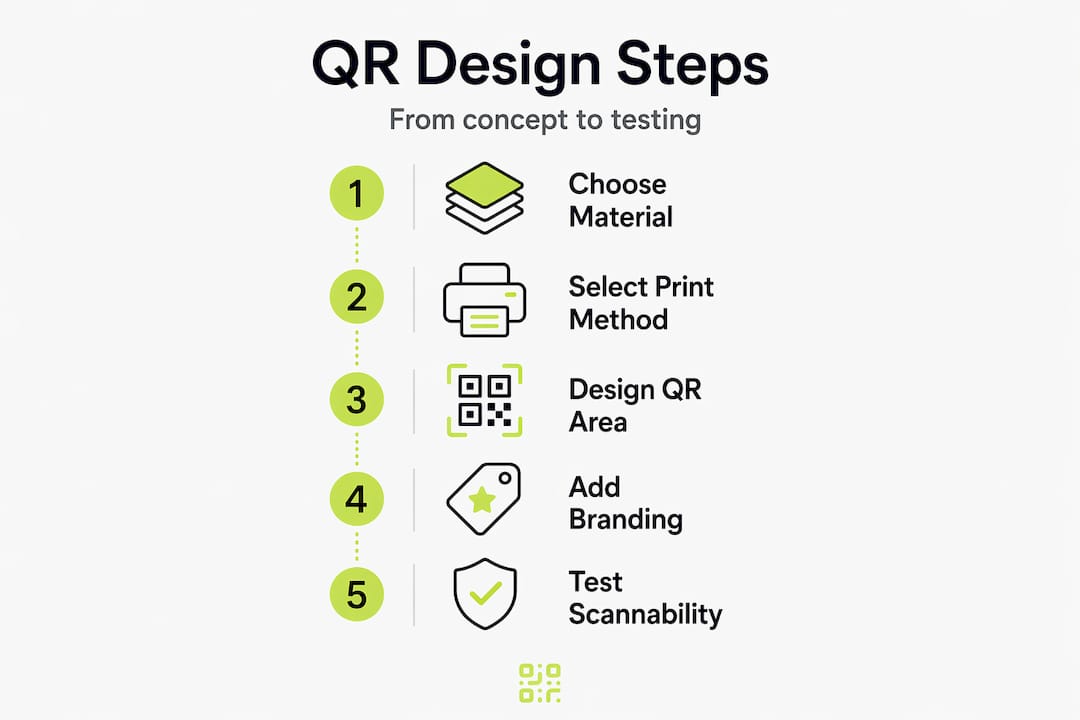
Before you think about brand colours or logo placement, get these elements correct.
- Minimum size: A QR code should be at least 2.5 cm × 2.5 cm for reliable scanning at a normal reading distance. Smaller codes require higher print resolution to avoid dot gain distorting the modules.
- Contrast: The code must have a dark foreground on a light background. Reversing this (light on dark) causes scan failures on many devices. Avoid placing the code over a gradient or texture.
- Quiet zone: Every QR code requires a clear border, or “quiet zone,” of at least four modules wide on all sides. Cutting into this space is one of the most common reasons custom QR labels fail to scan.
- Error correction level: Use level M or level Q when incorporating a logo into the centre of the code. These levels allow 15% to 30% of the code to be obscured while remaining scannable.
Incorporating branding without sacrificing function
You can include your brand colours and logo within a QR label without compromising performance. The key is proportion. A logo embedded in the centre should occupy no more than 30% of the total code area, and it should be placed precisely at the centre, not offset.
Material glossiness and finish directly affect scan rates, so once the design is finalised, test it in the actual lighting conditions where customers will encounter it. A code that scans perfectly on your desk may struggle under the overhead lighting of a retail store.
Pro Tip: Always test your QR label design with at least three different smartphone models before printing at volume. Android and iOS cameras handle contrast and resolution differently, and a 30-second test could save you hundreds in wasted stock.
Dynamic QR codes add another dimension to design strategy. Because the destination URL can be updated after printing, you can print one label design and repurpose it across multiple campaigns without changing the physical label. This makes dynamic QR codes ideal for seasonal promotions, product relaunches, and A/B testing landing pages without touching your physical inventory.
Emerging standards and smart label technologies
The QR label is not standing still. As supply chains and retail environments grow more complex, the expectations placed on labels have grown alongside them.
GS1 compliance and interoperability
GS1-standardised QR codes encode structured product data including Global Trade Item Numbers (GTINs), batch numbers, and expiry dates. This structure allows the same code to be scanned by a consumer’s phone, a retailer’s point-of-sale system, and a logistics platform, each receiving the information relevant to them. Carrefour has implemented GS1-standardised QR codes across 50 private label products, demonstrating that large-scale retail deployment is already underway.
For brands supplying major retailers, GS1 compliance is increasingly a practical requirement rather than an optional upgrade. It ensures your QR label works within the retailer’s existing systems without custom integration work on their side.
Dynamic codes, RFID, and the question of control
Dynamic QR codes allow destination URL updates after printing, but they depend entirely on a resolver service to function. If that service goes offline or cancels your account, every printed label points nowhere. This is one of the most overlooked risks in QR label management and the reason choosing a reliable platform matters more than most businesses realise.
QR codes complement RFID rather than replace it. RFID excels at bulk scanning in supply chains where line-of-sight is not possible, while QR codes engage consumers directly. The two technologies serve different audiences within the same product journey and increasingly appear together on the same label.
Smart labels are becoming a legal baseline for traceability and sustainability compliance in food, pharmaceutical, and electronics sectors. Treating them as a nice-to-have is no longer a viable position for businesses operating at scale.
Data privacy in QR label tracking
When your QR label tracks scan data, you are collecting behavioural information about real users. GDPR compliance requires that this data collection is disclosed and that users have recourse. Choose a platform that processes data within GDPR-compliant frameworks and provides you with clear documentation to support your own compliance obligations. Embedding QR label tracking into a broader omnichannel strategy requires that your data practices hold up to scrutiny.
How to implement and manage QR labels
Knowing what a good QR label looks like is useful. Knowing how to produce, deploy, and optimise it at scale is where the real operational value sits.
-
Select your production method. For small batches of custom QR labels, an online QR label maker combined with a professional print service is the fastest route. For ongoing high-volume needs, invest in a dedicated thermal transfer printer with label design software.
-
Generate dynamic QR codes before printing. Static codes lock you into a single destination permanently. Generating dynamic codes through a platform like Qrlytics means you can update the redirect URL at any time without reprinting. This is especially valuable for seasonal campaigns or product packaging with a long shelf life.
-
Test before you commit to a print run. Print a proof of the label at the intended size and test it in the actual environment, whether that is a warehouse shelf, a retail display, or outdoor signage. Scan with multiple devices and in different lighting conditions. Check that the QR code campaigns resolve correctly and that the landing page loads quickly on mobile.
-
Monitor scan analytics from day one. Once labels are in the field, scan data tells you which products are generating engagement, which locations are performing, and which formats are not working. Review this data weekly during a campaign launch, and monthly during steady-state operations.
-
Maintain label integrity in logistics. Labels applied during manufacturing can be damaged during transit. Specify label placement away from edges and folds, and use an overlaminate where labels will be handled repeatedly. Consider reducing print waste by shifting to dynamic codes that do not require reprinting when campaign details change.
A practical example: a food and beverage brand using QR labels on product packaging updated their recipe video and nutritional guidance four times in one year without reprinting a single label. Their packaging remained consistent while the digital experience stayed current, saving both print costs and the environmental impact of reprinting.
My perspective on QR labels as a strategic asset
I have seen QR labels treated as an afterthought more times than I can count. The code gets added at the last stage of a packaging design brief, printed on whatever material the supplier quotes first, and linked to a homepage that was never designed for mobile. The result is a label that technically exists but delivers nothing.
What I have learned is that the businesses getting real value from QR labels share one trait: they treat the label as a deliberate touchpoint, not a decoration. They think about what happens after the scan before they decide what the label looks like. They choose materials that match their environment. They use dynamic codes so the label stays useful for the life of the product, not just the first campaign.
The comparison with emerging technologies like NFC is worth making honestly. NFC offers a tap-based experience with no need for a camera scan, and it is gaining traction in premium packaging. But QR codes remain the more accessible, lower-cost option for most businesses, and the infrastructure around them, including standardised product data and analytics, is maturing rapidly.
My honest view: if you are not tracking what happens after a QR label is scanned, you are running your marketing in the dark. The scan is the start of a measurable conversation, not the end of a printing job.
— The Qrlytics editorial team
How Qrlytics helps you get QR labels right
If the principles in this guide resonate, Qrlytics gives you the tools to put them into practice without technical complexity.

You can create a QR code instantly with no credit card required. Every code generated through Qrlytics remains functional permanently, even if your billing status changes. That guarantee matters when your labels are printed on thousands of product units.
For campaigns that need flexibility, the dynamic QR code generator lets you update destination URLs at any time. And if you want to understand what your labels are actually doing in the field, Qrlytics provides real-time scan analytics including device data, location heat maps, and campaign comparisons. All data is processed in full GDPR compliance. Whether you are a marketing professional building a campaign or an operations team managing asset tracking at scale, Qrlytics is built to support QR label management that does not break.
FAQ
What is a QR label and how does it differ from a QR code sticker?
A QR label combines a printed QR code with product or branding information on a single substrate, while a QR code sticker typically refers to a standalone adhesive code applied separately. In practice, the terms are often used interchangeably, but QR labels tend to refer to purpose-designed printed items with integrated branding.
What is the best printing method for durable QR labels?
Thermal transfer printing is the recommended method for durable QR labels in logistics, warehousing, and outdoor environments, as direct thermal printing fades with heat and sunlight exposure, making codes unreadable over time.
How do I make a QR label with a logo?
Use a QR label maker that supports error correction level M or Q, embed your logo in the centre at no more than 30% of the code area, and always test the finished design with multiple devices before printing at scale.
Why should I use dynamic instead of static QR labels?
Dynamic QR codes allow you to update the destination URL after printing, which protects your investment in printed materials and gives you full control over where the label sends users throughout the product lifecycle.
Do QR labels work for GS1 compliance in retail?
Yes. GS1-standardised QR codes can encode structured product data such as GTINs and batch numbers. Carrefour’s deployment across 50 products demonstrates that QR labels meeting GS1 standards are already operating within major retail systems.