Marketers: 5 Steps to Keep QR Codes Working After Cancellation
Static QR codes keep working after cancellation because they contain the destination URL directly. Dynamic codes usually stop working because they depend on the provider’s servers to redirect scans, and cancellation typically switches that redirect off. If any of your printed materials matter, export your URLs or convert critical codes to static versions before you cancel, and get the provider’s cancellation terms in writing.
TL;DR:
- Converting critical dynamic QR codes to static versions ensures they remain working independently of provider server status after cancellation.
- Some platforms keep codes active during the paid billing cycle but deactivate or restrict management features once the account is canceled.
- Returning to a free plan or hosting redirects on your own domain can prevent loss of functionality when cancelling a subscription.
- Reactivating codes is often possible through renewal, though original codes may be replaced unless the platform guarantees permanence.
- Always export URLs and scan data, and test static or migrated codes before cancelling to avoid campaign disruptions or dead links.
Table of Contents
- What happens to QR codes when you cancel a subscription
- How can you keep existing QR codes working after cancelling?
- Why do dynamic codes fail but static codes don’t?
- What happens with timing, and can a cancelled code be reactivated?
- What’s the checklist for cancelling without breaking your campaigns?
- What are the legal and compliance considerations around cancelling QR codes?
- Author perspective: common mistakes and pragmatic advice
- How QRlytics keeps your QR codes working after you cancel
- Sources
- FAQ
What happens to QR codes when you cancel a subscription
Provider behaviour on cancellation falls into three broad patterns, and which one applies to you depends entirely on the platform’s terms of service rather than any universal QR standard.
- Deactivation on cancellation. The dynamic redirect is switched off, so a scan returns an error page, a “code not found” message, or simply times out. This is the most common outcome for free and low-cost QR tools.
- Read-only grace period. Some providers let codes keep redirecting until the end of the billing cycle you’ve already paid for, but they lock editing and analytics immediately, so you can’t update the destination or see who scanned it.
- Full persistence with restricted tools. A smaller group of platforms keep the code live indefinitely but strip away management features, meaning the code works but you can no longer touch it.
The practical fallout is what stings: a poster printed six months ago suddenly points nowhere, a client’s event lanyard scans to a dead link, and every scan history you built up for that campaign disappears with the account. Support-centre documentation across the industry describes this same pattern of immediate deactivation, end-of-term access, or stripped editing rights as the norm rather than the exception.
How can you keep existing QR codes working after cancelling?
You have more control over this than most people assume, provided you act before the cancellation takes effect rather than after.
- Downgrade instead of cancelling outright. Some providers offer a free tier that preserves existing redirects even without payment. Check whether your platform has one before assuming full cancellation is the only route.
- Convert critical codes to static versions. A static QR code encodes the final destination URL directly into the pattern itself, so it has no dependency on a provider’s servers at all.
- Export your URL list and host your own redirects. If you control a domain, you can point short links there instead of relying on a third party’s redirect infrastructure.
- Choose a platform that guarantees permanence from the start. QRlytics, for instance, is built so codes created during an active subscription keep working regardless of later billing status, which removes this problem before it starts.
Before deciding which route fits, run through a short checklist: how many codes are affected, do you still need to edit destinations, and how much do you rely on ongoing scan analytics?
Pro Tip: Keep one static backup code for every printed asset that matters, even if you’re happy using dynamic codes day to day. It costs nothing and it’s the cheapest insurance against a provider’s policy change.
Why do dynamic codes fail but static codes don’t?
A dynamic QR code doesn’t actually contain your destination URL. It contains a short redirect key that points to the provider’s server, which then looks up the current destination and forwards the scanner there. That’s what makes dynamic codes editable after printing, but it also means the code is only as reliable as the provider’s willingness to keep that lookup running.
- When an account moves to a cancelled state, the provider’s system typically flags the associated codes the same way. The IBM Security Verify API documents exactly this kind of lifecycle for QR verifications: once a record moves to a CANCELED state, it can no longer be attempted and is eventually removed altogether.
- Payment platforms show the identical pattern. The MAIB MIA QR API has an explicit cancel endpoint for both static and dynamic codes; once triggered, the code’s status becomes “Cancelled” and it can no longer be used for payment, regardless of code type.
- A static QR code sidesteps this entirely. The destination URL sits inside the pattern itself, so there’s no server-side switch to flip. It stays valid until the destination page itself goes offline, which is a decision you control rather than one your subscription status makes for you.
That server dependency is the whole story behind why some QR codes seem to “expire” while others never do.
What happens with timing, and can a cancelled code be reactivated?
Timing varies more than most people expect, and it’s worth confirming before you click cancel rather than after your codes go dark.
- Some services deactivate the moment you cancel; others honour the billing period you’ve already paid for and only switch off access at renewal date. Read the cancellation policy rather than assuming either behaviour.
- Reactivation is often possible simply by renewing your subscription, though whether your original codes come back exactly as they were depends on the provider. Some restore them intact; others issue fresh codes with new redirect keys.
- Always ask support for written confirmation of exactly when deactivation happens and whether there’s any retention or archival window for your data.
- Ticketing and event systems handle this slightly differently: replacing a QR code on a ticket invalidates the old one immediately and keeps an audit trail, a pattern More.com’s ticketing documentation confirms is standard practice for security reasons.
What’s the checklist for cancelling without breaking your campaigns?
Work through this before you touch the cancel button, not after your posters stop scanning.
- Inventory everything. List every active code, note whether each is dynamic or static, and flag which live campaigns depend on it.
- Back up your data. Export destination URLs, scan history, and any analytics reports you’ll want for future reference.
- Convert or migrate what matters. Turn business-critical dynamic codes into static ones, or host redirects on a domain you control.
- Test before you rely on it. Scan your converted or migrated codes on the actual printed materials and packaging, and keep a short overlap window running both systems if you can.
- Document the cancellation. Save the confirmation email and any support replies stating exactly when the old codes will stop working.
Pro Tip: Run your test scans with more than one phone and more than one camera app. A code that resolves fine on your handset can still misbehave on an older Android scanner, and you want to know that before a customer does.
What are the legal and compliance considerations around cancelling QR codes?
Cancellation isn’t purely a technical event. It can also trigger data-handling obligations you’re contractually and, in some cases, legally bound to honour.
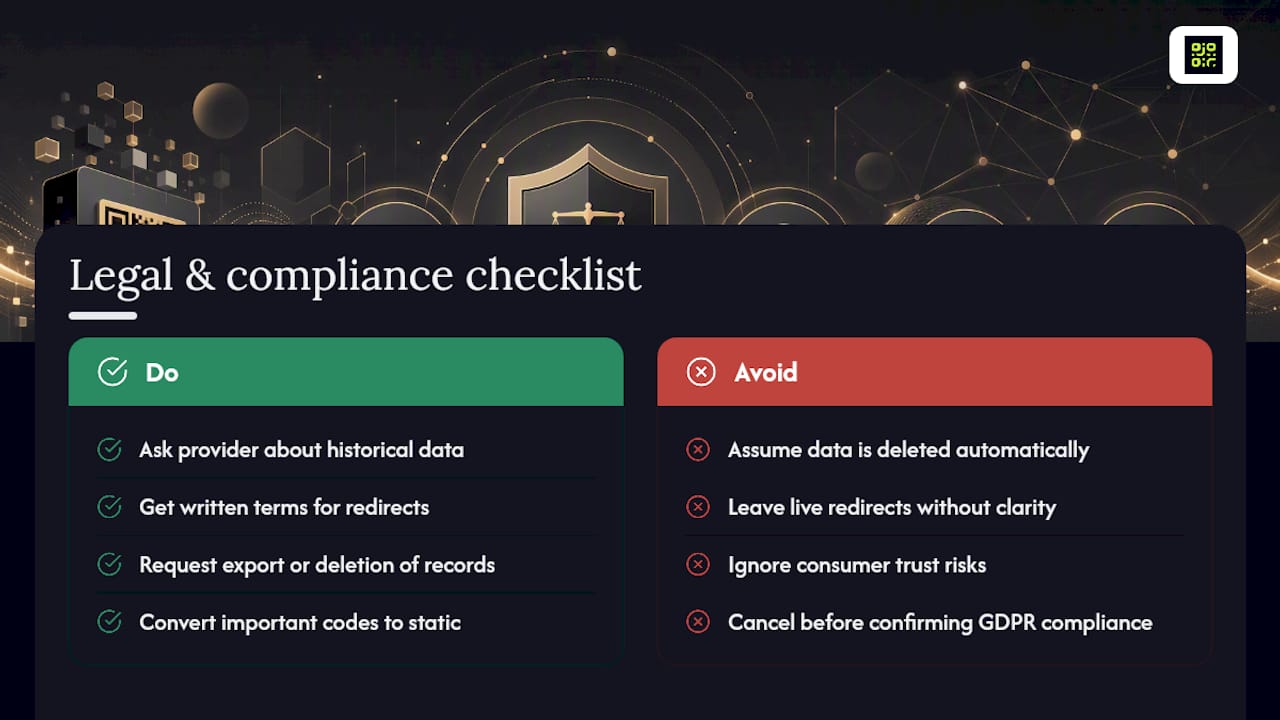
If your QR codes fed into a marketing platform collecting scan locations, device types, or timestamps, that data is personal data under most privacy frameworks, and it doesn’t stop being covered by data protection law just because you’ve stopped paying. Ask your provider what happens to historical scan records after cancellation: do they delete them, retain them for a fixed period, or export them to you on request? A GDPR-compliant platform should be able to answer that clearly, and you’re entitled to a straight answer.
There’s also a consumer-facing angle worth taking seriously. If your QR codes are on physical products, packaging, or signage that stays in circulation after your account is cancelled, a scanner hitting a dead link isn’t just a broken campaign. It can look like a security problem to the person scanning it, and it feeds a wider trust issue around QR codes generally. The safest position is contractual clarity: know, in writing, what your provider does with both the redirect and the underlying data the moment your subscription ends, and factor that into which codes you convert to static before you go anywhere near the cancel button.
Author perspective: common mistakes and pragmatic advice
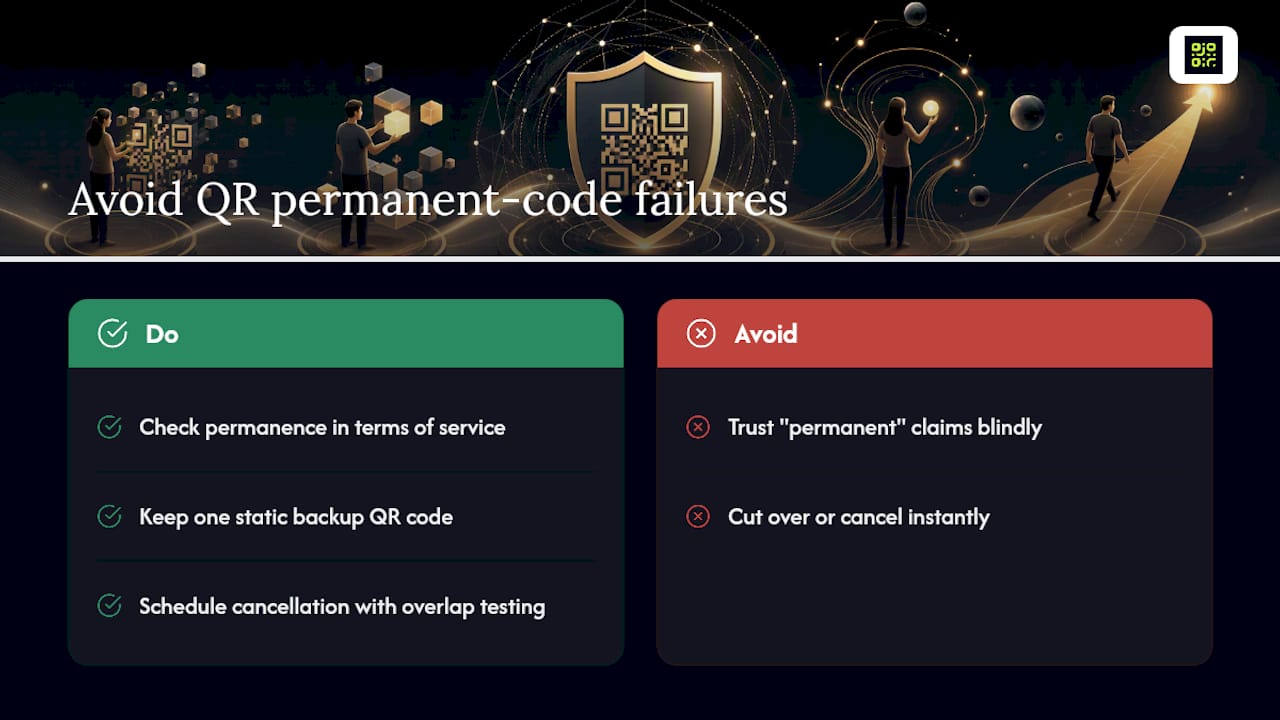
The mistake I see most often is taking a vendor’s marketing claim of “permanent” QR codes at face value without checking the actual terms of service. Permanence is a contractual promise, not a technical default, and the two aren’t always the same thing.
The pragmatic habit that fixes most of this: always keep one static backup code for anything printed. And when you do cancel, schedule it with a short testing overlap rather than cutting over instantly, so you catch broken redirects before a live campaign does.
— The
How QRlytics keeps your QR codes working after you cancel
Some platforms switch off your codes the moment billing lapses. Some platforms keep codes created during an active subscription functional regardless of later billing status, so a poster printed last year still scans correctly even if payment was paused or downgraded.

Some platforms offer permanence alongside dynamic URL updates, real-time scan analytics with global heatmaps, and GDPR-compliant tracking that addresses data-handling questions. If a code needs to survive changes to your account, creating a permanent QR code is the direct way to test that for yourself, and you can also start with the free QR code generator to see how the redirect and analytics behave before committing to anything. No credit card is needed to get started.
Sources
- Cancel a QR code login verification — IBM Security Verify reference
- Cancel Active QR (Static, Dynamic) | maib MIA QR API
- How do I change a ticket’s barcode or QR code? | More.com Ticketing Platform Help Center
FAQ
My QR code has been deactivated. How can I reactivate it?
In most cases, renewing your subscription restores access, though whether the original code is reinstated intact or replaced with a new redirect key depends on the provider. Ask support directly rather than assuming.
Can you reactivate a deactivated QR code?
Often yes, if you renew before the provider’s retention window closes, but some platforms treat cancellation as permanent after a set period and issue a fresh code instead. Some providers avoid this problem by keeping codes created during an active subscription functional regardless of later billing changes.
What is the FBI warning about QR codes?
The warning concerns fraudulent QR codes placed over legitimate ones to redirect scanners to malicious sites, not codes that stop working after a subscription ends. It’s a separate security issue from the cancellation problem covered here, but it’s another reason to prefer platforms with transparent redirect handling.
How do I cancel my QR code subscription safely?
Export your destination URLs and analytics first, convert business-critical dynamic codes to static versions, test the converted codes on your actual printed materials, then cancel with written confirmation of when deactivation takes effect.