QR code legacy support: what businesses need to know

TL;DR:
- Maintaining QR code legacy support is crucial to prevent campaign failures caused by platform and hardware changes. Using vector formats, proactive infrastructure management, and real-time scan analytics help ensure long-term functionality. Most failures are preventable through early migration, proper file choices, and ongoing monitoring.
QR code legacy support is defined as the technical and operational capability to keep QR codes functional despite changes to underlying software platforms, link management systems, or scanning hardware. For businesses running long-term marketing campaigns, this is not a minor technical concern. When Google deprecated Firebase Dynamic Links in august 2025, QR codes failed completely for new users overnight. That single infrastructure change wiped out onboarding flows for apps like ListenWIFI and exposed a vulnerability that affects any organisation relying on third-party linking platforms. Understanding what QR code legacy support means, and how to maintain it, is the difference between a campaign that keeps working and one that silently breaks.
What is QR code legacy support and how does it work technically?
QR code legacy support is the set of technical measures that keep a QR code functional as the systems around it change. The term is not formal industry vocabulary. The recognised concept sits within broader discussions of QR code backward compatibility and dynamic link management. Both terms describe the same practical goal: a code printed on a poster, product, or access card in 2022 should still work in 2026.

Dynamic vs static QR codes
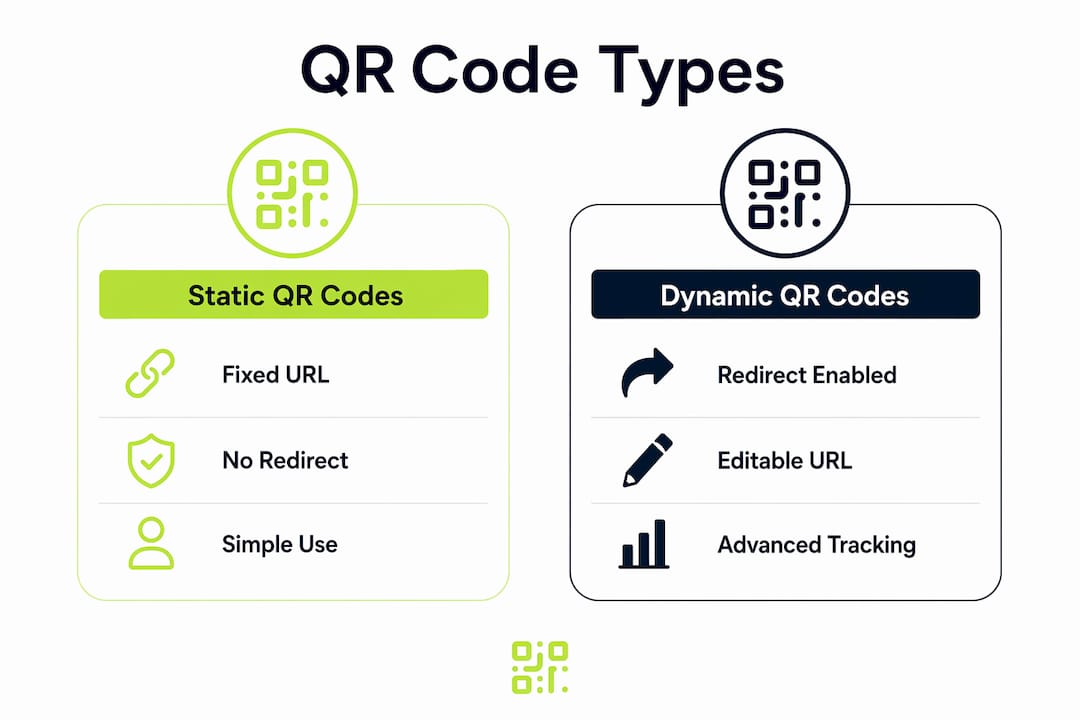
The most important technical distinction is between static and dynamic QR codes. A static QR code encodes a URL or data string directly into the code’s pattern. Change the destination and you must reprint the code. A dynamic QR code encodes a short redirect URL that points to a management platform. You update the destination in the platform without touching the printed code. This redirect layer is where legacy support lives or dies.
The Firebase Dynamic Links lesson
The Firebase Dynamic Links deprecation in august 2025 is the clearest recent example of legacy support failure. All Firebase-based QR codes stopped redirecting new users correctly after that date, breaking app onboarding flows entirely. The fix required migrating to AppsFlyer’s OneLink platform, which offers more resilient deep linking. The lesson is direct: any QR code whose redirect depends on a single third-party platform carries a legacy risk that must be actively managed.
Hardware compatibility and open standards
Legacy support also applies to physical scanning hardware. Dual-role QR readers can retrofit modern QR scanning onto existing card access controllers via a Wiegand interface. This preserves legacy card systems while enabling QR functionality, avoiding a full system replacement. At the software level, ISO/IEC 18004 standardises QR code structure and mandates Reed-Solomon error correction, which allows older codes to remain scannable by modern devices even when partially damaged. Open standards are the foundation of long-term backward compatibility.
Pro Tip: When selecting a QR code platform, confirm that your redirect infrastructure is owned or controlled by the provider, not dependent on a free third-party service like Firebase that can be discontinued without notice.
How do QR code file formats affect legacy campaign compatibility?
File format is a frequently overlooked dimension of QR code legacy support. The format you choose at the point of creation determines whether your code will print cleanly, scale correctly, and remain usable in legacy print workflows years later.
Vector formats and their advantages
Vector formats, specifically SVG, PDF, and EPS, encode QR codes as mathematical paths rather than fixed pixel grids. SVG and PDF scale without quality loss, making them the correct choice for print campaigns where codes may appear at multiple sizes. EPS occupies a specific niche: many established signage and packaging manufacturers still request EPS files because their prepress pipelines were built around that format. Supplying SVG to a printer running a legacy EPS workflow creates friction and potential quality issues.
Raster formats and their limits
PNG is the most common raster format for QR codes. It works well for digital use and small print runs at fixed sizes. The problem is resolution. Raster formats have a fixed pixel count, and enlarging them causes blurring that can cause scan failures. For any campaign where the code will appear at varying sizes, a vector format is the correct choice from day one.
The table below compares the four main QR code file formats across the criteria that matter most for legacy campaign management.
| Format | Scalability | Print quality | Legacy workflow support | Best use case |
|---|---|---|---|---|
| SVG | Unlimited | Excellent | Modern digital and print | Web, digital signage, modern print |
| Unlimited | Excellent | Broad compatibility | Print campaigns, presentations | |
| EPS | Unlimited | Excellent | Legacy prepress pipelines | Specialist print, packaging |
| PNG | Fixed resolution | Good at native size | Digital only | Web, email, small print |
Pro Tip: Always request your QR code in SVG format as a minimum. If you work with a print supplier using legacy prepress software, ask specifically whether they accept SVG or require EPS before submitting artwork.
What practical steps maintain legacy QR code functionality?
Maintaining QR code legacy support is an ongoing operational task, not a one-time setup. The following steps give you a structured approach to keeping codes functional across platform changes, hardware upgrades, and format decisions.
-
Audit your redirect infrastructure before deprecation deadlines. Identify every QR code in active use and confirm which platform manages its redirect URL. If any codes rely on Firebase Dynamic Links or another deprecated service, migrate to a supported platform such as AppsFlyer OneLink before the cutoff date. Failure to migrate results in a 100% failure rate for affected codes.
-
Retrofit hardware with dual-mode readers rather than replacing full systems. A Wiegand interface dual reader adds QR scanning capability to an existing access control system without replacing the controller. This approach reduces cost significantly and preserves the legacy card access that staff and visitors already use.
-
Keep vCard QR code payloads simple for older device compatibility. Avoiding complex data payloads such as embedded photos improves scan success on older Android devices that support only vCard 3.0. Use quoted-printable encoding in vCard 2.1 and 3.0 formats and limit note fields to plain text.
-
Use a dynamic QR code platform with built-in analytics. Platforms like Qrlytics provide real-time scan data that lets you detect a drop in scan rates before a code failure becomes a campaign crisis. Monitoring scan volume over time is the earliest warning signal that a redirect or format issue has developed.
-
Store master QR code files in vector format. Keep SVG or PDF source files for every code you deploy. If a code needs to be reprinted at a larger size or in a new context, you can do so without quality loss. This is a simple archiving habit that prevents avoidable reprinting costs.
What are the most common pitfalls in managing legacy QR codes?
The most damaging mistakes in QR code legacy management share a common cause: assuming that a code that worked at launch will continue working without active oversight.
-
Relying on deprecated platforms without a migration plan. The Firebase Dynamic Links failure is the definitive case study. Broken customer journeys and lost engagement follow immediately when a linking platform is discontinued. Any platform that offers free dynamic linking without a clear commercial model carries a higher deprecation risk.
-
Testing on only one device or OS version. A QR code that scans correctly on a current iPhone may fail on an older Android running a different camera app. Test every code on at least three device types, including one older Android model, before deploying to print.
-
Over-complicating vCard data payloads. Legacy vCard QR codes must use simplified note fields with quoted-printable encoding in versions 2.1 and 3.0 to function on older devices. Adding photos, long notes, or non-standard fields breaks compatibility with a significant portion of older readers.
-
Discarding EPS files from legacy print workflows. If your print supplier uses a prepress pipeline built around EPS, switching to SVG without confirming compatibility can introduce errors. Keep EPS versions of codes used in specialist print contexts until you have confirmed your supplier has moved to a modern workflow.
-
Ignoring scan analytics as a health indicator. A sudden drop in scan volume is often the first sign of a redirect failure. Without QR code tracking in place, you may not discover a broken code until a customer or colleague reports it manually.
Key takeaways
QR code legacy support requires proactive infrastructure management, correct file format choices, and continuous scan monitoring to prevent campaign failures.
| Point | Details |
|---|---|
| Define your redirect dependency | Identify which platform manages each code’s redirect URL and assess its deprecation risk. |
| Migrate before deadlines | Firebase Dynamic Links failed 100% of codes after august 2025; migrate to supported platforms before cutoff dates. |
| Choose vector formats | SVG and PDF scale without quality loss; EPS remains relevant for legacy prepress print workflows. |
| Simplify vCard payloads | Limit data complexity in vCard QR codes to maintain compatibility with older Android devices. |
| Monitor scan analytics | Real-time scan data is the earliest indicator of a redirect or format failure in a live campaign. |
Why legacy support deserves more attention than most marketers give it
Most of the QR code failures I have seen in client campaigns were entirely preventable. The pattern is consistent: a team launches a campaign, the codes work at launch, and then nobody checks them again. Six months later, a platform change or a subscription lapse quietly breaks the redirect, and the team only discovers it when a customer complains.
The Firebase Dynamic Links deprecation in 2025 was a wake-up call for the industry, but it was not a surprise to anyone paying attention. Google had signalled the deprecation well in advance. The organisations that were caught out were those treating QR codes as a set-and-forget asset rather than a managed one.
The hardware side of this is equally underappreciated. I have seen facilities managers spend significant budget replacing entire access control systems when a dual-mode reader retrofit would have achieved the same outcome at a fraction of the cost. Modular upgrades that preserve legacy infrastructure while adding QR capability are almost always the smarter financial decision.
My prediction is that legacy support will become a formal procurement criterion for QR code platforms within the next few years. As more organisations experience the cost of broken campaigns, the question “what happens to our codes if we cancel or if your platform changes?” will become standard due diligence. The platforms that can answer that question clearly will win the trust of serious marketing teams. Understanding QR code consistency is no longer optional for anyone running campaigns at scale.
— The
How Qrlytics keeps your QR codes working through every platform change
If the Firebase Dynamic Links story resonates, Qrlytics was built precisely to address that risk. Every dynamic QR code created on the platform uses Qrlytics-owned redirect infrastructure, meaning your codes are not dependent on a third-party service that can be deprecated or discontinued.

With Qrlytics, you can update redirect URLs without reprinting a single piece of material. Real-time scan analytics give you the visibility to catch performance drops before they become campaign failures. Codes created during an active subscription remain functional permanently, regardless of billing status. For marketing teams and IT managers who need long-term control over their QR code infrastructure, the dynamic QR code generator is the place to start. No credit card required.
FAQ
What is QR code legacy support?
QR code legacy support is the ability to keep QR codes functional despite changes to the software platforms, link management systems, or scanning hardware they depend on. It involves dynamic linking, open standards compliance, and proactive infrastructure management.
Why did Firebase Dynamic Links break QR codes?
Google deprecated Firebase Dynamic Links in august 2025, causing all QR codes that relied on those links to stop redirecting new users correctly. Organisations had to migrate to alternative platforms such as AppsFlyer OneLink to restore functionality.
What file format is best for long-term QR code campaigns?
SVG and PDF are the best formats for long-term campaigns because they scale without quality loss. EPS remains relevant for legacy prepress print workflows used by specialist signage and packaging suppliers.
How do I keep vCard QR codes working on older devices?
Use vCard 2.1 or 3.0 format with quoted-printable encoding and avoid complex payloads such as embedded photos. Simplified note fields and limited data improve scan success on older Android devices.
How can I tell if a QR code has stopped working?
A sudden drop in scan volume in your analytics platform is the earliest indicator of a redirect or format failure. Without active scan tracking in place, broken codes often go undetected until a user reports the issue manually.