Avoid Legal Risk: Launch QR Consent in 7 Steps in the US (ESIGN/UETA)
QR-enabled consent is a practical, legally defensible way to deliver mobile consent forms, provided the landing page and audit trail meet legal and privacy standards. In the United States, ESIGN and UETA already recognise electronic signatures, and a pilot randomised trial found that adding a QR code to consent forms raised response rates when the landing page was fast and simple. Platforms that keep QR links permanent and trackable can make the technical side straightforward. The compliance side still needs your attention.
TL;DR:
- Using dynamic QR codes is safer than static ones because they allow URL updates and revocation without reprinting, especially for long-term campaigns.
- To ensure legal validity, consent records must include signer identity, exact timestamp, URL and form version, device and IP details, and an unalterable storage method.
- Secure QR consent pages require HTTPS, clear privacy notices, minimal redirects, and encryption of stored data to prevent phishing and protect personal information.
- Proper placement, size, and clear instructions boost scan rates, with tested load times under two seconds and physical positioning at eye level being critical factors.
- QR consent is most effective in high-traffic, time-sensitive environments like events or clinical check-ins, but less suitable for complex procedures or unreliable internet settings.
Table of Contents
- How QR code consent works from scan to signature
- Is electronic consent legally valid in the United States?
- What privacy and security risks come with QR consent?
- How do you design a QR code that people actually scan?
- Does adding a QR code actually increase consent rates?
- How do you launch a QR consent form step by step?
- When is QR consent the right fit and when isn’t it?
- Build compliant QR consent workflows with Qrlytics
- Sources
- FAQ
How QR code consent works from scan to signature
A QR-enabled consent process is really just a shorter path to the same legal document you’d otherwise hand someone on paper. The scan replaces the clipboard. Everything after it needs to meet the same bar.
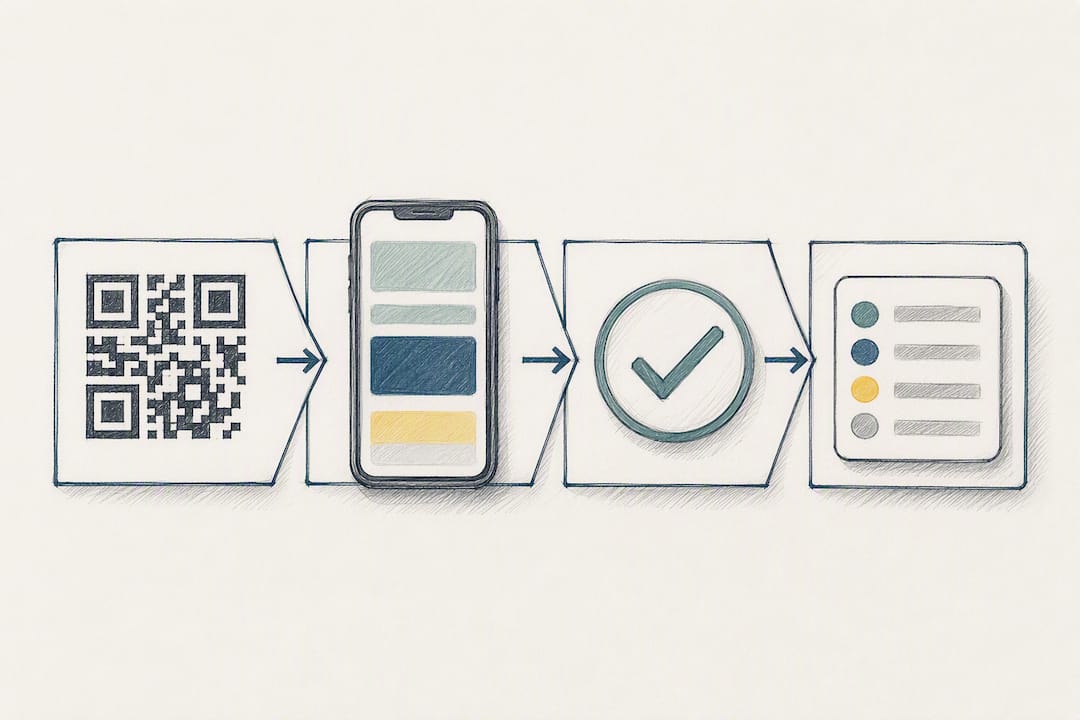
The flow runs in a fixed sequence: someone scans the code, lands on a mobile-optimised page, reads a plain-language consent notice, then actively affirms it through a checkbox, typed name, or drawn signature. That action gets logged as an audit record the moment it happens, not after the fact. Skipping any step in that order, or trying to infer consent from the scan itself, is one of the most common mistakes in this space. A scan tells you someone opened a page. It tells you nothing about whether they agreed to anything.
Your first real decision is dynamic versus static QR codes. A dynamic code points to a URL you can change after printing, which matters more than it sounds. If your consent template gets revised, or you need to revoke access to an old version, a dynamic code lets you redirect scans to the current form without reprinting a single poster or badge. A static code is simpler to generate but locks you into whatever URL you embedded on day one. For anything beyond a single short-lived event, dynamic is the safer default.
Three integration patterns cover most use cases:
- Standalone form: the QR code links to a hosted consent page with no backend integration, suited to one-off events or small pilots.
- EHR or CRM integration: submitted consent records file automatically into existing patient or customer systems, which platforms like Access eForms by Phreesia are built around.
- Follow-up messaging: an SMS or email fires immediately after submission with a link to a preference centre, giving the signer a way to review or withdraw consent later.
Before launch, test landing-page load speed on a mid-range phone, check rendering across iOS and Android camera apps (they handle QR redirects differently), and confirm that revoking or updating the destination URL behaves as expected. A code that fails silently on one device model is worse than no code at all.
Is electronic consent legally valid in the United States?
Yes. Electronic signatures captured through a QR-enabled form are legally recognised in the United States under ESIGN and UETA, provided the platform keeps a proper record of who signed, when, and what exact version of the document they saw. The law doesn’t require a wet signature. It requires proof.
That proof has to hold up if it’s ever challenged, which means your system needs to capture a specific set of facts every time, not just the ones that seem obvious.
- Signer identifier: a name, email, or account ID tied to the specific person who affirmed consent.
- Timestamp: the exact date and time consent was recorded, not the date the record was later reviewed.
- Landing URL and template version: the precise page and wording the signer actually saw, since consent language often changes over a campaign’s lifetime.
- Device and IP metadata: supporting evidence of the scan and submission context.
- Immutable storage: records that can’t be edited retroactively, only appended to or superseded by a new version.
Healthcare and clinical settings carry extra weight. If the consent form touches protected health information, encrypt it, restrict access by role, and if it’s part of a clinical trial, layer in whatever additional review your institutional review board requires. A generic e-signature setup built for retail or events is not automatically fit for a hospital consent workflow, even though the underlying legal framework (ESIGN and UETA) is the same one.
One operational point gets missed constantly: the moment someone signs, send them a link to a preference centre or withdrawal mechanism. Consent that can’t be easily revoked invites regulatory scrutiny, and in some sectors it’s an outright requirement rather than a nice-to-have.
What privacy and security risks come with QR consent?
The security of a QR code has nothing to do with the code itself and everything to do with where it points. Microsoft’s own guidance is blunt about this: a QR code is just a shortcut, and the risk lives entirely in the destination page.
Your consent landing page needs HTTPS with a valid, current certificate, full stop. Avoid chained redirects that bounce a scanner through two or three intermediate domains before reaching the actual form. Those chains are exactly what phishing campaigns exploit, and even when your intentions are clean, a long redirect path looks suspicious to anyone paying attention, which erodes the trust you’re trying to build.
Before you collect a single piece of personal information, the page should state plainly what data you’re gathering and why. Don’t drop non-essential cookies or tracking pixels before the person has actually consented. That sequencing matters both legally and practically. Landing pages built with clean, branded design, like the patterns covered in QRlytics’s guide to branded landing pages, also tend to convert better precisely because they look like they belong to someone accountable.
On the storage side:
- Encrypt consent records at rest using AES-256 or an equivalent standard.
- Use immutable, append-only logging so no record can be silently altered after capture.
- Make records exportable in a standard format for audits, legal requests, or internal review.
- Generate immediate, machine-readable proof of consent, such as a signed PDF or a cryptographic hash of the submission, so the person and your organisation both have something concrete.
Pro Tip: Keep your consent landing pages on your own branded domain rather than a generic shortener. A URL that clearly belongs to your organisation reduces both phishing risk and the hesitation people feel before scanning.
How do you design a QR code that people actually scan?
Placement and visual design decide whether your consent code gets scanned at all, long before anyone reaches the legal text. A code that’s technically perfect but poorly placed just sits there unused.
Keep the call-to-action text next to the code short and specific, something like “Scan to confirm your consent” rather than a vague “Scan here.” Size the code generously; a common failure is shrinking it to fit a corner of a poster, which makes it unreadable from more than arm’s length. Leave a clean quiet zone of white space around the code itself and keep branding subtle rather than overlaid on top of the scannable area, since heavy graphics over a QR pattern are a leading cause of failed scans.
Placement should sit at eye level and in a moment of natural pause: check-in desks, event badges, printed receipts, or waiting-room signage all work because people are already standing still. A code buried in the footer of a busy flyer competes with everything else on the page and loses.
On the landing page itself:
- State an estimated completion time upfront (“takes about 90 seconds”).
- Lead with a clear privacy headline rather than burying it below the form.
- Offer a language toggle if your audience isn’t uniformly English speaking.
- Give the signer a download or confirmation option once they’ve completed the form.
Test variations of your CTA phrasing, code size, and page load speed against each other rather than guessing. Page speed matters more than most teams expect. Aim for a largest contentful paint under two seconds, since every extra second of load time is a chance for someone to give up and walk away before they’ve even read the consent notice.
Does adding a QR code actually increase consent rates?
The clearest evidence available is a pilot randomised controlled trial run with cancer patients being asked to consent to qualitative research. Adding a QR code as an access point for the consent form produced higher completion rates and fewer failures to consent compared with the standard paper-based process.
A pilot randomised trial found that patients offered QR code access to a consent form completed it at higher rates than those given the standard process alone, with fewer instances of failure to consent.
That’s a genuinely useful data point, but it comes with real caveats. It’s one pilot study, in one clinical setting, with a limited sample. It doesn’t tell you the effect will be identical at a trade show, a retail counter, or a school enrolment desk. What it does tell you is directional: when the landing experience is fast and low-friction, offering a QR shortcut removes a barrier that paper forms and manual sign-in sheets create.
The practical interpretation is to treat the QR code as a conversion optimisation layered on top of a compliant process, not a substitute for one. If your landing page is slow, confusing, or asks for information before explaining why, the code itself won’t fix that. The gains observed in the trial came from pairing the shortcut with a landing page that respected the signer’s time, not from the QR code as an isolated feature.
How do you launch a QR consent form step by step?
Getting from a blank page to a live, compliant QR consent form follows a fairly predictable sequence, and skipping steps is where most implementations run into trouble later.
- Draft and version your consent language. Write it in plain terms, assign it a version number, and store the original alongside every future revision.
- Define exactly what data you’ll collect and why. Vague purpose statements are a common weak point if a form is ever challenged.
- Build a mobile-optimised landing page with a short privacy summary up top, a link to the full policy, and HTTPS enabled throughout.
- Generate a dynamic QR code, test its revocation behaviour, and confirm the destination URL updates correctly before you print anything.
- Check physical scannability at the distances and lighting conditions you’ll actually use, whether that’s a poster across a room or a badge at arm’s length.
- Enable audit logging capturing timestamp, template version, and signer metadata, along with export options and a working withdrawal flow.
- Run an accessibility and device compatibility pass, then pilot with a small group before rolling out fully.
Pro Tip: Print a handful of test codes and scan them with three or four different phone models before your first full print run. Camera apps handle redirects inconsistently, and this catches problems while they’re still cheap to fix.
When is QR consent the right fit and when isn’t it?
QR consent earns its keep in high-footfall, time-pressured settings: event check-ins, field operations, contactless registrations, and marketing campaigns where speed and a clean audit trail both matter. Anywhere a paper clipboard used to be the bottleneck, a well-built QR flow usually beats it.
It’s a weaker fit on its own for complex clinical procedures that genuinely need in-person counselling before consent, or for environments with unreliable connectivity, since the form has to load to mean anything. In those cases, QR access can supplement a conversation, not replace it.
What tips the decision in practice is often the platform underneath the code. Link permanence, straightforward revocation, and detailed scan analytics turn a QR code from a static print asset into something you can actually manage and audit over time.
*— The
Build compliant QR consent workflows with Qrlytics
There are alternatives to disposable QR generators for anyone building consent workflows that need to survive months or years of real-world use. Some platforms offer codes that keep working permanently, even if billing lapses, so a consent form printed on badges or posters today doesn’t quietly break six months from now. Dynamic URL updates allow revision of consent templates without reprinting, and some platforms provide GDPR-compliant tracking with scan-level detail suitable for audits.

Start on the free tier and build a test dynamic code around a sample consent form before you commit to anything. Confirm the analytics export gives you the timestamp and version detail your compliance process actually needs, then check the full plan options once you’re ready to scale beyond a pilot. Evaluate the audit logging and export formats properly before your first print run goes to the printer.
Sources
- Effect on Response Rates of Adding a QR Code to Patient Consent Forms for Qualitative Research in Patients With Cancer: Pilot Randomized Controlled Trial
- Microsoft Learn
FAQ
Can someone get your information from a QR code?
A QR code itself only stores a destination link, it can’t extract data from your phone. Risk comes from where that link takes you: a fake or unsecured landing page can be built to harvest information, which is why checking the destination domain and confirming HTTPS matters more than the code itself.
What is the FBI warning about QR codes?
The FBI has warned that criminals sometimes place fraudulent QR code stickers over legitimate ones in public places, redirecting scanners to malicious sites designed to steal login details or payment information. The fix for organisations is keeping codes on tamper-evident signage and using a platform, such as Qrlytics, that lets you monitor and update the destination if a code is compromised.
Can someone else scan a QR code if I take a picture of it?
Yes, a photograph of a QR code is fully scannable by anyone who has access to that image, exactly like the printed original. If your QR code links to a personal or sensitive consent form, treat the image with the same care you’d give any document containing that information.
Is it safe to share your QR code?
It depends entirely on what the code links to. Sharing a code that points to a public menu or event page carries little risk, but sharing one tied to a personal consent record, payment page, or account login should be avoided unless you control who receives it and trust the destination is genuinely yours.