High Quality QR Codes That Never Need Reprinting for Marketers
A high-quality QR code is a vector file (SVG, PDF or EPS) for print, or a properly sized PNG for screens, with a clear quiet zone, strong contrast and a module size matched to its viewing distance. DPI matters less than most guides suggest. Test the code at the distance people will actually scan it from before you commit it to print, and choose a reliable QR code provider that keeps codes working permanently once a campaign is live.
TL;DR:
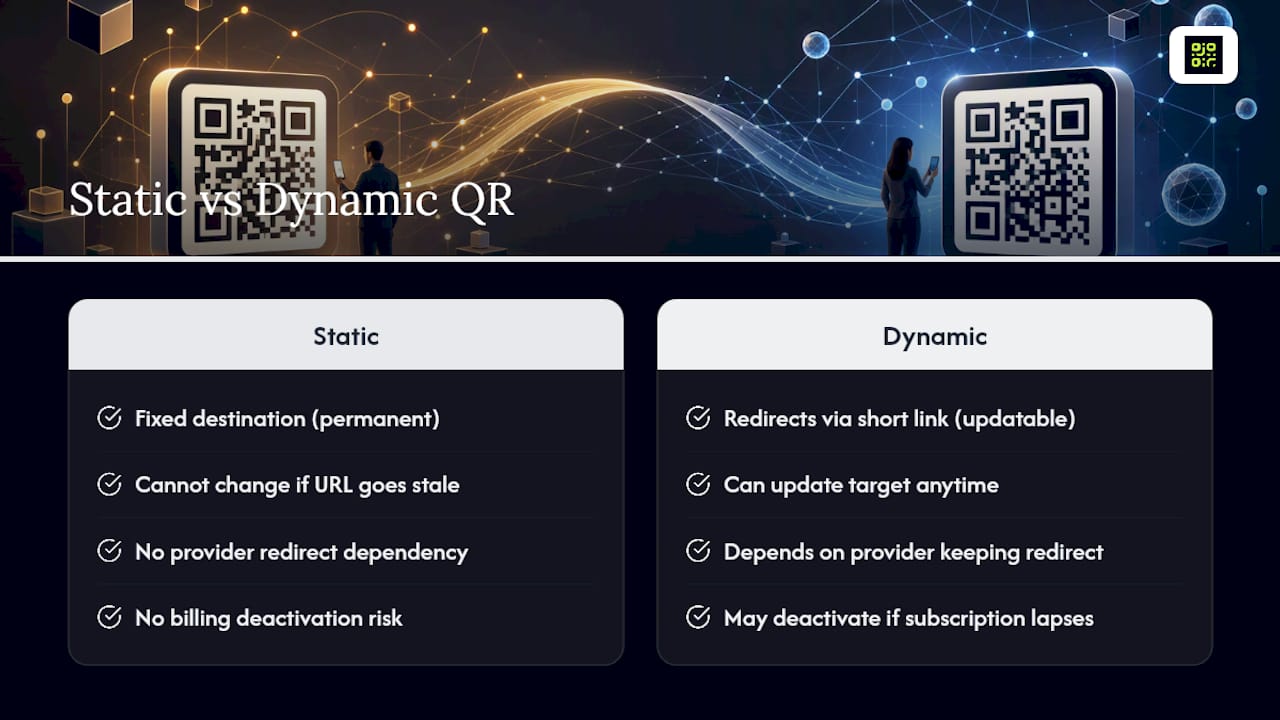
- Static QR codes are permanent but cannot be updated if the destination URL changes, while dynamic codes allow mid-campaign edits but depend on the provider’s long-term reliability.
- Vector file formats like SVG or PDF are preferred for print because they scale without losing quality, with 300 DPI recommended for final printed resolution on standard substrates.
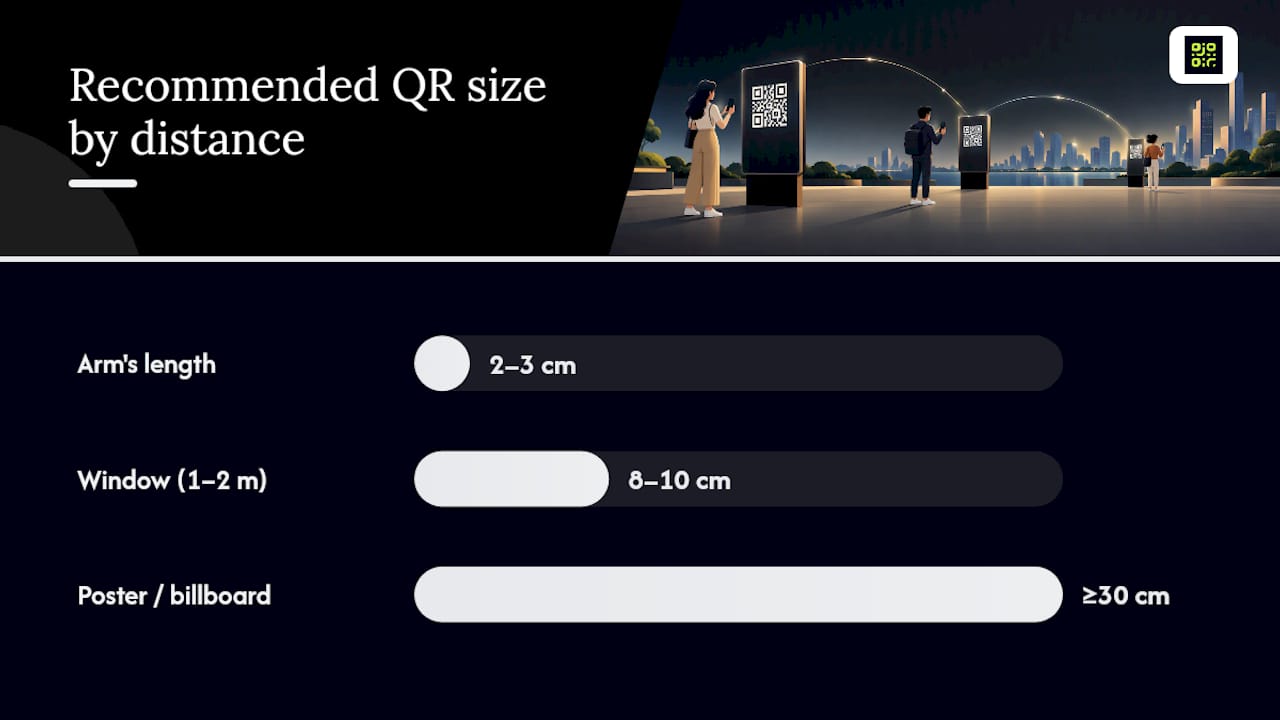
- QR code size should match the viewing distance, with at least 2 to 3 centimeters for arm-length scans and 30 centimeters for broad-distance scanning, tested on the actual material before printing.
- Proper branding involves limiting logos to 20-30% of the code area, maintaining high contrast, and preserving the quiet zone, while avoiding low-contrast or decorative patterns that impair scanability.
- Always test printed codes at the actual distance, under real lighting conditions, using multiple devices before mass production to prevent missed scans due to size, substrate, or glare issues.
Table of Contents
- How do you create a high-resolution QR code?
- Which file format and resolution actually work for print?
- How big should the code be for the viewing distance?
- How do you add a logo and colours without breaking the scan?
- Static or dynamic: which one protects your printed materials?
- What should you test before printing or publishing?
- Are QR codes safe to scan, and what did the FBI warn about?
- Why permanence and analytics decide whether a QR campaign actually works
- Get permanent, brandable QR codes without the reprint risk
- Sources
- FAQ
How do you create a high-resolution QR code?
Getting from idea to finished file takes four decisions, not one. Skip any of them and even a sharp-looking code can fail on the shop floor or at the till.
- Decide the content and whether it needs to change later. A code linking to a fixed PDF menu can stay static. A code on a billboard, a product label, or anything you might need to redirect later needs a dynamic link.
- Shorten the destination URL where possible. A long tracking string with dozens of parameters increases the code’s data density, which packs the modules tighter and makes scanning harder at distance. Clean URLs scan more reliably.
- Personalise carefully. Add a logo only if it sits inside a safe zone, pick colours with strong contrast against the background, and never touch the quiet zone, the blank border that lets scanners lock on.
- Export in the right format for the destination. SVG or PDF for anything going to a printer, PNG for anything staying on a screen. Never export as JPEG.
Static vs dynamic QR codes is the decision that shapes everything downstream, including whether you can fix a typo in the destination URL after 10,000 copies are already printed.
Which file format and resolution actually work for print?
Vector formats (SVG, PDF, EPS) have no resolution ceiling. A vector QR code scales from a business card to a shopfront window without a single pixel degrading, which is why vector artwork is the preferred handoff format for print jobs of variable or large size. Raster PNG is fine when the final size is fixed and known in advance, such as a code destined for a website banner or an email footer.
The standard for offset and digital print is 300 DPI at the final printed size. Here’s what that means in pixels for common formats:
For anything above 30 cm, drop to 150 DPI and export as vector rather than trying to scale a raster file. JPEG compression softens the sharp edges between modules, and file DPI metadata can lie: a PNG might claim 300 DPI while actually holding far fewer usable pixels than the label suggests. Always check pixel dimensions directly, not the metadata tag.
How big should the code be for the viewing distance?
Resolution on your screen means nothing if the printed code is too small for the scanner to resolve at the distance a person is standing. This is a physical size problem, not a file quality problem.
DENSO Wave, the company that invented the QR code, recommends at least four dots (printer pixels) per module for stable scanning, whatever printer or press you’re using. Fall below that and modules blur into each other, especially on absorbent stock or through lamination glare.
As a working rule of thumb: a code meant to be scanned from arm’s length (a menu, a business card) needs roughly 2 to 3 cm minimum. A code on a shop window meant to be scanned from a metre or two away needs 8 to 10 cm. A billboard or bus-stop poster scanned from several metres out needs 30 cm or more. Viewing distance should drive size decisions before file resolution does, and it’s worth testing the printed proof at that exact distance, not just on your desk.
Substrate matters too. Matte paper holds ink crisply; glossy stock and lamination throw reflections that confuse a camera’s autofocus. Fabric and textured surfaces spread ink slightly, so bump the module size up when printing on either.
How do you add a logo and colours without breaking the scan?
Branding a QR code is where good intentions cause the most scan failures. A few rules keep it safe:
- Keep any logo or graphic overlay to roughly 20 to 30% of the total code area, centred, never covering the three corner “eye” markers.
- Choose colour combinations with strong contrast; dark modules on a light background remain the safest bet, and inverted (light-on-dark) codes need extra testing.
- Preserve the quiet zone at full width on all four sides. It’s tempting to crop it tight for a cleaner layout, but scanners use that blank border to find the code’s edges.
- Custom eye shapes and rounded modules are usually safe if contrast stays high; skip them on very small codes where fine detail disappears.
- Avoid decorative patterns on thin modules, low-contrast palettes, or dark-on-dark colour schemes altogether, since high resolution alone doesn’t guarantee a scan when contrast and quiet zone are compromised.
- Always add a short line of text near the code (“Scan for menu”, “Scan to book”) as a fallback if the code itself ever fails.
Static or dynamic: which one protects your printed materials?
A static code has its destination baked in permanently. It never breaks, but it also never changes: if the URL goes stale, the printed code goes with it. A dynamic code redirects through a short link you can update, which is what makes campaign tracking and mid-run corrections possible at all.
The catch with dynamic codes is that they depend on the provider keeping that redirect alive. Some free generators quietly deactivate codes the moment a subscription lapses or a payment fails, and every poster, sticker or menu carrying that code turns into a dead end overnight. Ask any provider directly what happens to a code’s function if you downgrade or cancel.
Some providers offer guarantees that codes created during an active subscription keep working permanently, regardless of later billing status. That single guarantee is what turns a printed batch of codes from a liability into a durable, trackable channel. Pairing permanence with scan analytics also means you’re not reprinting materials just to fix a broken link, you’re using scan data to improve the next campaign.
What should you test before printing or publishing?
Run this before any code goes to press:
- Scan it at the actual distance people will use it from, not from your desk, using at least two different phones and both the native camera and a dedicated scanner app.
- Check it under the lighting and on the substrate you’ll actually use, glossy laminate and matte card behave differently under the same torch.
- Open the scanned preview and read the URL before tapping through. A genuine destination shows a recognisable domain, not a shortened redirect you don’t recognise.
- Send printers a vector file with exact centimetre dimensions specified, and never let anyone resave it as a JPEG along the way.
Pro Tip: Print a single test sheet at actual size before running the full batch. A code that scans fine on your monitor can fail entirely once ink spreads slightly on real stock.
Are QR codes safe to scan, and what did the FBI warn about?
The FBI warned in July 2025 about unsolicited packages containing QR codes used to initiate fraud, advising people not to scan codes from unknown senders. The bureau has also flagged “quishing”, QR-code phishing, where attackers paste counterfeit stickers over legitimate codes or redirect scans to fake payment portals.
A polished, high-resolution code says nothing about whether it’s genuine. Before scanning anything unfamiliar:
- Preview the destination URL and check the domain matches who you expect, don’t tap through blind.
- Never enter login details or card numbers on a page reached by scanning a code, especially one on an unsolicited flyer or package.
- If a scan leads to a payment or login screen, navigate to that organisation’s known site directly instead.
Organisations distributing their own codes should train staff on quishing, apply device management policies, and use phishing-resistant multi-factor authentication so a single scanned link can’t compromise an account.
Why permanence and analytics decide whether a QR campaign actually works
The technical guidance in this piece only pays off if the code still works six months after printing. A permanently redirecting link protects the money already spent on print runs, packaging, and signage, and it protects the trust a customer places in your brand when a scan actually goes somewhere.
Analytics turn that same code into a feedback loop: which locations get scanned, at what time, on which device. That data should shape the next print run, not just decorate a dashboard.
Run the QA checklist above on every batch. Then choose a platform built around permanence, not one that treats your printed materials as disposable.
— The
Get permanent, brandable QR codes without the reprint risk
Some QR code platforms address the permanence problem by offering codes that keep working even if billing status changes later, so a printed batch never turns into wasted stock. These platforms often provide dynamic redirects you can edit after the fact, real-time scan analytics with location heatmaps, GDPR-compliant tracking, and branding control over colours, logos and quiet zones, alongside easy onboarding processes.

Start on the Free plan to generate your first dynamic QR code, run the testing checklist from this guide against a printed proof, and check your scan analytics before committing to a full print run. If the numbers make sense for your campaign volume, the Pro plan unlocks unlimited codes and deeper reporting when you’re ready to scale.
Sources
Key claims here draw on FBI alerts on quishing and unsolicited QR fraud, DENSO Wave’s module-size guidance, and technical DPI and pixel guidance for print designers. Marketers weighing the ROI case for tracked campaigns can also see this analysis of analytics and marketing ROI.
FAQ
How do I get a high-resolution QR code?
Generate the code at vector format (SVG or PDF) rather than a fixed-pixel PNG, since vector artwork has no resolution ceiling and scales cleanly to any print size. If you must use a raster file, export at 300 DPI at the final printed dimensions, not just a large pixel count with no size target attached.
What is the FBI warning about QR codes?
The FBI warned that unsolicited packages containing QR codes have been used to initiate fraud schemes, and advises against scanning codes from unknown senders. The bureau also tracks “quishing” attacks, where fake codes redirect scans to fraudulent payment or login pages.
Who makes the best QR codes?
The best QR codes come from generators that let you export vector files, control colour contrast and quiet zone width, and guarantee the code’s destination link stays active over time. Qrlytics builds its platform around that last point specifically: codes created during an active subscription keep redirecting permanently, which matters more for print reliability than any single design feature.
What is the most reliable way to test a QR code before printing?
Scan the printed proof at the actual distance it will be viewed from, using more than one phone and scanning app, ideally one iPhone and one Android device. Also check it under real lighting and on the actual substrate, since glare, lamination and low contrast cause more scan failures than low resolution does.