Explaining QR identity verification: how it works in 2026
TL;DR:
- QR identity verification confirms authenticity by linking scans to a live issuer server, not by the QR code itself.
- It enables rapid, secure checks on mobile devices without requiring specialized apps, making it practical at scale.
QR identity verification is the process of confirming a person’s or document’s authenticity in real time by scanning a unique QR code linked to an issuer’s secure system. The industry term for this is QR code document verification, and it covers everything from passport checks to employee onboarding. The QR code itself is not the security feature. True security comes from the issuer’s live validation infrastructure, which the QR code simply points to. This distinction matters enormously for anyone building or using a verification system. Cryptographic signatures and real-time database checks do the actual work. The QR code is the key that opens the door, not the lock itself.
How does QR identity verification work in practice?
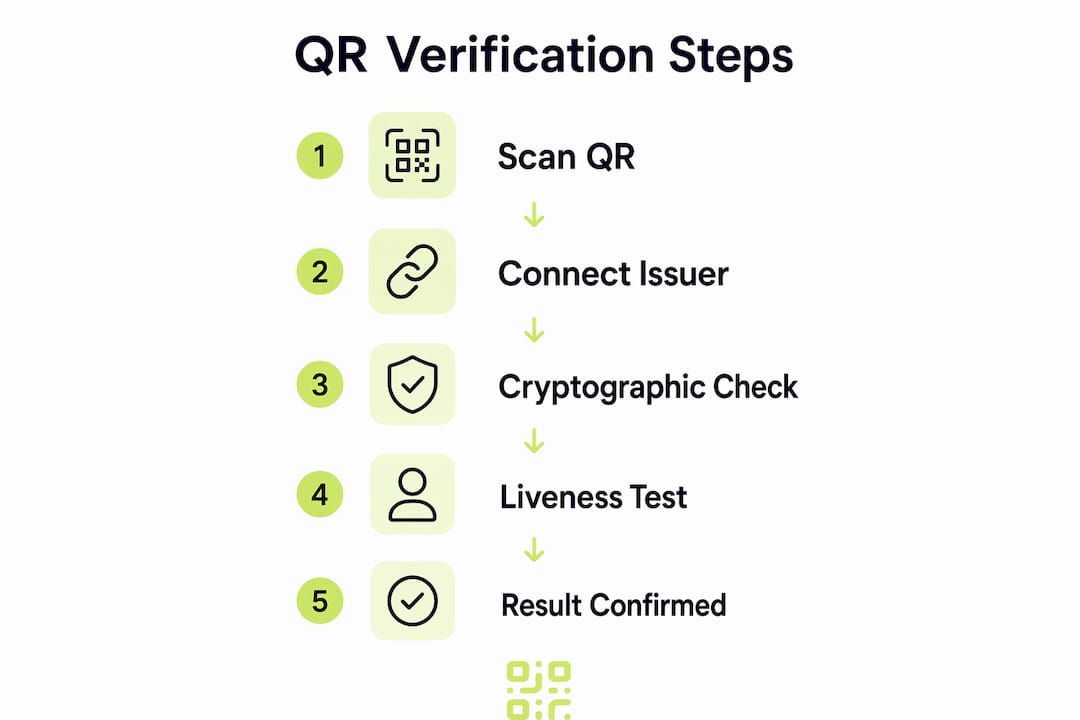
The QR code authentication process follows a clear sequence of steps. Understanding each one helps you spot weak points and choose the right system.
-
Scan with a standard camera. Verification completes in under 3 seconds using any smartphone camera, with no dedicated app or account required. That speed makes QR verification practical at scale, from airport gates to retail counters.
-
The QR code resolves to a secure URL. The code contains a cryptographic pointer, not raw identity data. That pointer directs the scanner to a verification page hosted on the issuer’s own domain.
-
Server-side cryptographic checks run automatically. Every scan triggers a full recomputation of the document hash, a signature check, and a certificate revocation query using OCSP or CRL protocols. These checks confirm the document has not been altered since it was issued.
-
The result is returned to the scanner. A clear pass or fail appears on screen, typically within the same 3-second window. No manual review is needed.
-
Advanced systems add liveness detection. For high-assurance contexts such as financial onboarding, liveness detection confirms the presenter is a live person, preventing replay attacks where a fraudster shows a photo or screenshot of someone else’s document.
Pro Tip: Always check that the verification page URL matches the official issuer domain before trusting a result. The domain is the trust anchor, not the QR code pattern itself.
The entire process replaces what used to require a trained human reviewer and several days of manual checks. For businesses processing high volumes of identity documents, that shift is significant.

What makes QR identity verification more secure than traditional methods?
Traditional verification methods rely on static data. An emailed verification link carries its payload in the URL itself, meaning anyone who intercepts the link can access the same information. A QR code works differently.
QR-based verification survives physical reproduction, including printing and screenshots, because the code resolves to live issuer infrastructure rather than carrying payload data. You can photocopy a QR-verified document a hundred times and each scan still checks against the same live database. An emailed link copied and forwarded carries no such guarantee.
The security architecture rests on three layers:
- Cryptographic proof. The issuer signs the document with a private key. The verification server checks that signature against the issuer’s public certificate on every single scan. Any alteration to the document breaks the signature and the check fails.
- Certificate revocation. If an issuer revokes a certificate, every subsequent scan returns a failure. This means stolen or cancelled credentials cannot be reused.
- Domain authenticity. The verification page must be hosted on a legitimate issuer domain. Domain legitimacy is the primary trust anchor against spoofing attacks, where a fraudster creates a fake verification page that mimics the real one.
“The QR code acts as a cryptographic pointer to issuer-held live records. The security is in the infrastructure, not the pattern printed on the page.”
Liveness detection adds a fourth layer for enterprise-grade use cases. Combining QR scanning with liveness checks prevents an attacker from presenting a printed copy of someone else’s verified document. The system confirms both that the document is genuine and that the person holding it is physically present.
This architecture is why QR verification is replacing static digital signatures and manual document inspection across regulated industries. A static signature tells you a document was valid when it was signed. A QR-linked live check tells you it is valid right now.
What are the practical uses and benefits of QR identity verification?
QR code identity checks appear across a wide range of real-world contexts. The common thread is the need to confirm authenticity quickly, without burdening the user with apps or accounts.
Common use cases include:
- Customer onboarding and KYC. Automated KYC systems parse QR data, check digital signatures, and run liveness checks, replacing multi-day manual review processes. A bank or fintech can verify a customer’s government-issued ID in seconds rather than days.
- Document verification at borders and venues. Passports, driving licences, and event tickets embedded with QR codes can be checked instantly by staff with a standard phone.
- Secure access control. Businesses issue QR-coded credentials to employees or contractors. Scanning at entry points confirms the credential is current and has not been revoked.
- Age and country verification. Rather than sharing a full identity document, a user can present a QR code that returns a simple yes or no answer to a specific claim.
Pro Tip: For privacy-sensitive use cases, look for systems that use cryptographic proofs rather than full document sharing. Privacy-first verification models share only a verified claim, such as “over 18” or “UK resident”, without exposing the underlying personal data.
The benefits of QR verification are concrete and measurable. Speed is the most obvious: a check that once took days now takes seconds. Cross-border validity is equally significant. A QR-verified document issued in one country can be checked by a verifier in another without any shared database agreement, because both parties connect to the same issuer infrastructure. App-free operation removes friction for end users, which matters for consumer-facing businesses where drop-off rates are a real concern.
Understanding QR identity checks also helps businesses design better user journeys. When you know the verification is instant and requires no download, you can build it into checkout flows, registration pages, and access gates without worrying about user abandonment.
What challenges should you be aware of with QR identity verification?
QR identity verification is not without limitations. Knowing them helps you deploy the technology responsibly.
- Spoofed verification pages. If a fraudster creates a fake verification page and encodes its URL into a QR code, a user who does not check the domain will see a convincing but false result. Domain verification is not automatic on the user’s side. It requires deliberate attention.
- Issuer infrastructure dependency. The entire security model depends on the issuer maintaining their verification server. If that server goes offline or is compromised, every QR code it backs becomes unverifiable. Businesses relying on third-party issuers should confirm uptime guarantees and incident response policies.
- QR code as stand-alone security is a misconception. A QR code printed on a document does not make that document secure by itself. Without a live issuer backend performing cryptographic checks, the QR code is just a pattern. This misconception is common and leads to poorly designed systems.
- Liveness detection is not universal. Many entry-level verification systems skip liveness checks to reduce cost and complexity. For low-risk use cases that is acceptable. For financial services, healthcare, or border control, it is not.
- Data protection compliance. Even when verification shares minimal data, the scan event itself may constitute personal data processing under frameworks such as the UK GDPR. Businesses must record a lawful basis for processing and provide appropriate notices. QR data privacy practices should be reviewed before deploying any verification system at scale.
The most common failure mode is not a technical one. It is a user who trusts a QR code result without checking the domain of the verification page. Education and clear UI design are as important as the cryptographic architecture underneath.
Key takeaways
QR identity verification is secure because it connects to live issuer infrastructure, not because the QR code itself carries protected data. Every scan triggers cryptographic checks, and the domain of the verification page is the primary trust anchor.
| Point | Details |
|---|---|
| QR code is a pointer, not the security | True security comes from the issuer’s live validation server, not the QR pattern. |
| Verification completes in under 3 seconds | Any smartphone camera can complete a full cryptographic check without an app. |
| Domain authenticity is the trust anchor | Always confirm the verification page is hosted on the official issuer domain. |
| Liveness detection prevents replay attacks | High-assurance contexts require liveness checks alongside QR scanning. |
| Privacy-first models share proofs, not data | Cryptographic yes/no claims confirm facts without exposing personal documents. |
Why QR verification is the method I expect to dominate the next decade
I have watched identity verification methods cycle through fax copies, emailed PDFs, and SMS codes. Each one solved a problem and introduced a new one. QR-based verification is the first method I have seen that genuinely addresses the core tension between speed and security.
What strikes me most is the architecture. The security does not degrade with copies. A printed QR code on a laminated badge is just as verifiable as the original digital file, because both point to the same live server. That resilience is not a minor feature. It is a fundamental shift in how we think about document trust.
The privacy-first direction is where I see the most significant change coming. Cryptographic proofs that share only verified claims rather than full documents will become the norm for consumer-facing verification. A retailer does not need to see your date of birth. They need a confirmed answer to “is this person over 18?” That distinction will matter enormously as data protection enforcement tightens across the UK and Europe.
My practical advice for businesses adopting QR identity verification: do not treat the QR code as the security feature. Audit your issuer’s infrastructure, confirm their uptime commitments, and build domain-checking into your user interface. The technology is sound. The weak points are almost always in the implementation.
— The
Qrlytics and QR code management for verification-ready campaigns
Building a QR-based verification or authentication flow starts with reliable QR code infrastructure. Qrlytics provides dynamic QR codes that you can update in real time, meaning the destination URL can be changed without reprinting a single code. That matters when verification endpoints change or when you need to redirect users to updated authentication pages.

Qrlytics also provides scan analytics and tracking so you can monitor verification activity, spot unusual scan patterns, and confirm that your QR codes are performing as expected. All tracking is GDPR-compliant, which keeps your verification workflows aligned with UK data protection requirements. You can generate your first QR code with the free QR generator without a credit card, making it straightforward to test a verification flow before committing to a full deployment.
FAQ
What is QR identity verification?
QR identity verification is the process of confirming a person’s or document’s authenticity by scanning a QR code that connects to an issuer’s live validation server. The server performs cryptographic checks and returns a pass or fail result in real time.
Does QR verification require a special app?
No. Standard QR code signature validation works with any smartphone camera and completes in under 3 seconds, with no app or account required.
Is a QR code on a document enough to make it secure?
No. The QR code is a pointer to the issuer’s infrastructure. Without a live server performing cryptographic checks behind it, the QR code provides no security on its own.
How do QR codes prevent identity fraud?
QR-based systems use cryptographic signatures, certificate revocation checks, and optional liveness detection to confirm both document authenticity and physical presence, making forgery and replay attacks significantly harder.
What should I check before trusting a QR verification result?
Confirm that the verification page URL belongs to the official issuer domain. Domain authenticity is the primary trust anchor and the most common point of attack in spoofing attempts.