Stop Reprints: 3 Steps to Reliable QR Location Scans for Marketers
A location QR code opens a pinned map location the moment someone scans it, taking them straight into their phone’s map app instead of a browser. For most jobs, a dynamic QR code is the smarter default: it gives you scan analytics and lets you change the destination later without reprinting anything. Choose a plain geo URI only when the code needs to work with no internet connection at all.
TL;DR:
- Using a dynamic QR code allows you to update the destination without reprinting, saving costs if the venue or link changes.
- A geo URI QR code works offline and is best for areas with poor signal, but cannot display metadata like reviews or hours.
- For reliable scanning, keep codes at least 2cm by 2cm, ensure high contrast, and test under actual lighting before printing.
- Dynamic codes linked with analytics platforms provide scan data such as time, location, and device type, aiding marketing insights.
- Always test the QR code on multiple devices and in actual conditions, especially for static codes, to prevent wasted print runs.
Table of Contents
- How location QR codes work
- Create a location QR code in three steps
- Geo URI versus map URLs: which format wins?
- Design, printing and placement rules that actually matter
- Tracking and analytics: what you can actually measure
- Test your code before you publish or print
- Why a managed platform reduces the risk of getting this wrong
- The format choice matters more than most guides admit
- Need editable, trackable location QR codes?
- Sources
- FAQ
How location QR codes work
A location QR code stores one of two things: a geo URI or a map URL. Under RFC 5870, a geo URI takes the form geo:latitude,longitude and embeds the coordinates directly into the code. Because nothing needs to load from a server, the phone’s camera can hand those coordinates straight to whichever map app is installed, even with no signal.
A map URL works differently. It points to a specific listing, such as a Google Maps share link, and surfaces the business name, photos, opening hours and reviews once it loads. That richness comes at a cost: no connection, no destination.
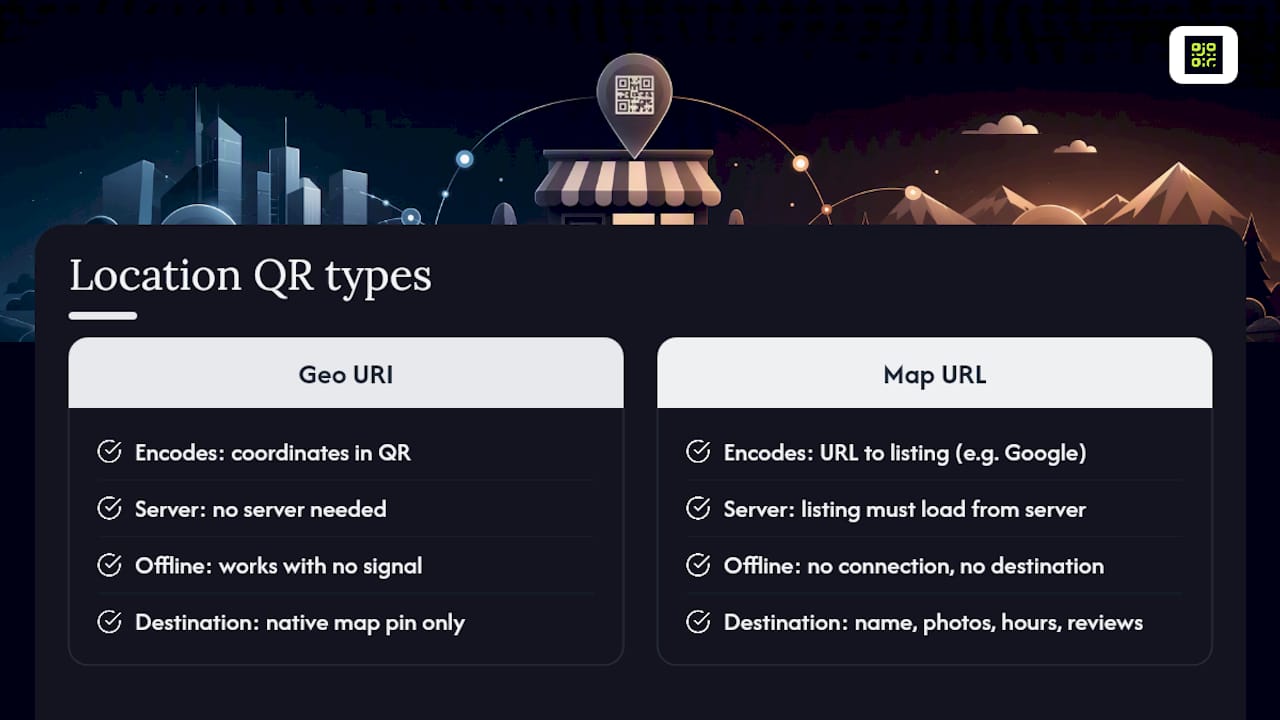
On modern iOS and Android, the default camera app recognises both formats without a separate scanner app. Point the camera, tap the prompt, and the phone either opens its native map with the pin dropped or hands off to whichever maps app is set as default.
Create a location QR code in three steps
Every reliable location QR code follows the same basic sequence, and it mirrors the flow most generator tools use because it’s the one users expect.
- Get your coordinates or share link. Drop a pin in your map app, then copy either the latitude and longitude or the “share” link. On Google Maps, that’s the
maps.app.goo.gllink; on Apple Maps, it’s a similar share URL. - Choose your encoding and generate. Paste coordinates into a geo URI generator for offline resilience, or paste the share link into a URL based QR generator if you want the destination page to show photos and reviews. Pick a static code for a one-off use, or a dynamic code if you might need to edit or track it.
- Download and place it. Export as SVG or high-resolution PNG for print, or PNG for screens. If you went dynamic, note the redirect link somewhere safe. You can change the destination later without touching the printed code itself.
Pro Tip: If you’re not sure whether you’ll need to update the destination later, default to dynamic. Reprinting signage because a venue moved two doors down costs far more than the extra step of setting up an editable code from the start.
Geo URI versus map URLs: which format wins?
The two formats solve different problems, and the right choice depends on what happens if the scanner has no signal.
| Factor | Geo URI (RFC 5870) | Google/Apple Maps URL |
|---|---|---|
| Works offline | Yes, coordinates are embedded | No, needs a live connection |
| Shows place metadata (name, reviews) | No, coordinates only | Yes |
| Editable after printing | Only if wrapped in a dynamic redirect | Yes, if the link itself is updatable |
| Best for | Trail markers, rural signage, disaster/emergency maps | Restaurants, retail, event venues, real estate listings |
A geo URI holds up in areas with poor coverage, which makes it the better pick for hiking trail markers or festival grounds with patchy signal. A Maps URL is the stronger choice whenever the destination benefits from showing its name, hours and reviews, such as a restaurant menu insert or a property listing sign.
Design, printing and placement rules that actually matter
A technically correct QR code still fails if it’s badly printed or badly placed. A few rules cover most of the failure cases:
- Keep a minimum size of 2cm x 2cm for close-range scanning (menus, tickets), rising to 5cm or more for signage read from a few metres away.
- Leave a clear “quiet zone” of blank space around the code roughly equal to four modules wide; cropping it too tight breaks scans.
- Export as SVG or high-resolution PNG for print, and standard PNG for digital screens and social posts.
- Keep strong contrast, ideally dark modules on a light background, and avoid placing a logo over more than about 10% of the code’s centre.
- Mount codes away from direct glare and at a height where a phone camera can be held flat, not angled sharply upward.
Pro Tip: Test a printed proof under the actual lighting it will live in. A code that scans perfectly on a laptop screen can fail outdoors in bright sun or under laminated glare.
Tracking and analytics: what you can actually measure
A static geo URI code, once printed, can never be edited and gives you no scan data at all. A dynamic QR code redirects through a short link you control, which unlocks both editability and measurement. Analytics platforms built around dynamic codes with UTM tagging typically report:
- Total scans and unique scans over time
- Timestamps, so you can spot peak scanning hours or days
- Approximate scan location, useful for multi-site signage or events spread across a venue
- Device and operating system data, which helps you optimise the landing page
Add UTM parameters to the destination URL with a consistent naming convention, such as utm_source=qr and utm_campaign=storefront_signage, so scans show up cleanly in your analytics rather than as unlabelled direct traffic. If you’re collecting location data on scans, say so briefly in your privacy notice and offer an opt-out where your platform supports it, since GDPR-style consent expectations apply to location tracking just as they do to any other personal data point.
Test your code before you publish or print
Skipping this step is the single most common reason a print run of QR codes ends up wasted. Run through this before committing to ink:
- Scan with the default camera app on at least one iPhone and one Android device, plus a third-party scanner app if your audience might use one.
- Confirm the dropped pin lands on the exact building or entrance, not just the right street.
- If you used a geo URI, test it in airplane mode to confirm it still opens the map correctly.
- For dynamic codes, time the redirect. Anything over a second or two feels broken to a scanner standing outside in the cold.
- If the scan fails, check contrast first, then confirm the coordinate format is a plain decimal (not degrees/minutes/seconds), then check the URL hasn’t been truncated by the generator.
Why a managed platform reduces the risk of getting this wrong
Static codes carry a permanent risk: any change to the destination, a moved venue, an updated menu link, means reprinting everything. Editable redirects remove that risk entirely. Heat maps and GDPR-compliant scan data also let you see which signage locations actually drive traffic, which is impossible to know from a static code. Onboarding typically takes minutes, and the payoff shows up the first time you need to fix a link without touching a single printed page.
The format choice matters more than most guides admit
Most advice on this topic jumps straight to “just use a QR generator” without asking what happens when the destination changes. That’s the real gap. A geo URI feels like the safe, standards-based choice because it’s backed by an actual RFC, but it locks you into whatever coordinates you encoded on day one. For a hiking trail marker that’s fine. For a retail campaign, a pop-up event, or anything tied to a lease, it’s a liability waiting to surface.
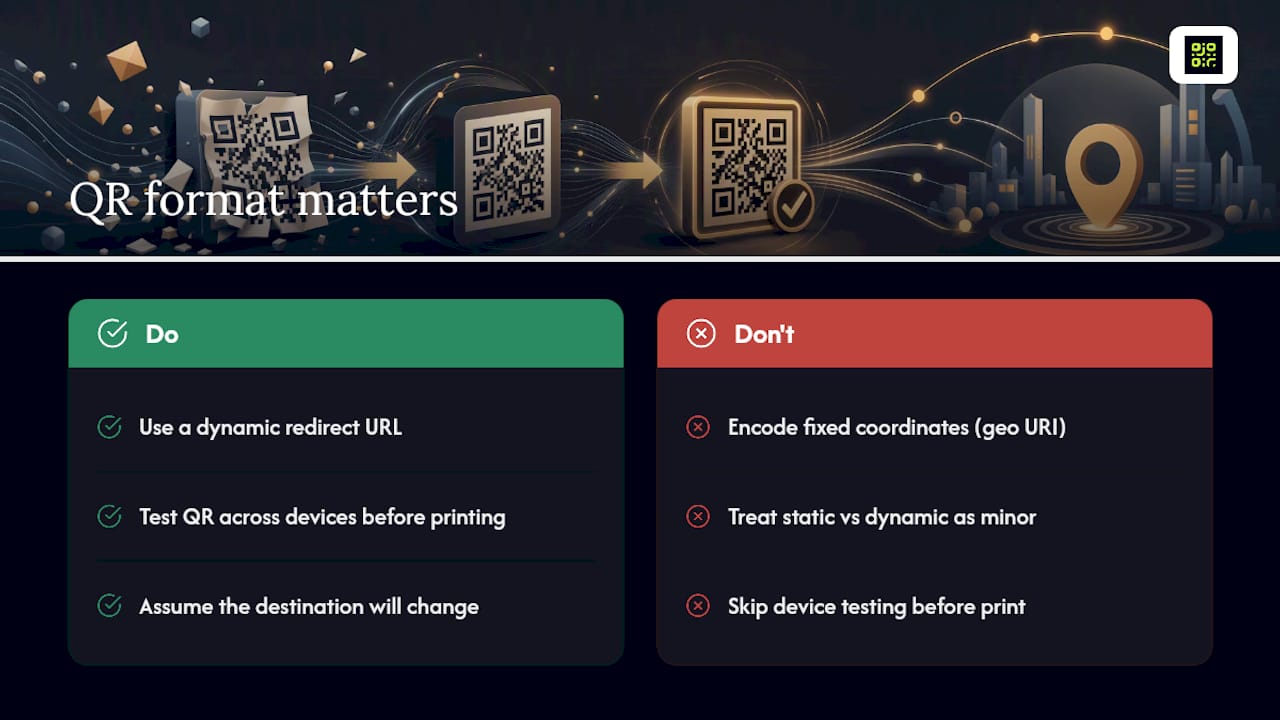
The conventional wisdom treats static and dynamic as a minor technical detail. It isn’t. It’s the single decision that determines whether your printed materials survive a venue change, a menu update, or a marketing pivot. Test across devices before you commit to a print run, always. But testing only protects you against today’s mistakes, not tomorrow’s changes.
If there’s one thing worth prioritising above design polish or clever placement, it’s this: assume the destination will need to change, because it usually does.
— The
Need editable, trackable location QR codes?
Qrlytics gives you the practical middle ground this guide has been building towards: dynamic codes that stay editable after printing, with real scan analytics attached from the first tap. Codes created during an active subscription keep working permanently, even if billing lapses later, which is important for printed signage that needs to remain functional over time.

This fits naturally for multi-location signage where a head office wants to update all destinations centrally, for events where a venue map changes between bookings, and for recurring seasonal campaigns where last year’s poster gets reused with a new landing page. You get scan counts, approximate scan location via heat maps, timestamps and device data without building your own tracking pipeline.
Start with the free QR code generator if you want to create a code today, or go straight to the dynamic QR code generator if editability and analytics are the priority from the outset. No credit card is needed to get started.
Sources
- Generate QR Code for Location · GPS Coordinates · QR Code AI
- QR Code ROI — How to Measure & Maximise Returns
- Google Maps short share link example
FAQ
Where is the QR scanner on my phone?
On both iPhone and Android, the default camera app scans QR codes directly, no separate app needed. Just open the camera and point it at the code.
How do I scan a QR code for a location?
Open your phone’s camera app, point it at the code, and tap the map link that appears; your phone will open its default map app with the location already pinned.
Where are QR scans saved?
Scan history isn’t stored on the phone itself in most cases. Platforms like Qrlytics store scan data, including timestamps and approximate scan location, on the dashboard tied to the dynamic code.
Can you track the location of a QR code?
Yes, but only with a dynamic QR code. A dynamic code records approximate scan location, device data and timestamps every time it’s scanned; a static geo URI code records nothing.