Marketers: Keep QR Codes for Feedback Live, Boost Response Rates
Use QR codes to capture feedback at the moment of experience: they raise response rates and cut friction when you pair short, mobile-first surveys with trackable codes. This guide covers placement, sizing and CTA rules, a step-by-step build-and-test workflow, and how to measure results using metrics like NPS and CSAT, all while keeping GDPR-compliant tracking and code permanence in mind with tools such as Qrlytics.
TL;DR:
- Most QR feedback codes should be dynamic to allow URL changes without reprinting, especially for assets with a long shelf life.
- Higher response rates are driven by placing QR codes at points of experience with clear contrast, size proportional to scanning distance, and effective call-to-action labels.
- Testing the full scanning and submission process on multiple device types before deployment prevents silent failures that reduce response volume.
- Tagging each code with location or campaign parameters enhances data analysis and enables immediate routing of low scores for quick follow-up.
- Using GDPR-compliant tools with real-time analytics and heatmaps helps optimize placement, measure response quality, and maintain operational safety.
Table of Contents
- What is a QR feedback form and how does it work?
- Why do QR feedback codes raise response rates?
- Placement, size, contrast and CTA rules that work
- How to build, test and deploy a QR feedback survey
- Mobile design, accessibility and privacy basics
- How to track and measure QR feedback performance
- Where QR feedback codes work best
- Why permanence matters for long-life QR campaigns
- What the data actually says about QR feedback
- Try Qrlytics for your next feedback campaign
- Sources
- FAQ
What is a QR feedback form and how does it work?
A QR feedback form works in three steps: a customer scans the code with their phone camera, the code opens a mobile browser pointing to a survey or form, and the response routes to wherever you collect data. No app download, no typing a web address.
You have two technical choices. A static QR code encodes the destination URL permanently. It is cheap and simple, but if the survey link ever changes, the printed code stops working. A dynamic QR code points to a short redirect URL you control, so you can repoint it to a new survey at any time without reprinting a single table tent or sticker.
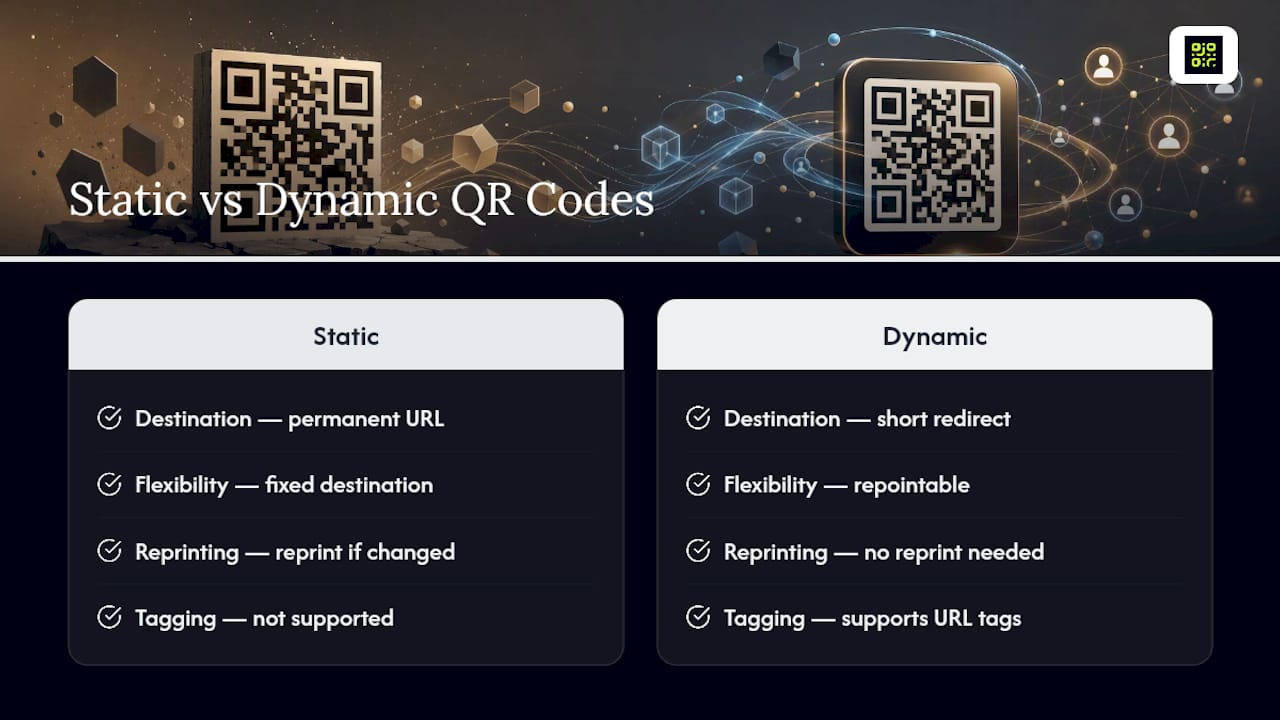
Most feedback deployments also benefit from URL pre-fill and tagging: appending a parameter to the link (say, ?location=branch12) lets you identify which code generated which response, without adding an extra question to the survey itself.
Why do QR feedback codes raise response rates?
The core advantage is friction removal. A Forbes Technology Council report found that 58% of respondents consider QR-based feedback easier to complete than paper forms. That is not a marginal edge; it means more than half your customers will engage with a scan-and-tap survey when they would have skipped a clipboard.
Timing matters as much as ease. Feedback captured seconds after an experience, while the memory is still fresh and the phone is already in hand, tends to be more accurate and more likely to get finished at all.

Operationally, QR feedback also speeds up triage. Tag each code to a location, shift, or member of staff, and a low score routes straight to the person who can act on it, often before the customer has left the building. For the business, that adds up to higher response volumes, fresher insight, and a workable path towards improving CSAT and Net Promoter Score (NPS) over time.
Placement, size, contrast and CTA rules that work
Where and how you display a QR code affects scan rates as much as the survey itself does. SurveyMonkey’s research on QR code deployment confirms that placement and mobile-first design strongly influence whether people bother scanning at all.
Follow these placement and design rules:
- Point of experience: receipts, table tents, exit signage, product packaging, or the final slide of a presentation, wherever the memory is freshest.
- Size: use a 10:1 distance-to-size ratio. A code meant to be scanned from a metre away needs to be roughly 10cm across.
- Quiet zone: leave clear white space around the code; a busy background or overlapping text breaks the scan.
- Contrast: dark modules on a light background scan fastest; avoid low-contrast colour pairings even if they match your branding.
- CTA framing: label the code directly. “Scan to share feedback — 60 seconds” outperforms a bare code with no explanation.
- Incentive line: a small nudge, such as entry into a monthly draw, can lift completion without distorting honest responses.
Pro Tip: Run an A/B test on the frame and caption around the code, not just the code itself. A naked QR code with no CTA can scan at roughly half the rate of one with a clear instruction and visual prompt.
How to build, test and deploy a QR feedback survey
A reliable workflow follows six steps, broadly matching the approach QuestionPro recommends for QR-based surveys:
- Design a short survey. Keep it to 3 to 5 questions, or a single star rating plus one open comment box. Shorter surveys triggered by a scan complete far more often than long ones.
- Choose a platform and generate the share link. Any form tool that outputs a public URL will work.
- Decide static or dynamic. For a one-off event, static is fine. For anything printed on packaging, signage, or table tents that will stay in circulation for months, choose dynamic so you can repoint it later.
- Create the code with a frame and logo, and export it as PNG for screens, SVG for scalable print, or PDF for professional printing.
- Test the full scan-to-submit flow on both iPhone and Android. Check camera permissions, confirm any URL pre-fill works, and print a physical proof before a full run.
- Deploy with unique codes or URL parameters per location or campaign, and route responses automatically to Google Sheets, a CRM, or a Slack channel so nothing sits unread.
Skipping step five is the most common failure point. A code that scans fine on one phone but fails on another, because of a permissions prompt or a broken redirect, quietly kills your response rate before anyone notices.
Mobile design, accessibility and privacy basics
A feedback form only performs if it works cleanly on the phone that just scanned it. Keep the layout single-column, use large tap targets for star ratings or buttons, and show a short progress cue (“Question 2 of 4”) so respondents know the commitment is small.
Accessibility matters too: label every field clearly, keep colour contrast high enough to read in bright daylight (many scans happen outdoors or under harsh restaurant lighting), and avoid intrusive CAPTCHAs that add friction for a marginal anti-spam benefit. Offering an anonymous response option, with no name or email required, tends to increase honesty on sensitive questions.
On privacy, collect only what the response actually needs. If you don’t need an email address to route a complaint, don’t ask for one, and state briefly how the feedback will be used.
How to track and measure QR feedback performance
Scan volume alone tells you little. Watch scan count against completion rate: a big gap between the two usually means the survey itself is too long or the first question is confusing, not that the code failed to attract attention. Track unique scanners, average time-to-complete, and the rolling trend on NPS or CSAT scores rather than a single snapshot.
Tagging is what turns raw scans into usable operational data. A unique code per location, or a URL parameter per campaign, lets you see exactly which branch, shift, or promotion generated which score, which is essential for root-cause work rather than guesswork. Tools built for QR code tracking handle this tagging automatically and can route low scores as an immediate alert.
Integration closes the loop. Piping responses into a CRM or a Slack channel, with a threshold alert on scores below a set number, means a bad experience gets a human response within minutes rather than surfacing in a quarterly report. Platforms offering built-in QR codes with analytics also give you scan-location heatmaps, useful for spotting which physical placement is actually driving engagement.
Where QR feedback codes work best
Deployment context shapes design more than most guides admit. A few proven patterns:
- Restaurants: table tents and receipt codes capture CSAT the moment the plate is cleared, letting a manager address a complaint before the customer leaves.
- Retail and e-commerce: packaging inserts or receipt codes gather product feedback after the unboxing moment, when impressions are strongest.
- Events: a code on the closing slide captures speaker scores instantly, and badge-printed codes work for per-session feedback at multi-track conferences.
- Healthcare and HR: discharge paperwork or break-room posters support anonymous pulse checks, though these settings need extra care around what personal data gets collected, particularly in the US where HIPAA rules apply.
A useful refinement across all of these: route the QR feedback to a private internal survey first, and only invite genuinely satisfied respondents to leave a public review afterwards. That two-step structure keeps low scores in your inbox for fixing, rather than on a public review page for everyone else to read. Better feedback loops of this kind can meaningfully move revenue, not just satisfaction scores.
Why permanence matters for long-life QR campaigns
Printed QR codes have an operational blind spot most guides skip: what happens when the survey link behind the code changes, or the account that generated it lapses? A static code frozen to an old URL becomes dead weight on every table tent, poster, and product box still in circulation, and there is no way to fix it without reprinting.
Dynamic QR management solves this by separating the printed code from its destination, so the link can be repointed without touching a single physical asset. Pairing that with GDPR-compliant tracking and scan heatmaps gives you both operational safety and a genuine measurement layer. For anything with a print run longer than a single event, three things belong on your checklist: use dynamic codes, schedule the code’s lifecycle in advance, and monitor scan activity regularly rather than assuming silence means success.
What the data actually says about QR feedback
Most advice on this topic focuses on the mechanics: size the code correctly, keep the survey short, test before printing. All true, and all necessary. What gets underplayed is that a QR feedback programme is only as good as its weakest printed asset, and that weakness usually shows up months after launch, not on day one.
The conventional wisdom treats QR code generation as a one-time task: make the code, print it, move on. That is backwards. A code printed on packaging or signage with a multi-month shelf life needs to survive changes to your survey tool, your CRM, or your team’s structure, none of which you can predict at print time. Static codes gamble on nothing changing. Dynamic codes accept that something will.
If there is one priority to take from this, it is sequencing: design the short survey first, but choose the code technology second, deliberately, based on how long that piece of print will be in the world. A restaurant table tent replaced monthly can run on a static code. A packaging insert printed in bulk for a year cannot.
— The
Try Qrlytics for your next feedback campaign
A reliable QR code platform gives you a direct path from printed code to working survey without the risk of a subscription lapse breaking codes already printed. Codes created during an active subscription remain functional, so a table tent or packaging insert printed today can stay live regardless of billing changes.

The platform pairs permanence with dynamic URL updates (repointing codes to new surveys without reprinting), real-time scan analytics including location heatmaps, and GDPR-compliant tracking. Onboarding is simple, allowing you to generate and test a feedback code quickly. Start with the free QR code generator for a single campaign, or move straight to the dynamic QR code generator if you’re printing anything meant to last beyond a single event.
Sources
- Rethinking customer feedback collection in the digital age with QR codes — Forbes
- QR code surveys: quick ways to boost response rates — SurveyMonkey
- QR codes for surveys: How to use them — QuestionPro
- Quishing warning and guidance — United States Postal Inspection Service (USPS/USPS Inspection Service)
FAQ
How do I create a QR code for feedback?
Build a short mobile-first survey (3 to 5 questions or a single rating plus a comment box), generate a shareable link, then convert that link into a QR code using a generator such as Qrlytics’s free tool. Test the scan-to-submit flow on both iPhone and Android before printing.
Can I scan a QR code for feedback with any phone?
Yes. Modern iPhone and Android cameras scan QR codes natively without a separate app, opening the linked survey directly in the phone’s browser.
What is the FBI or USPS warning about QR codes?
US authorities, including the Postal Inspection Service, have warned about “quishing,” where scammers place fake QR codes to steal personal data. Visible branding, a clear CTA, and a recognisable business name on the sign help customers trust a legitimate code before scanning.
How do I create a Google feedback QR code?
Build your feedback form in Google Forms, copy its shareable link, then paste that link into a QR code generator to produce a scannable code. For a printed asset that needs to last, use a dynamic code so you can update the destination later without reprinting.
How short should a QR feedback survey be?
Keep it under one to two minutes, ideally 3 to 5 questions or a single rating with an open comment. Shorter surveys triggered by a scan complete at far higher rates than longer ones.