Digital engagement tracking workflow: 2026 guide
TL;DR:
- A structured digital engagement tracking workflow connects business goals to user interactions, utilizing tools like GA4 and GTM, for effective campaign optimization. It requires a comprehensive tracking plan, disciplined governance, consistent UTM conventions, and GDPR compliance built into every process. Planning and disciplined management ensure reliable data collection, enabling faster, more confident marketing decisions.
A digital engagement tracking workflow is a systematic process that maps business goals to specific user interactions, automates data collection, and feeds insights back into campaign optimisation. The industry standard term for this practice is marketing measurement architecture, though most practitioners use the more descriptive phrase. Tools like Google Analytics 4 (GA4), Google Tag Manager (GTM), and UTM parameters form the technical backbone of any reliable setup. Without a structured workflow, you are collecting data without context, and context is what turns numbers into decisions. This guide walks you through every layer of building one that actually works.
What are the essential components of a digital engagement tracking workflow?
A tracking plan is the non-negotiable starting point. It is a structured document that maps each KPI to a specific GA4 event, records the trigger conditions, lists the parameters being captured, and assigns a QA status to every event. Without it, your development and marketing teams are working from different assumptions, and rework is almost guaranteed. Think of it as the contract between your business goals and your data layer.

Beyond the document itself, you need the right tools and the right people in place before a single tag is written.
Core tools required:
- GA4 for event collection, reporting, and audience building
- Google Tag Manager (GTM) for deploying and managing tracking scripts without code deployments
- A consent management platform (CMP) such as Cookiebot or OneTrust to gate tracking scripts behind user consent
- A UTM naming convention document shared across every team that creates campaign links
Governance matters as much as tooling. Assign a clear owner for the tracking plan, typically a marketing analyst or data engineer, and define who has permission to add or modify tags in GTM. Without ownership, tracking plans drift. Events get added ad hoc, naming conventions break down, and your reports become unreliable within months.
Pro Tip: Use a shared spreadsheet or a dedicated tool like Avo or Segment Protocols to maintain your event taxonomy. A consistent naming convention such as object_action (for example, form_submit or video_play) scales far better than freeform event names invented by individual developers.
Naming conventions deserve particular attention. An event called “button_click” tells you nothing. An event called “cta_click_homepage_hero” tells you exactly what happened, where, and in what context. That specificity is what makes your QR code tracking and broader campaign data genuinely useful at scale.
How to implement event tracking with GA4 and Google Tag Manager
GA4 uses four event tiers: automatically collected events (page views, sessions), enhanced measurement events (scroll depth, outbound clicks), recommended events (purchase, sign_up), and custom events that you define yourself. Understanding which tier an event belongs to prevents the most common mistake in GA4 setup, which is double-tracking the same interaction through both enhanced measurement and a custom GTM tag simultaneously.
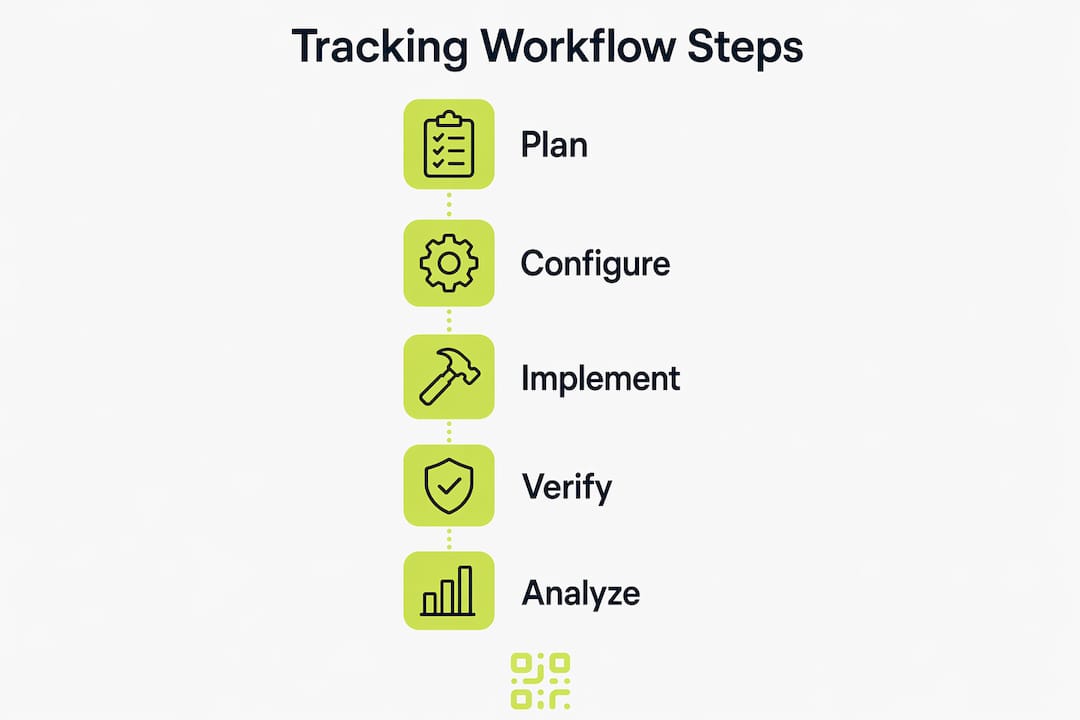
Here is a reliable step-by-step process for configuring event tracking via GTM:
- Disable conflicting enhanced measurement settings. In GA4, go to Data Streams and turn off any enhanced measurement events you plan to track manually via GTM. This prevents double-counting.
- Create a GA4 Configuration Tag in GTM. This tag fires your Measurement ID on all pages and is the foundation every subsequent event tag depends on.
- Build event tags using the GA4 Event tag type. Name each tag to mirror the event name (for example, Tag: “GA4 Event: form_submit”). Add parameters such as form_id and page_location to capture context.
- Set triggers precisely. Use CSS selectors, element visibility, or custom events from the data layer rather than broad “All Clicks” triggers, which fire on everything and inflate your data.
- Register custom parameters in GA4. Any custom parameter you send must be registered as a custom dimension or metric in GA4’s admin panel before it appears in reports.
- Verify in GTM Preview Mode and GA4 DebugView. Fire the event in a test environment, confirm it appears in the GTM preview panel, then check GA4 DebugView to confirm the parameters are arriving correctly.
Pro Tip: Inspect the data layer directly in your browser’s developer console using "dataLayer` in the console tab. This shows you exactly what information is available before you build your GTM triggers, saving significant debugging time.
A common mistake is tracking too many events from the start. Start with 6 to 10 events focused on activation and engagement milestones. Event sprawl, where dozens of poorly defined events accumulate over time, makes your analytics unreliable and your reports unreadable. Prioritise quality over quantity at every stage.
| Event type | Setup method | Risk of double-tracking |
|---|---|---|
| Automatically collected | No action needed | Low |
| Enhanced measurement | Toggle in GA4 Data Streams | High if also set in GTM |
| Recommended events | GTM or gtag.js | Low if named correctly |
| Custom events | GTM only | Medium if triggers are too broad |
QA status per event should be tracked as pending, verified, or failed throughout the implementation lifecycle. Silent tag failures, where a trigger stops firing after a site update, are the most damaging data quality issue because they are invisible until someone notices a suspicious drop in reported conversions.
How to integrate UTM parameters for accurate attribution
UTM parameters are the most reliable first-party attribution method available now that third-party cookies are being deprecated across major browsers. The three required parameters are utm_source (where the traffic originates), utm_medium (the channel type), and utm_campaign (the specific campaign name). Set UTMs at campaign creation, not retroactively. Retroactive tagging creates gaps in your attribution data that cannot be recovered.
The most damaging attribution problems are not technical. They are process failures caused by inconsistent UTM naming across teams. One person writes “Email” as the medium, another writes “email”, and a third writes “e-mail”. GA4 treats these as three separate sources, fragmenting your reporting and making channel comparisons meaningless.
Best practices for UTM consistency:
- Maintain a single shared UTM builder document or use a tool like Google’s Campaign URL Builder with pre-approved values for source, medium, and campaign
- Use lowercase only, with underscores replacing spaces (for example, utm_campaign=spring_sale_2026)
- Capture UTM parameters in your CRM at the point of lead creation to enable closed-loop attribution from first click to closed deal
- Audit UTM usage monthly using a GA4 custom report filtering by source/medium to identify untagged or inconsistently tagged traffic
| Scenario | Correct approach | Common mistake |
|---|---|---|
| Email newsletter | utm_medium=email | utm_medium=Email or utm_medium=Newsletter |
| Paid social | utm_medium=paid_social | utm_medium=Social or utm_medium=CPC |
| QR code campaign | utm_source=print, utm_medium=qr | No UTM on QR destination URL |
Connecting UTM data to your CRM, whether that is Salesforce, HubSpot, or another platform, closes the attribution loop. Without CRM integration, you can see which campaigns drive traffic but not which campaigns drive revenue. That distinction is what separates useful reporting from decorative dashboards.
How to maintain GDPR compliance within your tracking workflow
GDPR compliance is not a checkbox you tick once. It is a design constraint that must be built into every layer of your tracking workflow. Consent must be freely given, specific, informed, and provable. That means your CMP must record a timestamped, versioned consent record for every user, and withdrawal must be as easy as granting consent.
The practical implication for your GTM setup is that no tracking tags should fire before consent is granted. Configure your CMP to push a consent state event into the data layer, then use GTM’s built-in Consent Mode or a custom trigger to gate all analytics and advertising tags behind that event. This is not optional under GDPR. Firing GA4 or advertising pixels before consent constitutes unlawful processing.
“Privacy auditing requires maintainable operational evidence such as timestamped consent with version references, since UI opt-in logs alone are insufficient for compliance proof.” Legiscope
Audit your workflow at least quarterly. Check that your CMP version matches your current cookie catalogue, that new tags added to GTM are covered by the consent logic, and that your consent records are exportable for data subject access requests. The GDPR compliance guide from Qrlytics covers the specific steps for marketing analytics contexts in detail.
Pro Tip: Use Google’s Consent Mode v2 in GTM to model conversion behaviour for users who decline analytics consent. This preserves some attribution signal without processing personal data, giving you better data quality while remaining compliant.
How to operationalise and automate your tracking workflow
A tracking workflow that runs only during campaign launches is not a workflow. It is a one-off project. The goal is a continuous instrumentation-to-analytics-to-optimisation loop that runs with minimal manual intervention. Automation in engagement tracking workflows can reduce cycle time by up to 30% by removing bottlenecks from manual reporting and QA processes. That time saving compounds across every campaign you run.
Here is how to build that loop in practice:
- Define a review cadence. Review core engagement metrics weekly: session engagement rate, event count per session, conversion rate by source. Review attribution and funnel performance monthly.
- Automate reporting. Connect GA4 to Looker Studio (formerly Google Data Studio) and build dashboards that refresh automatically. Set up GA4 email alerts for significant drops in key events.
- Maintain a change log. Every GTM container publish should include a note describing what changed and why. This is the single most effective way to diagnose data anomalies after the fact.
- Run QA checks after every site update. Use GTM Preview Mode and GA4 DebugView after any code deployment to confirm that existing tags still fire correctly. Site updates are the most common cause of silent tracking failures.
- Use the tracking plan as a living document. Update event QA status, add new events as products evolve, and retire events that no longer map to active KPIs.
Pro Tip: Set up a GA4 anomaly detection alert for your most critical conversion events. If form submissions drop by more than 20% week on week, you want to know within hours, not at the next monthly review.
For lead generation workflows, connecting your engagement data to automated nurture sequences in your CRM creates a closed loop where user behaviour directly triggers the next marketing action. That is where tracking stops being a reporting function and starts being a growth function.
Key takeaways
A reliable digital engagement tracking workflow requires a written measurement plan, disciplined event governance, consistent UTM conventions, and GDPR-compliant consent management working together before any optimisation is possible.
| Point | Details |
|---|---|
| Start with a tracking plan | Document every KPI, event, trigger, and QA status before writing a single tag. |
| Govern your GA4 event tiers | Disable enhanced measurement for events you track via GTM to prevent double-counting. |
| Standardise UTM naming | Use lowercase, underscores, and a shared builder to prevent fragmented attribution data. |
| Build consent into GTM | Gate all tracking tags behind CMP consent events to meet GDPR requirements. |
| Automate the review loop | Connect GA4 to Looker Studio and set anomaly alerts to catch silent failures early. |
Why planning beats tooling every time
Most tracking implementations fail not because the tools are wrong but because the planning was skipped. I have seen marketing teams spend weeks configuring GA4 and GTM only to discover that their event names are inconsistent, their UTMs are untagged on half their campaigns, and their consent setup fires analytics before the user has clicked anything. The rework cost is enormous, and the data collected during that period is unusable.
The teams that get this right treat the tracking plan as a product in itself. They version it, they assign ownership, and they review it on a schedule. They also invest in the relationship between marketing and development. When a developer understands why an event parameter matters for attribution, they are far less likely to rename a data layer variable during a refactor without telling anyone.
The other thing I would push back on is the instinct to track everything. Real-time engagement data is only valuable when it is tied to decisions you are actually going to make. If you cannot name the specific campaign or product question that an event answers, do not track it. Restraint in event design is a sign of maturity in measurement, not a limitation.
The strategic value of a well-maintained tracking workflow is that it makes every subsequent marketing decision faster and more confident. You stop debating whether a campaign worked and start asking why it worked and how to repeat it.
— The
Take your campaign tracking further with Qrlytics

If your campaigns include printed materials, physical environments, or offline touchpoints, QR codes are a direct extension of your digital engagement tracking workflow. Qrlytics generates dynamic, trackable QR codes that capture scan data including location, device type, and time, all in real time. Every code supports UTM parameter integration so your offline scans feed directly into GA4 attribution reports. The platform is built for GDPR-compliant tracking, with consent-aware analytics that meet the same standards your digital workflow requires. You can create a free QR code instantly with no credit card needed, or explore dynamic QR code options for campaigns that need editable destinations and ongoing performance data.
FAQ
What is a digital engagement tracking workflow?
A digital engagement tracking workflow is a structured process that links business KPIs to specific user events, deploys tracking via tools like GA4 and GTM, and feeds data into ongoing campaign optimisation. It combines technical setup, governance, and reporting into a repeatable system.
How many events should I track in GA4?
Start with 6 to 10 events focused on key activation and engagement milestones. Tracking too many events creates event sprawl that makes analytics unreliable and reports difficult to interpret.
Why are UTM parameters critical for attribution?
UTMs are the most reliable first-party attribution method now that third-party cookies are being deprecated. They must be standardised at campaign creation using consistent lowercase naming to prevent fragmented reporting across channels.
How do I make my tracking workflow GDPR compliant?
Configure your consent management platform to push a consent state into the GTM data layer, then gate all analytics and advertising tags behind that consent event. Maintain timestamped, versioned consent records that are exportable for data subject access requests.
What causes silent tracking failures?
Silent tracking failures occur when a site update breaks a GTM trigger or data layer variable without any visible error. Running GTM Preview Mode and GA4 DebugView after every code deployment is the most reliable way to detect them early.