What is QR code error correction? A clear guide
TL;DR:
- QR code error correction uses Reed-Solomon algorithms to preserve readability despite physical damage by embedding redundant data. Levels L, M, Q, and H offer increasing resilience, with higher levels producing larger, denser codes suited for more challenging environments or logo embedding. Choosing the appropriate level depends on printing quality, environmental exposure, and design overlay requirements to ensure reliable scanning.
QR code error correction is defined as the built-in mechanism that allows a QR code to remain fully scannable even when part of its surface is damaged, obscured, or dirty. The technology relies on the Reed-Solomon algorithm, a mathematical method developed at MIT in 1960 that later powered everything from Voyager space probes to audio CDs. QR codes encode redundant data alongside the original payload, so a scanner can reconstruct missing information without any external input. There are four standard error correction levels, labelled L, M, Q, and H, each offering a different balance between damage resilience and data storage capacity. Understanding which level to use, and why, is the difference between a QR code that works reliably in the field and one that fails at the worst possible moment.
How does QR code error correction work?
QR code error correction operates at the byte level, not the bit level. This distinction matters because byte-level processing groups data into larger, more meaningful units, making the correction process far more efficient when dealing with the burst damage typical of physical wear, such as a scratch across a printed label.

The underlying method treats your encoded data as the coefficients of a polynomial. Imagine plotting a curve through several points on a graph. If you know the degree of the polynomial, you can reconstruct the entire curve even if a few of those points are missing or corrupted, because a polynomial of degree (n-1) is uniquely defined by n points. Reed-Solomon applies exactly this principle, using arithmetic over a finite field called GF(256), which contains 256 elements corresponding to the 256 possible byte values.
When a QR code is generated, the encoder performs polynomial arithmetic over GF(256), dividing the data polynomial by a generator polynomial to produce a set of error correction codewords. These codewords are appended to the original data codewords before the final code is assembled. When a scanner reads a damaged code, it uses those appended codewords to identify and fix corrupted bytes.
The algorithm distinguishes between two types of problem. An erasure is a byte the scanner knows is missing, for example a physically absent module. An error is a byte that is present but incorrect. Erasures cost one correction symbol each; errors cost two, because fixing an unknown error requires both locating it and correcting its value. This asymmetry explains why a QR code with a clean but partially obscured surface recovers more gracefully than one with subtly corrupted data.
Pro Tip: If you are embedding a logo or decorative element into a QR code, always treat the covered area as erasures, not errors. Choosing a higher correction level accounts for this predictable loss and keeps the code scannable.
What are the four QR code error correction levels?
The ISO/IEC 18004 standard defines four error correction levels for QR codes, each identified by a letter. Levels L, M, Q, and H recover approximately 7%, 15%, 25%, and 30% of data respectively. The higher the recovery percentage, the more redundant data is added, which increases the visual density of the code and reduces the space available for your actual payload.
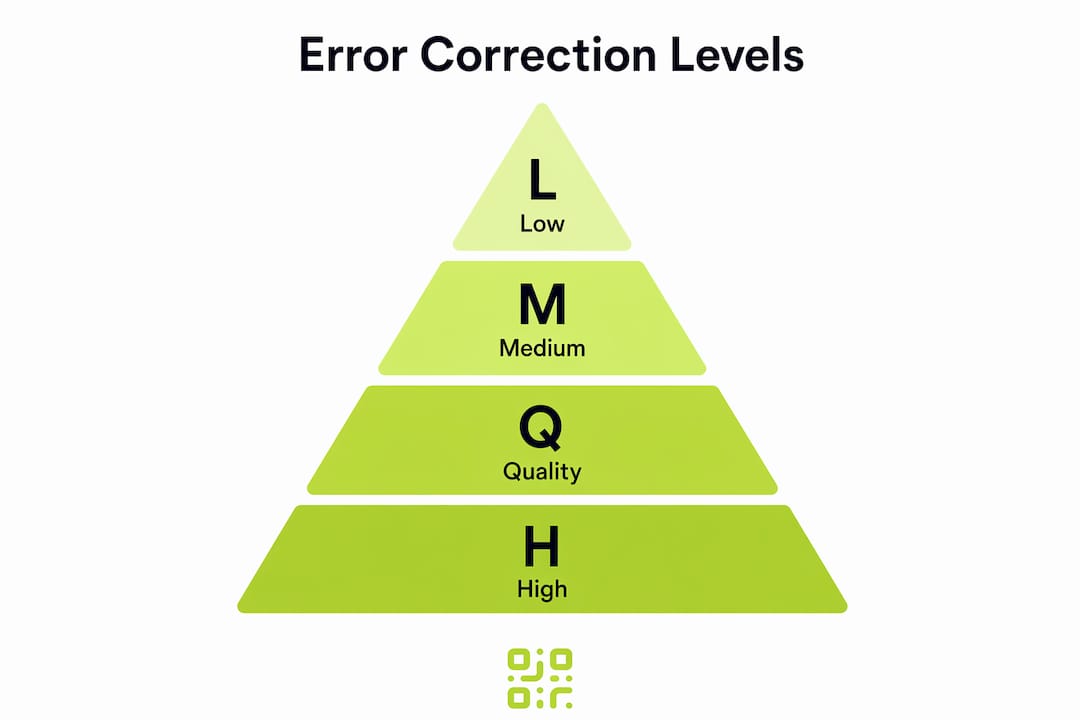
| Level | Recovery capacity | Best suited for | Trade-off |
|---|---|---|---|
| L (Low) | 7% | Digital displays, clean indoor environments | Smallest code, lowest resilience |
| M (Medium) | 15% | General marketing, product packaging | Good balance for most use cases |
| Q (Quality) | 25% | Industrial settings, outdoor signage | Larger code, strong damage tolerance |
| H (High) | 30% | Logo-embedded codes, harsh environments | Largest code, maximum resilience |
Level L is appropriate when the code will never leave a controlled environment, such as a screen display or a freshly printed document that will be scanned immediately. The smaller data footprint means the resulting code has fewer modules and scans faster, which matters in high-throughput settings like event ticketing.
Level M is the default choice for most web and marketing QR codes. Most web QR codes use level M or Q because they balance resilience with a manageable code size. A flyer left on a café table for a week, or a code printed on a cardboard box, will typically survive with level M intact.
Level Q suits outdoor environments where rain, UV exposure, and physical contact are expected. Signage on construction sites, codes on vehicle tyres, and labels on industrial equipment all benefit from the additional redundancy.
Level H is the correct choice when you intend to overlay a logo or brand mark directly on the code. Level H allows embedding logos by intentionally obscuring up to 30% of the code area, with error correction compensating for the loss. Without this level, a logo overlay would simply break the code.
Pro Tip: Do not default to level H for every code. The increased module density makes codes harder to scan at small print sizes. Match the level to the actual risk of damage in your deployment environment.
How to apply error correction effectively in practice
Selecting the right correction level is a decision shaped by several concrete factors. Getting it wrong in either direction creates real problems: too low and your codes fail in the field; too high and your codes become visually complex, slow to scan, or too large to fit your design.
Consider these factors before generating any QR code:
- Printing quality and substrate. Codes printed on coated paper with a high-resolution printer tolerate lower correction levels. Codes screen-printed onto fabric, etched into metal, or applied as vinyl stickers need level Q or H because the production process itself introduces imperfections.
- Expected environmental exposure. A code on a restaurant menu inside a laminated sleeve can use level M. A code on outdoor event signage exposed to rain and direct sunlight needs level Q at minimum.
- Code size at print. Higher correction levels produce denser codes. If your design constrains the code to a small footprint, a level H code at 2 cm square may become unscannable. Test at actual print size before committing to a campaign.
- Logo or design overlay. Any decorative element placed over the code modules reduces effective data area. Level H is the only correction level that provides enough redundancy to absorb this reliably.
- Dynamic versus static codes. Dynamic QR codes redirect through a short URL, which is shorter than a full destination URL. This shorter payload means you can afford a higher correction level without the code becoming excessively large. Qrlytics generates dynamic codes precisely for this reason, keeping codes compact while allowing higher resilience settings.
Common pitfalls to avoid include generating codes at level L for printed materials that will be handled repeatedly, failing to test codes after adding a logo overlay, and assuming that a code that scans on screen will scan equally well once printed at a reduced size. The Qrlytics blog covers QR code generation mistakes that stem directly from ignoring these factors.
How does QR code error correction compare to other barcode systems?
Traditional linear barcodes, such as EAN-13 or Code 128, have no meaningful error correction. They rely on a single check digit to detect errors, not correct them. A single scratch across the bars of a linear barcode renders it unreadable. This is not a design flaw so much as a deliberate simplicity trade-off: linear barcodes encode less data and were designed for clean, controlled retail environments.
QR codes outperform traditional barcodes precisely because Reed-Solomon error correction was built into the standard from the outset. The two-dimensional structure of a QR code means damage to one area does not destroy the entire data stream, unlike a linear barcode where every bar is part of a single sequential read.
Other 2D barcode formats offer their own approaches. Data Matrix codes, used widely in electronics manufacturing and healthcare, also use Reed-Solomon correction and can recover from similar levels of damage. PDF417, common in transport ticketing, uses a different scheme called erasure correction that performs well when large contiguous sections are lost. Aztec codes, found on boarding passes, use a Reed-Solomon variant optimised for small print sizes.
| Barcode type | Error correction method | Max data recovery | Typical environment |
|---|---|---|---|
| EAN-13 / Code 128 | Check digit only | None | Clean retail, logistics |
| QR code | Reed-Solomon (L/M/Q/H) | Up to 30% | Universal, marketing, industrial |
| Data Matrix | Reed-Solomon | Up to 30% | Electronics, healthcare |
| PDF417 | Erasure correction | Variable | Transport, ID documents |
| Aztec | Reed-Solomon variant | Up to 25% | Boarding passes, ticketing |
For businesses moving from legacy barcode systems to QR codes, this comparison makes the case clearly. The higher correction capability of QR codes is not a luxury feature. It is the reason QR codes are viable across packaging, outdoor advertising, and product labelling in ways that linear barcodes simply are not. Understanding QR code resilience in this comparative context helps developers and marketers justify the format choice to stakeholders who may still default to older systems.
Key takeaways
QR code error correction is the primary reason QR codes remain reliable across physical environments where linear barcodes would fail entirely.
| Point | Details |
|---|---|
| Reed-Solomon is the foundation | The algorithm reconstructs lost data using polynomial arithmetic, operating at the byte level for efficiency. |
| Four levels serve different needs | L, M, Q, and H recover 7%, 15%, 25%, and 30% of data respectively, with higher levels increasing code density. |
| Level choice affects code size | Higher correction levels reduce available data capacity and produce visually denser codes that require more space. |
| Logo overlays require level H | Embedding a logo intentionally obscures code modules, and only level H provides enough redundancy to compensate. |
| Environment drives the decision | Printing substrate, exposure conditions, and design constraints should determine your correction level, not habit. |
Why error correction deserves more attention than it gets
Most people generating QR codes treat error correction as a background setting, something the tool handles automatically. That assumption works until it does not, and when it fails, it fails visibly: a printed brochure with a broken code, a product label that will not scan after six months on a warehouse shelf, a campaign that loses conversions because the code was generated at level L and then had a logo dropped on top of it.
What I find genuinely underappreciated is how much error correction enables creative flexibility. The ability to embed a brand logo inside a QR code without breaking it is not a cosmetic trick. It is a direct consequence of level H correction absorbing the data loss caused by the overlay. Businesses that understand this use it deliberately. Those that do not either avoid logos entirely or produce broken codes they cannot diagnose.
The rise of dynamic QR codes makes this even more relevant. A dynamic code points to a redirect URL rather than a final destination, which keeps the encoded payload short. That shorter payload means you can select level H without the code becoming unwieldy, giving you maximum resilience and full design freedom simultaneously. Platforms like Qrlytics are built around this principle: codes that are consistent for marketers and reliable in the field, not just at the point of generation.
Scanning technology has also improved. Modern smartphone cameras and dedicated scanners handle partially damaged codes better than ever, but they still depend on the error correction data being present in the first place. Better hardware amplifies good error correction. It cannot substitute for the absence of it.
— The
Generate QR codes with the right error correction built in
Understanding error correction is only useful if your QR code generator actually lets you control it. Many free tools default to level M with no option to change it, which is fine for simple use cases but limiting for anything more demanding.

Qrlytics gives you full control over error correction levels when generating both static and dynamic QR codes, so you can match resilience to your actual deployment environment. Every code comes with real-time scan analytics, GDPR-compliant tracking, and the guarantee that codes remain active regardless of billing status. You can start with the free QR code generator without a credit card and test different correction levels before committing to a print run.
FAQ
What is QR code error correction in simple terms?
QR code error correction is a built-in system that allows a QR code to be scanned successfully even when part of it is damaged or obscured. It works by storing redundant data that a scanner uses to reconstruct any missing or corrupted sections.
Which error correction level should I use for a QR code with a logo?
Use level H, which recovers up to 30% of data. This is the only level that provides enough redundancy to compensate for the area of the code covered by a logo overlay.
Does a higher error correction level make a QR code harder to scan?
Not harder to scan, but it does produce a denser, larger code. Higher correction levels reduce available data capacity and increase the number of modules, which can make scanning slower at very small print sizes.
How does Reed-Solomon error correction work in QR codes?
Reed-Solomon treats the encoded data as polynomial coefficients and generates additional codewords through polynomial division. A scanner uses these extra codewords to locate and correct errors or reconstruct erased bytes during reading.
Can QR codes recover from any amount of damage?
No. QR codes can recover from damage up to the limit set by their correction level, with level H recovering up to 30% of the code area. Damage beyond that threshold will cause the scan to fail.