What is a dynamic URL? A guide for developers

TL;DR:
- Dynamic URLs are generated in real-time using query parameters, allowing for personalized and data-driven content delivery. Proper management, including canonical tags and parameter controls, ensures they do not harm SEO through duplicate content or crawl budget issues. They are essential for marketing tracking, campaign flexibility, and powering complex web applications efficiently.
Dynamic URLs are one of those technical concepts that web developers and digital marketers encounter constantly yet rarely discuss with precision. If you’ve ever wondered what is a dynamic URL and why it matters for your site’s performance and SEO, you’re in the right place. These URLs are generated in real time by servers, shaped by query parameters and database responses. They power everything from eCommerce product filters to personalised landing pages. Understanding how they work and how to manage them correctly is the difference between a well-optimised site and one quietly bleeding crawl budget.
Table of Contents
- Key takeaways
- What is a dynamic URL?
- How dynamic URLs work technically
- SEO implications of dynamic URLs
- Dynamic URLs in marketing campaigns
- Practical tips for managing dynamic URLs
- My honest perspective on dynamic URLs
- Put dynamic URLs to work with Qrlytics
- FAQ
Key takeaways
| Point | Details |
|---|---|
| Dynamic vs static URLs | Dynamic URLs are generated in real time using parameters; static URLs are fixed and deliver the same content every time. |
| SEO risks are manageable | Index bloat and duplicate content are real concerns, but canonical tags and parameter controls resolve them effectively. |
| Marketing precision | Dynamic URL parameters automate campaign tracking and remove manual entry errors from UTM workflows. |
| QR code dependency risk | Dynamic QR codes rely on redirect servers, so your infrastructure must remain active to keep codes functional. |
| Right tool for the job | Choose dynamic URLs for complex, data-driven sites and static URLs when content rarely changes and SEO simplicity matters. |
What is a dynamic URL?
To understand a dynamic URL, it helps to first understand its opposite. A static URL is a fixed web address that always points to the same content. It looks clean: "https://example.com/about-us`. The server delivers the same page every single time, regardless of who asks or when.
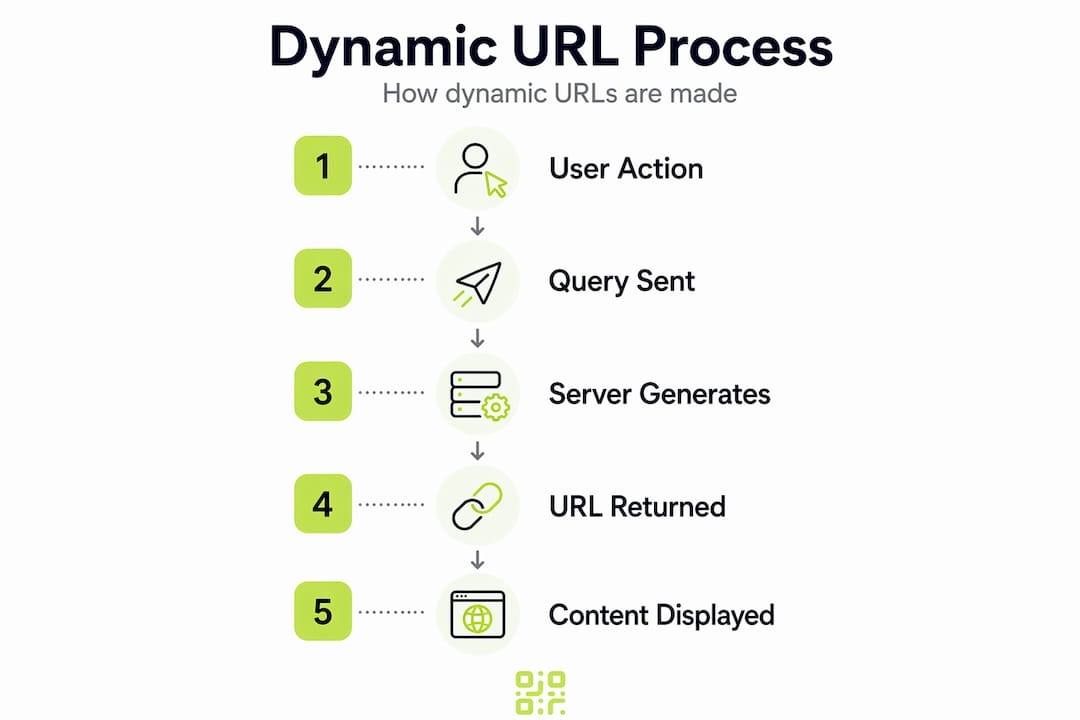
A dynamic URL, by contrast, is generated in real time by the server based on query parameters, session data, or database queries. The content delivered can vary depending on those inputs.
Here is a typical dynamic URL example:
https://shop.example.com/products?category=shoes&colour=red&size=8
The elements after the ? are called query parameters. Each parameter is a key-value pair joined by =, and multiple parameters are chained with &. The server reads these values, queries the database, and returns only the matching products.
Here is a quick comparison to make the difference concrete:
| Feature | Static URL | Dynamic URL |
|---|---|---|
| Structure | Fixed path, no parameters | Contains ?, =, & symbols |
| Content | Same every request | Varies by parameter values |
| Generation | Pre-built HTML files | Server-side, on demand |
| Common use | Blog posts, landing pages | Product filters, search results |
| SEO complexity | Low | Requires active management |
Common dynamic URL examples you will recognise from everyday browsing include:
https://example.com/search?q=wireless+headphones(search results page)https://shop.example.com/items?sort=price_asc&page=2(sorted product listing)https://app.example.com/dashboard?user_id=4821&view=summary(personalised dashboard)https://news.example.com/articles?tag=technology&date=2026-01(filtered news feed)
Each URL above tells the server precisely what content to retrieve and how to present it.
How dynamic URLs work technically
When a user clicks a link or submits a form that produces a dynamic URL, the server does not simply retrieve a pre-built HTML file. Instead, the backend queries a database and assembles the page content on the fly, based on the parameter values it receives.
Take an eCommerce filter as an example. A user selects “red” and “size 8” from a product filter panel. The browser sends a GET request with those values appended to the URL. The server passes those parameters to the database, retrieves only matching records, and renders a product listing page unique to that combination.

This architecture is what makes large-scale platforms practical. Without dynamic URLs, an eCommerce site with 10,000 products and dozens of filter combinations would need tens of thousands of static HTML files. Maintaining them manually would be unworkable. Dynamic generation handles this automatically, reducing the workload across complex platforms significantly.
Dynamic URLs also power personalisation. When you log in to a web application and see a dashboard tailored to your account, the URL often contains a session token or user ID that tells the server exactly what data to display. Content management systems use a similar approach, pulling article content from a database based on a slug or ID passed in the URL.
Pro Tip: When building a dynamic system, keep your query parameter names descriptive and consistent. Using ?colour=red is far clearer for debugging and analytics than ?c=r, and it makes future URL parameter management much easier.
SEO implications of dynamic URLs
This is where most developers and marketers run into trouble. Dynamic URLs are not inherently bad for SEO, but they require careful management. Left unchecked, they create two major problems: index bloat and duplicate content.
Consider a clothing retailer with filters for colour, size, and material. Even a modest product range can produce 25 or more unique URLs from just two filter dimensions (five colours multiplied by five sizes). Add a third filter and you are looking at hundreds of crawlable combinations, many of which display nearly identical content. Search engines will crawl all of them, consuming your crawl budget while potentially indexing redundant pages.
The good news is that these problems are solvable with the right practices:
-
Use canonical tags. A canonical tag tells search engines which URL is the “primary” version of a page. When you have many parameter variants of the same product listing, canonical tags consolidate those variants back to a single, authoritative URL. This prevents duplicate content penalties without removing the filtering functionality users need.
-
Manage URL parameters in Google Search Console. You can specify how Google should treat individual parameters. For example, you might tell it that
?sort=does not change the page content meaningfully and should be ignored for indexing purposes. -
Distinguish tracking parameters from content parameters. Parameters like
utm_sourceandutm_mediumare often excluded from indexing by search engines but they still consume crawl budget when they appear in your sitemap or internal links. Never include UTM-tagged URLs in your XML sitemap. -
Implement
noindexselectively. For paginated or filtered pages that add little unique value, anoindexmeta tag prevents them from entering the search index while still allowing users to access them. -
Use URL redirection thoughtfully. When you restructure parameters, a proper redirect strategy protects any equity already associated with older URL patterns. The guide on URL redirection explained covers this well.
Pro Tip: Before launching a new dynamic URL structure, audit your parameter combinations in a staging environment. Map out every possible URL variant and identify which ones need canonical tags or noindex treatment before they reach production.
Understanding dynamic URL best practices means treating SEO management as part of your development workflow, not an afterthought.
Dynamic URLs in marketing campaigns
Dynamic URLs are central to modern digital marketing, particularly in campaign tracking. If you run paid search or social advertising, you have almost certainly encountered UTM parameters. These are query string values appended to a landing page URL that tell your analytics platform where a visitor came from.
The problem with manually writing UTM parameters is human error. A mistyped campaign name or inconsistent capitalisation can fragment your data in Google Analytics, making it impossible to accurately assess campaign performance. Dynamic URL parameters solve this cleanly.
Platforms like Google Ads support value track parameters such as {campaignid} and {keyword}. These placeholders are replaced at click time with the actual campaign ID or search term, pulling the data directly from the platform without any manual input. The result is cleaner data, reduced error rates, and no disruption to the platform’s learning algorithms when you update a URL.
Here is what well-implemented dynamic URL marketing tracking delivers:
- Automated population of source, medium, campaign, and keyword data without manual entry.
- Consistent data formatting across all campaigns and ad variants.
- Preservation of campaign optimisation history because URLs update dynamically rather than being replaced wholesale.
- Easier attribution modelling when session data is passed consistently through each touchpoint.
Dynamic URLs also sit at the heart of QR code strategies. A dynamic QR code does not encode a destination URL directly. Instead, it encodes a short redirect URL that points to a server, which then forwards the user to the actual destination. This means you can update the destination at any time without reprinting the physical code.
The operational risk here is significant. Dynamic QR codes depend on redirect servers that must remain operational. If the provider’s infrastructure lapses, every QR code pointing through that server breaks instantly. The printed codes look identical but go nowhere. For marketers with codes on product packaging, event signage, or catalogues, this is a serious vulnerability.
Security is another consideration. For dynamic content that involves sensitive access, signed URLs and dynamic watermarking provide an added layer of protection by embedding session-specific metadata and limiting access to authorised users. This matters particularly for gated content, member portals, and secure document delivery. You can read more about QR code security practices to understand how this applies to campaign tracking specifically.
Practical tips for managing dynamic URLs
Getting dynamic URLs right is not complicated, but it does require discipline. These are the most common pitfalls and how to avoid them:
- Watch for parameter proliferation. Every new filter, sort option, or tracking variable you add multiplies your crawlable URL space. Document every parameter in use and audit quarterly.
- Never include UTM parameters in internal links. If a UTM-tagged URL gets shared internally or picked up by a crawler, it can create duplicate indexing issues and attribute internal traffic incorrectly in your analytics.
- Test canonical tag implementation before launch. A misconfigured canonical tag points search engines to the wrong page, consolidating equity onto an unintended URL. Always verify using a crawl tool.
- Plan for server dependency in QR workflows. If you rely on dynamic QR codes in print campaigns, your redirect infrastructure must be reliable and long-lived. Choose a provider who guarantees code permanence regardless of billing changes.
- Match URL type to use case. For blog posts and landing pages, static URLs are simpler and easier to manage. Reserve dynamic URL structures for genuinely data-driven pages: product listings, search results, dashboards, and personalised content.
- Roll out new parameter structures gradually. Introduce new tracking or filtering parameters in phases and monitor crawl stats in Search Console before full deployment. Sudden URL proliferation can trigger crawl rate throttling.
The core principle is that dynamic URLs are a technical necessity in most modern web applications. The goal is not to avoid them but to control their scope and communicate their structure clearly to both users and search engines.
My honest perspective on dynamic URLs
I’ve reviewed enough web projects to know that the “dynamic URLs are bad for SEO” argument is largely a relic of early-2000s SEO thinking. Back then, search engines genuinely struggled to crawl parameter-heavy URLs. That is no longer the reality. What I find more concerning today is how often developers and marketers still treat URL management as someone else’s problem.
In my experience, the real issue is not the dynamic URL itself. It’s the absence of a clear parameter governance policy. I’ve seen sites with dozens of undocumented parameters, no canonical strategy, and UTM tags appearing in internal links because no one established clear rules. The technical debt that creates is far harder to untangle than setting clear standards from the start.
What I advocate is a simple shared document between developers and marketers that lists every parameter in use, its purpose, and how it should be treated by search engines. It takes an hour to create and saves months of diagnostic work later. Dynamic URLs offer real flexibility. The teams that benefit most from that flexibility are the ones who treat URL structure as a first-class concern from day one.
— The Qrlytics Team
Put dynamic URLs to work with Qrlytics
If you manage QR code campaigns, the stakes around dynamic URL infrastructure are particularly high. Qrlytics is built to address exactly this. With the dynamic QR code generator, you can create editable, trackable QR codes where the destination URL can be updated at any time without reprinting a single code. Campaign parameters are managed centrally, and every scan feeds into real-time analytics including global heat maps and GDPR-compliant tracking data.

Unlike platforms that deactivate codes when a subscription lapses, Qrlytics guarantees that codes created during an active subscription remain functional permanently. If you want to explore the platform before committing, the free QR code generator requires no credit card and gets you started immediately. For teams serious about campaign tracking and ROI, Qrlytics gives you the infrastructure to manage dynamic URLs confidently at scale.
FAQ
What is a dynamic URL in simple terms?
A dynamic URL is a web address generated in real time by a server, typically containing query parameters (such as ?category=shoes&size=8) that tell the server what content to retrieve and display.
Are dynamic URLs bad for SEO?
Dynamic URLs are not inherently harmful for SEO. With proper canonical tags and parameter management, they can be managed effectively without causing duplicate content or crawl budget issues.
What is a dynamic URL update in the context of QR codes?
A dynamic URL update means changing the destination a QR code points to without altering the printed code itself. This is possible because the code links to a redirect server, which forwards users to whichever URL you have set as current.
How do dynamic URLs affect campaign tracking?
Dynamic URL parameters such as UTM values can be populated automatically at click time, removing manual data entry and keeping campaign analytics accurate and consistent across all ad platforms.
What is the difference between dynamic and static URLs?
Static URLs are fixed addresses that always deliver the same content. Dynamic URLs change their output based on parameter values passed in the query string, making them suitable for personalised, filtered, or database-driven content.