What is URL redirection? A practical guide
TL;DR:
- URL redirection is a background web technology most users encounter daily when links automatically forward to new pages. Properly managing redirect types and avoiding chains or loops preserve SEO value and site performance. Organizations should regularly audit redirects and utilize dynamic QR codes for flexible marketing campaigns and seamless rebranding.
URL redirection is one of those web technologies that most people interact with dozens of times a day without realising it. When you click an old link and land on the right page anyway, that’s URL redirection at work. For digital marketers, developers, and business owners, understanding what is URL redirection goes far beyond basic awareness. Get it wrong and you risk losing search rankings, slowing your site, and breaking campaign tracking. Get it right and it becomes a powerful tool for managing your web presence with confidence.
Table of Contents
- Key takeaways
- What is URL redirection and how does it work?
- Types of URL redirects and their SEO impact
- Common redirect pitfalls to avoid
- Practical benefits of URL redirection
- My honest take on redirect management
- Manage your redirects smarter with Qrlytics
- FAQ
Key takeaways
| Point | Details |
|---|---|
| Redirects use HTTP status codes | The server communicates redirect instructions via 3xx status codes and a Location header. |
| Redirect type affects SEO significantly | A 301 passes most link equity; a 302 signals temporary movement and transfers less SEO value. |
| Chains and loops cause real harm | Multiple redirect hops increase latency and degrade both performance and search rankings. |
| Redirects serve marketers directly | You can change a campaign destination without updating every printed or digital link. |
| Auditing before migration is non-negotiable | Testing redirects before any site launch prevents SEO loss and broken user journeys. |
What is URL redirection and how does it work?
URL redirection, sometimes called URL forwarding, is the process of automatically sending a user from one web address to another. When your browser requests a URL, the server responds with an HTTP status code. If that code falls in the 3xx range, the server is telling the browser: “The content you want is now at a different address.” The browser then makes a second request to that new address, all within single-digit milliseconds. To the person browsing, it feels instant.
The technical sequence works like this:
- Your browser sends a GET request to the original URL.
- The server responds with a 3xx status code and a Location header containing the new URL.
- The browser reads the Location header and automatically requests the new address.
- The server at the new address responds with a 200 OK, and the page loads.
This entire exchange happens in the background. Users rarely see it occur. That invisibility is part of what makes redirects so easy to overlook, yet so consequential when misconfigured.
There are two broad categories of URL redirection methods. Server-side redirects are handled by your web server or hosting configuration, using files like ".htaccess` for Apache servers or server blocks in Nginx. These are the gold standard because they respond instantly and send clear signals to search engines. Client-side redirects, on the other hand, rely on HTML meta tags or JavaScript running in the browser. They work, but they execute more slowly and communicate less clearly with search engines.

Pro Tip: If you are setting up redirects on a shared hosting environment, your .htaccess file is your fastest route to configuring server-side redirects without touching server configuration directly.
Types of URL redirects and their SEO impact
Choosing the wrong redirect type is one of the most common technical mistakes on the web. Each type carries different signals for browsers, search engines, and caching systems. Here is a clear breakdown:
| Redirect type | Permanence | SEO value passed | Caching behaviour | Best used when |
|---|---|---|---|---|
| 301 | Permanent | High | Cached by browser | Moving a page permanently |
| 302 | Temporary | Lower | Not cached | Short-term maintenance or tests |
| 307 | Temporary | Lower | Not cached | Temporary move, preserving HTTP method |
| 308 | Permanent | High | Cached by browser | Permanent move, preserving POST method |
| Meta refresh | Depends on delay | Low | Not cached | Only as a last resort |
| JavaScript | Variable | Low | Not cached | Tracking-specific scenarios only |
The 301 redirect is the most widely used for permanent moves. 301 redirects transfer most SEO link equity, making them the right choice whenever you move a page for good. If your old URL had backlinks, a 301 passes the majority of that value to the new destination.
The 302 redirect tells search engines the move is temporary. Use it for short-term scenarios, like a promotional landing page or a page under active rebuilding. Applying a 302 when you mean a permanent move is a costly mistake. Search engines may continue indexing the original URL and decline to fully credit the new one.
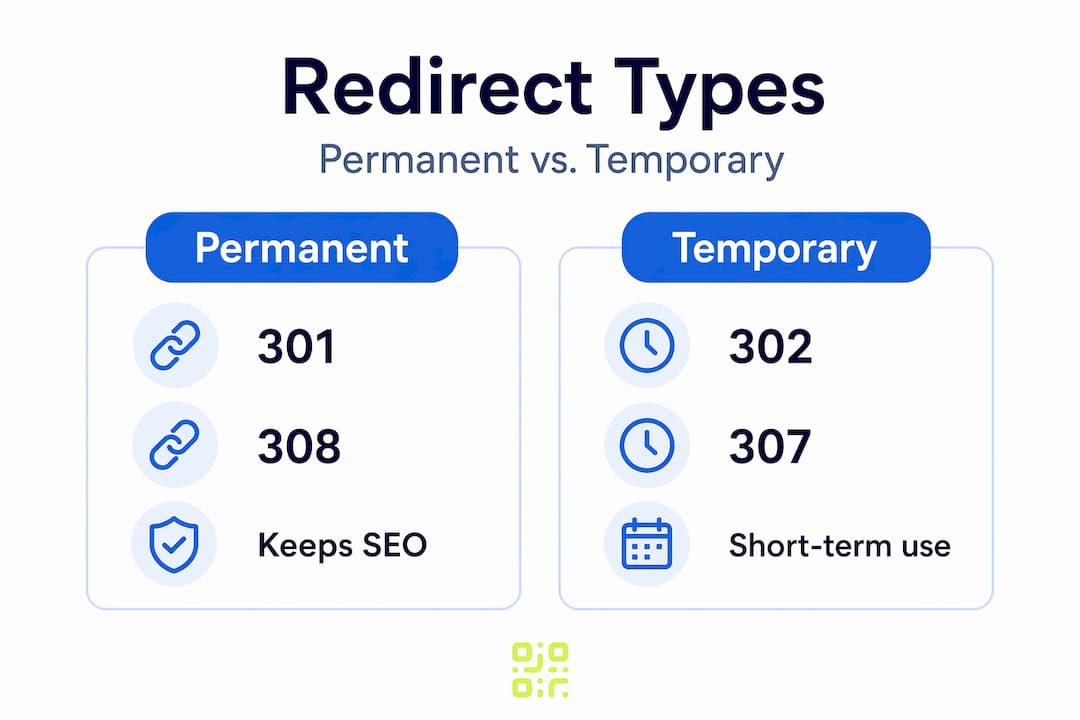
The 307 and 308 redirects are less commonly discussed but genuinely important, particularly for developers working with APIs and forms. Advanced redirects like 307 and 308 preserve the original HTTP request method, meaning a POST request stays a POST rather than being converted to a GET. Without this, form submissions or API calls can fail silently when they hit a redirect.
One often-missed nuance: browsers cache 301 redirects, sometimes permanently. If you set up a 301 and later need to change the destination, some users will still be routed to the old target because their browser stored the redirect locally. Testing in an incognito window during development avoids this confusion.
Client-side redirects like meta refresh and JavaScript are generally discouraged. They execute after the page has begun loading, which creates a worse experience for users and sends weaker signals to crawlers. Use them only when a server-side option is genuinely unavailable.
Pro Tip: During a site migration, audit every redirect type in your list before going live. A single 302 where a 301 was intended can silently cost you ranking power over weeks.
Common redirect pitfalls to avoid
Redirects are easy to set up incorrectly, and the consequences compound over time. These are the issues most likely to cause problems in real-world environments:
-
Redirect chains. A chain occurs when URL A redirects to URL B, which redirects to URL C. Each redirect hop causes a full round-trip request, adding DNS lookups, TLS handshakes, and HTTP response times. A chain of three or four hops can noticeably slow page load. Search engines also dilute the passed SEO value across each hop.
-
Redirect loops. This is when URL A redirects to URL B, which redirects back to URL A. The browser keeps making requests indefinitely until it times out and shows an error. Loops often appear after CMS migrations or when HTTPS enforcement rules are misconfigured.
-
Caching problems. As noted, permanent redirect caching can cause stuck routing even after you update the server rule. Always test redirects in fresh browser sessions, especially during staging.
-
Mismatched redirect types. Using a 302 for a permanent rebrand, or a 301 for a page you plan to restore, both create long-term problems. The former wastes link equity; the latter causes confusion once the original URL returns.
-
Missing Location headers. A 301 response without a valid Location header leaves browsers with nowhere to go. The page simply fails. This usually happens with manually coded redirect rules that contain a typo or formatting error.
-
HTTP to HTTPS inconsistencies. If your site serves both
http://andhttps://variants without a consistent redirect to one canonical version, search engines may index duplicate content, and users may land on insecure pages.
Thorough redirect audits before site migration are one of the most valuable technical tasks you can perform. Tools like Screaming Frog or browser-based redirect checkers will map every hop in your redirect chain and flag loops before they go live.
Pro Tip: Set a rule for yourself: no redirect should resolve in more than one hop. If you find a chain, fix the source URL to point directly to the final destination.
Practical benefits of URL redirection
Once you understand the mechanics, the practical uses for URL redirection become clear. This is where the technology moves from a technical concern to a genuine business asset.
-
Preserving SEO during site moves. When you redesign a site or restructure your URL paths, a well-planned set of 301 redirects keeps your search rankings intact. Without them, every old URL that rankings were built on returns a 404 error and all that authority is lost.
-
Campaign flexibility for marketers. URL redirects let marketers change campaign destinations without touching the original link. If you printed 10,000 flyers with a QR code pointing to a specific URL, a redirect means you can update the destination whenever the campaign changes, without reprinting anything.
-
Branded short links. Companies use redirect services to create short, branded URLs that are easier to share and remember. The short link redirects to a longer destination URL. This keeps marketing materials clean and makes tracking far simpler.
-
Domain forwarding and rebranding. When a business changes its domain name, a 301 redirect from the old domain to the new one tells both users and search engines where everything has moved. Done correctly, you retain most of the authority and traffic your old domain had built.
-
HTTPS enforcement. Redirecting all HTTP traffic to HTTPS is now a baseline security and SEO requirement. Google treats HTTPS as a ranking signal, and browsers flag non-secure pages as warnings. A single server-side redirect rule handles this for every page on your site.
-
Fixing broken links. When content is deleted or moved, a redirect from the old URL to the most relevant existing page recovers lost traffic instead of serving visitors a dead end. For tracking QR code engagement, maintaining active redirect destinations is especially critical since a broken scan offers no recovery path for the user.
The benefits of URL redirection extend to data and analytics too. When redirect destinations are managed centrally, you gain the ability to swap tracking parameters, test different landing pages for the same link, and measure the performance of campaigns in real time.
My honest take on redirect management
In my experience, redirects are consistently the most underestimated element of site architecture. Developers set them up during a migration, and then nobody reviews them again for years. By that point, you often have chains four or five hops long, a few loops buried in old campaign URLs, and a handful of 302s that were always meant to be 301s.
The thing I have seen trip up even experienced teams is the caching behaviour of 301 redirects. You fix the server rule, test it yourself, and it works. A colleague tests it from their machine and still hits the old destination. That is browser caching at work, and it causes genuine confusion about whether the fix actually deployed.
I also think redirects are a critical part of site architecture, not just a cleanup task. The organisations that treat redirects as an afterthought end up with messy URL structures that slow the site and confuse crawlers. The ones that build a redirect map as part of every migration, and audit it quarterly, keep their technical SEO in good shape without heroic effort.
My practical advice: keep a living spreadsheet of every redirect you implement, including the date, the reason, and the intended permanence. When you build that habit, redirect audits take minutes rather than days.
— The
Manage your redirects smarter with Qrlytics
If you use QR codes in your marketing, URL redirection is already central to how those campaigns work. The question is whether you have full control over where those redirects lead.

Qrlytics is built on the principle that your QR codes should never stop working. With dynamic QR codes, every scan goes through a Qrlytics-managed redirect, which you can update at any time from your dashboard. Need to change a campaign destination after your brochures are printed? Update the redirect URL in seconds. No reprinting. No broken links. No lost scans.
Beyond redirect management, Qrlytics gives you real-time analytics on every scan, GDPR-compliant tracking, and global heat maps so you can see exactly where your audience is engaging. The platform requires no credit card to get started, making it straightforward to see the results for yourself.
Explore the free QR code generator to create your first trackable redirect today.
FAQ
What is URL redirection in simple terms?
URL redirection automatically sends a visitor from one web address to another. The process uses HTTP status codes to instruct the browser to load a different URL, and it typically happens in milliseconds without any visible interruption to the user.
What is a 301 redirect and when should I use it?
A 301 redirect signals a permanent move and transfers most of the SEO link equity from the old URL to the new one. Use it any time you permanently change a URL, restructure your site, or migrate to a new domain.
What is the difference between temporary and permanent redirects?
Permanent redirects (301, 308) tell search engines the change is final and pass significant SEO value. Temporary redirects (302, 307) indicate the move is short-term, pass less SEO value, and leave the original URL indexed by search engines.
Can redirect chains hurt my SEO?
Yes. Each additional hop in a redirect chain adds latency and dilutes the SEO value being passed. Search engines and users both experience slower load times, and crawl budgets can be wasted on chains rather than actual content.
How does URL redirection work with QR codes?
Dynamic QR codes use a redirect URL managed by the QR code platform. When someone scans the code, they are first sent to the platform’s redirect server, which then forwards them to the current destination. This lets you change where the code leads without creating a new QR code.