QR vs DataMatrix codes: a complete guide for campaign success
TL;DR:
- Choosing the correct 2D barcode depends on campaign environment, size constraints, and targeting consumer or industrial audiences.
- QR codes excel in flexibility, smartphone compatibility, and detailed analytics, making them optimal for consumer marketing.
- DataMatrix codes are ideal for small spaces, regulated industries, and environments where durability outweighs customization.
Picking the wrong 2D code for your marketing campaign can quietly cost you thousands in wasted print materials, broken customer journeys, and data you never collected. Many marketers treat QR and DataMatrix codes as interchangeable, assuming any square barcode will do the job. That assumption is wrong, and it shows up in campaigns that scan inconsistently, offer no analytics, or simply fail when the printed material gets scratched or weathered. This guide cuts through the confusion, compares both code types honestly, and gives you a clear framework for choosing the right format for every channel and campaign goal.
Table of Contents
- How QR and DataMatrix codes work for marketers
- QR vs DataMatrix: features compared for campaign reliability
- Integrating QR and DataMatrix into your marketing workflow
- What to consider before committing: compliance, branding and analytics
- A campaign strategist’s view: what most guides miss about QR and DataMatrix choices
- Create, track and future-proof your codes with QRlytics
- Frequently asked questions
Key Takeaways
| Point | Details |
|---|---|
| Error correction is vital | Both code types offer robust recovery, but QR lets you set the level for extra protection. |
| Choose the right code | DataMatrix suits small or regulated prints, while QR excels in branding and versatility. |
| Analytics need planning | For long-term marketing insights, combine tracking tools and code management from the start. |
| Integration is strategic | Embed codes purposefully across touchpoints and monitor scan data for campaign impact. |
| Branding vs compliance | Balance custom designs with legal and technical requirements unique to your sector. |
How QR and DataMatrix codes work for marketers
Now that we’ve highlighted the confusion, let’s break down what actually sets these code types apart and why it matters.
Both QR codes and DataMatrix codes are two-dimensional barcodes, meaning they store data in both horizontal and vertical directions. This makes them far more capable than traditional one-dimensional barcodes. However, the way they encode and recover data differs in ways that matter enormously once your codes are printed and out in the world.
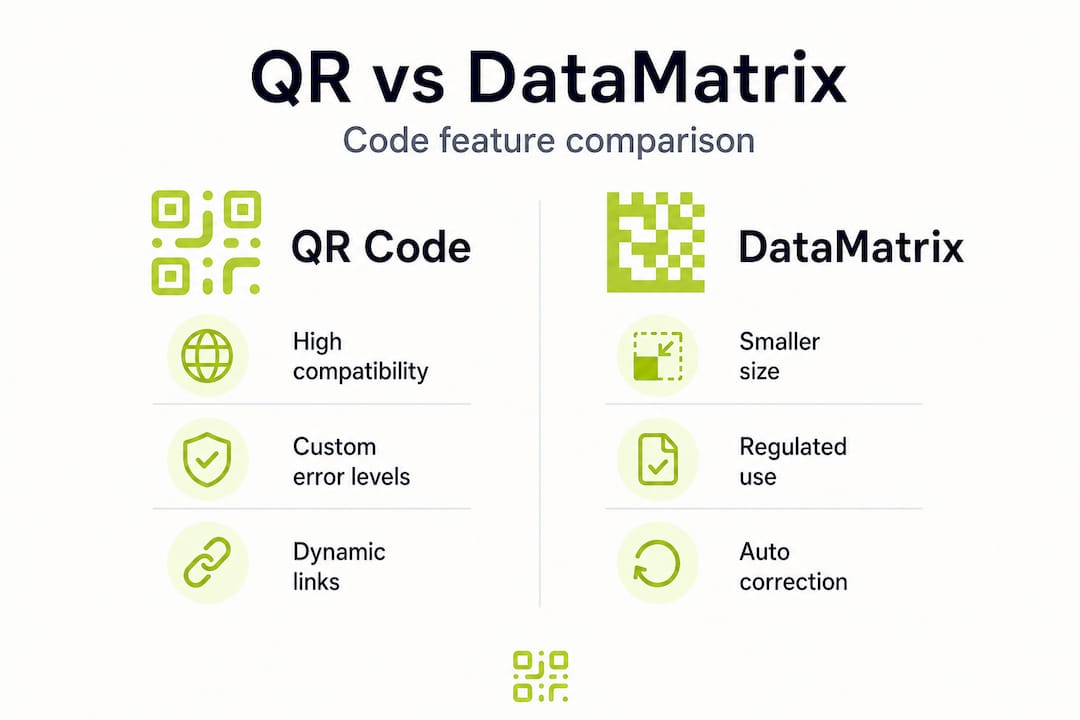
QR codes use a square grid of black and white modules, with three distinctive finder squares in the corners that help scanners quickly locate and orient the code. DataMatrix codes also use a square or rectangular grid, but they rely on a solid “L-shaped” border for orientation. This structural difference has a direct impact on minimum print size. DataMatrix codes can be printed at a much smaller scale and still scan reliably, which is why you see them on pharmaceutical packaging, circuit boards, and food labels where space is at a premium.
Error correction is where things get particularly interesting for campaign managers. Both use Reed-Solomon error correction up to roughly 30% recovery, but with a key difference: QR codes let you select your error correction level (L: 7%, M: 15%, Q: 25%, H: 30%), while DataMatrix ECC200 applies its correction automatically. For marketers, QR’s selectable levels mean you can balance data capacity against durability depending on the environment. A code on a glossy indoor poster can use a lower correction level to store more data, while a code on outdoor signage should use the highest level to survive rain, dirt, and fading.
Here is a quick overview of where each code type naturally fits:
- QR codes: Outdoor advertising, retail displays, event signage, digital screens, branded campaigns requiring custom colours and logos
- DataMatrix codes: Product packaging, pharmaceutical labels, industrial asset tracking, small-format print where space is limited
- Both: Printed brochures, direct mail, packaging inserts, and any channel where scan reliability is critical
You can find practical QR code marketing tips on the QRlytics blog, covering everything from design to deployment. For campaigns that need to run for months or years, advanced campaign tracking becomes essential, and the code format you choose affects what tracking is even possible.
Pro Tip: When printing codes on materials that will be handled frequently, such as product packaging or event lanyards, always choose the highest error correction level available. A slightly larger code is a worthwhile trade-off for a code that keeps scanning reliably six months into your campaign. For further guidance on print marketing best practices, reviewing your format choices before going to print is always time well spent.
QR vs DataMatrix: features compared for campaign reliability
With the basics covered, let’s see how these codes compare head-to-head for your campaign needs.
The table below gives you a direct comparison across the features that matter most when planning a long-running marketing campaign.
| Feature | QR code | DataMatrix code |
|---|---|---|
| Error correction | Selectable: L, M, Q, H (up to 30%) | Automatic ECC200 (up to 30%) |
| Maximum data capacity | ~4,296 alphanumeric characters | ~2,335 alphanumeric characters |
| Minimum print size | ~2cm x 2cm for reliable scanning | ~5mm x 5mm for reliable scanning |
| Smartphone scanning | Native camera support on iOS and Android | Requires dedicated app in most cases |
| Branding and customisation | High: colours, logos, shapes | Low: functional, minimal design options |
| Typical use cases | Consumer marketing, digital campaigns | Industrial, pharma, regulated packaging |
| Analytics compatibility | Excellent with dynamic code platforms | Limited without specialist platforms |
The standout figure here is that both codes support up to 30% damage recovery, which is critical for any code printed on physical materials. A QR code on a coffee shop loyalty card that gets scratched or creased can still scan perfectly at the H error correction level. A DataMatrix code on a medicine box can survive warehouse handling and still be read by a pharmacist’s scanner.
Where QR codes hold a clear advantage for most consumer-facing campaigns is smartphone compatibility. Every modern iPhone and Android device reads QR codes natively through the camera app, with no additional software required. DataMatrix codes, by contrast, typically need a dedicated scanning app, which creates friction for your audience. If your campaign relies on customers scanning a code spontaneously, that extra step can significantly reduce your scan rate.

For printed campaign tracking, QR codes connected to a dynamic platform give you the richest data. You can track code scans by location, device, time of day, and even update the destination URL without reprinting anything. DataMatrix codes used in industrial or regulated settings often feed into proprietary systems rather than open analytics platforms, making them less flexible for general marketing purposes.
Choosing the wrong format has real consequences. A marketer who prints DataMatrix codes on a direct mail campaign expecting consumers to scan them with their phone will find most recipients simply cannot. Conversely, a pharmaceutical company using QR codes on small blister packs may struggle with print size constraints that DataMatrix handles easily. Matching the code to the context is not optional. It is the difference between a campaign that works and one that fails silently. Reviewing campaign analytics strategies before launch helps you set the right expectations and measurement framework.
Integrating QR and DataMatrix into your marketing workflow
Having compared their strengths, let’s put these codes to work in real marketing workflows.
A reliable deployment process prevents the most common campaign failures: codes that were never tested at print size, redirect URLs that were set up incorrectly, and analytics that were never configured. Follow these steps for every campaign:
- Define your goal and channel first. Decide whether the code will appear on print, packaging, digital screens, or a combination. This determines which code type and error correction level to use before you generate anything.
- Generate your code with the correct settings. For consumer-facing print campaigns, use a QR code with H-level error correction. For small-format or regulated packaging, use DataMatrix. Use a platform that lets you set these parameters explicitly.
- Set up your redirect URL and analytics tracking. Dynamic codes allow you to update QR code destinations after printing, which is invaluable for long-running campaigns. Connect your code to an analytics platform before deployment so every scan is captured from day one.
- Test at actual print size. Print a physical proof and scan it with multiple devices under realistic conditions. Test in low light, at an angle, and with partial obstruction to simulate real-world use.
- Embed the code correctly in your design. Maintain a quiet zone (clear border) around the code. For QR codes, this is typically four modules wide. Skipping this step is one of the most common causes of scan failure.
- Monitor and iterate. Use your track code analytics dashboard to review scan performance weekly during the first month. Identify underperforming placements and adjust.
The table below maps code types to common marketing channels and recommended settings:
| Channel | Recommended code | Error correction | Key consideration |
|---|---|---|---|
| Outdoor billboard | QR | H (30%) | Weather and distance resistance |
| Product packaging (small) | DataMatrix | Automatic ECC200 | Minimum print size |
| Direct mail | QR | Q (25%) | Consumer smartphone scanning |
| Event signage | QR | H (30%) | Crowd and lighting conditions |
| Pharmaceutical label | DataMatrix | Automatic ECC200 | Regulatory compliance |
| Digital screen | QR | M (15%) | No physical damage risk |
| Brochure insert | QR | Q (25%) | Handling and folding wear |
Pro Tip: For any campaign running longer than three months, always use dynamic QR codes rather than static ones. Reed-Solomon error correction protects the physical code from damage, but dynamic codes protect your campaign from changes in destination URLs, product pages, or landing content. Together, they give you a resilient, adaptable campaign asset. Platforms that support dynamic codes also make it easier to improve ROI by letting you optimise destinations based on real scan data without reprinting materials.
Skipping the analytics setup is the most expensive mistake in QR campaign management. Without it, you have no idea which placements are driving scans, which locations are performing, or whether your campaign is reaching its audience at all. Setting up tracking takes minutes but delivers months of actionable data.
What to consider before committing: compliance, branding and analytics
Before finalising your deployment, don’t overlook these strategic and practical issues.
Choosing between QR and DataMatrix is not purely a technical decision. Branding, regulatory requirements, and analytics capability all play a role, and getting these wrong can undermine an otherwise well-planned campaign.
Branding flexibility is a significant advantage for QR codes. You can customise colours, add a logo to the centre, round the corners of the modules, and align the design with your brand identity. DataMatrix codes offer almost none of this flexibility. Their functional, grid-based design is optimised for machine reading, not brand expression. If your campaign relies on a visually distinctive code that fits within a branded design, QR is the clear choice.
Compliance and regulatory requirements often dictate the decision in certain industries. Consider the following:
- Pharmaceutical and medical device packaging frequently requires DataMatrix codes under GS1 standards, particularly for serialisation and traceability
- Food and beverage packaging in regulated markets may specify particular barcode formats for supply chain scanning
- Retail product labelling for large retailers often has specific barcode requirements that must be met before shelf placement
- Event ticketing and access control systems may be built around QR code readers specifically
If you operate in any of these sectors, check the relevant standards before choosing your code format. Using the wrong type can result in rejected shipments or non-compliant packaging.
Analytics readiness is where many marketers underinvest. Not all code generators support meaningful tracking. You need a platform that captures scan data, provides geographic and device breakdowns, and lets you update destinations without breaking the code. Before you verify QR codes before print, confirm that your analytics setup is live and correctly attributed to your campaign.
“A QR or DataMatrix code without analytics is a missed opportunity. Every scan is a data point that tells you where your audience is, what device they use, and when they engage. Building that insight in from the start transforms your printed materials into a measurable marketing channel.”
For teams focused on QR for campaign ROI, the combination of resilient codes, dynamic destinations, and real-time analytics is what separates a professional campaign from a basic one. Investing in the right tools at the start costs far less than reprinting materials or rebuilding a campaign mid-flight.
Both QR and DataMatrix codes support up to 30% error recovery, but only if you generate them correctly. Choosing the right error correction level and testing thoroughly before print, including reviewing brochure design and printing specifications, ensures your codes perform as expected throughout the campaign lifecycle.
A campaign strategist’s view: what most guides miss about QR and DataMatrix choices
To round off, let’s step back and consider what most experts overlook.
Most comparisons of QR and DataMatrix codes treat the decision as a purely technical one: capacity, size, error correction, and scanning compatibility. These factors matter, but they miss the real question, which is how long does your campaign need to last, and who is managing it after launch?
The “either/or” framing is outdated. Sophisticated campaigns regularly use both code types simultaneously. A product launch might use DataMatrix on the physical packaging for supply chain compliance while using a QR code on the accompanying leaflet for consumer engagement and analytics. These are not competing choices. They are complementary tools serving different functions within the same campaign.
The most common misjudgement we see is prioritising aesthetics over data longevity. Marketers spend considerable time customising QR code colours and adding logos, which is entirely reasonable for brand consistency. But they sometimes reduce error correction to accommodate a more complex design, not realising they have made the code fragile. A beautiful code that fails to scan after three months of outdoor exposure is not a success.
The professional lesson is straightforward: plan for code management and analytics from day one, not as an afterthought. This means choosing a platform that supports dynamic redirects, captures scan data reliably, and keeps your codes active regardless of billing changes. It means setting error correction levels based on the deployment environment, not the design brief. And it means reviewing lasting campaign tracking insight before you commit to a format, not after your materials are at the printer.
The campaigns that deliver the best results are the ones where code format, error correction, analytics, and destination management were all decided together at the planning stage. That discipline is what separates a campaign that runs reliably for two years from one that starts breaking down after the first reprint.
Create, track and future-proof your codes with QRlytics
If you want practical tools that put these strategies into action, QRlytics can help.
QRlytics is built for marketers and business owners who need codes that keep working long after the campaign launches. You can generate both QR and DataMatrix codes with the right error correction settings, connect them to real-time analytics, and update destinations without touching your printed materials.

Start with the free QR generator to test your designs before committing to print. When you’re ready for campaigns that need flexibility and longevity, the dynamic code generator lets you change redirect URLs at any time. Every code comes with access to code analytics tools that track scans by location, device, and time, giving you the data to optimise your campaigns continuously. No credit card is required to get started.
Frequently asked questions
Can DataMatrix codes store more data than QR codes?
QR codes typically store more data overall, with a capacity of up to 4,296 alphanumeric characters compared to DataMatrix’s 2,335, but DataMatrix can encode more information into a smaller physical print area, making it the better choice where space is severely limited.
Should I pick QR or DataMatrix for retail product packaging?
Choose DataMatrix for limited print space and regulated industries such as pharmaceuticals or food labelling where GS1 standards apply. QR codes are the better option when you want branded, visually customised codes that consumers can scan with a standard smartphone camera.
How can I ensure my printed codes still scan if damaged?
Use codes with high Reed-Solomon error correction, which provides up to 30% damage recovery, and always test your printed codes at actual size under realistic conditions before your campaign goes live.
Are QR and DataMatrix codes equally trackable?
Both code types can be tracked, but QR codes connected to a dynamic platform offer significantly richer analytics, including scan location, device type, and time data, while DataMatrix codes in industrial settings often feed into closed, proprietary systems with limited marketing analytics capability.