How to update QR code destinations for better results
TL;DR:
- Outdated QR codes on printed materials damage trust and lead to lost customers, but updating destinations is possible with dynamic codes. Choosing the right platform and following proper procedures ensures quick, reliable updates while avoiding common mistakes like subscription lapses or content type mismatches. Ongoing verification, documentation, and monitoring turn QR codes from static assets into powerful, adaptable marketing tools.
Printed materials with outdated QR codes are a silent campaign killer. A flyer pointing to a discontinued product page, a restaurant menu linking to last season’s offers, or a business card directing to a 404 error — these are not minor inconveniences. They erode trust, waste budget, and hand potential customers a reason to walk away. The good news is that updating your QR code destination is entirely achievable without reprinting a single sheet, provided you understand how dynamic QR codes work and which platform to trust with the job.
Table of Contents
- What you need to update QR code destinations
- Step-by-step: How to update your QR code destination
- Troubleshooting common QR destination update mistakes
- Verifying and monitoring your updated QR codes
- Why most brands underestimate QR destination maintenance
- Ready to manage your QR destinations like a pro?
- Frequently asked questions
Key Takeaways
| Point | Details |
|---|---|
| Dynamic QR codes offer flexibility | Only dynamic QR codes allow you to update destinations whenever your campaign needs change. |
| Provider reliability is vital | Choosing a trustworthy QR platform reduces risks of expired codes and lost leads. |
| Verification prevents costly errors | Testing and monitoring your updated QR codes ensures ongoing functionality and branding strength. |
| Hybrid strategy minimises risk | Use static codes internally, dynamic codes for campaigns, and always monitor your provider’s reliability. |
What you need to update QR code destinations
With the risks established, let’s clarify what you need to safely and reliably update QR code destinations.
The first thing to understand is the fundamental difference between static and dynamic QR codes. A static QR code has its destination permanently encoded into the code itself. Once printed, there is no way to change where it points. A dynamic QR code, by contrast, points to a short redirect URL that your platform controls. You update the redirect, and the same physical code now leads somewhere new.
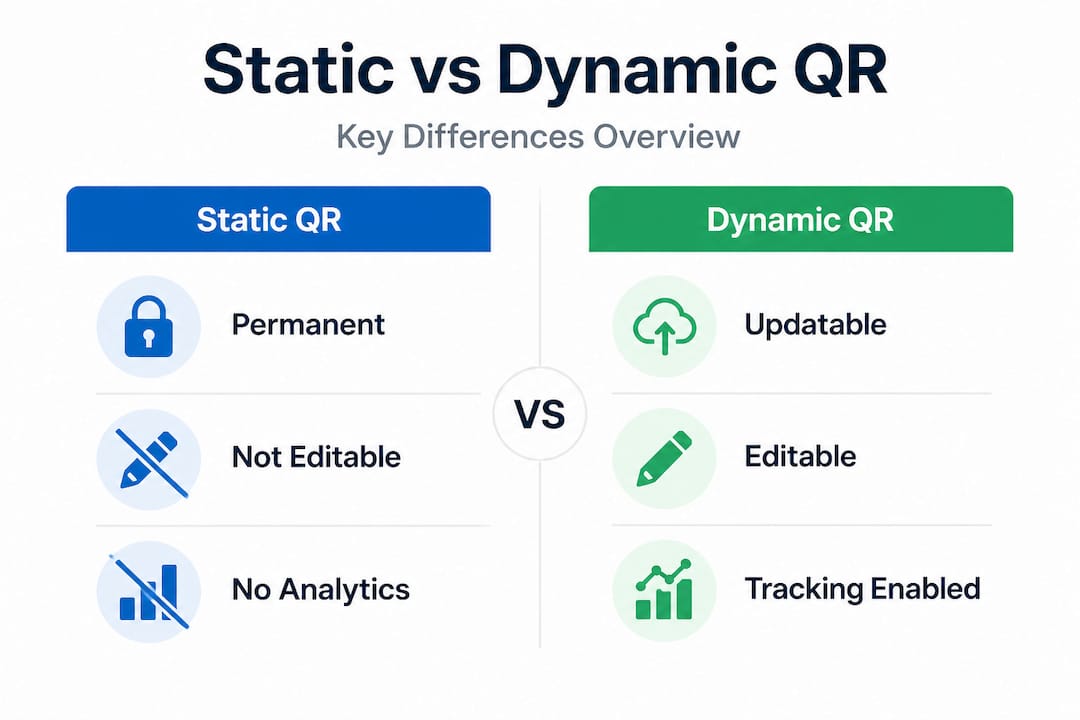
This distinction matters enormously for any campaign that may evolve over time. If you are running seasonal promotions, updating product pages, or managing multiple locations, a dynamic QR code generator is not optional — it is essential.
Here is a quick comparison to help you choose the right code type from the outset:
| Feature | Static QR code | Dynamic QR code |
|---|---|---|
| Destination editable | No | Yes |
| Requires internet to scan | No | Yes |
| Scan analytics available | No | Yes |
| Works offline | Yes | No |
| Risk of expiration | None | Depends on provider |
| Best for | Permanent content | Campaigns, menus, links |
Static codes do have legitimate uses. They are ideal for permanent, offline, or high-security contexts where the destination will never need to change. However, as noted by QR code experts, dynamic codes carry their own risks, including service dependency, an internet requirement at scan time, and potential expiration if a subscription lapses. The provider you choose matters as much as the code type itself.
Before you start updating destinations, make sure you have the following in place:
- An active account on a dynamic QR code platform that supports destination editing
- Access credentials for the platform where the original code was created
- The redirect URL you want the code to point to, tested and live
- A record of which physical materials carry which QR codes
- A testing device (a smartphone) to verify the updated destination after changes
Pro Tip: If you are evaluating platforms, try a free QR generator first to understand the interface before committing to a paid plan. Familiarity with the dashboard reduces errors when you need to make urgent updates.
One critical nuance: not all dynamic platforms allow you to switch content types. For example, a code originally configured to open a URL cannot always be repurposed to display a vCard or a PDF. Content type switching is a limitation many marketers discover only when they need it most. Check your platform’s capabilities before creating codes at scale, especially if you plan to use them across different content formats. QR codes for marketing campaigns benefit most from platforms that are transparent about these constraints upfront.
Step-by-step: How to update your QR code destination
Once your prerequisites are in order, you can proceed with updating the QR code destination using this step-by-step process.
Follow these steps carefully. Skipping verification at any stage can result in live codes pointing to the wrong destination, which is exactly the problem you are trying to avoid.
-
Log into your QR management platform. Use the account under which the original code was created. If your team shares access, confirm you are editing the correct code and not a duplicate or archived version.
-
Locate the specific QR code. Most platforms organise codes by name, campaign, or creation date. Use filters or search to find the right one quickly. If you have not labelled your codes, now is a good time to start.
-
Open the destination settings. Look for options labelled “redirect URL,” “destination,” or “target link.” This is the field you will update. Do not confuse this with the short URL the code uses internally.
-
Check for content type restrictions. Confirm that the new destination is the same content type as the original. As experts highlight, switching from a URL to a vCard, for instance, is not always supported. If you need a different content type, you may need to create a new code entirely.
-
Enter the new destination URL. Paste the full URL, including the “https://” prefix. Avoid shortened URLs within a shortened URL, as layered redirects can slow load times and confuse analytics.
-
Save the changes. Most platforms apply updates immediately. Some may show a brief propagation delay of a few seconds to a few minutes.
-
Test the updated code. Scan the physical or digital code using your smartphone. Confirm it routes to the correct destination. Test on both iOS and Android if possible, as browser behaviour can vary.
-
Record the change. Note the date, the previous destination, the new destination, and who made the update. This log is invaluable for audits, campaign retrospectives, and troubleshooting.
Here is a reference table for common update scenarios and what to expect:
| Scenario | Update possible? | Notes |
|---|---|---|
| URL to new URL | Yes | Straightforward; test after saving |
| URL to PDF | Depends on platform | Check content type support first |
| URL to vCard | Rarely supported | May require a new code |
| Seasonal campaign swap | Yes | Schedule in advance if platform allows |
| Expired subscription code | No | Reactivate subscription first |
Pro Tip: Use QR code tracking to monitor scan activity before and after an update. A sudden drop in scans after a destination change can indicate a broken link or a redirect loop worth investigating.
Reviewing your QR code analytics immediately after an update gives you a baseline. If scan volume remains consistent but conversions drop, the issue is likely with the new landing page rather than the code itself.

Troubleshooting common QR destination update mistakes
Even the most reliable tools can pose challenges. Here are common mistakes and how to fix them.
Subscription lapse and code expiration. This is one of the most damaging mistakes in QR code management. Many providers deactivate codes when a subscription lapses, meaning printed materials become useless overnight. Always set billing reminders well in advance of renewal dates, and choose a provider that is transparent about what happens to your codes if payment fails.
Attempting to switch content types. As mentioned, content type changes are often not supported. If you try to repurpose a URL code as a vCard, you may find the option simply does not exist. Plan your content type at the point of creation, not after the fact.
Service lock-in. Some platforms make it difficult or impossible to export your codes or migrate to a new provider. If your provider goes offline, your codes go with it. Evaluate providers not just on features but on their track record and terms of service. QR codes for designers and marketing teams alike need portability and reliability built into their workflow.
Not testing after every update. It sounds obvious, but many teams update a destination and assume it worked. A typo in the URL, a missing “https://”, or a page that has not yet gone live can all result in a broken experience for real users. Always scan the code yourself before considering the update complete.
Here are the key mistakes to avoid, summarised:
- Letting subscriptions lapse without a contingency plan
- Failing to label codes clearly before distributing them at scale
- Using layered redirects that slow load times
- Skipping post-update testing on multiple devices
- Attempting content type changes without checking platform support first
“The most expensive QR code mistake is not a technical one — it is an organisational one. Teams that do not document their codes, their destinations, and their update history are one billing lapse or staff change away from a broken campaign.”
Pro Tip: Maintain a simple spreadsheet or project management record that maps each QR code to its physical location, current destination, and last update date. This takes minutes to set up and can save hours of troubleshooting later.
Verifying and monitoring your updated QR codes
Once you have updated and troubleshot your QR code, ongoing verification and monitoring ensure lasting results.
Verification is not a one-time task. Destinations change, pages go offline, and campaigns evolve. A code that worked perfectly last month may point to a dead page today if the destination URL was altered without updating the QR record.
Here is what a solid verification and monitoring routine looks like:
- Scan every updated code immediately after making changes, using at least two different devices
- Check the destination page loads correctly and is not returning a 404, redirect loop, or maintenance page
- Review scan analytics weekly to spot unusual drops in activity that might indicate a broken link
- Set calendar reminders for monthly code audits, especially for codes on long-running printed materials
- Monitor your platform’s uptime and reliability to catch any service disruptions before they affect users
The question of which codes to monitor most closely depends on your strategy. Research on hybrid QR code approaches recommends using static codes for internal or permanent content while reserving dynamic codes for customer-facing campaigns. This limits your monitoring burden to the codes that actually need it.
| Code type | Monitoring priority | Recommended check frequency |
|---|---|---|
| Dynamic, customer-facing | High | Weekly |
| Dynamic, internal use | Medium | Monthly |
| Static, permanent content | Low | Quarterly |
| Static, archived campaigns | None | On demand only |
Using track QR code scans data as part of your monitoring routine transforms what might feel like an administrative chore into a genuinely useful marketing signal. Scan volume, device type, location, and time of day all tell you something about how your audience is engaging with your materials.
Why most brands underestimate QR destination maintenance
With the process steps covered, it is worth reflecting on why ongoing QR code destination management is rarely prioritised — and how that creates a competitive advantage for those who get it right.
Most brands treat QR codes as a one-time design task. The code gets created, placed on a flyer or packaging, and then forgotten. Nobody owns it. Nobody checks it. Nobody updates it when the campaign changes. This is not negligence — it is a structural gap. QR codes sit at the intersection of print design, digital marketing, and IT infrastructure, and they often fall through the cracks between teams.
The brands that get this right treat QR codes as living assets, not static decorations. They assign ownership, maintain records, and schedule audits. They also think strategically about which code type serves which purpose. Research confirms that a hybrid approach — static for permanent internal use, dynamic for customer-facing campaigns — reduces risk while maximising flexibility.
There is also a provider reliability issue that most brands do not consider until it is too late. If your QR code platform goes down, changes its pricing, or closes entirely, every dynamic code you have created becomes a liability. Monitoring provider reliability is not paranoia — it is basic risk management. Choosing a provider that guarantees code longevity, even after billing changes, is a decision that protects your marketing ROI tracking investment over the long term.
The competitive advantage here is straightforward. Brands that maintain their QR destinations consistently deliver a better user experience, gather better data, and avoid the reputational damage of broken links on printed materials. That is not a small thing when you consider how many touchpoints a single QR code can represent across a campaign’s lifetime.
Ready to manage your QR destinations like a pro?
Taking control of your QR code destinations is easier than ever with dedicated tools.
QRlytics is built specifically for marketers and business owners who cannot afford broken links or expired codes. Every code you create during an active subscription remains functional permanently, regardless of billing changes. That is a guarantee most providers simply do not offer.

You can create free QR codes instantly, with no credit card required, to see exactly how the platform works. When you are ready to manage destinations at scale, the dynamic QR code editor lets you update redirect URLs in seconds, with changes applied immediately. And with built-in QR code performance tracking, you get real-time scan data, device breakdowns, and location insights to inform every campaign decision. QRlytics gives you the control, permanence, and clarity your campaigns deserve.
Frequently asked questions
Can I update a static QR code’s destination?
No. Static QR codes have their destination permanently encoded at the point of creation. Only dynamic QR codes support destination updates after generation.
Do I need internet to update a QR code destination?
Yes. Updating a dynamic QR code’s destination requires internet access to log into your management platform, as dynamic codes rely on server-side redirects to function.
What happens if my QR code provider subscription expires?
Many platforms will deactivate your codes when a subscription lapses, resulting in broken links. Choose a provider that is transparent about their policy on code longevity after billing changes.
Can I switch a QR code from a URL to another content type?
Most providers do not support content type switching such as from URL to vCard. If you need a different content type, you will typically need to generate a new code from scratch.