Get Applicants in 60 Seconds: QR Hiring Setup for Recruiters
Use dynamic QR codes that route to short, mobile-optimised landing pages, not straight to your ATS form. Candidates scan on their phones far more than desktops, so a fast, focused first screen keeps them moving instead of bouncing. Tag each code with campaign parameters and you can finally measure which poster, receipt, or booth actually produced a hire. Platforms exist that make the codes permanent and the data usable.
TL;DR:
- Using dynamic QR codes ensures that links remain active even after roles close or URLs change, saving printing costs and maintaining campaign effectiveness.
- Placement of QR codes in high-traffic, targeted locations like storefront windows, receipts, and campus posters increases immediate engagement and application completion rates.
- A short, mobile-optimized landing page including role details and a single call-to-action significantly improves candidate conversion compared to linking directly to lengthy forms.
- Tracking scan-to-apply conversion and location-specific data helps measure which physical placements generate qualified applicants and optimize future campaigns.
- Employing GDPR-compliant platforms and regularly checking code functionality prevents data privacy issues and dead links, ensuring ongoing campaign reliability.
Table of Contents
- How do QR codes work in recruiting?
- Where should you place hiring QR codes?
- What should the scan-to-apply landing page include?
- What metrics matter for tracking hiring QR campaigns?
- How do you launch a hiring QR campaign quickly?
- What features actually prevent QR hiring campaigns from failing?
- What compliance and privacy rules apply to hiring QR codes?
- How do you integrate QR codes with your existing ATS?
- Are there real examples of QR codes working in hiring?
- What does a QR hiring campaign cost?
- How do you evaluate applicant quality from QR sourcing?
- Try it in your first week
- Get your QR codes working properly
- Sources
- FAQ
How do QR codes work in recruiting?
A QR code is a link with a shape. Someone scans it, their phone opens a destination URL, and that page either collects an application or sends them onward into your applicant tracking system. What separates a good hiring QR code from a wasted one is what happens in that middle step.
Static codes bake the destination URL into the code itself. Change your job posting URL and the printed code stops working. Dynamic codes point to a redirect you control, so you can swap the destination without reprinting a single poster. For recruiting, where job requisitions open and close constantly, dynamic is the only sensible choice.
The bigger issue is what candidates land on. Sending a scan directly to a lengthy application form kills momentum. ExactHire’s research on QR-based applications shows that taking candidates straight from a physical touchpoint to a mobile apply path cuts drop-off meaningfully, because friction is the enemy at every step.
Practitioner guidance backs this up further:
- Using a short, mobile-first landing page before the ATS increases completion rates compared with linking directly to a long form, according to Recruitment.
- QR hiring is most effective for immediate, localised roles like retail, hospitality, events, and campus jobs, where candidates can act immediately upon seeing the code.
- Dynamic codes preserve the value of printed materials by allowing destination updates when roles close, avoiding wasted posters.
Where should you place hiring QR codes?
Placement decides reach more than design does. The strongest hiring QR campaigns put codes where a candidate is already standing still for a moment, not where they’re rushing past.
High-impact spots worth testing:
- Storefront windows for retail roles, visible to passers-by outside opening hours.
- In-store receipts reaching customers who already know and like the brand.
- Job fair booths, replacing paper flyers candidates lose within the hour.
- Company vehicles, useful for delivery, trades, and logistics hiring.
- Campus posters near cafeterias and notice boards for student or graduate roles.
- Referral cards current employees hand to friends.
Match copy to context. A storefront code might read “Weekend shifts, apply in 60 seconds.” A vehicle decal works better with “Drive with us, scan for pay & routes.” A campus poster can lean on flexibility: “Part-time hours around your timetable, scan to apply.”
Give every placement its own unique code, even when they point to the same role. Without separate codes, you’ll know total scans but never which physical location or channel actually produced applicants, which is precisely the operational question multi-site employers need answered. Recruitment.link notes that location-filtered destinations let a retailer see exactly which store’s poster is converting.
What should the scan-to-apply landing page include?
The page a candidate lands on after scanning decides whether they finish applying or close the tab. Keep it brutally simple. Show the role title, pay range or shift pattern, and location within the first screen, no scrolling required to understand what’s on offer.
A workable structure looks like this:
- Headline: job title and one clear benefit (“Warehouse Associate, £13/hr, immediate start”).
- Must-know facts: three or four bullets covering schedule, location, and requirements.
- Single call to action: one button, “Apply Now,” nothing competing for attention.
- Quick-apply option: phone number capture or a pre-filled form field where your ATS supports it.
- Redirect into full ATS flow: only after the candidate has committed to continuing.
Recruitment.link’s practitioner findings are blunt on this point: linking a QR code directly to a long application form is the single most common mistake employers make, and it consistently costs completions. A landing page that answers the basics first, then hands candidates into the ATS, protects conversion at the exact moment attention is weakest.
Avoid asking for a resume upload before you’ve even confirmed the candidate wants the shift. Test the page on both iPhone and Android before printing anything. Slow load times or broken form fields on one operating system are common and easy to miss if you only test on your own device.
Pro Tip: Check your landing page’s load speed on a phone with patchy signal, like inside a car park or basement break room, since that’s exactly where candidates often scan.
What metrics matter for tracking hiring QR campaigns?
Scans alone tell you almost nothing. What matters is scan-to-apply conversion, meaning the percentage of people who scan and actually start an application. Track that figure by placement, not just in aggregate, so you can compare a storefront code against a vehicle decal fairly using tools like AI Visibility Tracking & Reporting for Marketing Teams to integrate QR analytics into your broader marketing dashboards.
Worth watching:
- Total scans per code, tracked over time to catch decay.
- Scan-to-apply conversion rate, indicating how effectively a landing page converts scanners into applicants.
- Scans by placement, showing which physical locations are generating interest.
- Time-of-day and day-of-week trends, helping optimize staffing and candidate follow-up timing.
Attribution depends on tagging every destination URL with campaign parameters, standard UTM tags work well, alongside an ATS source label so the application record itself shows where it came from. Several platforms support this natively: Dayforce lets recruiters download per-posting QR codes with a source field baked in, so hires get credited to the right physical campaign automatically. Qrlytics’ own analytics and campaign tracking guide covers setting up that tagging structure from scratch.
Maintenance can’t be an afterthought. Run a quick daily check that codes still resolve, then a monthly audit of every printed code against its live redirect. Teamtailor’s guidance recommends a regular testing and follow-up routine specifically to catch this before candidates hit a dead link.
How do you launch a hiring QR campaign quickly?
You don’t need weeks of planning to get a working code live. The sequence below takes most teams under an hour for a single placement.
- Build the destination: a short mobile landing page with role, pay, and CTA.
- Generate a dynamic code pointed at that page’s URL.
- Add campaign tags, UTM parameters plus an ATS source label.
- Brand and export the code at print resolution, adding your logo if the platform allows it.
- Print and place it at your chosen location.
- Test on both iPhone and Android before it goes public.
- Monitor analytics weekly for the first month, then monthly after that.
Minimum tracking fields worth including from day one: a campaign or source parameter, the placement name, and the date printed. When a role closes, redirect the code to your general careers page rather than leaving it dead, recruitment.link’s testing guidance flags this as the difference between a code that keeps working and a poster that quietly becomes useless.
What features actually prevent QR hiring campaigns from failing?
Most QR hiring failures trace back to one thing: a printed code that stopped working after something changed on the back end. A role closed, a subscription lapsed, a URL got restructured, and suddenly a poster in a shop window points nowhere.
Some platforms address this directly. Codes created during an active subscription can keep working permanently, regardless of later billing status, which matters enormously for hiring teams who print posters, vehicle decals, and job fair signage meant to last for months. Dynamic URL updates allow redirection of a code from a closed role to a new one without touching the physical material. Real-time analytics and scan heat maps help show which locations are producing applicants, and GDPR-compliant tracking keeps that data collection defensible.
For recruiting specifically, permanence solves the exact failure mode described earlier in this piece: a printed placement outliving the job it advertised. Instead of reprinting every time a requisition changes, you update the destination once and every existing code updates with it.
What compliance and privacy rules apply to hiring QR codes?
QR codes themselves carry no special legal status, but what they collect and where that data goes matters. Any landing page gathering candidate information, a name, phone number, or CV, is subject to the same data protection obligations as your standard application form. If your organisation operates in or serves the EU/EEA, that means GDPR obligations apply to consent, storage, and retention of anything a candidate submits, regardless of whether the entry point was a scan or a click.
Be specific about what you collect and why. A quick-apply field asking only for a name and phone number carries less compliance overhead than one requesting full CVs and references upfront, and it converts better besides. State clearly on the landing page how the data will be used and for how long you’ll retain it if the candidate isn’t hired.
Analytics tracking around QR scans, location, device type, scan timestamp, generally counts as lower-risk operational data rather than personal data, provided you’re not tying individual scans to identifiable people without consent. Choosing a QR platform with GDPR-compliant tracking built in removes ambiguity here rather than leaving your legal team to interpret it after the fact.
One overlooked risk: QR code security. Malicious actors have been known to paste fraudulent QR stickers over legitimate ones in public places, a tactic the FBI has warned about, redirecting scanners to phishing pages instead of your careers site. Check your physical placements periodically for tampering, particularly on unattended locations like vehicle decals or outdoor posters, and consider codes with verification features that confirm the destination hasn’t been swapped.

How do you integrate QR codes with your existing ATS?
Most modern applicant tracking systems already support QR-based sourcing in some form, so the integration question is usually about attribution, not technical feasibility. Dayforce, for example, lets recruiters generate job-posting QR codes directly from within the platform, with source tracking that flows straight into the candidate record.
If your ATS doesn’t generate codes natively, the fix is straightforward: create the code externally with a platform like Qrlytics, point it at a short landing page, and have that page’s “Apply” button carry the ATS’s own tracking parameter through to the application form. This preserves source attribution even when the QR platform and the ATS are entirely separate systems.
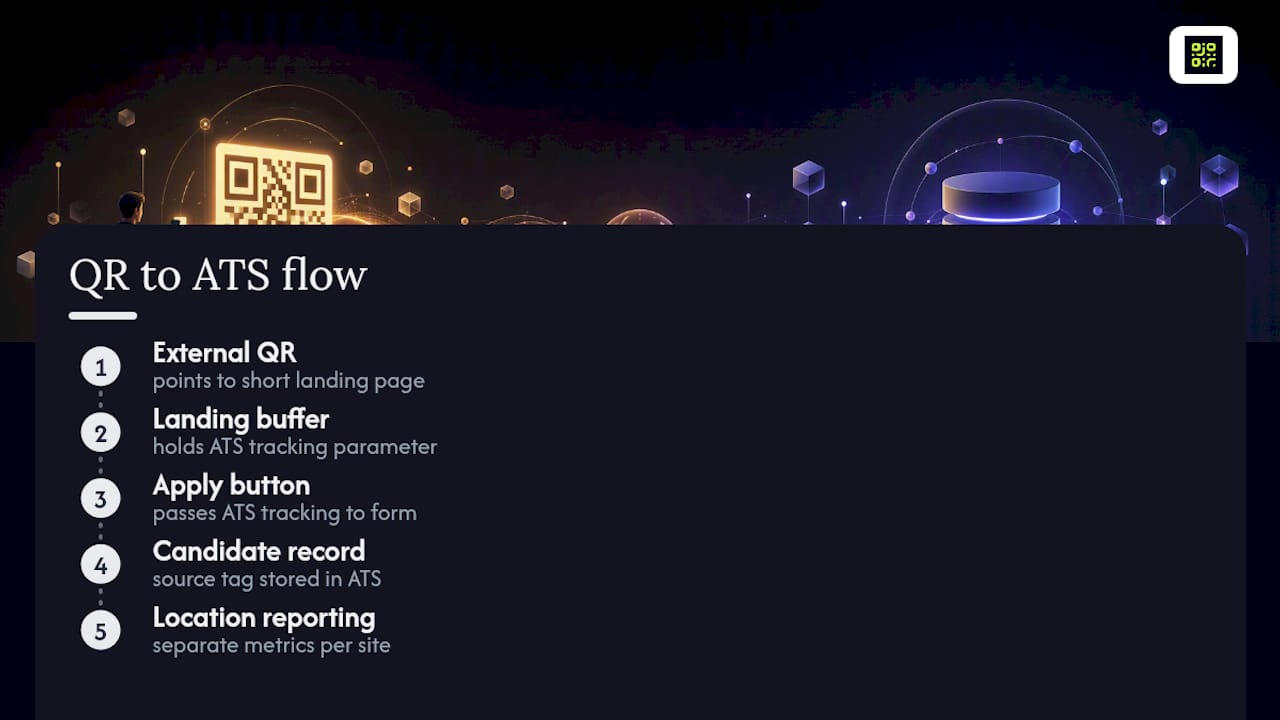
Two integration principles are worth holding onto. First, never let the QR code bypass your ATS’s own source-tagging fields, since that’s the data your reporting dashboards already rely on. Second, keep the landing page as a buffer rather than a direct pass-through. Teamtailor’s documentation on creating and using QR codes recommends testing this flow end-to-end after any ATS update, since form field changes on the ATS side can silently break a pre-fill link that worked fine the week before.
For multi-location employers, route each site’s code to a location-filtered job list within the ATS rather than a generic careers page. That way, a candidate scanning a code at a specific store sees only roles at that store, and your reporting can separate one location’s performance from another’s without manual cross-referencing.
Are there real examples of QR codes working in hiring?
The strongest QR hiring results share a pattern: localised roles, immediate action, and a short path from scan to apply. Retail and hospitality employers report the clearest wins here, largely because the audience, someone standing in the shop or walking past it, is already a plausible candidate for weekend or shift work.
A receipt-based campaign illustrates the mechanic well. A retailer prints a code on customer receipts with copy like “Join our team, scan to apply,” pointing to a landing page listing current shifts at that specific store. Because the code is dynamic, the retailer swaps the destination each time shift needs change, without reprinting a single receipt roll. Recruitment.link’s guidance on pairing QR codes with a numeric job code or SMS option is particularly relevant here, since not every customer wants to open a camera app in a checkout queue, but most will text a five-digit code.
Job fair booths tell a similar story. Paper flyers get lost within the hour; a QR code on a table sign or lanyard survives as long as the candidate’s phone does. Campus recruiting follows the same logic, students already scan constantly and a poster near a lecture hall with “Part-time, flexible around lectures” outperforms a generic “Now Hiring” sign because it answers the candidate’s real question before they even scan.
The common thread across every strong example is specificity: the code, the copy, and the landing page all point to one clear, immediate action.
What does a QR hiring campaign cost?
The financial barrier to entry is lower than most recruiters expect. Generating a basic QR code costs nothing on free tiers offered by most platforms, including Qrlytics, and the real expense sits in printing and placement rather than the technology itself.
Printing costs vary by material and placement. Paper posters run cheapest, vehicle decals and window clings cost more due to durable materials, and branded signage for job fair booths sits somewhere in between. None of these costs are QR-specific, they’re the same printing costs any signage campaign carries.
Where cost differences actually show up is in the platform tier you choose. Free QR generators typically limit you to static codes, meaning a printed poster becomes worthless the moment the role closes or the URL changes, at which point the real cost is the wasted print run and reprint, not the software. Paid tiers unlocking dynamic codes, campaign tagging, and analytics carry a subscription cost, but that cost buys the ability to update destinations indefinitely and measure which placements are actually working, both of which reduce wasted spend elsewhere.
The honest calculation for a hiring team is this: weigh the subscription cost of a dynamic QR platform against the cost of reprinting static posters every time a role changes, plus the value of finally knowing which placement produced which hire. For any employer running more than one or two physical placements at a time, dynamic tracking tends to pay for itself through better-targeted reprints alone.
How do you evaluate applicant quality from QR sourcing?
QR-sourced candidates deserve the same evaluation rigour as any other channel, but the data available to assess quality differs in a useful way: you know precisely which physical placement produced each applicant.
Track quality signals by placement over time, not just at the end of a campaign. A monthly audit reporting scans, scan-to-apply conversion, and applicant quality by placement gives you the evidence to decide whether a printed location deserves to stay active or should be retired. This is exactly the discipline recruitment.link recommends: running a monthly audit against those three metrics rather than judging a placement on gut feeling after a few weeks.
Watch for a gap between scan volume and applicant quality. A vehicle decal may attract many scans from casual interest but fewer qualified applicants, whereas a job fair booth might yield fewer scans but a higher percentage of qualified candidates due to audience self-selection. Neither pattern is inherently better, but knowing which is which tells you where to invest signage budget next quarter.
Compare QR-sourced candidates against your other channels using the same screening criteria you’d apply anywhere, interview show-up rate, time-to-hire, and early retention are all fair comparison points. Don’t judge QR sourcing on volume alone. A channel that produces fewer but more consistently qualified applicants is often more valuable than one flooding your pipeline with scans that never convert to interviews.
Try it in your first week
Pick three placements, a storefront, a receipt, and a vehicle or booth, and give each one a unique code this week. Keep the copy short and specific: name the shift and the pay, not just “Now Hiring.” That single change in wording tends to lift conversion more than any design tweak, because it answers the candidate’s first question before they even scan.
*— The *
Get your QR codes working properly
Certain QR code platforms address the failure this guide keeps circling back to: printed hiring materials that stop working the moment something changes on the back end. A role closes, a subscription lapses, a URL shifts, and a static code goes dead while the poster stays up for months.

Codes created during an active Qrlytics subscription keep resolving permanently, regardless of later billing status, so a vehicle decal or storefront cling doesn’t become worthless the day your card expires. If you want to test a single placement right now, the free QR code generator needs no card and gets a working code in minutes. For a proper campaign with multiple placements, the dynamic QR code generator lets you edit destinations, tag campaigns, and pull scan analytics by location, exactly the setup this guide recommends for tracking which poster actually produced a hire. Start with one placement, measure it for a fortnight, then scale to the rest.
Sources
- Apply with QR Code - ExactHire
- QR code job applications: setup and best uses
- Download a Job Posting QR Code - Dayforce help
- Create and use QR codes - Teamtailor support
FAQ
What is the FBI warning about QR codes?
The FBI has warned that criminals sometimes paste fraudulent QR stickers over legitimate ones in public places to redirect scanners to phishing sites, so checking physical placements for tampering matters, particularly on unattended outdoor signage.
How do I scan a QR code to apply for a job?
Open your phone’s camera app and point it at the code; most modern phones detect it automatically and show a link to tap, which opens the job’s landing page in your browser.
Can I get a QR code for free?
Yes, basic QR code generation is free on most platforms, including Qrlytics’ free generator, though dynamic codes with editable destinations and analytics typically require a paid tier.
Can ChatGPT generate QR codes?
ChatGPT can describe how QR codes work and help write the destination page copy, but it cannot generate a scannable QR code image itself; you need a dedicated generator for that.
Why shouldn’t a QR code link directly to a job application form?
Long forms as the first screen after a scan increase drop-off; a short landing page showing the role, pay, and a single clear call to action first keeps more candidates moving toward completing the application.