Run an Agency QR Workflow Pilot in an Afternoon and Avoid Reprints
The right approach is dynamic QR codes run from one central workspace, with consistent naming, templating and tracking built in from the first batch. Start small: pilot a templated batch with UTM-tagged destinations before rolling out to every client. Do that, and you get editable destinations after print, unified reporting, and clean handoffs instead of scattered spreadsheets.
TL;DR:
- Use dynamic QR codes for bulk printing, outdoor placements, and campaigns needing destination updates or analytics tracking, to avoid costly reprints and provide data insights.
- Implement batch creation with templates, CSV imports, and consistent naming conventions to efficiently manage codes for multiple clients while maintaining branding and tracking accuracy.
- Ensure QR codes are printed at least 2cm by 2cm, with proper contrast and quiet zones, and thoroughly test them on different devices and lighting conditions before finalizing.
- Keep ownership of QR codes centralized in a controlled workspace to streamline management and transfers, with clear contractual terms on expiration, billing, and access rights.
- Incorporate necessary legal and accessibility measures by linking to accessible landing pages, obtaining consent for data collection, and providing fallback URLs to maximize usability and compliance.
Table of Contents
- Why QR codes matter in agency QR workflows
- Static or dynamic QR codes: which does your campaign need?
- Running QR workflows at agency scale: batch creation and branding
- Who owns the QR code: agency or client?
- How do you design a QR code that always scans?
- What metrics should agencies report to clients?
- Which QR features actually matter for agency workflow automation?
- How Qrlytics fits an agency’s QR checklist
- Are QR codes for agencies legally compliant and accessible?
- What agencies actually trade off running QR at scale
- Try an agency QR pilot before you commit budget
- Sources
- FAQ
Why QR codes matter in agency QR workflows
QR codes solve a problem agencies have chased for years: proving that offline media actually did something. A poster, a shelf-edge sticker, or a lanyard becomes a measurable channel the moment it carries a code, and that changes how you pitch print and packaging budgets to clients.
The agency use cases that justify the operational effort tend to cluster around a few formats:
- Print-to-web campaigns, where a magazine ad or flyer routes to a landing page you can swap without a reprint.
- Event check-in and badge scanning, feeding attendance data straight into a client report.
- Packaging and point-of-sale codes that link to product information, warranty registration, or loyalty sign-ups.
- Lead capture at trade shows, where a scan replaces a form and a business card.
The real payoff is measurable offline-to-online journeys, paired with the ability to update a destination mid-campaign. Before adding QR to a plan, ask whether the placement gets enough foot traffic to generate meaningful scan volume, and whether the client actually wants the data, not just the format.
Static or dynamic QR codes: which does your campaign need?
A static QR code encodes a fixed destination permanently into the pattern itself. A dynamic QR code points to a short redirect URL you can edit anytime, without touching the printed code.
Static works fine for single-use, low-volume jobs. A one-off flyer for a single event, a business card, or a code that will never need a destination change can use static without much downside.
Dynamic becomes necessary the moment any of these apply:
- You need to update the destination after the print run has already shipped.
- You’re running A/B tests across placements or client segments.
- The campaign needs scan counts, device data, or timing information.
- The same code appears across multiple channels that launch on different dates.
The operational risk with static codes is quiet but expensive: a wrong URL discovered after 10,000 posters are printed means a full reprint, and there’s no analytics trail to show whether the code even worked.
Pro Tip: Default to dynamic for anything printed in bulk or destined for outdoor placement. The marginal cost is trivial next to the cost of a reprint.
Running QR workflows at agency scale: batch creation and branding
Producing codes for one client is easy. Producing batches for multiple clients, all correctly branded and trackable, is where agencies lose time without a repeatable process.
- Build a template first. Set destination structure, UTM parameters, and branding (colour, logo, frame style) before generating a single code.
- Import via CSV. Map each row to a client, campaign, and destination URL rather than creating codes one at a time.
- Apply a naming convention. Something like
client_campaign_placement_datekeeps a workspace searchable once you’re managing hundreds of live codes. - Tag by client and campaign type so reporting and billing can filter without manual sorting.
- Route branding variants through a proofing step, checking logo placement doesn’t compromise the scannable pattern.
- Run a QC pass before the file goes to print: test-scan every code on at least two devices, confirm destination, confirm UTM tags are live.
This is the exact gap that trips up agencies moving from one client to many: managing QR codes for multiple clients is a workflow problem, not a QR problem, and it needs batch tools and naming discipline, not more manual effort.
Who owns the QR code: agency or client?
Ownership questions surface the moment a client wants to leave, or a code needs updating after the account has changed hands internally. Two structures dominate.
Agency-owned workspaces keep every client’s codes under one account you control. This is faster to administer and easier to standardise, but it creates a dependency: if the client leaves, someone has to transfer or rebuild the codes.
Client-owned projects give each client their own account or sub-workspace. Handoff is cleaner, but you lose some central oversight and may duplicate setup work across accounts.
A basic handoff checklist prevents most disputes:
- Export a full asset list (codes, destinations, scan history) before any transfer.
- Transfer ownership outright, or agree long-term access terms if the agency retains the account.
- Document code expiry terms and who pays for continued hosting.
- Put renewal and transfer terms in the contract, not just in a Slack message.
A simple permission matrix helps too: account admins manage billing and workspace settings, campaign managers create and edit codes, and clients get read-only report access.
Pro Tip: Put ownership and transfer terms in the statement of work before the first code is generated, not after the relationship ends.
How do you design a QR code that always scans?
A code that fails to scan on-site is worse than no code at all. It wastes the placement and often the client’s trust in the format.
Technical minimums that matter:
- Print QR codes no smaller than 2cm by 2cm for close-range materials (business cards, product packaging); scale up for distance viewing.
- Keep the quiet zone, the blank border around the code, at least four modules wide.
- Maintain strong contrast: dark code on light background performs best, and low-contrast colour pairings are the single most common cause of failed scans.
Material choices affect readability more than most teams expect. Gloss varnish and heavy lamination can create glare that defeats a phone camera under bright light, while matte finishes and uncoated stock scan more reliably outdoors.
Build a proofing routine before sign-off: test-scan the final artwork on at least two phone models, under both bright daylight and dim indoor lighting, and check a physical printed swatch rather than relying on a screen preview. Version print files clearly (v1, v2, final) so printers and suppliers never work from an outdated proof.
What metrics should agencies report to clients?
Clients don’t want a raw list of clicks. They want to know the code worked and what happened next.
Track these as a baseline:
- Total scans and unique devices, to separate one person scanning repeatedly from genuine reach.
- Time-of-day and day-of-week patterns, useful for timing future placements.
- Placement-level heat maps, showing which location or version drove the most activity.
- Conversion events on the landing page itself, not just the scan.
Instrument the landing page with UTM parameters matching your naming convention, and set up event tracking (form submits, add-to-cart, sign-ups) so the scan connects to an actual outcome rather than stopping at “someone looked.” Practical agency reporting prioritises clarity over volume: scans, unique devices, top placements, and conversions, laid out simply rather than buried in a raw export.
A monthly or campaign-end report works for most retainers; event-based campaigns often warrant a same-week wrap report while the data is still fresh. On privacy, keep tracking anonymised at the device level and be ready to export raw data on request. A practical guide to QR tracking covers the instrumentation side in more depth if you’re setting this up for the first time.
Which QR features actually matter for agency workflow automation?
Not every QR platform is built for multi-client volume. Evaluate any tool against what an agency actually needs day to day, not what looks good on a features page.
Non-negotiable capabilities:
- Dynamic URL editing, so destinations change without touching printed material.
- Bulk create and CSV import, for batch work across clients.
- Workspaces with role-based permissions, separating admin, campaign manager, and client-viewer access.
- API and webhook access, for teams that want QR events feeding into other systems.
Operational guarantees worth checking before you commit a client’s budget: do codes stay active permanently, or can they be deactivated by a billing lapse? Are lifecycle controls available to schedule code expiry or destination changes in advance? Is there an audit log showing who edited what, and when?
Integration priorities usually follow the same order: analytics platforms first, CRM systems second, then print vendor workflows and tag managers. Some teams also connect QR scans directly into checklist-driven automation, triggering a task sequence the moment a code is scanned at an event or retail activation, which cuts out a fair amount of manual coordination during launches.
How Qrlytics fits an agency’s QR checklist
Qrlytics maps directly onto the checklist above: dynamic codes with editable destinations, permanent functionality even if a subscription lapses, and scan heat maps for placement-level reporting. API access supports agencies wiring scans into other systems, and onboarding requires no credit card, useful when piloting with a new client before committing budget. A dynamic QR code generator built for editability after print addresses the exact reprint risk static codes create.
Are QR codes for agencies legally compliant and accessible?
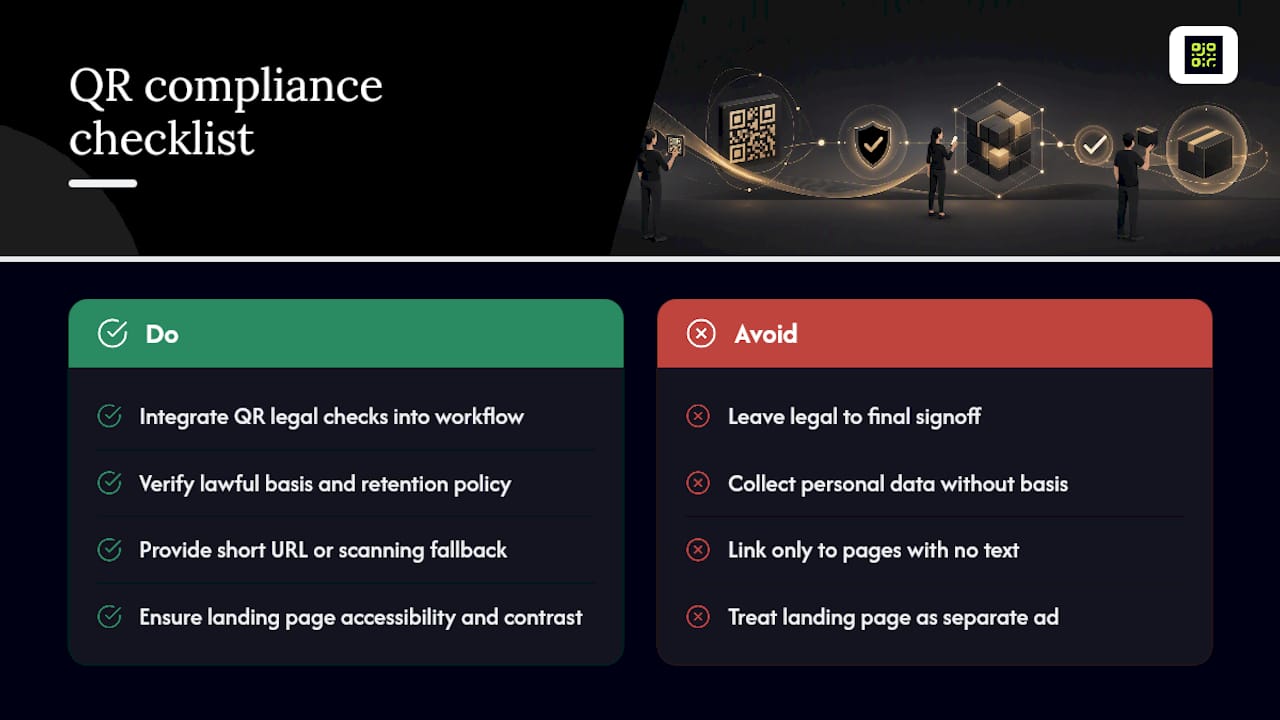
QR codes themselves aren’t regulated as a format, but what they link to and how they collect data is. Any agency running QR campaigns across clients needs to treat this as part of the workflow, not an afterthought handled by legal at the end.
Data protection is the biggest exposure. If a landing page or scan event captures personal data, GDPR (for EU or UK audiences) or equivalent regional rules apply, meaning you need a lawful basis for tracking, clear consent where required, and a documented retention policy. Scan-level analytics that only record device type and timestamp, without personal identifiers, sit in a lower-risk category than anything that ties a scan to an individual’s identity.
Accessibility deserves more attention than it usually gets. A QR code that only routes to a page with no text alternative excludes anyone who can’t scan it, whether that’s a visibility impairment or simply a broken camera. Best practice is to always print a short URL or instruction alongside the code, so the same content is reachable without scanning. The landing page itself should meet basic Web Content Accessibility Guidelines standards, readable text contrast, alt text on images, and no reliance on colour alone to convey information.
Advertising standards bodies in most markets also expect any linked claims (pricing, offers, health claims) to meet the same accuracy rules as the printed material itself. Treat the landing page as an extension of the ad, not a separate space with looser rules. Build a short compliance check into your QC step alongside the scan test: does the destination page have a privacy notice, is consent handled correctly, and is there a fallback for anyone who can’t scan.
What agencies actually trade off running QR at scale
Running a tight, centrally governed workspace slows you down slightly on every individual campaign. Running fast and loose, letting each account manager generate codes wherever, breaks down the moment three clients ask for a scan report on the same afternoon.
The pragmatic middle ground: lock the naming convention and destination template, but keep the actual code creation fast enough that nobody skips it under deadline pressure. Limited admin roles, rather than full access for everyone, protect against accidental overwrites without adding real friction. One shared workspace with consistent tags beats five personal accounts and a shared spreadsheet nobody updates.
— The
Try an agency QR pilot before you commit budget
Qrlytics gives agencies something most QR tools don’t: a guarantee that codes created during an active subscription keep working permanently, even if billing lapses later, so a client’s printed material never turns into a dead link. That’s the exact risk this article has walked through, reprints and broken campaigns caused by codes that quietly stop resolving.

A sensible pilot takes an afternoon. Build one small dynamic batch for a single client using the free QR code generator, test editing the destination after “printing” a proof, then pull a scan report to see what client-ready data looks like in practice. No credit card is needed to start, so you can run the whole test before any budget conversation happens. If the workflow holds up, the Pro plan unlocks unlimited codes, advanced analytics, and API access for teams ready to scale it across every client account.
Sources
FAQ
What’s the difference between static and dynamic QR codes for agencies?
Static codes encode a fixed destination that can never change once printed. Dynamic codes redirect through an editable link, meaning agencies can update the destination after a campaign has already gone to print.
How should an agency structure QR code ownership across clients?
Agencies typically choose between agency-owned workspaces, which centralise control, or client-owned projects, which simplify handoff. Whichever structure you use, document expiry, billing, and transfer terms in the contract before the first code is generated.
What does Qrlytics cost for an agency running multiple clients?
Qrlytics offers a Free plan with no cost, and a Pro plan for agencies needing unlimited codes and advanced analytics; Pro pricing is available directly on the pricing page.
What metrics should go in a client-ready QR report?
Include total scans, unique devices, placement-level heat maps, and conversion events on the landing page rather than raw click counts. A practical QR tracking guide breaks down how to instrument these.
Do QR codes need to meet accessibility standards?
The linked landing page should meet basic accessibility guidelines, including readable contrast and alt text, and the code should always be paired with a printed fallback URL. This matters most for public-facing materials like packaging, posters, and event signage.