Speaker profile QR codes: permanent, trackable hubs
TL;DR:
- Dynamic QR codes for speaker profiles allow for editable redirects and real-time scan analytics. Building focused, easy-to-navigate hubs with a single call-to-action maximizes booking conversions from scans. Using platform guarantees and GDPR-compliant tracking ensures long-term asset longevity and data privacy.
A QR code for a speaker profile is a scannable code that directs an audience member straight to a speaker’s professional landing page, vCard payload, or contact hub. For marketers and event teams, the right choice is a dynamic QR code pointing to a focused, editable speaker hub — one that captures bookings, tracks scans, and never breaks when you change the destination URL.
Quick answer:
- Permanence: use a dynamic code with a guaranteed redirect, so printed materials stay valid indefinitely
- Trackability: instrument every scan with UTM parameters and real-time analytics
- Next action: build a focused hub, create a dynamic code, test before printing
Pro Tip: Never point a speaker QR code at a generic LinkedIn profile if bookings are the goal. A tailored hub with a single booking CTA converts far better than a social profile page.
Table of Contents
- What is a QR code for a speaker profile, and when should you use one?
- What should your speaker landing page include to turn scans into bookings?
- How do you create and manage permanent, trackable speaker QR codes?
- Which analytics should you track, and how do you stay UK GDPR-compliant?
- Design and print best practices for speaker slides, badges, and cards
- How do you turn post-event scans into measurable outcomes?
- Why permanence and platform guarantees protect your printed materials
- Key takeaways
- The mistake most event teams make with speaker QR codes
- Qrlytics gives you permanent, trackable speaker codes from day one
- Useful sources
- FAQ
What is a QR code for a speaker profile, and when should you use one?
Speaker QR codes come in four main payload types, and the choice matters more than most event teams realise.
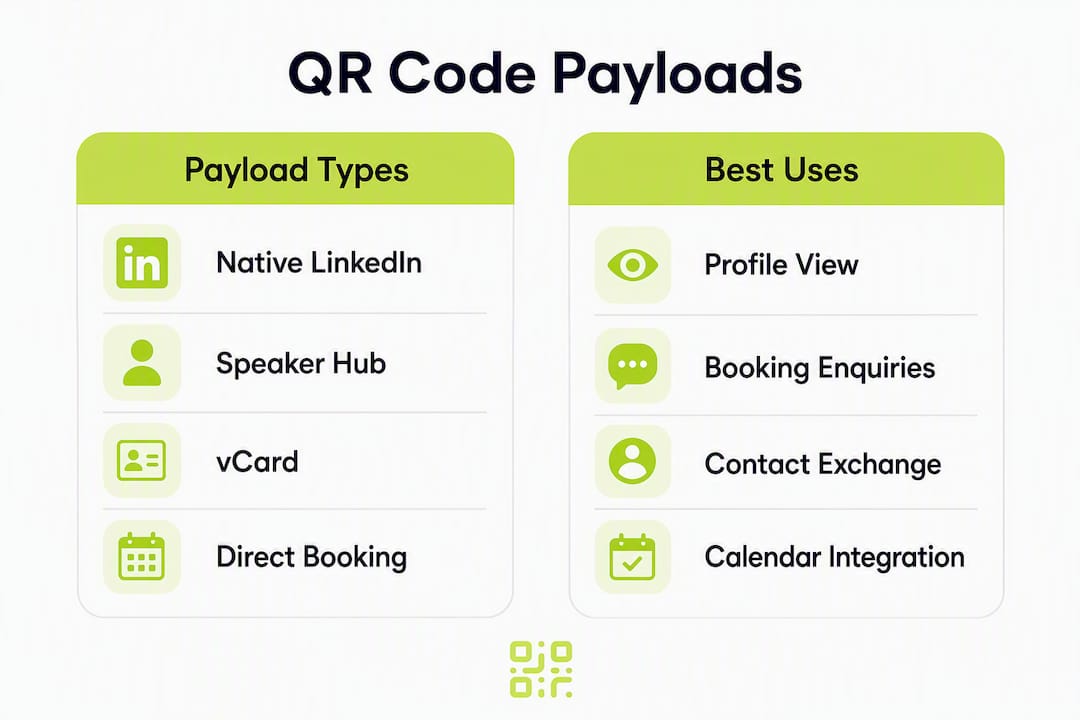
| Payload type | What it does | Best fit |
|---|---|---|
| Native LinkedIn QR | Opens the speaker’s LinkedIn profile | Quick credibility follow-up |
| vCard payload | Saves contact details to the scanner’s phone | Contact exchange at networking events |
| Static URL | Points to a fixed web address | One-off print runs with no need to update |
| Dynamic URL | Points to an editable redirect with analytics | Speaker hubs, conferences, ongoing campaigns |
LinkedIn’s native QR points directly at a profile you do not control for redirect purposes; a custom dynamic code points at a URL you own, giving you editable redirects and full tracking. For most speakers, that distinction determines whether a printed badge or slide deck remains useful after the event.
Primary use cases:
- Conference speaker slides (end-screen code for post-talk follow-up)
- Event badges for role-specific lead capture
- Printed speaker one-sheets and business cards
- Hybrid session follow-up via email or post-event landing pages
- Networking events where attendees want to save contact details instantly
Pro Tip: Match the payload to the role. Use a speaker hub URL for booking enquiries, a vCard for contact exchanges at networking events, and a LinkedIn QR only when credibility signalling is the sole objective.
What should your speaker landing page include to turn scans into bookings?
A focused speaker hub outperforms generic aggregators and LinkedIn for converting scans into bookings. The reason is simple: fewer choices mean faster decisions. One primary CTA reduces cognitive load and increases the likelihood of a booking enquiry.
Core elements every speaker hub needs:
- Professional headshot and a two-sentence bio
- Two or three signature talk titles with one-line descriptions
- A speaker reel or demo clip (embedded, not linked away)
- A clear booking or contact CTA above the fold
- Fee range or a “request a quote” link to screen enquiries early
- Lightweight downloadable speaker kit or session deck
Speakers who provide a demo reel and speaker kit accessible directly from the QR landing page see stronger post-talk engagement, because immediate post-talk scanners want reel and concise speaker information right away.
Wireframe order (top to bottom):
- One-line value proposition (“Award-winning keynote on [topic]”)
- Headshot + short bio
- Primary CTA: calendar booking or contact form
- Signature talks with brief descriptions
- Speaker reel or demo clip
- Social proof: past stages, logos, or testimonials
- Secondary resource: downloadable speaker kit
Pro Tip: Use UTM parameters per talk or event (e.g. utm_source=event&utm_campaign=talk-title) so your analytics map scans to individual sessions, not just the hub overall. This is how you prove ROI per appearance.

How do you create and manage permanent, trackable speaker QR codes?
Dynamic codes are the standard choice for any speaker QR that will appear on printed materials. They let you change the destination and gather scan data without reprinting assets — which matters when a speaker updates their hub or changes their booking process mid-season.
Step-by-step creation workflow:
- Set the hub URL with UTM parameters appended
- Create a dynamic QR code in your chosen platform
- Brand the code (add logo, adjust colours to match speaker identity)
- Export as SVG or PDF for print; export PNG at 300–600 dpi for slides
- Run a print proof at the intended output size
- Scan from typical distances on both iOS and Android
- Confirm the redirect fires and analytics register the scan
- Schedule publishing and set up a monitoring dashboard
Provider checklist — what to require before committing:
- Permanence guarantee (codes remain active regardless of billing status)
- GDPR-compliant analytics with no unnecessary personal data collection
- Editable redirect URL without reprinting
- Branding and customisation options
- API or bulk tools for high-volume event programmes
| Use case | Recommended format | Minimum print size |
|---|---|---|
| Slide end-screen | PNG 300 dpi | 5 cm × 5 cm |
| Printed handout | SVG/PDF | 3 cm × 3 cm |
| Business card | SVG/PDF | 2 cm × 2 cm |
| Event badge | SVG/PDF | — |
Pro Tip: Always export vector (SVG or PDF) for print and include a CMYK colour proof. A rasterised PNG scaled up at the printer is one of the most common causes of scanning failures at events.
Which analytics should you track, and how do you stay UK GDPR-compliant?
For speaker QR codes, the metrics that matter are scans, unique scanners, scan location (heat map), time-of-day, device type, and conversion events such as booking form completions or calendar bookings. Scan volume alone tells you reach; the conversion rate to booking tells you whether the hub is working.
Key metrics to track:
- Total scans and unique scanners per event or session
- Scan location via global heat map (which rooms or cities produced the most activity)
- Time-of-day distribution (post-talk spikes confirm audience engagement)
- Device type split (iOS vs Android affects QR camera behaviour)
- Conversion events: form completions, calendar bookings, kit downloads
Under UK GDPR, anonymised analytics by default is the safest baseline. Scan counts and heat map data do not typically constitute personal data, but the moment you capture a name, email, or phone number via a contact form on the hub, you need a lawful basis, a privacy notice, and a clear data retention policy.
Practical compliance steps:
- Display a privacy notice on the hub page before any contact form
- Obtain explicit consent before storing contact details from event attendees
- Set a data retention limit for event lead lists (commonly 12 months)
- Keep a record of your lawful basis for each data processing activity
- Use server-side postbacks or anonymised identifiers to reconcile scans with your CRM
Pro Tip: Use a consistent UTM naming convention across all events (e.g. utm_medium=qr&utm_source=badge&utm_campaign=event-name-2026) and reconcile scan exports with CRM sign-ups weekly. This avoids over-collecting personal data while still giving you clean attribution.
Design and print best practices for speaker slides, badges, and cards
QR codes fail at events for predictable reasons: too small, too low contrast, or placed where lighting or varnish interferes with scanning. Testing at print resolution and from real scanning distances prevents most deployment failures.
| Material | Minimum size | Quiet zone | Error correction |
|---|---|---|---|
| Slide end-screen | 5 cm × 5 cm | 4 modules | Q-level |
| Printed handout | 3 cm × 3 cm | 4 modules | M-level |
| Business card | 2 cm × 2 cm | 4 modules | M-level |
| Event badge | — | 4 modules | Q-level |
Design rules:
- Maintain a minimum contrast ratio of 4:1 between the code and its background
- Keep the quiet zone (white border) at least four modules wide on all sides
- Use Q-level error correction when embedding a logo in the code centre
- Avoid placing codes on glossy or foil-finished surfaces — varnish scatters the scanner’s light
- Always include a human-readable fallback URL beneath the code for accessibility
- Badge payloads should match the badge role: vCard for contact exchange, profile URL for speakers
Test with the native camera app on both iOS and Android, and brief event staff on the scanning workflow before the doors open.
How do you turn post-event scans into measurable outcomes?
Pre-event:
- Set UTM parameters for each session and material type
- Create dashboard widgets showing scans by session and by day
- Run cross-device scan tests on printed proofs
During the event:
- Monitor scan spikes in real time during and immediately after each talk
- Use heat maps to identify which printed materials or room locations drove the most activity
- Flag redirect failures immediately and update the dynamic destination without reprinting
Post-event:
- Export scan CSVs from your analytics platform
- Reconcile with calendar bookings and contact form completions
- Prioritise high-intent scanners (those who completed a booking form or downloaded the speaker kit) for outreach within 48 hours
- Calculate cost per qualified lead: total event cost ÷ number of booking enquiries generated from QR scans
Metric tracking list:
- Baseline scans per session
- Conversion rate from scan to booking enquiry
- Time-to-contact after the event
- Cost per qualified lead across the event programme
The networking value of a well-instrumented speaker QR code extends well beyond the event itself — post-event scan data often reveals which sessions generated the most sustained interest over the following week.
Why permanence and platform guarantees protect your printed materials
Codes that expire or lose their redirects waste printed materials and damage campaigns. A speaker whose badge QR stops working mid-conference has no recourse without reprinting — and reprinting at an event is rarely possible.
Platform features to require before signing up:
- Permanence guarantee: codes remain active regardless of billing status
- Dynamic redirect editing without reprinting
- Real-time scan analytics and global heat maps
- Exportable CSVs and API access for CRM integration
- GDPR-compliant data processing with a data processing addendum available
Procurement checklist:
- Ask for a certificate of permanence
- Request a data processing addendum confirming GDPR compliance
- Verify that analytics are exportable and anonymised by default
Key takeaways
Dynamic speaker QR codes pointing to a focused, conversion-optimised hub — backed by a permanence guarantee and GDPR-compliant analytics — deliver measurably better results than static codes or generic social profile links.
| Point | Details |
|---|---|
| Use dynamic codes | Editable redirects mean printed materials stay valid even when the hub URL changes. |
| Build a focused hub | One primary CTA (booking or contact form) converts better than a multi-link aggregator. |
| Instrument every scan | UTM parameters and real-time analytics let you attribute bookings to specific sessions. |
| Stay UK GDPR-compliant | Anonymise analytics by default; capture contact details only with explicit consent and a privacy notice. |
| Choose Qrlytics | Qrlytics provides permanent dynamic codes, real-time analytics, heat maps, and GDPR-compliant tracking — no credit card required to start. |
The mistake most event teams make with speaker QR codes
The most common error is also the most avoidable: pointing the code at a LinkedIn profile and calling it done. LinkedIn profiles are not designed for conversion. They have no booking CTA, no fee information, no reel above the fold, and no analytics. You get zero data on who scanned, when, or whether they took any action.
The second mistake is overloading the hub. A speaker page with eight links, three social icons, a newsletter sign-up, and a podcast embed is a decision-paralysis machine. Every additional option reduces the probability that a scanner completes the one action you actually want.
The quick wins are straightforward: a single CTA hub, a fee range visible without scrolling, and a calendar booking link rather than a contact form. Calendar booking removes a round-trip email exchange and typically produces faster conversions. For high-volume event programmes, use a platform with API access so you can manage codes across multiple speakers without manual intervention.
Qrlytics gives you permanent, trackable speaker codes from day one
Printed speaker materials are a long-term asset. A QR code that breaks when a subscription lapses turns that asset into a liability. Qrlytics solves this directly: every dynamic QR code created during an active subscription remains functional permanently, and you can update the redirect destination at any time without touching the printed code.

The platform includes real-time scan analytics, global heat maps, GDPR-compliant tracking, CSV exports, and API access — everything on the procurement checklist covered earlier in this guide. Onboarding requires no credit card, so you can test the full feature set before committing. Start with the free QR code generator to build your first speaker hub code today, or go straight to the dynamic QR product page for editable, trackable codes built for event campaigns.
Useful sources
- LinkedIn QR code guide — step-by-step guide to generating and using LinkedIn QR codes for professional networking and events
- Conference badge QR best practice — payload recommendations, lead capture guidance, and testing advice for event badges
- vCard and badge scanning UX — explains vCard payloads versus URL payloads and their respective scanning experiences
- Speaker hub conversion guidance — why a focused hub outperforms LinkedIn for converting post-talk scans into bookings
- QR codes for event speakers — practical examples of speaker QR use cases including reel and kit access
- Gravatar QR badge workflow — illustrates an alternative badge approach using claimable Gravatar profiles
- Qrlytics dynamic QR generator — platform page for editable, trackable dynamic codes with permanence guarantee
- Qrlytics analytics and tracking — details on GDPR-compliant scan analytics, heat maps, and CSV export
FAQ
What is a QR code for a speaker profile?
A speaker profile QR code is a scannable code that directs an audience member to a speaker’s professional landing page, vCard, or booking hub. Dynamic QR codes are preferred because they allow editable redirects and full scan analytics without reprinting materials.
Should I use a static or dynamic QR code for a speaker hub?
Use a dynamic QR code. It lets you update the destination URL after printing, tracks every scan with real-time analytics, and remains valid if the hub page changes — making it the only practical choice for printed event materials.
What should I put on the speaker landing page?
Include a headshot, a short bio, two or three signature talk titles, a speaker reel, a booking or contact CTA above the fold, and a fee range or quote-request link. Keep it to one primary CTA to maximise conversion from scans to enquiries.
How do I stay UK GDPR-compliant when tracking speaker QR scans?
Use anonymised analytics by default for scan counts and heat maps. If you capture contact details via a form on the hub, display a privacy notice, obtain explicit consent, state your lawful basis, and set a clear data retention limit for event lead lists.
Does Qrlytics guarantee that speaker QR codes stay active?
Yes. Qrlytics guarantees that codes created during an active subscription remain functional permanently, regardless of billing status. The platform also provides GDPR-compliant analytics, editable redirects, and exportable scan data for post-event reporting.